1. Produk Lebihview
The ADATA Premier 512GB microSDXC A1 UHS-I Class 10 V10 Memory Card is a high-speed storage solution designed for mobile phones, tablets, and other compatible mobile devices. It offers a substantial 512GB capacity, allowing for extensive storage of applications, photos, and videos. The card is A1 qualified, enhancing app performance on Android devices, and supports read speeds up to 100MB/sec. It comes with a full-size SD adapter for broader compatibility and ease of use with various devices.

Image 1: ADATA Premier 512GB microSDXC Memory Card.
Ciri-ciri Utama:
- Kapasiti Storan 512GB: Ample space for high-resolution photos, 4K videos, and applications.
- A1 Performance Rating: Optimized for faster app loading and performance on Android smartphones and tablets.
- UHS-I Class 10 V10: Ensures smooth Full HD and 4K video recording and playback.
- High Read Speed: Up to 100MB/sec for quick data transfers.
- Included SD Adapter: Provides compatibility with devices that use standard SD card slots.
- Reka bentuk tahan lasak: Features X-ray proof, temperature proof, and magnetic resistance for enhanced data security.
2. Persediaan dan Pemasangan
This section guides you through the proper installation of your ADATA microSDXC card into compatible devices.
2.1 Inserting the microSD Card into a Device
- Identify the microSD Slot: Locate the microSD card slot on your smartphone, tablet, or other compatible device. Refer to your device's user manual if unsure.
- Orientasikan Kad: Hold the microSD card with the gold contacts facing down (or as indicated by your device's slot design).
- Masukkan Kad: Gently push the microSD card into the slot until it clicks into place. Do not force the card.
- Sahkan Pemasangan: Your device should recognize the new storage. You may receive a notification or see the storage listed in your device's settings.
2.2 Using the SD Adapter
The included SD adapter allows you to use your microSDXC card with devices that have a standard SD card slot, such as digital cameras, laptops, or desktop computers.

Image 2: ADATA microSDXC Memory Card with its full-size SD Adapter.
- Insert microSD into Adapter: Slide the microSD card into the designated slot on the side of the SD adapter until it locks securely.
- Insert Adapter into Device: Insert the SD adapter (with the microSD card inside) into the SD card slot of your computer or camera.
- Akses Data: Your device will now recognize the card, allowing you to transfer files, view photos, or record data.
Nota: Ensure the write-protection switch on the side of the SD adapter is in the "unlocked" position if you intend to write data to the card.
3. Arahan Operasi
The ADATA Premier microSDXC card is designed for seamless operation across various applications.
3.1 Penyimpanan dan Pemindahan Data
- File Pengurusan: Gunakan peranti anda file manager or connect to a computer to transfer photos, videos, music, and documents to and from the card.
- Prestasi Kelajuan Tinggi: With read speeds up to 100MB/sec, large files can be transferred efficiently.
3.2 App Storage (A1 Rating)
The A1 Application Performance Class rating means the card is optimized for running applications directly from the memory card, providing faster app launch times and smoother performance on compatible Android devices.
- Peranti Android: In your Android device settings, you can often move installed applications to the microSD card to free up internal storage.
- Faedah: This improves device performance by offloading app data and allows for more internal storage for other critical functions.
3.3 Video Recording (V10 Rating)
The V10 Video Speed Class ensures a minimum sustained write speed of 10MB/s, making it suitable for recording Full HD (1080p) video without dropped frames.
- Peranti Serasi: Ideal for use in smartphones, tablets, action cameras, and drones for recording high-quality video.

Image 3: ADATA microSDXC card in use with multiple electronic devices.
4. Penyelenggaraan dan Penjagaan
To ensure the longevity and optimal performance of your ADATA microSDXC card, follow these maintenance guidelines:
- Penyingkiran Selamat: Always safely eject the card from your device before physically removing it to prevent data corruption.
- Perlindungan Fizikal: Store the card in its protective case or the SD adapter when not in use to prevent physical damage to the contacts or card body.
- Perlindungan Alam Sekitar: The card is designed to be X-ray proof, temperature proof, and magnetic resistant. However, avoid exposing it to extreme conditions unnecessarily.
- Sandaran Biasa: Sandarkan data penting daripada kad microSD anda secara berkala ke medium storan lain (cth., cakera keras komputer, storan awan) untuk mengelakkan kehilangan data.
- Avoid Formatting: Only format the card when necessary, as formatting erases all data. If formatting is required, use your device's built-in formatting utility or a reliable computer utility.
5. Penyelesaian masalah
If you encounter issues with your ADATA microSDXC card, consider the following troubleshooting steps:
- Kad Tidak Dikenali:
- Pastikan kad dimasukkan sepenuhnya ke dalam slot.
- Try inserting the card into a different compatible device or using the SD adapter with a computer to rule out a device-specific issue.
- Check if the SD adapter's write-protection switch is in the "unlocked" position if using the adapter.
- Clean the gold contacts on the card with a soft, dry, lint-free cloth.
- Prestasi Perlahan:
- Pastikan peranti anda menyokong kelajuan UHS-I. Peranti lama mungkin tidak menggunakan keupayaan kelajuan kad sepenuhnya.
- Elakkan mengisi kad sehingga kapasiti maksimumnya, kerana ini kadangkala boleh menjejaskan prestasi.
- If using for app storage, ensure your Android device is optimized for A1 performance.
- Kerosakan/Ralat Data:
- Sentiasa keluarkan kad dengan selamat sebelum dialih keluar.
- Run a disk check or error-checking utility on a computer to scan for and repair bad sectors.
- If issues persist, back up any recoverable data and then format the card.
- Card Capacity Incorrect:
- Some devices or operating systems may display slightly less than the advertised capacity due to formatting overhead. This is normal.
6. Spesifikasi
| Ciri | Perincian |
|---|---|
| Jenama | ADATA |
| Nama Model | Perdana |
| Kapasiti Penyimpanan Memori | 512 GB |
| Jenis Memori Denyar | Micro SDXC |
| Kelas Kelajuan Persatuan Digital Selamat | Class 10, UHS-I, V10, A1 |
| Kelajuan Baca | Sehingga 100 MB/s |
| Tulis Kelajuan | 50.0 MB/s (typical, based on V10 rating) |
| Ciri Khas | Temperature Proof, X-Ray Proof, Magnetic Resistant |
| Peranti Serasi | Smartphones, Tablets, Action Cameras, Drones, etc. |
| warna | Hitam |
| Berat Barang | 9.07 g (0.32 auns) |
| Dimensi Pakej | 4.53 x 3.94 x 0.02 inci |
| Pengeluar | Adata |
| UPC | 842243030518 |
| Nombor Model Item | 842243030518 |
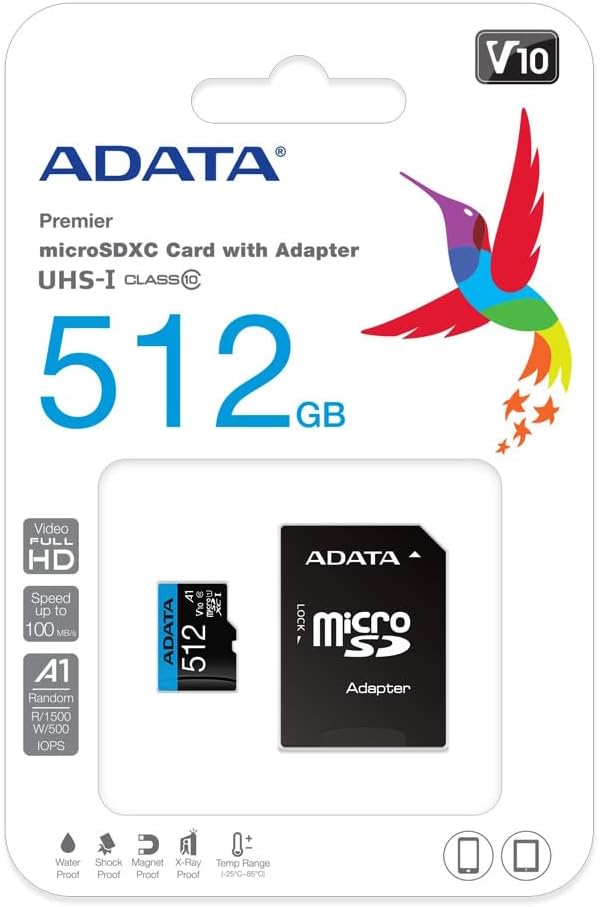
Image 4: Retail packaging of the ADATA Premier microSDXC Memory Card.
7. Waranti dan Sokongan
ADATA offers a Lifetime Warranty for this product, ensuring long-term reliability and customer satisfaction.
- Jenis Waranti: Waranti Seumur Hidup
- Sokongan: For technical assistance, warranty claims, or further inquiries, please visit the official ADATA webtapak atau hubungi sokongan pelanggan mereka.
8. Video Produk
Watch the official product video for more information on the ADATA 512GB microSDXC card.
Video 1: Tayangan video produk rasmicasing the features and benefits of the 512GB microSD card. This video highlights its storage capacity, speed, and compatibility with various devices.


