pengenalan
This manual provides detailed instructions for the setup, operation, and maintenance of your LTC NB981 Nimbleback 98-Key Wired Mechanical Keyboard. The NB981 features a compact 98-key layout, hot-swappable switches, a reliable wired USB-C connection, and dynamic white backlighting, designed for both gaming and general use.

Image: The LTC NB981 Nimbleback 98-Key Wired Mechanical Keyboard, showcasinsusun atur padat dan reka bentuk penutup kekuncinya.
Kandungan Pakej
Sila sahkan bahawa semua item yang disenaraikan di bawah disertakan dalam pakej anda:
- LTC NB981 Nimbleback Mechanical Keyboard
- Kabel USB-C ke USB-A
- Penarik Kekunci
- Penarik Suis
- 4 x Suis Penggantian
- Manual Pengguna / Panduan Ringkas

Image: All components included in the LTC NB981 keyboard package, including the keyboard, cable, pullers, and spare switches.
Persediaan
Menyambung Papan Kekunci
- Connect the USB-C end of the provided cable to the port on the back of the keyboard.
- Sambungkan hujung kabel USB-A ke port USB yang tersedia pada komputer anda.
- Papan kekunci ini boleh dipasang dan digunakan dan akan dikenali secara automatik oleh sistem pengendalian anda tanpa pemacu tambahan.

Imej: Dari dekat view of the keyboard's USB-C port and the detachable cable, illustrating the wired connection.
Keserasian Sistem Pengendalian
The LTC NB981 keyboard is compatible with Windows 7, Windows 8, Windows 10, and macOS systems.
To switch between operating system modes:
- For Windows mode: Press fn + A
- For macOS mode: Press Fn + S

Image: Visual representation of the Fn+A and Fn+S key combinations for switching between Windows and Mac operating system modes.
Arahan Operasi
Kawalan Lampu Latar
The keyboard features 20 dynamic white backlight modes. Use the following key combinations to control the backlighting:
- Change Backlight Mode: Press Fn + |\
- Adjust Brightness: Press Fn + ↑ (peningkatan) / Fn + ↓ (mengurangkan)
- Adjust Speed: Press Fn + ← (decrease) / Fn + → (meningkat)
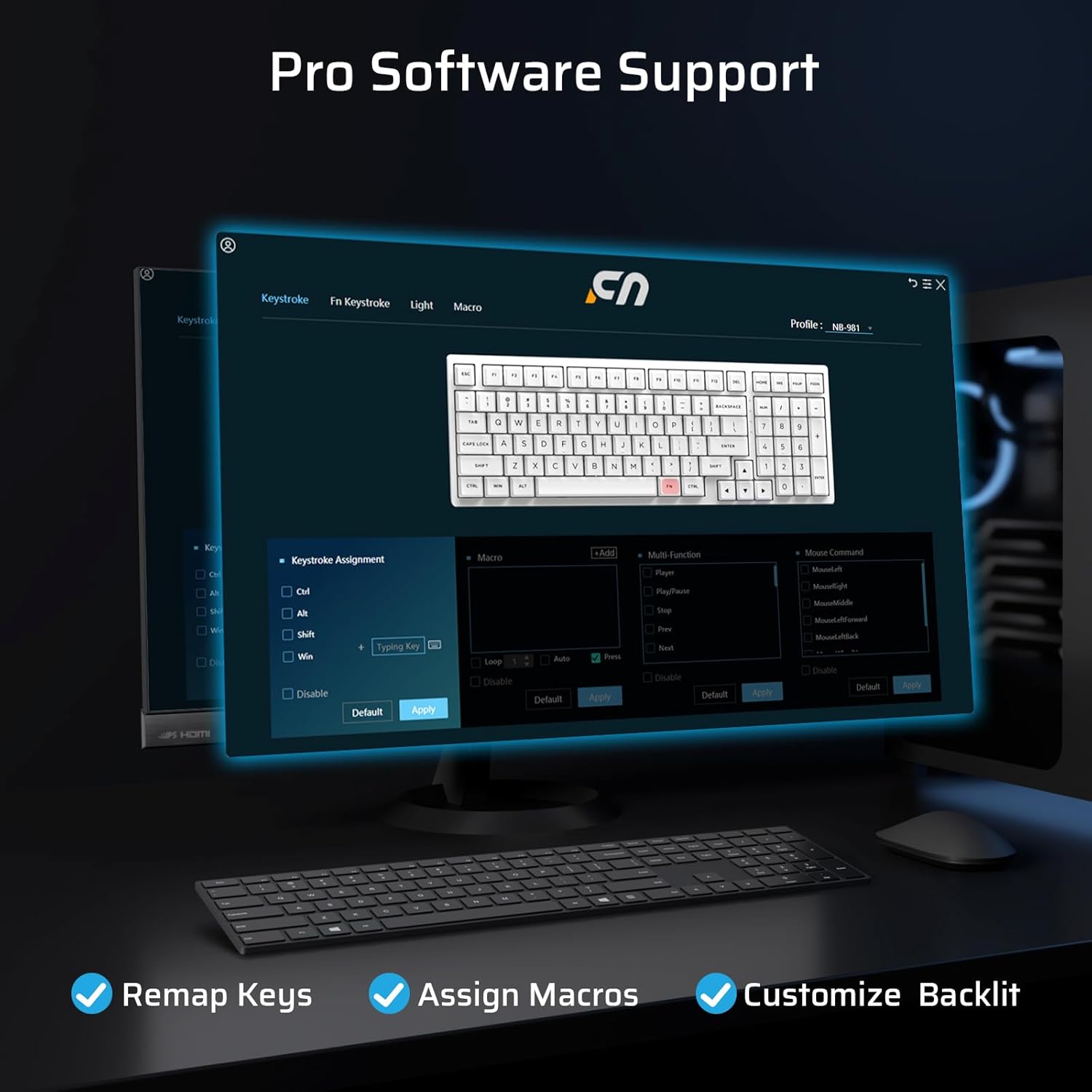
Image: The LTC NB981 keyboard illuminated with its white backlight, demonstrating one of the available lighting modes.
Multimedia and Function Keys
Access various multimedia and system functions by pressing the Fn key in combination with the designated function keys:
| Gabungan Kunci | Fungsi |
|---|---|
| Fn + F1 | Display Brightness - |
| Fn + F3 | Kembali ke Desktop |
| Fn + F4 | Kawalan Misi |
| Fn + F5 | Backlight Brightness - |
| Fn + F8 | Main/Jeda |
| Fn + F9 | Lagu Seterusnya |
| Fn + F10 | bisu |
| Fn + F12 | Jilid + |
| Fn + Del | Tangkapan skrin |
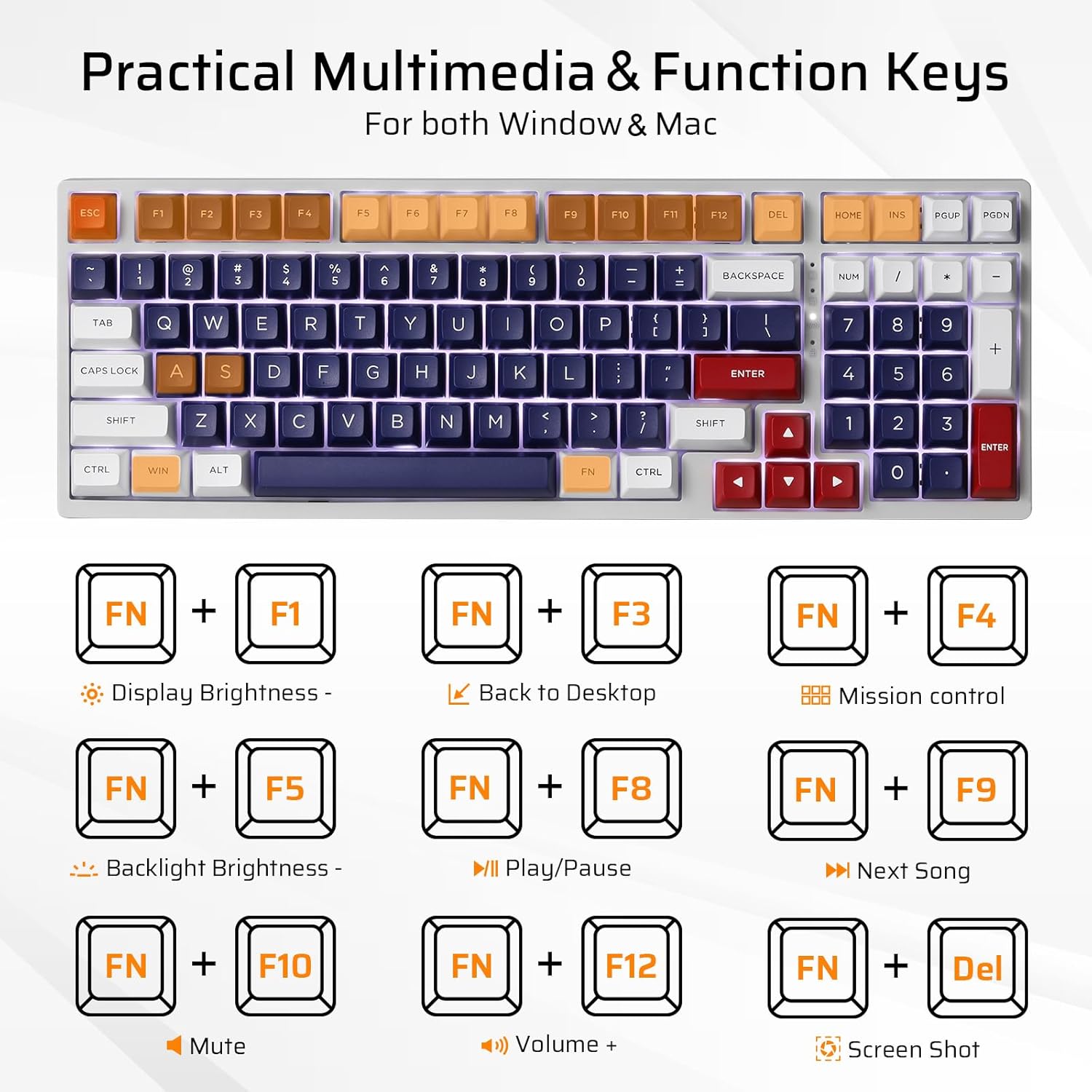
Image: A visual guide to the Fn key combinations for multimedia and system functions on the LTC NB981 keyboard.
Penyesuaian Perisian
The LTC NB981 supports professional software for advanced customization. This software allows you to:
- Petakan semula fungsi utama.
- Assign macros for complex commands.
- Personalize lighting effects beyond the built-in modes.
Download the official software from the LTC website for full functionality and to unlock advanced features.

Image: A screenshot of the LTC NB981 customization software interface, showing options for key remapping, macro assignment, and lighting control.
Penyelenggaraan
Pembersihan
Regular cleaning helps maintain the keyboard's performance and appearance:
- Putuskan sambungan papan kekunci daripada komputer anda sebelum membersihkan.
- Use a soft, dry, lint-free cloth to wipe the keycaps and chassis.
- For deeper cleaning, use the provided keycap puller to carefully remove keycaps. This allows access to the switches and plate for cleaning with compressed air or a small brush.
- Do not use harsh chemicals or abrasive materials, as these may damage the keyboard's finish or keycap legends.
Suis Boleh Tukar Panas
The NB981 features a hot-swappable PCB, allowing you to replace 3-pin or 5-pin MX-style mechanical switches without soldering. This is useful for customization or replacing faulty switches.
- Using the provided switch puller, carefully grip the top and bottom tabs of the switch you wish to remove.
- Gently pull the switch upwards until it detaches from the PCB.
- Take the new switch and ensure its pins are straight. Align the pins with the corresponding holes on the PCB.
- Gently press the new switch into place until it clicks. Ensure it is fully seated and the pins are not bent during insertion.
- Test the new switch to confirm proper function.

Image: A demonstration of removing and inserting hot-swappable mechanical switches on the LTC NB981 keyboard using the switch puller.
Menyelesaikan masalah
If you encounter issues with your LTC NB981 keyboard, refer to the following common problems and solutions:
Papan Kekunci Tidak Membalas
- Pastikan kabel USB disambungkan dengan selamat pada papan kekunci dan komputer anda.
- Cuba sambungkan papan kekunci ke port USB lain pada komputer anda.
- Uji papan kekunci pada komputer lain untuk menentukan sama ada isu itu adalah dengan papan kekunci atau sistem anda.
- Inspect the USB-C cable for any visible damage. If possible, try using a different USB-C cable.
Lampu Latar Tidak Berfungsi atau Salah
- Ensure the backlight is not turned off or set to minimum brightness. Use Fn + ↑ untuk meningkatkan kecerahan.
- Kitar semula mod lampu latar menggunakan Fn + |\ to see if a different mode activates.
- If using custom software, ensure that your lighting settings are correctly applied and saved.
Kekunci Tidak Mendaftar atau Menaip Berganda
- This may indicate a faulty switch. Use the switch puller to replace the affected switch with one of the spare switches provided or a compatible replacement.
- Ensure the keycap and switch are fully seated and not obstructed by debris.
- If the issue persists across multiple keys, consider reinstalling the keyboard drivers or testing on another computer.
Spesifikasi
Key technical specifications for the LTC NB981 Nimbleback Mechanical Keyboard:
| Ciri | Perincian |
|---|---|
| Model | NB981 |
| Susun atur | 98-Key (96% Compact) |
| Ketersambungan | USB-C berwayar |
| Jenis Suis | Mechanical (Red Switch, Hot-swappable) |
| Lampu latar | White, 20 Dynamic Modes |
| Kekunci Kekunci | PBT |
| Keserasian | Windows 7/8/10, macOS |
| Dimensi (L x W) | 14.9 x 5.2 inches (approx. 37.8 x 13.2 cm) |
| Berat Barang | 2.66 paun (lebih kurang 1.2 kg) |
| Ciri Khas | Hot-Swappable, Programmable Keys, Multimedia Keys |

Image: The LTC NB981 keyboard with its dimensions (14.9 inches length, 5.2 inches width) indicated.
Waranti dan Sokongan
LTC products are covered by a limited manufacturer's warranty. For detailed warranty information, technical support, or service inquiries, please visit the official LTC webtapak atau hubungi sokongan pelanggan mereka secara langsung.
Sila simpan bukti pembelian anda untuk sebarang tuntutan waranti.


