pengenalan
The Digitek DWM-106 2-in-1 Wireless Microphone System is designed for high-quality audio capture in various professional and personal settings. This versatile system includes one receiver and two transmitters, along with multiple audio adapters (TRS, TRRS, Type-C, and Lightning) for broad compatibility with DSLR cameras, camcorders, Android, and iOS devices. Featuring advanced noise cancellation and reverberation modes, it ensures clear and immersive sound. The included charging case provides convenient portability and extended battery life, making it ideal for broadcasting, vlogging, interviews, dan penstriman langsung.
Apa yang ada dalam Kotak

Image showing all components included in the Digitek DWM-106 package, neatly arranged with their names.
- 1 x Penerima
- 2 x Pemancar
- 1 x Kes Pengecasan
- 1 x Lightning Audio Adapter
- 1 x Type-C Audio Adapter
- 1 x TRS Audio Adapter
- 1 x TRRS Audio Adapter
- 1 x Manual Arahan
- 1 x Beg kain
Produk Selesaiview
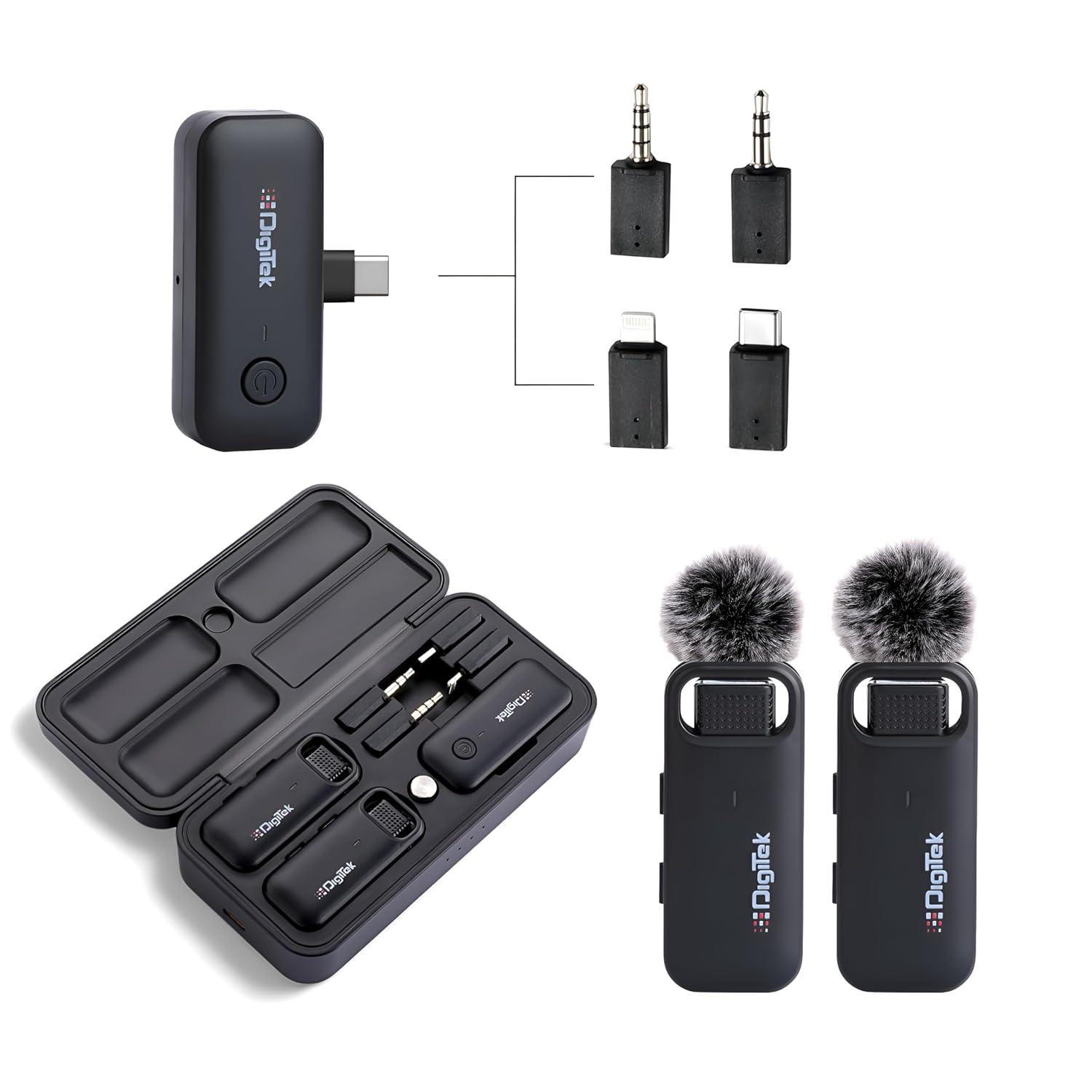
Berakhirview of the Digitek DWM-106 system, showing the receiver, two transmitters, and various audio adapters.
The Digitek DWM-106 system comprises a compact receiver, two miniature transmitters, and a portable charging case. Each component is designed for ease of use and optimal performance.
Komponen:
- Pemancar (TX): Two small, clip-on units with built-in microphones for capturing audio. They feature a power button and a mode switch button for reverberation, noise reduction, and ordinary modes.
- Penerima (RX): A compact unit that connects to your recording device. It has a power button and a function LED indicator (Red/Green/Blue) to show status.
- Sarung Pengecasan: A protective case that charges both the receiver and transmitters. It has a Type-C input for charging and battery level indicators.
- Audio Adapters: Includes Lightning, Type-C, TRRS, and TRS adapters to ensure compatibility with a wide range of smartphones, cameras, and other recording devices.

Diagram illustrating the various ports, buttons, and LED indicators on the transmitter and receiver units, along with the different audio adapters.
Panduan Persediaan
1. Charging the System:
Before first use, ensure all components are fully charged. Place the transmitters and receiver into the charging case. Connect the charging case to a power source using a Type-C cable. The charging case has a 1000mAh / 3.7V battery capacity and takes approximately 3.5 hours for a full charge. Battery level indicators on the case will show charging status.

Visual representation of the charging case and its components, highlighting the charging time and battery capacity.
2. Connecting the Receiver:
- Identify the correct audio adapter for your device (Lightning for iOS, Type-C for Android/other USB-C devices, TRRS for smartphones/laptops with combined audio jack, TRS for cameras/camcorders).
- Plug the chosen audio adapter into the receiver's output port.
- Insert the receiver with the attached adapter into your recording device's audio input port.
3. Menghidupkan dan Memadankan:
- Press and hold the power button on both the receiver and transmitters to turn them on.
- The units will automatically attempt to pair. The LED indicator on the receiver will change color (e.g., from blinking to solid) once a successful connection is established.
- Ensure the LED indicator on the receiver is solid, indicating a stable connection.
Arahan Operasi
1. Operasi Asas:
- Hidupkan/Mati Kuasa: Press and hold the power button on each unit (transmitter and receiver) for a few seconds to turn them on or off.
- Mode Switching (Transmitter): The transmitter features a mode switch button. Press it to cycle through:
- Mod Gema: Adds an echo effect to the audio.
- Mod Pengurangan Bunyi: Minimizes background noise for clearer recordings.
- Ordinary Mode: Standard audio capture without special effects.
- Pemantauan: For real-time audio monitoring, connect headphones to your recording device if it supports audio output while recording.

A user wearing headphones while recording, demonstrating the ability to monitor audio output for precision and real-time correction.
2. Rakaman:
Once the receiver is connected and paired with the transmitters, open your preferred audio or video recording application on your device. The Digitek DWM-106 system will be recognized as an external microphone. Begin recording as you normally would with your device.
3. Optimal Placement:
For best audio quality, clip the transmitter microphone to clothing, approximately 6-8 inches from the speaker's mouth. Ensure there are no obstructions between the transmitter and receiver for optimal wireless range.
Ciri-ciri Utama
- Extended 80M Range: Enjoy clear and uninterrupted audio transmission up to 80 meters, making it suitable for large venues and outdoor recordings.

Visual representation of the 80-meter effective range, 360° sound capture, and 20Hz-20kHz frequency response range.
- Advanced Noise Cancellation & Reverberation Mode: Enhance your audio quality by minimizing background noise and adding depth with the reverberation effect.
Terperinci view of the mode switch button on the transmitter, indicating options for Reverberation, Noise Reduction, and Ordinary modes.
- Universal Audio Adapter Support: Comes with Lightning, Type-C, TRRS, and TRS adapters for seamless compatibility with a wide array of devices including DSLR cameras, camcorders, Android phones, and iOS devices.
- Convenient Charging Case: The included charging case not only protects your microphone system but also recharges it on-the-go, providing up to 4 hours of RX/TX run time on a single charge.
- LED Indicator on Receiver: Stay informed about the receiver's status with a clear and easy-to-see LED indicator.
- Aplikasi Serbaguna: Ideal for a variety of uses such as live streaming, conferences, interviews, audio/video recording, voiceovers, vlogging, and karaoke.

Examples of versatile applications including karaoke, online classes, vlogging, and live streaming, showcasing the microphone's adaptability.
Spesifikasi
| Ciri | Perincian |
|---|---|
| Nombor Model | DWM 106 |
| Teknologi Ketersambungan | Wayarles UHF |
| Jenis Penyambung | Lightning, Type-C, TRRS, TRS |
| Julat Tanpa Wayar | Sehingga 80 meter |
| Jenis Bateri | Ion Litium (3 diperlukan, disertakan) |
| Kapasiti Bateri Kes Pengecasan | 1000mAh / 3.7V |
| Masa Mengecas | lebih kurang 3.5 jam |
| RX/TX Run Time | lebih kurang 4 jam |
| Dimensi Produk (LxWxH) | 6.7 x 10.9 x 18.1 cm |
| Berat Barang | 410 g |
| Pengeluar | IMS Mercantiles Pvt. Ltd. |
| Negara Asal | India |
Penyelenggaraan
- Pembersihan: Use a soft, dry cloth to clean the surfaces of the transmitters, receiver, and charging case. Avoid using liquid cleaners or solvents.
- Storan: When not in use, store the microphone system in its charging case to protect it from dust and physical damage. Store in a cool, dry place away from direct sunlight and extreme temperatures.
- Penjagaan Bateri: To prolong battery life, avoid fully discharging the batteries frequently. Recharge the system regularly, even if not in constant use.
Menyelesaikan masalah
| Masalah | Kemungkinan Punca | Penyelesaian |
|---|---|---|
| Tiada keluaran bunyi |
|
|
| Poor audio quality / Hissing noise |
|
|
| Julat tanpa wayar terhad |
|
|
Waranti dan Sokongan
For warranty information and technical support, please contact Digitek customer service. The manufacturer, IMS Mercantiles Pvt. Ltd., can be reached at 011 4707 4444.
Sila simpan bukti pembelian anda untuk sebarang tuntutan waranti.


