1. Pengenalan
Thank you for choosing the boAt Wave Flex Connect Smart Watch. This manual provides essential information for setting up, operating, and maintaining your device. Please read it carefully to ensure optimal performance and longevity of your smartwatch.
2. Apa yang ada di dalam Kotak
- boAt Wave Flex Connect Smart Watch
- Kabel Pengecasan
- Manual Pengguna
- Kad Waranti
3. Persediaan
3.1 Pengecasan Awal
Before first use, fully charge your boAt Wave Flex Connect Smart Watch. Connect the charging cable to the watch's charging port and plug the USB end into a compatible power adapter (not included) or a computer's USB port. The watch display will indicate charging status.

Image: The smartwatch screen showing 100% battery, indicating a full charge. This image highlights the impressive battery life of up to 10 days on normal use and 30 days on standby.
3.2 Berpasangan dengan Telefon Pintar Anda
- Download the "boAt Crest" app from your smartphone's app store (Google Play Store for Android or Apple App Store for iOS).
- Pastikan Bluetooth didayakan pada telefon pintar anda.
- Buka aplikasi boAt Crest dan ikut arahan pada skrin untuk membuat akaun atau log masuk.
- Select "Add Device" within the app and choose "Wave Flex Connect" from the list of available devices.
- Sahkan permintaan berpasangan pada telefon pintar anda dan jam tangan pintar.
4. Mengendalikan Jam Tangan Pintar Anda
4.1 Navigasi Asas
The boAt Wave Flex Connect features a responsive touch display and a physical button for navigation.
- Leret ke atas/bawah: Scroll through notifications, menus, or quick settings.
- Leret Kiri/Kanan: Access different widgets like activity tracking, heart rate, weather, or music control.
- Ketik: Pilih item atau buka aplikasi.
- Tekan butang: Return to the home screen or wake the display.
4.2 Panggilan Bluetooth
The Wave Flex Connect supports Bluetooth calling, allowing you to make and receive calls directly from your wrist when connected to your smartphone.

Image: The smartwatch screen showing an incoming call notification, demonstrating the Bluetooth calling feature. Users can accept or decline calls directly from the watch.
4.3 Ciri Paparan
Experience clear visuals on the 1.83" HD Display with a resolution of 240 x 280. The 2.5D Curve Display and 550 Nits Brightness ensure excellent readability even in bright conditions. The Wake Gesture feature allows you to simply raise your wrist to activate the screen.

Image: A close-up of the smartwatch display, emphasizing its 1.83" HD screen, 240x280 resolution, 2.5D curve, and 550 Nits brightness for clear visibility.
4.4 Health & Wellness Monitoring
The boAt Wave Flex Connect helps you keep track of your health with various monitoring features:
- Pemantauan Denyut Jantung: Pantau kadar denyutan jantung anda secara berterusan sepanjang hari.
- Pemantauan Oksigen Darah (SpO2): Ukur tahap oksigen darah anda.
- Pemantauan Tidur: Analyze your sleep patterns (deep sleep, light sleep, awake time).
- Amaran Sedentari: Terima peringatan untuk bergerak selepas tempoh tidak aktif.
4.5 Utility Features
Your smartwatch comes equipped with several convenient utility functions:
- penggera: Tetapkan penggera terus daripada jam tangan anda.
- Weather Update: Get real-time weather information.
- Kawalan Muzik: Kawal main balik muzik pada telefon pintar anda yang disambungkan.
- Kawalan Kamera: Gunakan jam tangan anda sebagai pengatup jauh untuk kamera telefon anda.
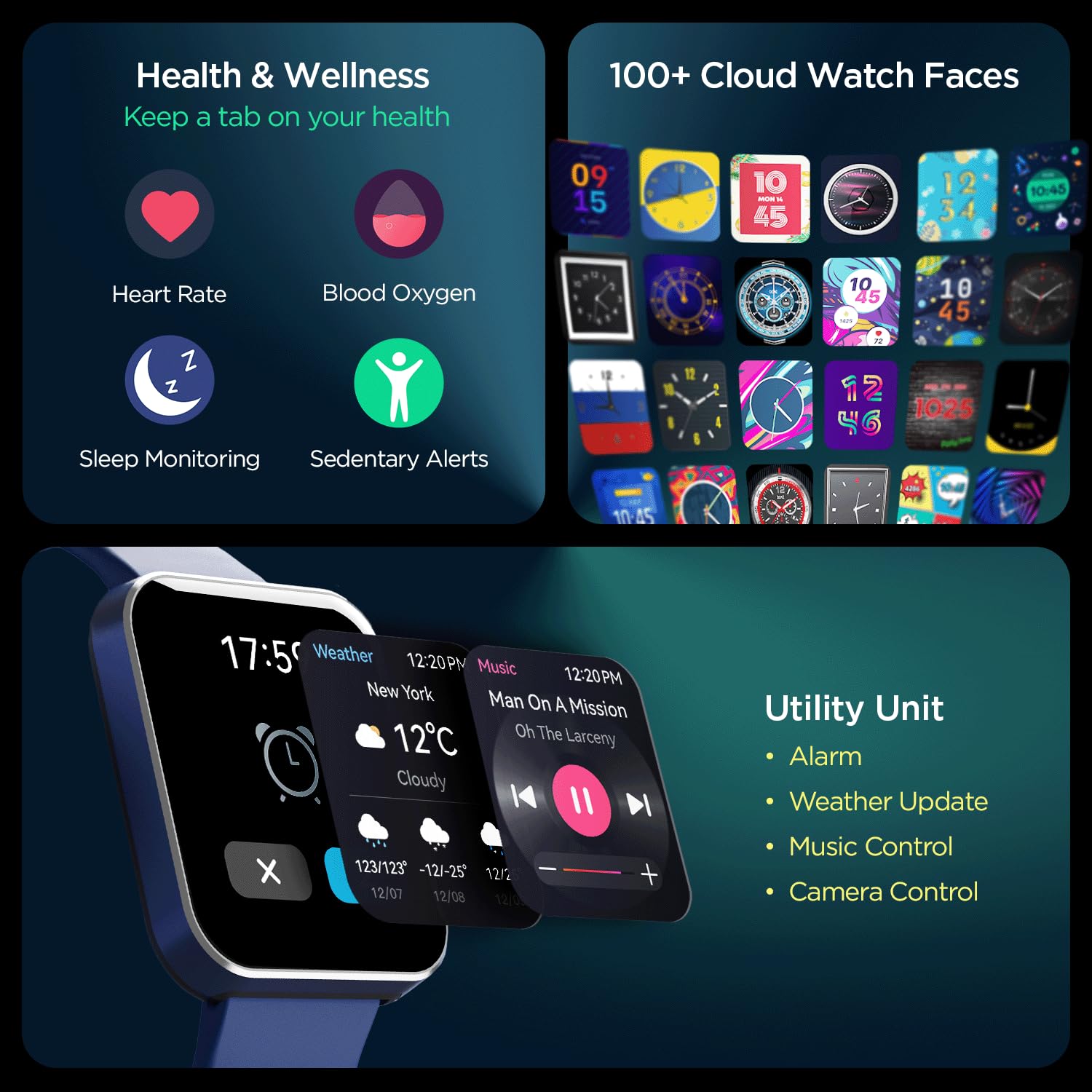
Imej: komprehensif view of the smartwatch's capabilities, including health tracking (heart rate, SpO2, sleep, sedentary alerts), a wide selection of watch faces, and practical utilities like weather, music, and camera control.
4.6 boAt Coins Integration
Earn rewards via boAt Coins on the boAt Crest App by engaging with your smartwatch and the ecosystem.

Image: The smartwatch paired with a smartphone showing the boAt Crest app interface, highlighting the boAt Coins reward system and available vouchers.
5. Penyelenggaraan
- Pembersihan: Lap jam tangan dan tali dengan kerap menggunakan kain lembut dan kering. Untuk kotoran degil, gunakan sedikit pembersihamp kain dan keringkan dengan teliti.
- Tahan Air: Rujuk spesifikasi produk untuk penilaian rintangan air. Elakkan daripada mendedahkan jam tangan kepada air panas, wap atau pancutan air bertekanan tinggi.
- mengecas: Gunakan hanya kabel pengecas yang disediakan. Elakkan menggunakan kabel atau pengecas yang rosak.
- Storan: Simpan jam tangan di tempat yang sejuk dan kering jauh dari cahaya matahari langsung dan suhu yang melampau.
6. Penyelesaian masalah
6.1 Jam Tangan Tidak Menyala
- Pastikan jam tangan dicas sepenuhnya. Sambungkannya ke pengecas selama sekurang-kurangnya 30 minit.
- Tekan dan tahan butang sisi selama 10-15 saat untuk cuba memulakan semula secara paksa.
6.2 Isu Berpasangan
- Pastikan Bluetooth diaktifkan pada telefon pintar dan jam tangan anda.
- Pastikan jam tangan berada dalam julat Bluetooth telefon anda (biasanya 10 meter).
- Mulakan semula telefon pintar dan jam tangan pintar anda.
- Forget the device in your phone's Bluetooth settings and try pairing again through the boAt Crest app.
6.3 Data Kesihatan yang Tidak Tepat
- Pastikan jam tangan dipakai dengan kemas di pergelangan tangan anda, kira-kira satu jari lebar di atas tulang pergelangan tangan.
- Keep the sensor clean and free from dirt or sweat.
- Note that environmental factors and individual physiology can affect sensor accuracy.
7. Spesifikasi
| Ciri | Perincian |
|---|---|
| Jenama | botAt |
| Nama Model | Wave Flex Connect |
| Saiz Paparan | 1.83 inci |
| Resolusi | 240 x 240 piksel |
| Jenis Paparan | LCD Digital |
| Kecerahan | Sehingga 550 Nit |
| Hayat Bateri | Up to 10 days (normal use), 30 days (standby), 3 days (with Bluetooth Calling) |
| Jenis Bateri | Polimer Litium |
| Ketersambungan | Bluetooth |
| Peranti Serasi | Telefon pintar |
| Sistem Operasi | OS jam tangan pintar |
| Berat Barang | 51 g |
| Pengeluar | Imagine Marketing Limited. |
8. Waranti dan Sokongan
8.1 Maklumat Waranti
Your boAt Wave Flex Connect Smart Watch comes with a Waranti 1 Tahun from the date of purchase. Please retain your purchase receipt and the warranty card for any warranty claims. The warranty covers manufacturing defects and does not cover damage caused by misuse, accidents, unauthorized repairs, or normal wear and tear.
8.2 Sokongan Pelanggan
For any queries, technical assistance, or warranty claims, please contact boAt customer support. You can find contact details on the official boAt website or refer to the warranty card included in your product package.
Manufacturer: Imagine Marketing Limited., info@imaginemarketingindia.com


