1. Pengenalan
This manual provides detailed instructions for the safe and effective operation of your DIGITEK DCL 60WBC 60W Bi-Color Handheld Continuous LED Light. Please read this manual thoroughly before use and retain it for future reference. The DCL 60WBC is designed to provide versatile and powerful illumination for photography and videography, featuring adjustable color temperature, brightness, and special effects.

Rajah 1.1: The Digitek DCL 60WBC Bi-Color Handheld Continuous LED Light, shown with its diffuser and handle attached. This image illustrates the compact and portable design of the lighting unit.
2. Apa yang ada di dalam Kotak
Sahkan bahawa semua komponen berikut disertakan dalam pakej anda:
- Bi-Colour Light Body
- Penyebar
- Pemegang Pegang Tangan
- AC Power Adapter
- Petak Bateri
- Alat Kawalan Jauh

Rajah 2.1: An illustration of the items included in the product package: the diffuser, handheld handle, bi-color light body, battery compartment, and AC power adapter.
3. Bahagian dan Fungsi
Familiarize yourself with the various parts of the DCL 60WBC LED light and their functions.

Rajah 3.1: Terperinci view of the Digitek DCL 60WBC, highlighting key components such as the detachable lamp cover, battery compartment, battery-powered adapter cable, adjusting knob, level gauge, and handheld handle.
- Lamp Cover (Detachable): Protects the LED array and can be removed for accessory attachment.
- Petak Bateri: Holds NP-F series Li-ion batteries for portable operation.
- Battery Powered Adapter Cable: Connects the battery compartment to the light body.
- Adjusting Knob: Used for tilting the light angle.
- Level Gauge: Indicates the horizontal alignment of the light.
- Handheld Handle: Provides an ergonomic grip for manual operation.

Rajah 3.2: Close-up of the control panel and LCD display, showing buttons for color temperature adjustment (CT+ / CT-), brightness adjustment (+ / -), power switch, fan button, FX mode button, and day/night buttons. The LCD displays power, brightness, and color temperature.
- Skrin Paparan LCD: Shows current settings for brightness, color temperature, and battery status.
- Color Temperature Buttons (CT+ / CT-): Adjusts the color temperature from 2800K to 6800K.
- Brightness Buttons (+ / -): Adjusts light intensity from 1% to 100%.
- Suis kuasa: Menghidupkan atau mematikan unit.
- Butang Kipas: Controls the internal cooling fan.
- Butang Mod FX: Cycles through 9 special effect modes.
- Day & Night Buttons: Pre-set modes for specific lighting conditions.
- Soket kuasa: Untuk menyambungkan penyesuai kuasa AC.
4. Persediaan
- Pasang Pemegang: Securely attach the handheld handle to the light body using the provided mounting mechanism.
- Install Diffuser: Place the diffuser onto the front of the light body. This softens the light output and reduces harsh shadows.
- Sambungan Kuasa:
- Kuasa AC: Connect the AC power adapter to the power socket on the light and then plug it into a wall outlet.
- Kuasa Bateri: Insert compatible NP-F series Li-ion batteries (not included) into the battery compartment. Connect the battery-powered adapter cable from the compartment to the light body.
- Pemasangan (Pilihan): The light can be mounted onto a light stand using its cold shoe mount type. Ensure the light is securely fastened.

Rajah 4.1: The Digitek DCL 60WBC LED light fully assembled with the handheld handle and the battery compartment attached, ready for use.

Rajah 4.2: This image demonstrates the dual power capabilities of the DCL 60WBC, showing it can be powered by either an AC adapter or NP-F series Li-ion batteries (represented by blue blocks in the battery compartment).
5. Arahan Operasi
- Hidupkan/Mati Kuasa: Press the Power Switch button on the control panel to turn the light on or off.
- Melaraskan Kecerahan: Use the Brightness (+) and (-) buttons to increase or decrease the light intensity from 1% to 100%. The current brightness level will be displayed on the LCD screen.
- Melaraskan Suhu Warna: Use the Color Temperature (CT+) and (CT-) buttons to change the color temperature between 2800K (warm) and 6800K (cool). The selected color temperature will be shown on the LCD.
- Using Special Effects Modes: Press the FX Mode button to cycle through the 9 available special effect modes. These modes include various lighting simulations such as Flash, Storm, Fireworks, TV, Bad Bulb, Fire, and Candle.

Rajah 5.1: A visual representation of the nine special effect modes available on the DCL 60WBC, including Flash 1, Flash 2, Storm 1, Storm 2, Fireworks, TV, Bad Bulb, Fire, and Candle.
- Operasi Kawalan Jauh: The included infrared remote control allows for wireless adjustment of brightness, color temperature, and special effects from up to 20 meters away.

Rajah 5.2: The infrared remote control for the Digitek DCL 60WBC, demonstrating its functionality for adjusting light settings wirelessly from a distance of up to 20 meters.
- Kawalan Kipas: Use the Fan Button to manage the internal cooling fan. The fan helps maintain optimal operating temperature during extended use.
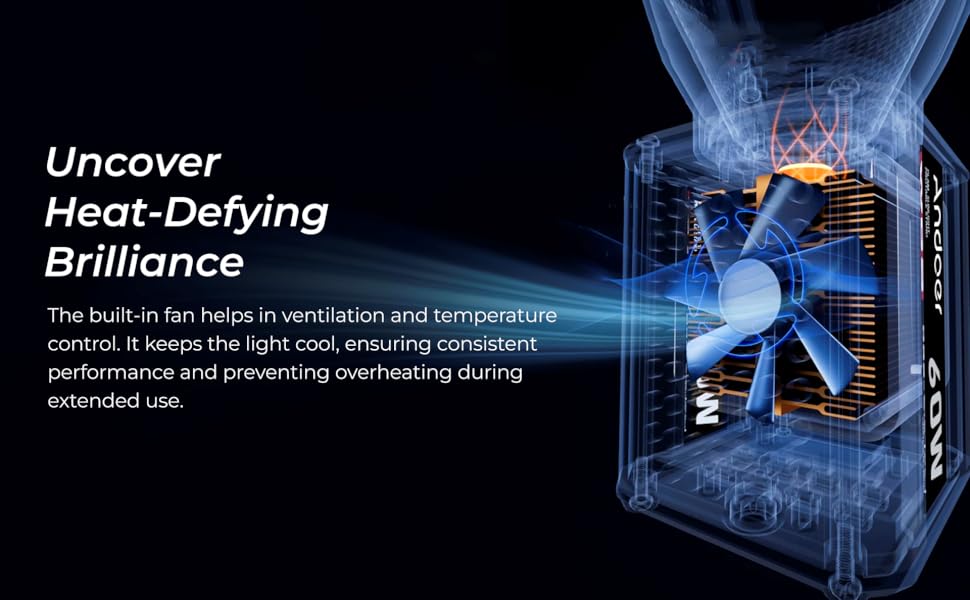
Rajah 5.3: X-ray view illustrating the internal cooling fan of the DCL 60WBC, which is crucial for ventilation and temperature control to prevent overheating during prolonged operation.
6. Penyelenggaraan
- Pembersihan: Use a soft, dry cloth to clean the light body and diffuser. Avoid using abrasive cleaners or solvents.
- Storan: When not in use, store the light in a dry, cool place, away from direct sunlight and excessive humidity.
- Penjagaan Bateri: If using batteries, remove them during long periods of inactivity to prevent leakage.
- Pengudaraan: Ensure the fan vents are clear of obstructions to allow for proper airflow and cooling.
7. Penyelesaian masalah
| Masalah | Kemungkinan Punca | Penyelesaian |
|---|---|---|
| Cahaya tidak menyala. | No power supply; AC adapter not connected or faulty; batteries depleted or incorrectly inserted. | Check AC power connection; ensure batteries are charged and correctly installed. |
| Alat kawalan jauh tidak berfungsi. | Remote batteries depleted; obstruction between remote and light; remote out of range. | Replace remote batteries; ensure clear line of sight; operate within 20 meters. |
| Output cahaya tidak konsisten atau berkelip-kelip. | Unstable power supply; loose connection; overheating. | Ensure stable power source; check all connections; ensure fan is operating and vents are clear. |
| Light feels excessively hot. | Fan not operating; obstructed vents; prolonged use in high ambient temperature. | Check fan operation; clear any obstructions from vents; allow light to cool down. |
8. Spesifikasi
| Ciri | Perincian |
|---|---|
| Nombor Model | DCL 60WBC |
| Kuasa Keluaran | 60W |
| Fluks Bercahaya | 7800 Lumen |
| Suhu Warna | 2800K - 6800K (± 200K) |
| Indeks Paparan Warna (CRI) | 96 |
| Pelarasan Kecerahan | 1% - 100% |
| Special Effect Modes | 9 mod |
| Sumber Kuasa | AC Power Adaptor / NP-F Series Li-ion Batteries (not included) |
| Julat Kawalan Jauh | Sehingga 20 meter (Inframerah) |
| Suhu Operasi | -10°C hingga 40°C |
| Berat Barang | 0.7 kg (700 g) |
| Dimensi Produk (LxWxH) | 25 x 10 x 31 Sentimeter |
| Teknologi Ketersambungan | Inframerah |
| Compatible Shoe Mount Type | Kasut Sejuk |
9. Waranti dan Sokongan
For warranty information and technical support, please refer to the warranty card included with your product or visit the official Digitek website. You may also contact Digitek customer service directly for assistance.
Manufacturer: IMS Mercantiles Pvt. Ltd.
Hubungi: 011 4707 4444
Untuk lebih banyak produk dan maklumat, lawati laman web Digitek Store on Amazon.


