1. Pengenalan
Thank you for choosing the BOTSLAB 2.5K Front Dash Cam. This device is designed to provide superior video quality and enhanced safety features for your vehicle. With its 2.5K HD resolution, 170° ultra-wide angle lens, and advanced functionalities like 24/7 parking mode, built-in GPS, and driver alerts, it ensures comprehensive coverage and peace of mind on the road. This manual will guide you through the setup, operation, and maintenance of your dash cam.
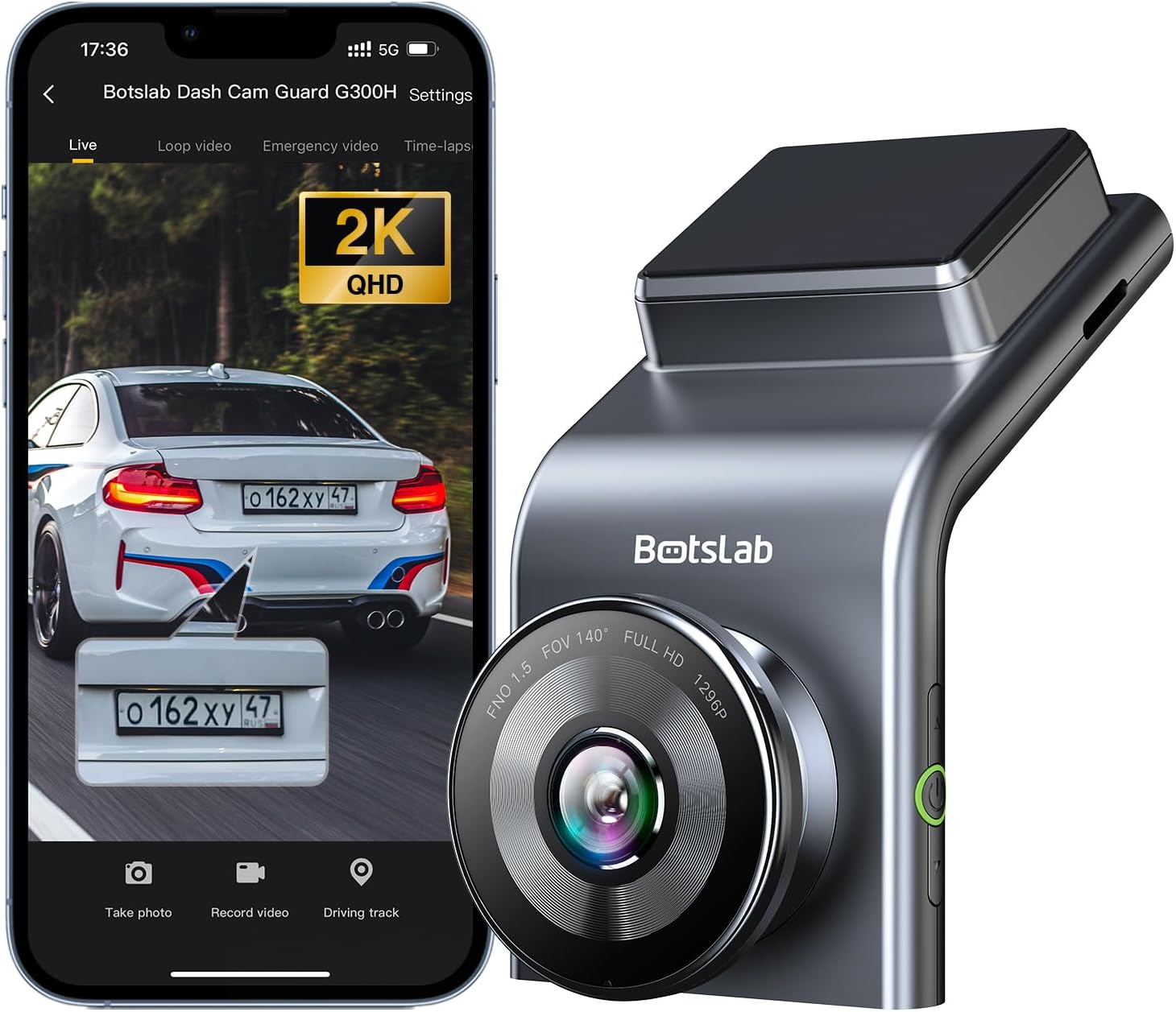
Figure 1: BOTSLAB 2.5K Front Dash Cam Overview
2. Apa yang ada di dalam Kotak
Sila semak kandungan pakej untuk memastikan semua item ada:
- Front Camera (x1)
- Pengecas Kereta (x1)
- USB Power Cord (x1)
- Installation Pry Bar (x1)
- Manual Pengguna (x1)
- Electrostatic Film (x1)

Rajah 2: Kandungan Pakej
3. Persediaan dan Pemasangan
The BOTSLAB Dash Cam is designed for easy installation with invisible wiring, ensuring a clean and integrated look in your vehicle. Follow these steps for proper setup:
- Pilih Lokasi Pemasangan: Pilih lokasi pada cermin depan anda yang tidak menghalang anda view jalan raya. Biasanya, ini adalah di belakang belakangview cermin.
- Cermin Depan Bersih: Pastikan kawasan yang dipilih pada cermin depan bersih dan kering.
- Apply Electrostatic Film: Peel off the protective layer from the electrostatic film and apply it to the cleaned area on your windshield. Smooth out any air bubbles. This film allows for easy removal of the dash cam mount without leaving residue.
- Attach Dash Cam Mount: Secure the dash cam mount to the electrostatic film. Ensure it is firmly attached.
- Mount Dash Cam: Slide the dash cam onto its mount until it clicks into place.
- Sambungkan Kuasa: Connect the USB power cord to the dash cam and route the cable along the edge of the windshield and dashboard to the car charger. Use the installation pry bar to tuck the cable neatly into the gaps for an invisible wiring setup.
- Plug into Car Charger: Masukkan pengecas kereta ke dalam soket pemetik api kenderaan anda.
- Laraskan Sudut: Power on the dash cam and adjust its angle to ensure the camera captures the road ahead clearly, covering the desired field of view (170° ultra-wide angle).

Figure 3: Easy Installation and Cable Management
4. Arahan Operasi
4.1. Power On/Off and Basic Recording
The dash cam will automatically power on and begin recording when your vehicle starts. It will power off automatically when the vehicle is turned off. Ensure a microSD card (not included, supports up to 256GB) is inserted for recording.

Figure 4: MicroSD Card Slot for Storage
4.2. 2.5K HD Video Quality and Night Vision
Experience 2.5K superior HD video quality with a 170° ultra-wide view angle that fully covers all lanes without blind spots. Coupled with clear Night Vision, you'll have full-color, high-quality videos in any lighting condition.

Figure 5: Enhanced Clarity with 2.5K Resolution
4.3. 24/7 Parking Mode
When used with the G300H dedicated hard-wired kit (ASIN: B0D3QK86TQ, sold separately), the G300H front dash cam can achieve 24/7 uninterrupted recording. Video is recorded any time there is a collision or accident. Benefit from Time-lapse Recording for uninterrupted 24-hour parking monitoring, utilizing minimal memory space. The Loop Recording feature ensures continuous recording, preserving vital clips while overwriting older videos.

Figure 6: 24/7 Parking Monitoring
4.4. Enhanced Awareness and Safety Features
Stay in sync with traffic through the Front Vehicle Start Reminder and enhance safety with Pedestrian Collision Alert. These features keep you alert to movement around you, automatically triggering notifications for a seamless and vigilant driving experience.
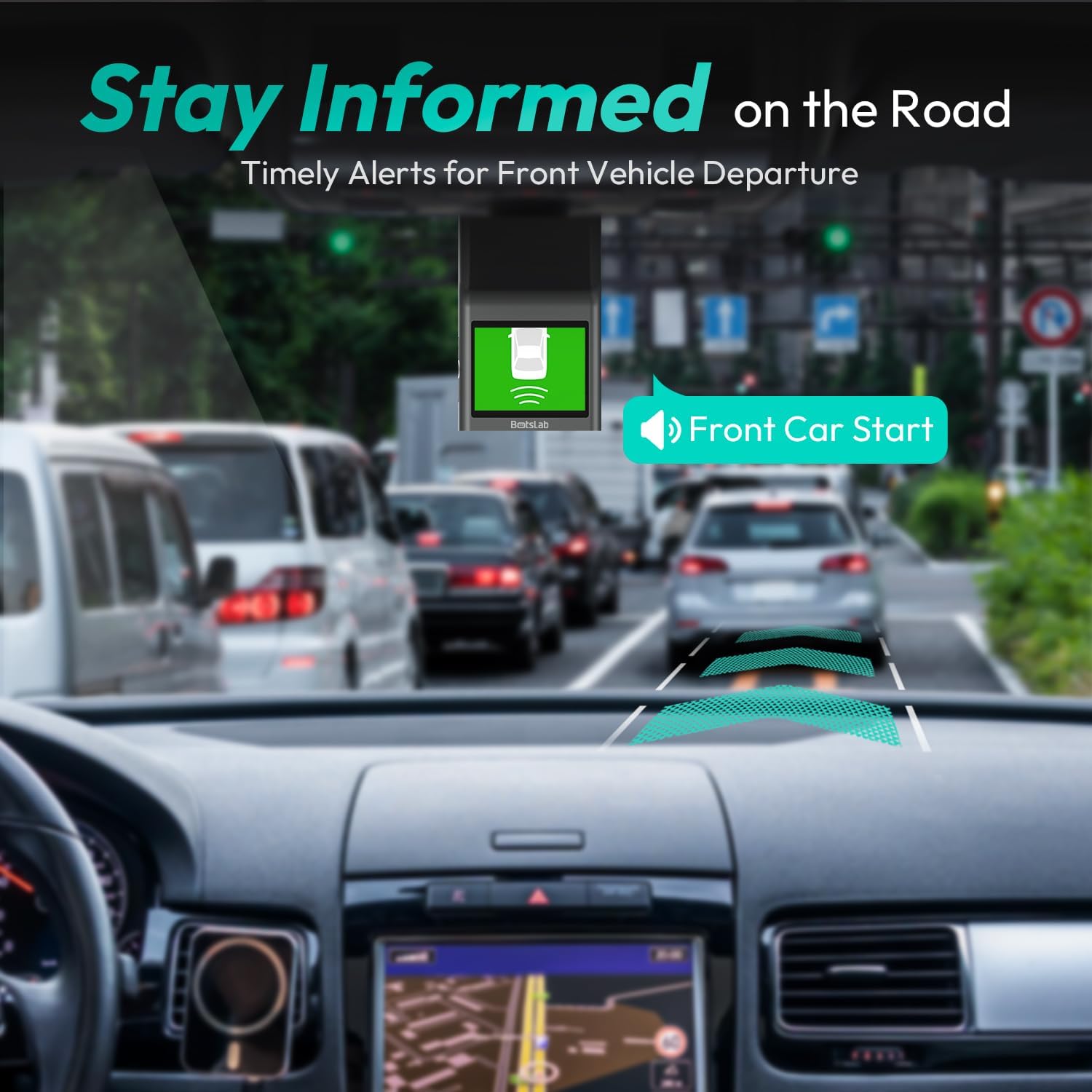
Figure 7: Front Vehicle Start Reminder

Figure 8: Pedestrian Collision Alert
4.5. GPS Integration
Built-in GPS functionality records every detail of your journey, from speed to location. View your personalized routes on Google Maps, right from your phone. It's not just about convenience; it's about keeping your travel data private and secure.

Figure 9: Precise Location Tracking with GPS
4.6. G-Sensor and Emergency Video Protection
In the event of a collision or sudden movement, the G-Sensor automatically locks videos, preventing overwriting. This feature provides the detailed evidence you need for insurance claims or traffic disputes.

Figure 10: Emergency Video Protection
5. Penyelenggaraan
To ensure the longevity and optimal performance of your BOTSLAB Dash Cam, follow these maintenance guidelines:
- Bersihkan Lensa: Regularly wipe the camera lens with a soft, lint-free cloth to ensure clear recordings. Avoid using abrasive cleaners.
- Check MicroSD Card: Periodically check the microSD card for errors or corruption. Format the card monthly to maintain optimal performance and prevent data loss. Back up any important footage sebelum memformat.
- Kemas kini Firmware: Check the BOTSLAB app or website for available firmware updates. Keeping your dash cam's firmware up-to-date ensures you have the latest features and bug fixes.
- Kawalan Suhu: Elakkan mendedahkan kamera papan pemuka kepada suhu yang melampau untuk tempoh yang lama. Jika diletakkan di bawah cahaya matahari langsung, pertimbangkan untuk menanggalkan kamera papan pemuka atau menggunakan pelindung matahari.
- Pemasangan selamat: Ensure the dash cam remains securely mounted to prevent vibrations that could affect video quality or cause the device to fall.
6. Penyelesaian masalah
Jika anda menghadapi masalah dengan kamera papan pemuka anda, rujuk masalah dan penyelesaian biasa berikut:
| Masalah | Kemungkinan Punca | Penyelesaian |
|---|---|---|
| Dash cam tidak dihidupkan. | No power supply; faulty car charger/cable. | Check car charger connection and vehicle's power outlet. Try a different USB cable or car charger. |
| Hentian rakaman atau footage telah rosak. | MicroSD card full, corrupted, or incompatible. | Format the microSD card regularly. Use a high-quality Class 10 or U3 microSD card. Replace the card if issues persist. |
| Isu sambungan Wi-Fi. | Interference; incorrect app settings. | Ensure you are within range. Restart the dash cam and your smartphone. Reinstall the BOTSLAB app. |
| GPS not tracking location. | Poor satellite signal; dash cam not receiving GPS data. | Pastikan cam dash mempunyai jernih view langit. Jauhi bangunan tinggi atau terowong. |
| Kualiti video kurang baik. | Kanta kotor; filem pelindung masih pada kanta; keadaan cahaya malap. | Clean the camera lens. Remove any protective film. Ensure proper lighting for optimal recording. |
For further assistance, please refer to the support section or contact customer service.
7. Spesifikasi
| Ciri | Perincian |
|---|---|
| Dimensi Produk | 0.59 x 0.98 x 2.17 inci |
| Berat Barang | 14.9 auns |
| Nombor Model | G300H |
| Teknologi Ketersambungan | WiFi 2.4GHz |
| Ciri Khas | Pedestrian Collision Alert, Built-In GPS, 24/7 Parking Monitoring |
| Resolusi Tangkapan Video | 2.5K |
| warna | biru muda |
| Pengeluar | 360 Smart Network |
| Tarikh Mula-mula Tersedia | 23 November 2023 |
| Orientasi | Depan |
| Jenis Perkhidmatan Kenderaan | Bus, Car, Truck |
| Jenis Pemasangan | Gunung Cermin Mata |
8. Waranti dan Sokongan
BOTSLAB is committed to providing high-quality AI-Vision security products and excellent customer service. Your dash cam comes with comprehensive support to ensure your satisfaction.
8.1. Maklumat Waranti
The BOTSLAB Dash Cam G300H includes a 365-Day Quality Guarantee. For detailed terms and conditions, please refer to the official warranty documentation or contact customer support.
8.2. Sokongan Teknikal
Kami tawarkan Bantuan Teknikal Seumur Hidup for your product. If you encounter any issues or have questions, please utilize the following support channels:
- Sembang Langsung: Download the Botslab APP, register and sign in, then navigate to 'Me' > 'Support' > 'Live Chat' for 24-hour assistance.
- rasmi Webtapak: melawat global.botslab.com untuk maklumat produk, Soalan Lazim dan sumber sokongan.
- Sokongan E-mel: Send your inquiries to Service@botslab.com. We aim for 48 Hours Fast Support.
- Komuniti Pengguna: Join the Botslab Users Group for peer support and discussions.


Figure 11: BOTSLAB Support and Care Information
For a complete digital version of this manual, you can access the Manual Pengguna (PDF).


