1. Arahan Keselamatan Penting
Please read and understand all safety instructions before operating this product. Keep this manual for future reference.
- Jangan dedahkan unit kepada hujan, kelembapan atau suhu yang melampau.
- Elakkan meletakkan unit berhampiran sumber haba seperti radiator, daftar haba, dapur atau peralatan lain yang menghasilkan haba.
- Hanya gunakan lampiran/aksesori yang ditentukan oleh pengilang.
- Cabut palam unit ini semasa ribut petir atau apabila tidak digunakan untuk jangka masa yang lama.
- Rujuk semua perkhidmatan kepada pegawai perkhidmatan yang berkelayakan. Servis diperlukan apabila alat telah rosak dengan cara apa pun.
- Pastikan pengudaraan yang betul di sekeliling unit. Jangan sekat sebarang bukaan pengudaraan.
- Lindungi kord kuasa daripada berjalan atau tersepit.
2. Kandungan Pakej
Sahkan bahawa semua item yang disenaraikan di bawah disertakan dalam pakej anda:
- 1x syitren PARON II Record Player
- 1x Manual Pengguna
- 1x Penutup Habuk
- 1x 12V AC Power Adapter

3. Produk Lebihview
Familiarize yourself with the main components of your syitren PARON II Record Player.


4. Persediaan
- Buka bungkusan Unit: Carefully remove the record player and all accessories from the packaging.
- Place the Dust Cover: Position the dust cover onto the hinges at the back of the unit.
- Sambungkan Kuasa: Plug the 12V AC power adapter into the DC IN port on the back of the record player, then plug the adapter into a wall outlet.
- Adjust Counterweight: The tonearm features an adjustable counterweight. Carefully balance the tonearm so it floats horizontally. Then, rotate the counterweight to the recommended tracking force (refer to cartridge specifications, typically around 2.5g for the AT3600L). This ensures optimal sound quality and prevents record damage.
- Pelarasan Anti-Skating: The anti-skating system helps prevent the stylus from skipping. Adjust this setting according to the instructions provided with the cartridge or by testing with a blank record.

5. Arahan Operasi
5.1 Memainkan Rekod Vinil
- Hidupkan kuasa: Putar tombol kuasa untuk menghidupkan unit.
- Pilih Kelajuan: Choose the appropriate speed (33 or 45 RPM) for your vinyl record using the speed selector switch.
- Rekod Tempat: Carefully place your vinyl record on the platter. If playing a 45 RPM single, use the included adapter.
- Angkat Tonearm: Gunakan tuil angkat tonearm untuk menaikkan tonearm.
- Stilus Kedudukan: Gerakkan lengan nada perlahan-lahan ke atas alur permulaan rekod yang diingini.
- Tonearm Bawah: Slowly lower the tonearm using the lift lever. The stylus will make contact with the record and playback will begin.
- Laraskan Kelantangan: Gunakan tombol kelantangan untuk menetapkan tahap pendengaran yang diingini.
The record player features an auto-stop function that will stop the platter approximately three minutes after the record ends. The tonearm will not auto-return.

5.2 Kesambungan Bluetooth
The syitren PARON II Record Player can receive audio wirelessly from Bluetooth-enabled devices.
- Dayakan Bluetooth: Switch the function selector to Bluetooth mode. The indicator light will flash, indicating it's in pairing mode.
- Pasangkan Peranti: On your smartphone, tablet, or other Bluetooth device, enable Bluetooth and search for available devices. Select "syitren PARON II" (or similar name) from the list.
- Pengesahan: Once paired, the indicator light on the record player will stop flashing and remain solid. You can now stream audio from your device to the record player's built-in speakers.
5.3 Sambungan Audio Luaran
The unit supports both Aux-in and RCA output for versatile audio connections.
- Aux-in: Connect an external audio source (e.g., MP3 player, CD player) to the AUX IN port using a 3.5mm audio cable. Select AUX mode on the record player to play audio from the connected device.
- Keluaran RCA: Connect the RCA output jacks on the back of the record player to an external amplifier or powered speakers using RCA cables. This allows you to use the record player as a source for a larger audio system.
6. Penyelenggaraan
6.1 Membersihkan Stilus
A clean stylus ensures optimal sound quality and extends the life of your records. Use a soft brush designed for stylus cleaning, brushing gently from back to front.
6.2 Membersihkan Unit
Wipe the unit with a soft, dry cloth. For stubborn marks, a slightly damp kain boleh digunakan, diikuti dengan kain kering. Elakkan pembersih atau pelarut yang kasar.
6.3 Dust Cover Care
The dust cover protects your turntable. Clean it with a soft, lint-free cloth. Avoid harsh chemicals that may scratch or cloud the plastic.
7. Penyelesaian masalah
Jika anda menghadapi masalah, rujuk kepada masalah dan penyelesaian biasa berikut:
| Masalah | Penyelesaian yang Mungkin |
|---|---|
| Tiada kuasa | Pastikan penyesuai kuasa disambungkan dengan selamat ke unit dan soket kuasa yang berfungsi. |
| Tiada suara dari pembesar suara | Check volume level. Ensure correct input mode (Phono, Aux, Bluetooth) is selected. |
| Melangkau atau bunyi herot | Clean the record and stylus. Re-adjust the tonearm counterweight and anti-skating. Ensure the record player is on a stable, level surface. |
| Bluetooth tidak berpasangan | Ensure the record player is in Bluetooth pairing mode. Disable and re-enable Bluetooth on your device. Move closer to the record player. |
Jika masalah berterusan, sila hubungi khidmat pelanggan untuk mendapatkan bantuan.
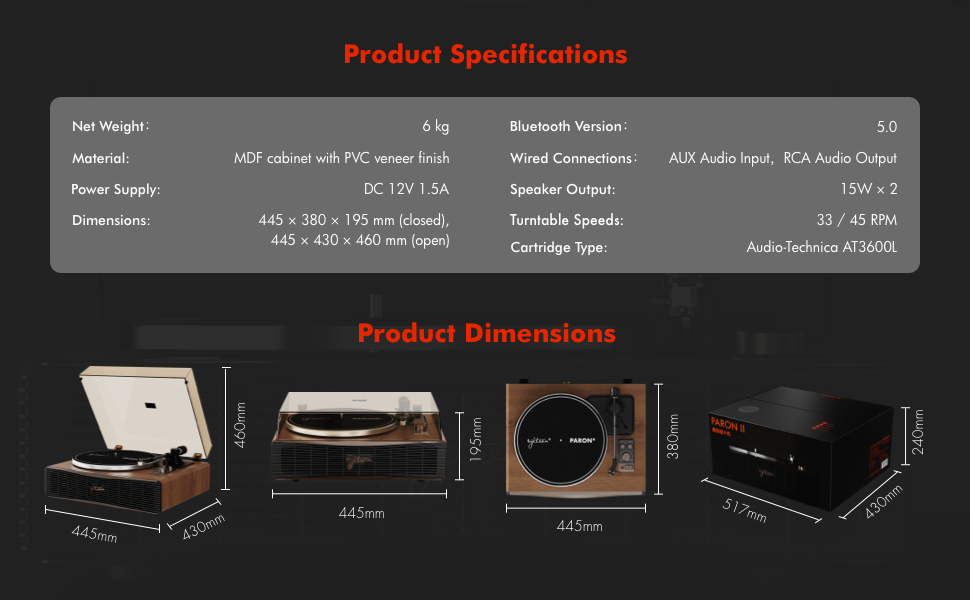
8. Spesifikasi
| Ciri | Perincian |
|---|---|
| Nama Model | PARON II |
| Nombor Model Item | SN13 |
| Dimensi Produk | 17.4 x 14.96 x 7.48 inches (445 x 380 x 195 mm closed) |
| Berat Barang | 16 paun (6 kg) |
| bahan | MDF cabinet with PVC veneer finish (Wood, Metal, Plastic) |
| Kelajuan Meja Putar | 33 1/3, 45 RPM |
| Jenis Kartrij | Audio-Technica AT3600L (Magnet-type) |
| Versi Bluetooth | 5.0 |
| Sambungan Berwayar | AUX Audio Input, RCA Audio Output |
| Output Speaker | 15W x 2 (Built-in 2.5" woofer and 2" tweeter) |
| Bekalan Kuasa | DC 12V 1.5A |
| Ciri Khas | Adjustable Counterweight, Built-In Speaker, Built-In Bluetooth Receiver, RCA Output, Suspension Shock Absorption System, S5 Motor System |
9. Waranti dan Sokongan
The syitren PARON II Record Player is designed for reliable performance. For warranty information or technical support, please refer to the contact details provided with your purchase documentation or visit the official syitren webtapak.
Sila simpan bukti pembelian anda untuk sebarang tuntutan waranti.


