pengenalan
The OQIMAX Bluetooth 5.0/5.3 Transmitter Receiver is a versatile 2-in-1 audio adapter designed to enhance your audio experience. It allows you to wirelessly transmit audio from non-Bluetooth devices or receive audio on non-Bluetooth devices, offering flexibility for various home and car audio setups. Featuring Bluetooth 5.3 technology and CVC noise reduction, it ensures stable connections and clear sound quality.
This adapter supports both Transmitter (TX) and Receiver (RX) modes, making it compatible with a wide range of devices such as TVs, PCs, MP3/MP4 players, car audio systems, speakers, and headphones. Its compact design and long battery life provide convenience for both stationary and portable use.
Produk Selesaiview
Familiarize yourself with the components and controls of your OQIMAX Bluetooth Audio Adapter.

Imej: Detailed diagram of the OQIMAX Bluetooth adapter, highlighting its key features: the 3.5mm Audio Port, Type-C Charging Port, RX/TX mode switch, Multi-function Button, and the Connection Indicator Light with its different states (Pairing State - Red/Blue flash, Low Battery Warning - Red flash, Connected - Blue/Red solid).
- Port Audio 3.5mm: For connecting to audio sources or output devices using the included AUX cable.
- Port Pengecasan Jenis-C: For charging the device using the provided Micro USB cable.
- RX/TX Switch: Bertukar antara mod Penerima (RX) dan Pemancar (TX).
- Butang pelbagai fungsi: Used for powering on/off, pairing, answering/ending calls, and playing/pausing music.
- Connection Indicator Light: Displays the device's status:
- Blue Light (fast flashing): Ready for pairing in RX mode.
- Red Light (fast flashing): Ready for pairing in TX mode.
- Blue Light (solid): Connected in RX mode.
- Red Light (solid): Connected in TX mode.
- Red Light (flashing slowly): Amaran bateri lemah.

Imej: The OQIMAX Bluetooth adapter package contents, showing the white adapter unit, a 3.5mm audio cable, and a USB charging cable.
Kandungan Pakej:
- OQIMAX Bluetooth 5.0/5.3 Transmitter Receiver
- Kabel Audio 3.5mm
- Kabel Pengecas USB Mikro
- Manual Pengguna
Persediaan dan Pengecasan
Pengecasan Awal
Sebelum penggunaan pertama, sila cas peranti sepenuhnya.
- Connect the provided Micro USB charging cable to the Type-C Charging Port on the adapter.
- Sambungkan hujung kabel USB yang satu lagi ke penyesuai kuasa USB standard (tidak disertakan) atau port USB komputer.
- The indicator light will show charging status (specific color/behavior not detailed in source, assume it indicates charging).
- Pengecasan penuh biasanya mengambil masa lebih kurang 2 jam.

Imej: The OQIMAX Bluetooth adapter next to a battery icon, illustrating its battery life: up to 8 hours for music playback and 2 hours for a full charge.
Nota: It is not recommended to use the device while charging, as this may introduce current noise.
Arahan Operasi
Menukar Mod
The device features a physical switch to select between Receiver (RX) and Transmitter (TX) modes. Always shut down the device before switching modes.

Imej: An illustration demonstrating the ease of operation, showing the RX/TX switch on the OQIMAX Bluetooth adapter. The top panel shows TX mode used with a TV and headphones, while the bottom panel shows RX mode used with a smartphone and wired headphones.
Mod Penerima (RX)
In RX mode, the adapter receives Bluetooth audio from your smartphone or other Bluetooth-enabled devices and outputs it to non-Bluetooth audio equipment like wired headphones, car audio systems, or home speakers.
- Pastikan peranti dicas.
- Connect the OQIMAX adapter (B-10S) to your non-Bluetooth audio device (e.g., headphones, car AUX input, speaker) using the 3.5mm audio cable.
- Slide the mode switch to the RX kedudukan.
- Press and hold the Multi-function Button to power on the device. The blue indicator light will flash rapidly, indicating it is in pairing mode.
- On your Bluetooth-enabled device (e.g., smartphone), search for Bluetooth devices and select "B-10S" to pair.
- Once connected, the blue indicator light will become solid. You can now stream audio wirelessly to your connected non-Bluetooth device.
- To answer/end calls or play/pause music, press the Multi-function Button.

Imej: The OQIMAX Bluetooth adapter in Receiver (RX) mode, wirelessly connected to a smartphone and outputting audio to a speaker, demonstrating its use in a home setting.
Mod Pemancar (TX)
In TX mode, the adapter transmits audio from non-Bluetooth devices (like TVs or PCs) to Bluetooth-enabled headphones or speakers.
- Pastikan peranti dicas.
- Connect the OQIMAX adapter (B-10S) to your non-Bluetooth audio source (e.g., TV, PC, CD player) using the 3.5mm audio cable.
- Slide the mode switch to the TX kedudukan.
- Press and hold the Multi-function Button to power on the device. The red indicator light will flash rapidly, indicating it is in pairing mode.
- Letakkan fon kepala atau pembesar suara Bluetooth anda ke dalam mod berpasangan.
- The OQIMAX adapter will automatically search for and connect to nearby Bluetooth receiving devices.
- Once connected, the red indicator light will become solid. Audio from your non-Bluetooth source will now be transmitted wirelessly to your Bluetooth headphones/speaker.
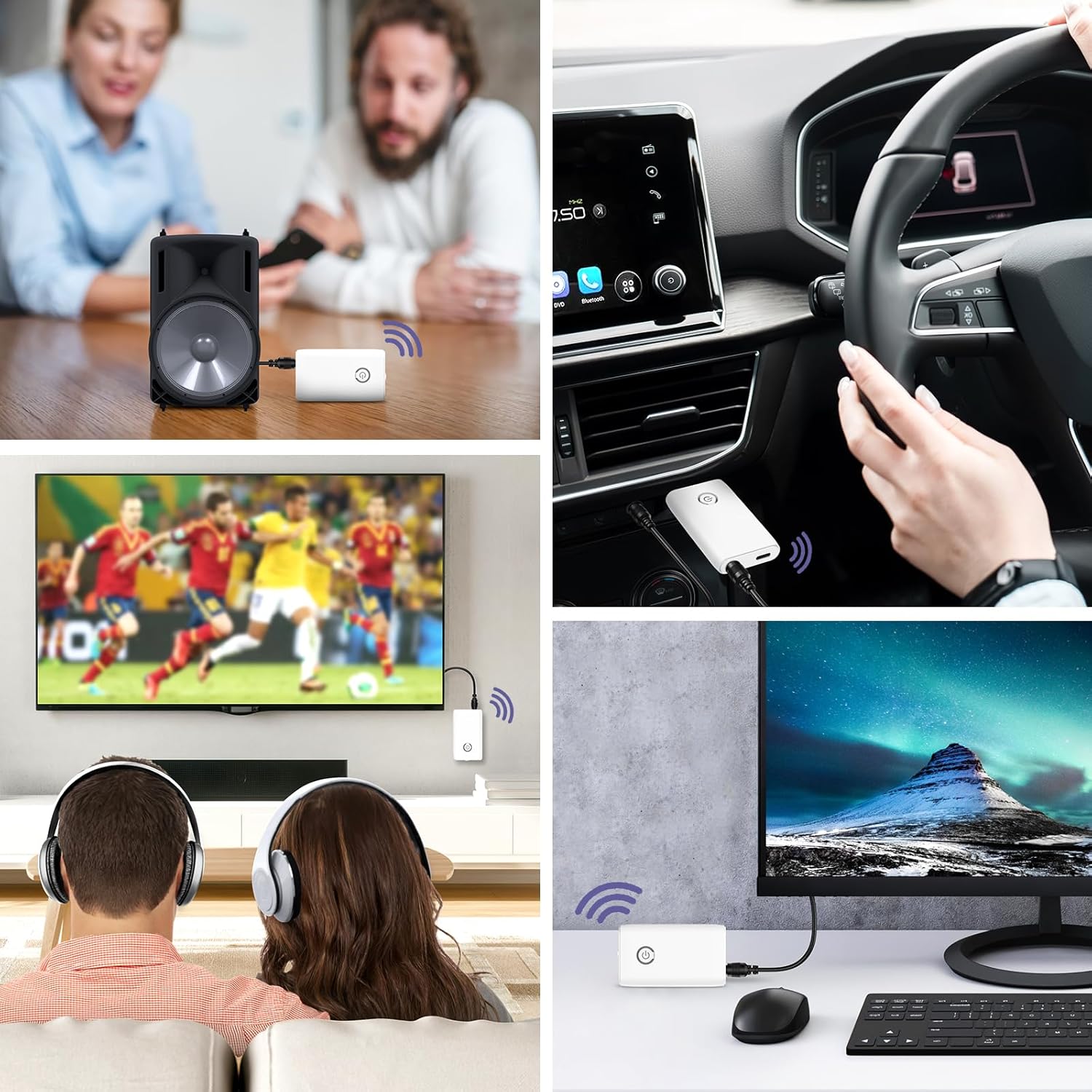
Imej: A collage of usage scenarios for the OQIMAX Bluetooth adapter. It shows the adapter transmitting audio from a TV to headphones, from a PC to headphones, and receiving audio from a phone to a car audio system or a portable speaker.
Penyelenggaraan
- Pastikan peranti kering. Kelembapan boleh merosakkan litar elektronik.
- Do not expose the device to extreme temperatures. High temperatures can shorten the life of electronic devices, damage batteries, and warp or melt certain plastics.
- Do not use harsh chemicals, cleaning solvents, or strong detergents to clean the device. Wipe it with a soft, slightly damp kain.
- Elakkan daripada menjatuhkan, mengetuk atau menggoncang peranti. Pengendalian yang kasar boleh merosakkan papan litar dalaman dan mekanik halus.
Menyelesaikan masalah
| Masalah | Kemungkinan Punca | Penyelesaian |
|---|---|---|
| Peranti tidak dihidupkan. | Bateri lemah. | Cas peranti sepenuhnya. |
| Tidak boleh dipasangkan dengan peranti lain. | Incorrect mode selected (TX/RX). Peranti tidak dalam mod berpasangan. Other device not in pairing mode. Terlalu jauh dari peranti yang satu lagi. | Ensure the correct mode is selected and the device is powered off before switching. Press and hold the Multi-function Button until the indicator light flashes rapidly. Ensure the target Bluetooth device is also in pairing mode. Gerakkan peranti lebih dekat (dalam jarak 10 meter). |
| Tiada audio atau kualiti audio yang lemah. | Sambungan kabel tidak betul. Kelantangan terlalu rendah. Gangguan. Using while charging. | Check that the 3.5mm audio cable is securely connected to both the adapter and the audio device. Adjust volume on both the adapter and the connected audio device. Beralih dari peranti wayarles lain atau sumber gangguan. Avoid using the device while it is charging to prevent current noise. |
| Sambungan sering terputus. | Jarak terlalu jauh. Halangan. Bateri lemah. | Kurangkan jarak antara penyesuai dan peranti yang disambungkan. Pastikan tiada halangan utama (dinding, objek logam besar) antara peranti. Cas peranti. |
Spesifikasi
| Jenama | OQIMAX |
| Nombor Model | CP212-Vitt |
| Versi Bluetooth | 5.3 |
| Teknologi Ketersambungan | Bluetooth, AUX (3.5mm), USB (for charging) |
| Ciri Khas | Hands-free calling, CVC Noise Reduction, Low Latency, 2-in-1 Transmitter/Receiver |
| Peranti Serasi | Headphones, Speakers, Computers, Radios, Car Stereo Systems, Televisions |
| Sumber Kuasa | Dikuasakan Bateri (Boleh dicas semula) |
| Kapasiti Bateri | 250mAh |
| Play Time (Receiver Mode) | Sehingga 8 jam |
| Play Time (Transmitter Mode) | Sehingga 6 jam |
| Masa Mengecas | Lebih kurang 2 jam |
| Julat Bluetooth | Sehingga 10 meter (33 kaki) |
| Dimensi Produk | 6.4L x 3.7W x 1.2H sentimeter |
| Berat Barang | 11 Gram |
| warna | putih |
Amaran Keselamatan
Please adhere to the following safety guidelines for battery use:
- Do not expose the battery to high heat or open flames.
- Jangan buang bateri ke dalam api.
- Recycle or dispose of the battery according to local regulations.
- Jauhkan daripada kanak-kanak.
Waranti dan Sokongan
For warranty information and technical support, please refer to the contact details provided with your purchase or visit the official OQIMAX webtapak.
Perkhidmatan Pelanggan: Please contact your retailer or OQIMAX customer support for assistance.


