
pengenalan
Thank you for choosing the Masterpro by Carlo Cracco Robot 1000 Multicooker. This advanced kitchen appliance is designed to simplify your cooking process with its versatile functions and integrated Wi-Fi connectivity. This manual provides essential information for safe operation, setup, usage, maintenance, and troubleshooting to ensure you get the most out of your device.

The Masterpro Robot 1000 multicooker with its main bowl and control panel.
Arahan Keselamatan
Sila baca semua arahan keselamatan dengan teliti sebelum menggunakan perkakas. Kegagalan untuk mengikut arahan ini boleh mengakibatkan kecederaan atau kerosakan pada perkakas.
- Sentiasa pastikan perkakas diletakkan di atas permukaan yang stabil, rata dan tahan haba.
- Jangan rendam unit utama dalam air atau sebarang cecair lain. Bersih dengan iklanamp kain sahaja.
- Keep hands and utensils away from moving blades during operation. Always use the spatula provided.
- Pastikan semua bahagian dipasang dengan betul sebelum beroperasi.
- Cabut plag perkakas daripada salur keluar kuasa apabila tidak digunakan, sebelum membersihkan, dan sebelum memasang atau membuka bahagian.
- Jangan kendalikan perkakas dengan kord atau palam yang rosak, atau jika ia tidak berfungsi atau telah rosak dalam apa jua cara.
- Perkakas ini adalah untuk kegunaan isi rumah sahaja. Jangan gunakan di luar rumah.
- Berhati-hati semasa mengendalikan cecair atau wap panas.
Kandungan Pakej
Sahkan bahawa semua item terdapat dalam pakej:
- Masterpro Robot 1000 Main Unit
- 4.5 Liter Stainless Steel Bowl with ergonomic handle
- Preparation/Cooking Lid
- Tudung Pengisar
- Internal Steamer Basket
- Steamer with Tray and Lid
- Shaft with Mixing Paddle
- Shaft with Butterfly Whisk
- Shaft with Stainless Steel Blades
- Extension Shaft with Slicing/Grating Disc
- Slicing/Grating Disc with Extension Shaft
- Spatula

Berakhirview of the Masterpro Robot 1000 multicooker and its comprehensive set of accessories, including various blades, whisks, steaming baskets, and lids.
Produk Selesaiview
The Masterpro Robot 1000 is a high-tech multicooker designed for diverse culinary tasks. Key components include:
- Unit Utama: Meletakkan motor, elemen pemanasan dan panel kawalan.
- Mangkuk Keluli Tahan Karat: 4.5-liter capacity for large preparations.
- Paparan Skrin Sentuh 7.7 inci: For intuitive control and recipe viewing.
- Quick Control Knob: With backlit ring for easy adjustments.
- Kesambungan Wi-Fi: Enables integrated recipe updates and online features.
- Skala Bersepadu: Accurate to 5 grams for precise ingredient measurement.
Persediaan
Ikuti langkah ini untuk persediaan awal:
- Bongkar: Keluarkan semua komponen dari pembungkusan dengan berhati-hati.
- Bersih: Wash the stainless steel bowl, lids, and all accessories with warm soapy water before first use. Rinse thoroughly and dry.
- penempatan: Place the main unit on a clean, dry, stable, and heat-resistant surface, away from edges and heat sources.
- Sambungan Kuasa: Plug the appliance into a grounded electrical outlet (220V-240V, 50-60Hz).
- Kuasa Awal Hidup: The touch screen display will illuminate. Follow any on-screen prompts for initial language selection or Wi-Fi setup.
Arahan Operasi
Mod Manual dan Automatik
The Masterpro Robot 1000 offers both manual and automatic operation modes. In manual mode, you control each setting (time, temperature, speed). In automatic mode, you can select from integrated recipes that guide you step-by-step.
Integrated Recipes and Wi-Fi
The appliance comes with over 500 integrated recipes. Connect the device to Wi-Fi to receive updates and potentially access new recipes. Each recipe provides step-by-step instructions on the 7.7-inch touch screen display.
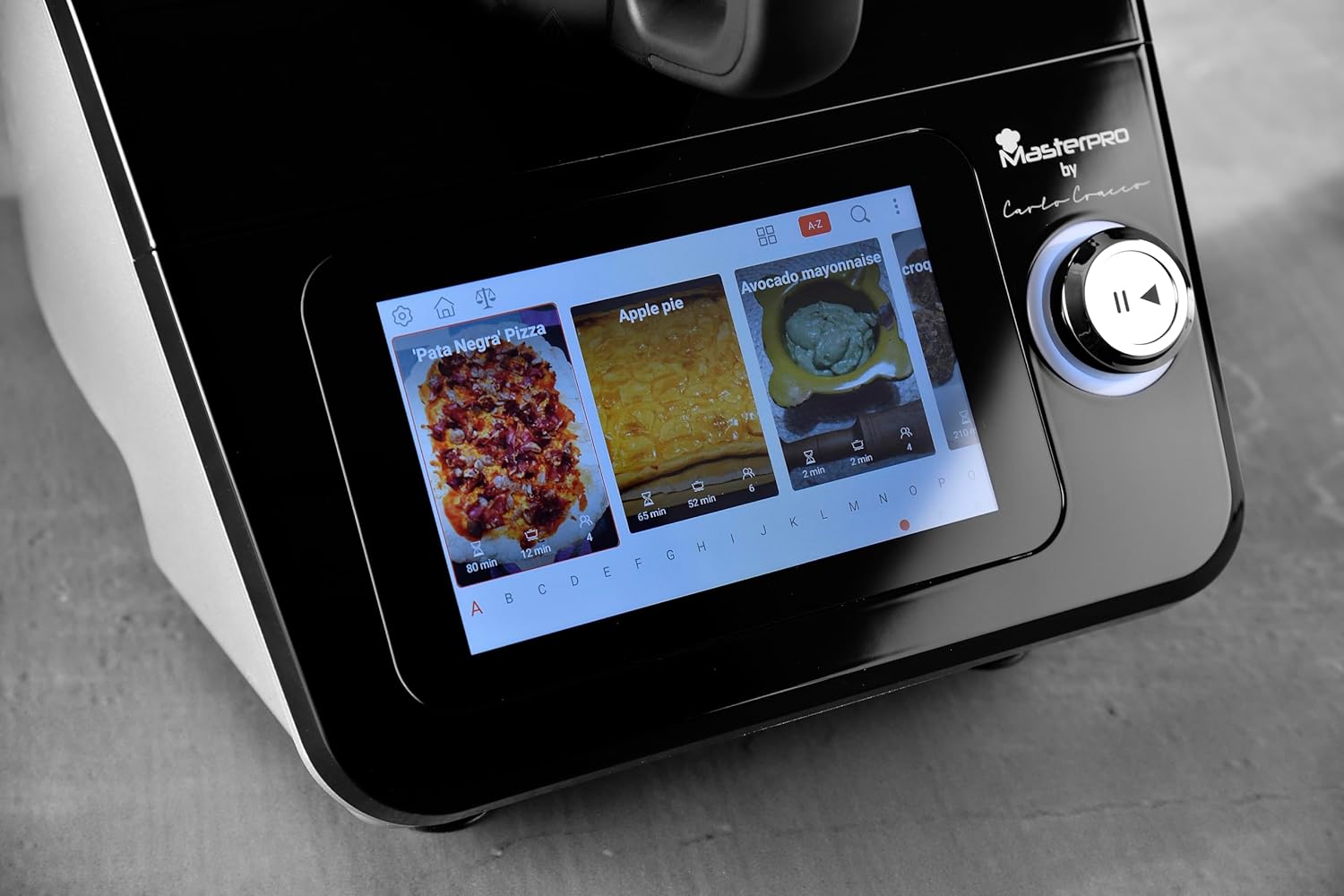
A close-up of the 7.7-inch touch screen display, illustrating the interface for selecting integrated recipes.
Fungsi Teras
The multicooker performs a wide range of functions:
- Penimbangan: Use the integrated scale for precise ingredient measurement.
- Pengadunan: Ideal for smoothies, sauces, and purees.
- Emulsifying: Create perfect mayonnaise or dressings.
- menguli: Prepare dough for bread, pizza, or pastries.
- Menghiris/Mengiris: Utilize the dedicated disc and extension shaft for uniform slicing and grating of vegetables.
- Menyebat: Use the butterfly whisk for whipping cream or egg whites.
- Memasak: Various cooking methods, including simmering, sautéing, and stewing.
- mengukus: Use the internal basket or the external steamer with tray and lid for healthy steamed dishes.

The multicooker in use, demonstrating the steaming function with the steamer basket and lid in place, preparing seafood.

The multicooker demonstrating the slicing function with the dedicated accessory, processing carrots.
Temperature and Timer
Adjust the cooking temperature from 37°C to 130°C. Set the timer for up to 90 minutes. These settings are controlled via the touch screen and quick control knob.
Speed Control and Inverter Blade
The appliance features 12 speed levels. For delicate preparations like risottos, use the inverter blade function to stir gently without cutting ingredients.
Penyelenggaraan dan Pembersihan
Regular cleaning ensures the longevity and optimal performance of your Masterpro Robot 1000.
- Cabut plag: Sentiasa cabut plag perkakas sebelum membersihkan.
- Mangkuk dan Aksesori: The stainless steel bowl, lids, and most accessories are dishwasher safe. For manual cleaning, use warm soapy water and a non-abrasive sponge.
- Unit Utama: Wipe the main unit and touch screen display with a soft, damp kain. Jangan gunakan pembersih yang melelas atau rendam unit di dalam air.
- Pengeringan: Pastikan semua bahagian benar-benar kering sebelum dipasang semula atau disimpan.
Menyelesaikan masalah
If you encounter issues with your Masterpro Robot 1000, refer to the table below for common problems and solutions.
| Masalah | Kemungkinan Punca | Penyelesaian |
|---|---|---|
| Perkakas tidak dihidupkan. | Tidak dipasang; kuasa outage; outlet rosak. | Periksa sambungan kord kuasa; mengesahkan bekalan kuasa; cuba outlet lain. |
| Software update fails or gets stuck. | Unstable Wi-Fi connection; corrupted download; temporary software glitch. | Ensure stable Wi-Fi connection. Restart the appliance and attempt the update again. If the problem persists, contact customer support. |
| Touch screen unresponsive or inaccurate. | Screen is dirty; temporary software issue; hardware malfunction. | Clean the screen with a soft, dry cloth. Restart the appliance. If the issue continues, contact customer support. |
| Blade inverter function not engaging. | Incorrect setting; temporary glitch. | Ensure the correct function is selected on the display. Restart the appliance. |
| Bowl capacity appears less than stated. | Misinterpretation of usable vs. total capacity; specific recipe limits. | The stated capacity of 4.5L refers to the total volume. Usable capacity for certain preparations might be slightly less to prevent overflow. Refer to recipe guidelines. |
Spesifikasi Teknikal
| Ciri | Spesifikasi |
|---|---|
| Jenama | MasterPRO |
| Model | Robot 1000 |
| warna | Hitam |
| Kapasiti Mangkuk | 4.5 Liter |
| Bilangan Kelajuan | 12 |
| Ciri Khas | Adjustable speed control, Wi-Fi connectivity, Integrated recipes, Integrated scale, Inverter blade function |
| Suhu Boleh Laras | 37-130°C |
| Julat Pemasa | 0-90 minit |
| Ketepatan Skala | 5 gram |
| kuasa | 1000 Watts (motor and heating) |
| Voltage / Kekerapan | 220V-240V ~ 50-60HZ |
| Dimensi Produk | 38P x 22p x 32T cm |
Waranti dan Sokongan
The Masterpro by Carlo Cracco Robot 1000 Multicooker comes with a standard manufacturer's warranty. Please refer to the warranty card included in your product packaging for specific terms and conditions. For technical support, service, or spare parts, please contact your retailer or the MasterPRO customer service department. Keep your proof of purchase for warranty claims.