pengenalan
Thank you for choosing the HyperGear Bunny Tracks Kids Bluetooth Wireless Headphones. These headphones are designed to provide a fun and immersive audio experience for children, featuring wireless Bluetooth connectivity, LED rabbit ears, and multiple playback options. This manual provides essential information for setting up, operating, and maintaining your headphones to ensure optimal performance and longevity.

The image displays the HyperGear Bunny Tracks Kids Bluetooth Wireless Headphones in white, featuring LED rabbit ears. The product packaging is also visible, highlighting key features like Bluetooth connectivity, kid-friendly sizing, comfortable fit, and mic/volume control.
Produk Selesaiview
Ciri-ciri Utama
- Kesambungan Bluetooth Wayarles: Seamless audio streaming from compatible devices.
- LED Rabbit Ears: Fun, illuminated design element.
- Reka Bentuk Lipat: Enhances portability and storage.
- Mikrofon terbina dalam: Untuk panggilan bebas tangan dan komunikasi dalam talian.
- Main Balik Berbilang Mod: Supports Bluetooth, 3.5mm Aux, microSD card, and FM radio.
- Sesuai Selesa: Adjustable headband and soft over-ear cushions.
- Masa Main 10 Jam: Extended listening on a single charge.
Kawalan dan Pelabuhan
The headphones feature intuitive controls and versatile input options for various audio sources.

Imej ini memberikan yang terperinci view of the control buttons located on the headphone ear cup. Labels indicate functions for power on/off, next track/volume up, play/pause/answer call, previous track/volume down, and mode switch.
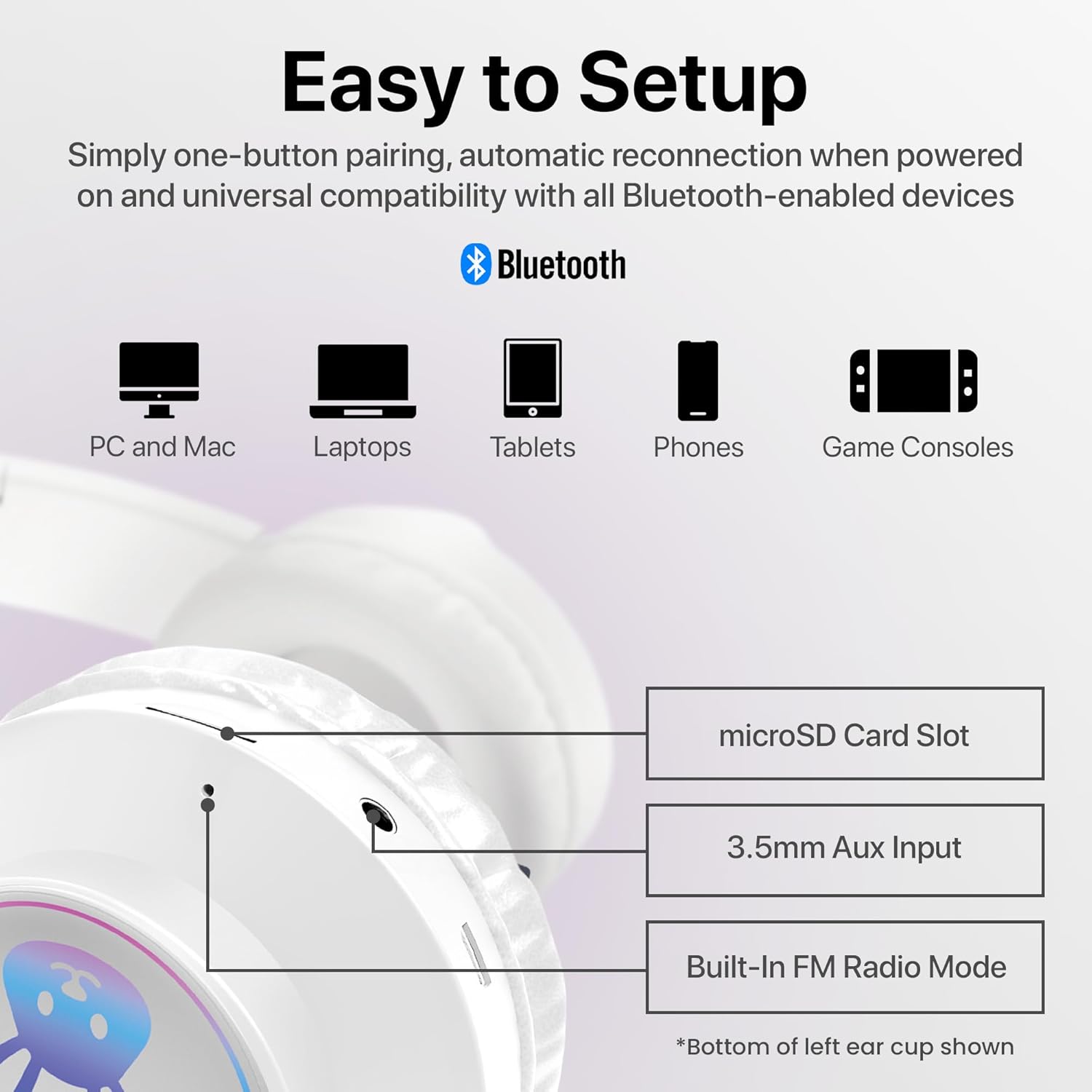
The image shows the various input ports on the bottom of the left ear cup, including a microSD card slot for direct audio playback, a 3.5mm Aux input for wired connections, and an indication of the built-in FM radio mode.
Arahan Persediaan
1. Mengecas Fon Kepala
- Connect the included charging cable to the charging port on the headphones.
- Plug the other end of the charging cable into a USB power source (e.g., computer USB port, USB wall adapter).
- The LED indicator will illuminate during charging and turn off or change color when fully charged. A full charge takes approximately 2 hours.
2. Menghidupkan/Mematikan
- Untuk Menghidupkan: Press and hold the Power button (usually combined with Play/Pause) until the LED indicator lights up and you hear an audible prompt.
- Untuk Mematikan: Press and hold the Power button until the LED indicator turns off and you hear an audible prompt.
3. Berpasangan Bluetooth
- Pastikan fon kepala dicas sepenuhnya dan dimatikan.
- Tekan dan tahan butang Kuasa selama lebih kurang 3-5 saat sehingga penunjuk LED berkelip biru dan merah, menunjukkan mod berpasangan.
- Pada peranti anda (telefon pintar, tablet, komputer), dayakan Bluetooth dan cari peranti yang tersedia.
- Select "HyperGear Bunny Tracks" from the list of found devices.
- Once paired, the LED indicator will typically show a solid blue light or flash blue slowly, and you will hear a confirmation tone.
4. Sambungan Berwayar (Mod Aux)
Untuk menggunakan fon kepala dalam mod berwayar:
- Connect one end of a 3.5mm audio cable (not always included, check packaging) to the Aux input port on the headphones.
- Sambungkan hujung satu lagi ke bicu output audio peranti anda.
- The headphones will automatically switch to Aux mode. Bluetooth functionality will be disabled in this mode.
5. microSD Card Playback
To play audio directly from a microSD card:
- Insert a microSD card with MP3 audio files into the microSD card slot on the headphones.
- The headphones will automatically switch to microSD mode and begin playing audio.
6. Mod Radio FM
Untuk menggunakan radio FM terbina dalam:
- Hidupkan fon kepala.
- Press the 'M/EQ' button (Mode/Equalizer) to switch to FM radio mode.
- Use the Volume Up/Down buttons to scan for stations. A short press may change frequency, while a long press might auto-scan. Refer to the control image for specific button functions.

This image depicts a young girl wearing the headphones while interacting with a laptop, suggesting use for online learning or entertainment.
Arahan Operasi
Basic Controls (Bluetooth/microSD Mode)
| Butang/Tindakan | Fungsi |
|---|---|
| Butang Kuasa (Tekan Sekejap) | Play/Pause music; Answer/End phone calls. |
| Butang Kuasa (Tekan Lama) | Kuasa Hidup / Mati. |
| '+' Button (Short Press) | Trek Seterusnya. |
| '+' Button (Long Press) | Kelantangan Naik. |
| '-' Button (Short Press) | Trek Sebelumnya. |
| '-' Button (Long Press) | Kelantangan Kurang. |
| 'M/EQ' Button (Short Press) | Switch Audio Mode (Bluetooth, FM, microSD, Aux). |
| 'M/EQ' Button (Long Press) | Activate Equalizer (if available, check product specifications for details). |
Pengurusan Panggilan Telefon
- Jawab Panggilan: Tekan butang Kuasa sebentar apabila panggilan masuk.
- Tamatkan Panggilan: Tekan butang Kuasa sebentar semasa panggilan.
- Tolak Panggilan: Tekan lama butang Kuasa apabila panggilan masuk.
LED Rabbit Ears
The LED rabbit ears illuminate automatically when the headphones are powered on, adding a visual element to the listening experience. There are no specific controls for the LED lights; they operate in conjunction with the headphone's power state.

A boy is shown wearing the headphones and holding a game controller, illustrating the headphones' suitability for gaming.
Penyelenggaraan
Pembersihan
- Lap fon kepala dengan kain lembut, kering dan tidak berbulu.
- Jangan gunakan pembersih yang melelas, pelarut atau bahan kimia yang kuat.
- Elakkan mendapatkan kelembapan ke dalam mana-mana bukaan.
Penyimpanan
- Simpan fon kepala di tempat yang sejuk dan kering jauh dari cahaya matahari langsung dan suhu yang melampau.
- Utilize the foldable design for compact storage and to protect the ear cups.
Penjagaan Bateri
- Charge the headphones regularly, even if not in frequent use, to maintain battery health.
- Elakkan daripada mencas bateri sepenuhnya untuk tempoh yang lama.
Menyelesaikan masalah
| Masalah | Penyelesaian yang Mungkin |
|---|---|
| Fon kepala tidak dihidupkan. | Pastikan fon kepala dicas sepenuhnya. Sambungkan ke sumber kuasa dan cuba lagi. |
| Tiada bunyi dari fon kepala. | Check volume levels on both the headphones and the connected device. Ensure headphones are correctly paired via Bluetooth or properly connected via Aux cable. Verify the correct audio mode is selected. |
| Tidak boleh berpasangan melalui Bluetooth. | Ensure headphones are in pairing mode (flashing blue/red LED). Turn off and on Bluetooth on your device. Move headphones closer to the device. Clear previous Bluetooth connections on your device. |
| Kualiti bunyi yang buruk. | Ensure the headphones are within Bluetooth range (10 meters). Check for interference from other wireless devices. Try a different audio source or file. |
| LED rabbit ears not lighting up. | Ensure the headphones are powered on. If the issue persists, contact customer support. |
Spesifikasi
| Ciri | Perincian |
|---|---|
| Nama Model | Bunny Tracks Headphones |
| Nombor Model Item | 15866 |
| Teknologi Ketersambungan | Wayarles (Bluetooth) |
| Teknologi Komunikasi Tanpa Wayar | Bluetooth 4.0 |
| Julat Bluetooth | 10 Meter |
| Bentuk alat dengar | Atas Telinga |
| Jenis Pemacu Audio | Dynamic Driver (40mm, inferred from image) |
| Julat Kekerapan | 20 Hz - 20,000 Hz |
| Hayat Bateri | Sehingga 10 Jam |
| Masa Mengecas | Approximately 2 Hours (inferred from A+ content) |
| Jenis Kawalan | Kawalan Media, Sentuh |
| Ciri Khas | Adjustable Comfy Fit, Ultra-Soft Plush Memory Foam Ear Cushions, LED Light-Up Rabbit Ears, Easy One-Button Setup, Foldable & Portable, Microphone Included |
| bahan | plastik |
| Berat Barang | 7.2 auns (0.45 paun) |
| Dimensi Produk | 7.1 x 2.9 x 10.6 inci |
| UPC | 633755158667 |

Satu dalaman view of the headphone ear cup, illustrating the 40mm dynamic driver responsible for audio output, designed for clear sound and bass.
Waranti dan Sokongan
For warranty information or technical support, please refer to the official HyperGear website or contact HyperGear customer service directly. Keep your purchase receipt as proof of purchase for any warranty claims.
Pengeluar: HIPERGEAR


