pengenalan
This manual provides comprehensive instructions for the safe and efficient operation, maintenance, and troubleshooting of your Defy 34L Electronic Grill Microwave Oven, model DMO392. Please read this manual thoroughly before using the appliance and retain it for future reference.
Arahan Keselamatan Penting
Always follow basic safety precautions when using electrical appliances to reduce the risk of burns, electric shock, fire, or injury to persons.
- Baca semua arahan sebelum menggunakan perkakas.
- Pastikan voltage sepadan dengan label penilaian.
- Do not operate the oven if the cord or plug is damaged.
- Jangan panaskan cecair atau makanan lain dalam bekas bertutup kerana ia boleh meletup.
- Regularly inspect the oven for damage to the door, hinges, seals, and interior.
- Only allow qualified service personnel to service or repair the oven.
- Jauhkan kanak-kanak dari perkakas.
- Gunakan hanya alat memasak yang selamat dari gelombang mikro.
- Jangan terlalu masak makanan.
- Jangan sekali-kali mengendalikan ketuhar dalam keadaan kosong.
Produk Selesaiview
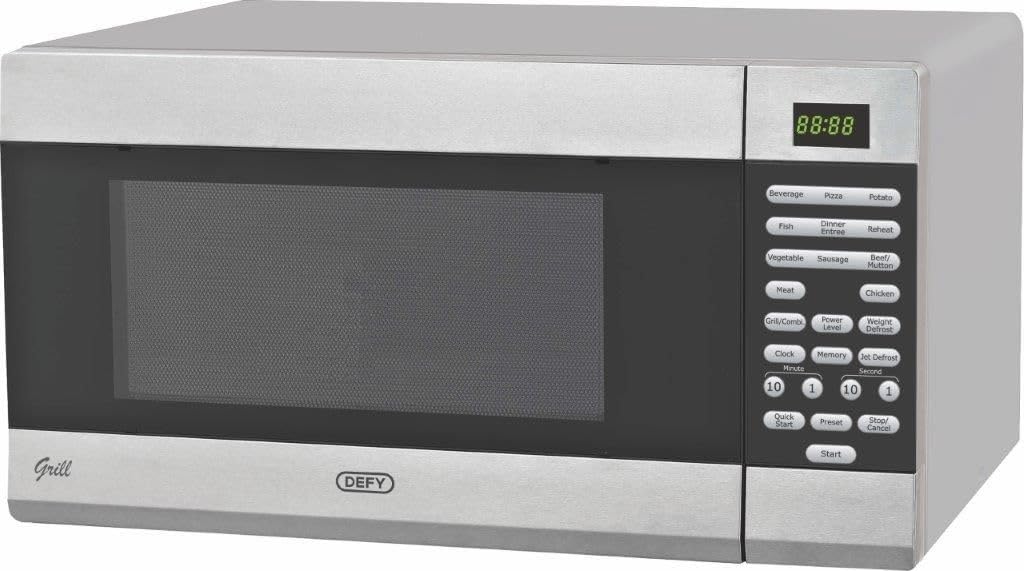
Image: The Defy 34L Electronic Grill Microwave Oven DMO392, featuring a silver exterior, a dark glass door, and a control panel with a digital display and various function buttons.
The Defy DMO392 is a 34-liter electronic microwave oven equipped with a grill function, offering versatile cooking options. It features a digital display for easy operation and monitoring, along with pre-set menu programs for various food types.
Persediaan dan Pemasangan
- Membongkar: Carefully remove the oven from its packaging. Retain packaging materials for future transport or storage if needed. Check for any damage.
- penempatan: Place the oven on a flat, stable surface capable of supporting its weight. Ensure adequate ventilation around the oven (at least 10cm clearance at the back and sides, 20cm above). Do not block air vents.
- Sambungan Kuasa: Plug the oven into a grounded electrical outlet. Ensure the power supply matches the specifications on the rating label.
- Perhimpunan Meja Putar: Place the roller ring inside the oven cavity, then position the glass turntable securely on top of the roller ring.
Arahan Operasi
Panel Kawalan Terlaluview
The control panel consists of a digital display, function buttons, and a dial for setting time and weight.
- Paparan Digital: Shows cooking time, power level, and various indicators.
- Butang Fungsi: Include options for Microwave, Grill, Combination, Defrost, and pre-set menus.
- Dail Masa/Berat: Used to adjust cooking time, weight for defrosting, or select menu items.
- Butang Mula/Jeda: Mulakan atau jeda memasak.
- Butang Berhenti/Batal: Berhenti memasak atau mengosongkan tetapan.
Menetapkan Jam
- In standby mode, press the "Clock" button once.
- Use the time/weight dial to set the hour.
- Press "Clock" again to confirm the hour.
- Use the time/weight dial to set the minutes.
- Press "Clock" to confirm the minutes. The clock is now set.
Memasak Microwave
- Letakkan makanan di dalam bekas yang selamat digunakan di dalam ketuhar gelombang mikro.
- Tutup pintu.
- Press the "Microwave" button repeatedly to select the desired power level (e.g., P100 for 100% power).
- Use the time/weight dial to set the cooking time.
- Tekan "Mula" untuk mula memasak.
Memasak Panggang
- Letakkan makanan di atas rak gril (jika disediakan) atau hidangan tahan panas.
- Tutup pintu.
- Tekan butang "Grill".
- Use the time/weight dial to set the grilling time.
- Press "Start" to begin grilling.
Memasak Gabungan
This mode combines microwave and grill functions for faster cooking and browning.
- Letakkan makanan dalam bekas yang sesuai.
- Press the "Combi" button repeatedly to select the desired combination mode (e.g., C-1 for 55% microwave, 45% grill).
- Use the time/weight dial to set the cooking time.
- Tekan "Mula" untuk bermula.
Auto Menu Programs
The oven features pre-set programs for common foods. Refer to the control panel for specific options like Beverage, Pizza, Potato, Fish, Dinner Entree, Reheat, Vegetable, Sausage, Beef/Mutton, Meat, Chicken.
- Letakkan makanan di dalam ketuhar.
- Press the corresponding auto menu button (e.g., "Pizza").
- Use the time/weight dial to select the weight or quantity.
- Tekan "Mula".
Penyelenggaraan dan Pembersihan
Pembersihan berkala membantu mengekalkan prestasi dan jangka hayat ketuhar gelombang mikro anda.
- Sebelum Pembersihan: Sentiasa cabut plag ketuhar dari salur keluar kuasa.
- Bahagian dalam ketuhar: Lap rongga dalaman dengan iklanamp cloth after each use. For stubborn stains, use a mild detergent. Do not use abrasive cleaners or steel wool.
- Meja putar dan Cincin Penggelek: These can be washed in warm soapy water or in a dishwasher.
- Bahagian Luar Ketuhar: Bersihkan bahagian luar dengan lembut, damp kain. Elakkan air masuk ke dalam lubang pengudaraan.
- Pengedap Pintu: Pastikan kedap pintu bersih untuk memastikan penutupan yang betul dan operasi yang cekap.
Menyelesaikan masalah
| Masalah | Kemungkinan Punca | Penyelesaian |
|---|---|---|
| Oven tidak bermula | Kord kuasa tidak dipasang; Pintu tidak ditutup dengan betul; Fius terputus atau pemutus litar tersandung. | Pastikan palam berada dalam alur keluar dengan kukuh; Tutup pintu dengan selamat; Periksa fius rumah/pemutus litar. |
| Makanan tidak masak sekata | Makanan tidak dikacau atau dipusing; Aras kuasa atau masa memasak yang salah. | Stir or turn food during cooking; Adjust power level and time as needed. |
| Cahaya tidak berfungsi | Mentol memerlukan penggantian. | Hubungi kakitangan perkhidmatan yang berkelayakan untuk penggantian mentol. |
| Kukus berlebihan di dalam ketuhar | Kandungan lembapan yang tinggi dalam makanan. | Ini adalah perkara biasa untuk makanan yang berlembapan tinggi. Lap bahagian dalam selepas digunakan. |
Spesifikasi
| Ciri | Perincian |
|---|---|
| Jenama | Defy |
| Nombor Model | DMO392 |
| Kapasiti | 34 Liter |
| Kuasa / Wattage | 1000 Watt |
| bahan | Keluli Tahan Karat |
| warna | putih |
| Berat Barang | 17.3 kg |
| Dimensi Produk (D x W x H) | 47.4D x 53.9W x 30H sentimeter |
| Ciri Khas | Temperature Control, Digital Display |
| Auto Shutoff | ya |
Waranti dan Sokongan
For warranty information, service, or technical support, please refer to the warranty card included with your product or visit the official Defy webtapak. Simpan resit pembelian anda sebagai bukti pembelian.
Defy Official Webtapak: www.defy.co.za


