1. Produk Lebihview
The AILRINNI Smart Door Lock is an advanced electronic locking system designed for enhanced home security and convenience. It offers multiple unlocking methods, including fingerprint, password, IC card, mobile application control via Bluetooth, and traditional mechanical key access. This lock is specifically designed for narrow frame doors and features a durable, waterproof construction.
Ciri-ciri Utama
- Kaedah Membuka Kunci Berbilang: Fingerprint, Password, IC Card, Mobile App, Mechanical Key.
- Pengecaman Cap Jari Pantas: Recognition time of less than 0.01 seconds.
- Keselamatan Tinggi: Low rejection rate (≤0.01%) and false recognition rate (≤0.001%).
- Kata Laluan Anti-Intip: Allows entry of random digits before or after the correct password to prevent onlookers from guessing your code.
- Kawalan Apl Bluetooth: Urus pengguna, view access logs, and generate temporary passwords remotely.
- Pembinaan Tahan Lama: Made from broken bridge aluminum and designed to be waterproof.
- Kuasa Kecemasan: USB charging port for temporary power in case of battery depletion.
Komponen Produk
The smart door lock system includes the main lock body (front and rear panels), mortise, and necessary installation hardware.

Image: Front and back panels of the AILRINNI Smart Door Lock, showcasing the sleek design and integrated keypad and fingerprint reader.

Image: Detailed diagram illustrating the dimensions of the lock (350mm height, 36mm width) and key components such as the Touch Screen Keypad, IC Card Area, Doorbell, Fingerprint Reader, Mechanical Key Hole, USB Charging Port, and Battery Box (for 4x AAA batteries).
2. Persediaan dan Pemasangan
Proper installation is crucial for the optimal performance and security of your AILRINNI Smart Door Lock. It is recommended to consult a professional if you are unsure about any steps.
2.1 Pemeriksaan Pra-Pemasangan
- Keserasian Pintu: This lock is designed for narrow frame doors. Ensure your door's thickness and frame dimensions are compatible.
- Mortise Type: The lock uses a 3585 - 22x240 double quick lock body mortise. Verify this matches your existing or planned mortise.
- Alat yang Diperlukan: Prepare necessary tools such as screwdrivers, drill, measuring tape, etc.

Image: Technical drawing of the 3585 - 22x240 mortise, indicating its dimensions (240mm height, 22mm width, 35mm backset, 85mm center distance) for proper fitment.
2.2 Langkah Pemasangan (Panduan Umum)
- Sediakan Pintu: If replacing an existing lock, remove it. Ensure the door frame and mortise cutout are clean and correctly sized for the 3585 mortise.
- Pasang Tanggam: Insert the mortise into the door edge and secure it with screws.
- Install Spindles and Cables: Insert the square spindle through the mortise. Carefully route the connecting cable from the front panel through the door to the rear panel. Note that spindle and screw lengths may need adjustment for varying door thicknesses.
- Pasang Panel Depan: Position the front panel, ensuring the spindle and cable are correctly aligned.
- Attach Rear Panel: Connect the cable to the rear panel. Align the rear panel with the spindle and secure it to the front panel using the provided screws.
- Pasang Bateri: Open the battery compartment on the rear panel and insert 4 AAA batteries (not included), ensuring correct polarity.
- Operasi Ujian: Before closing the door, test the mechanical key and handle operation to ensure smooth movement.
2.3 Initial Setup and Administrator Access
Upon first power-up, you will need to set up the administrator. This is crucial for managing all other users and settings.
- Enter Administrator Mode: Follow the voice prompts or refer to the specific instructions in the included quick start guide for entering the initial administrator setup mode.
- Tetapkan Kata Laluan Pentadbir: Create a strong administrator password.
- Register Administrator Fingerprint/Card: Register the administrator's fingerprint and/or IC card as prompted. The system may allow only one primary administrator access method (e.g., password or fingerprint) for initial setup, but additional methods can be added later.
- Download and Connect App: Download the designated mobile application (e.g., Tuya Smart or similar, as indicated in the product packaging). Enable Bluetooth on your smartphone and follow the app's instructions to pair with your smart lock.

Image: The AILRINNI Smart Lock installed on a door, with a smartphone displaying the mobile application interface, indicating Bluetooth app control functionality.
3. Arahan Operasi
The AILRINNI Smart Door Lock offers various convenient ways to unlock your door.
3.1 Kaedah Membuka Kunci

Image: Visual representation of the five primary unlocking methods available for the AILRINNI Smart Door Lock: APP Unlock, Fingerprint Unlock, Card Unlock, Password Unlock, and Key Unlock.
- Buka kunci cap jari:
Place your registered finger on the fingerprint reader. The lock will unlock if the fingerprint is recognized. The recognition process is very fast, typically less than 0.01 seconds.

Imej: Meletup view of the fingerprint sensor mechanism, highlighting its rapid recognition time (≤0.01s), low rejection rate (≤0.01%), and minimal false recognition rate (≤0.001%).
- Buka Kunci Kata Laluan:
Enter your registered password on the touchscreen keypad. Press '#' or the designated confirmation key to unlock. Utilize the anti-peeping feature by entering random digits before or after your actual password (e.g., XXX + Password + XXX) to obscure your code from onlookers.

Image: An illustration demonstrating the anti-peeping password feature, where extra digits can be entered before and after the correct password to enhance security.
- Buka Kunci Kad IC:
Tap your registered IC card on the designated card reading area of the lock. The lock will unlock upon successful recognition.
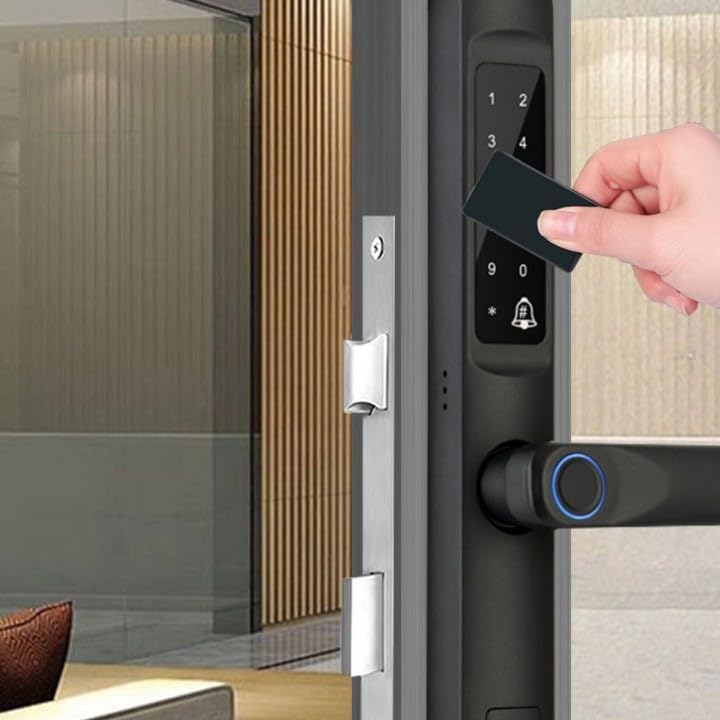
Image: A hand tapping an IC card against the smart lock's keypad, demonstrating the card unlock method.
- Mobile App Unlock:
Open the connected mobile application on your smartphone. Within the app, select the unlock function. Ensure Bluetooth is enabled on your phone and you are within range of the lock. The app also allows for generating temporary passwords for guests or service providers. - Buka Kunci Mekanikal:
In case of emergency or battery depletion, insert the mechanical key into the keyhole and turn to unlock the door.
3.2 User Management (via App or Admin Mode)
As an administrator, you can add, modify, or delete user fingerprints, passwords, and IC cards through the mobile application or by entering the administrator mode on the lock's keypad. Refer to the app's specific instructions for detailed steps on adding additional users or fobs.
4. Penyelenggaraan
Regular maintenance ensures the longevity and reliable operation of your AILRINNI Smart Door Lock.
- Penggantian Bateri: The lock is powered by 4 AAA batteries. When the battery level is low, the lock will provide an audible or visual alert. Replace all four batteries promptly to avoid interruption of service.
- Kuasa Kecemasan: If batteries completely deplete, you can temporarily power the lock using a USB power bank connected to the USB charging port located at the bottom of the front panel. This allows you to unlock the door and replace the batteries.
- Pembersihan: Wipe the lock's surface with a soft, dry cloth. Avoid using abrasive cleaners, solvents, or excessive moisture, as these can damage the electronic components or finish.
- Tahan Air: The lock is designed to be waterproof, offering protection against splashes and rain. However, avoid submerging the lock or exposing it to direct, high-pressure water streams.

Image: The AILRINNI Smart Lock shown with water droplets, illustrating its waterproof design for outdoor durability.
- Pemeriksaan Mekanikal: Periodically check the handle and mortise for smooth operation. Ensure no debris obstructs the latch or bolt.
5. Penyelesaian masalah
If you encounter issues with your AILRINNI Smart Door Lock, refer to the following common troubleshooting steps.
- Lock Not Responding / No Power:
• Check battery level. Replace all 4 AAA batteries if low or depleted.
• Use the USB emergency power port with a power bank to temporarily power the lock. - Cap Jari Tidak Dikenali:
• Ensure your finger is clean and dry.
• Try different angles or positions of your finger.
• Re-register your fingerprint if the issue persists.
• Ensure the fingerprint sensor is clean and free of smudges or debris. - Password Not Working:
• Ensure you are entering the correct password.
• Press the confirmation key (# or designated key) after entering the password.
• Be mindful of the anti-peeping feature; ensure you are entering the correct sequence of numbers. - IC Card Not Working:
• Ensure the IC card is properly registered.
• Tap the card firmly and directly on the IC card reading area. - Isu Ketersambungan Apl:
• Ensure Bluetooth is enabled on your phone and you are within close proximity to the lock.
• Restart the mobile application.
• Re-pair the lock with the app if necessary.
• Note: Some advanced internet-based features may require an additional gateway device, which is sold separately. - Difficulty with Installation (e.g., Spindle/Screws Too Long):
• The provided spindle and screws are designed for a range of door thicknesses. For very specific door dimensions, minor adjustments (e.g., cutting the spindle to size) may be required. It is advisable to consult a professional installer if you encounter significant fitting issues. - User Setup is Confusing:
• Refer to the detailed instructions within the mobile application for step-by-step guidance on adding and managing users (fingerprints, passwords, IC cards). The app typically provides a more intuitive interface for these operations.
If problems persist after following these steps, please contact AILRINNI customer support for further assistance.
6. Spesifikasi
| Atribut | Nilai |
|---|
| Jenama | AILRINNI |
| Nombor Model | bb9f0173-2a86-4e6d-b7c4-f6546e63fde1 |
| Dimensi (Pakej) | 43.1 x 23.3 x 13.3 cm |
| Lock Body Dimensions (Approx.) | 350mm (Tinggi) x 36mm (Lebar) |
| Berat badan | 2.18 kilogram |
| Sumber Kuasa | 4 x Bateri AAA (tidak termasuk) |
| Kuasa Kecemasan | Port Pengecasan USB |
| Jenis Tanggam | 3585 - 22x240 Double Quick Lock Body |
| bahan | Aluminium Jambatan Patah |
| Kaedah Membuka Kunci | Fingerprint, Password, IC Card, Mobile App, Mechanical Key |
| Kelajuan Pengecaman Cap Jari | ≤0.01 saat |
| Fingerprint Rejection Rate | ≤0.01% |
| Fingerprint False Recognition Rate | ≤0.001% |
7. Waranti dan Sokongan
For warranty information, technical support, or service inquiries regarding your AILRINNI Smart Door Lock, please refer to the warranty card included with your product or contact the seller/manufacturer directly. Keep your purchase receipt as proof of purchase.
For the most up-to-date support resources, including FAQs and contact details, please visit the official AILRINNI weblaman web atau platform tempat anda membeli produk tersebut.


