1. Pengenalan dan Garis Panduan Keselamatan
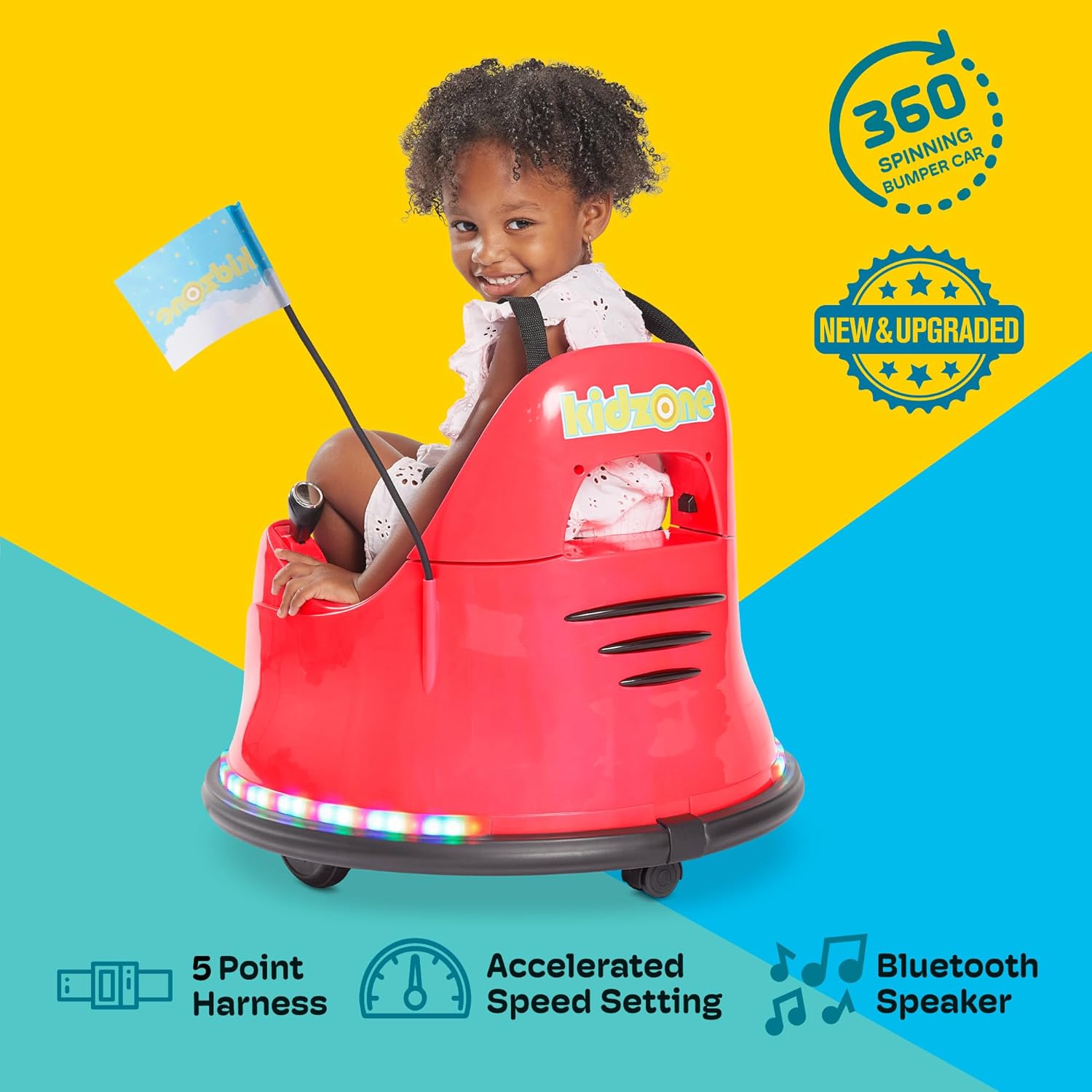
Welcome to the Kidzone Smart Bumper Car experience! This manual provides essential information for the safe assembly, operation, and maintenance of your new electric ride-on toy. Please read all instructions carefully before use and retain this manual for future reference.
Maklumat Keselamatan Penting:
- Julat Umur: Sesuai untuk kanak-kanak berumur 18 bulan hingga 6 tahun.
- Kapasiti Berat: Kapasiti berat maksimum ialah 66 paun (30 kg).
- Pengawasan Dewasa: Always ensure an adult supervises children during operation.
- Abah-abah Keselamatan: Always use the adjustable 5-point safety harness.
- Persekitaran Operasi: Use on flat, dry surfaces. Avoid slopes, uneven terrain, water, or busy streets.
- mengecas: The vehicle must be OFF and cannot be operated when charging. Fully charge the battery for 8-12 hours, but not more than 20 hours. Charge the battery at least once a month even if not operating the vehicle to maximize battery life.
- Keselamatan Bahan: Made from durable and non-toxic plastic, complying with ASTM/CPSIA/CPSC/CA Prop 65/FCC safety regulations.
2. Apa yang ada di dalam Kotak
Setelah membuka bungkusan anda, sila pastikan semua komponen berikut ada:
- 1 x Kidzone Smart Bumper Car
- 1 x Pengecas
- 1 x Alat Kawalan Jauh
- 1 x Manual Arahan (dokumen ini)
- DIY Sticker Sheets
- Bendera Perlumbaan
3. Persediaan dan Pemasangan
Follow these steps to assemble your Kidzone Smart Bumper Car:
- Sambungan Bateri: The bumper car's battery will be detached for shipping. Locate the battery compartment (usually under the seat). Use a Phillips head screwdriver to open the compartment, connect the battery terminals, and secure the compartment cover.
- Backrest Attachment: Carefully attach the backrest to the main body of the car. Ensure any internal wiring for lights is properly connected and tucked away to prevent pinching when securing the backrest.
- Bateri Kawalan Jauh: The remote control requires 2 AAA batteries (not included). Use a small Phillips head screwdriver to open the battery compartment on the back of the remote, insert the batteries, and secure the cover.
- Attach Racing Flag: Insert the racing flag into its designated slot on the rear of the bumper car.
- Caj Permulaan: Fully charge the bumper car for 8-12 hours before its first use. Refer to the 'Maintenance' section for detailed charging instructions.

Persediaan Video:
4. Arahan Operasi
Panel Kawalan Terlaluview:
The control panel, located inside the bumper car, allows you to manage various functions:

- Butang Kuasa: Press to turn the car ON/OFF.
- Mode Selector (Remote/Joystick): Switch between child-controlled joystick mode and parent-controlled remote mode.
- Speed Selection (Fast/Slow): Adjust the driving speed.
- Kawalan Cahaya: Cycle through various multi-colored light patterns for both upper and lower LED strips.
- Penunjuk Bateri: Memaparkan paras cas bateri semasa.
- Butang Bluetooth: Activates Bluetooth for music playback.
- Port Pengecasan: Connect the charger here.
Mod Memandu:
- Joystick Input Mode (Child Control):
For children capable of independent control. Push both joysticks forward to move forward, pull both back to move backward. Push one forward and one back to spin. Ensure the mode selector is set to 'Joystick'.

Figure 4: Child operating the bumper car with joysticks. - 2.4G Remote Control Mode (Parental Control):
For younger children or when parental supervision is desired. Ensure the mode selector is set to 'Remote'. Use the remote control's directional buttons to steer the bumper car. The remote also features a 'P' button for emergency braking and an 'S' button for speed adjustment.

Figure 5: Parent using the remote control. - APP Control Mode:
Download the free Kidzone APP on iOS or Android. Connect the app via Wi-Fi to control the direction, speed, lights, and music. The app also includes 'Play Mode' with games and rewards for an enhanced interactive experience.

Figure 6: Kidzone mobile application interface for smart control.
Light Settings and Customization:
- Lampu LED Berbilang Warna: Use the light control buttons on the panel to cycle through various colors and flashing patterns on the upper and lower LED strips.
- Pelekat DIY: Personalize your bumper car with the included DIY sticker sheets (letters, numbers, and fun designs).


5. Penyelenggaraan
- mengecas: Connect the provided charger to the charging port on the control panel. A full charge takes 8-12 hours and provides approximately 40 minutes of playtime. Do not charge for more than 20 hours. Charge the battery at least once a month to prolong its lifespan.
- Pembersihan: Wipe the bumper car with a damp kain. Elakkan menggunakan bahan kimia yang keras atau pembersih yang kasar.
- Storan: Store the bumper car in a dry, cool place away from direct sunlight when not in use.
6. Penyelesaian masalah
- Kereta Tidak Dihidupkan: Check if the battery is properly connected and fully charged. Ensure the power button is pressed.
- Car Not Moving: Verify that the correct driving mode (Remote or Joystick) is selected on the control panel. If using the remote, ensure its batteries are fresh.
- Lampu Tidak Berfungsi: Check the light control buttons on the panel. Ensure the battery has sufficient charge.
- Jauh Tidak Menjawab: Ensure the remote control has fresh AAA batteries and is properly paired with the bumper car.
7. Spesifikasi
| Ciri | Perincian |
|---|---|
| Model | Kidzone Smart Bumper Car (B0CM5L6BD1) |
| Dimensi Produk | 22.4"D x 22.4"W x 20.3"H |
| Berat Barang | 12.4 paun |
| Umur Disyorkan | 18 bulan - 6 tahun |
| Kapasiti Berat | 66 paun (30 kg) |
| Motor | Two 15W motors |
| Bateri | 12V Rechargeable Lead-acid Battery |
| Masa Mengecas | 8-12 jam |
| Masa main setiap Caj | Lebih kurang 40 minit |
| Mod Kelajuan | Fast (1.3 mph) / Slow (0.75 mph) |
| Pilihan Kawalan | Joystick, 2.4G Remote Control, Kidzone APP |
| Ciri Keselamatan | Adjustable 5-point seat belt, Anti-flat tires, Cushioned rubber bumper, Slow start safety feature |
8. Waranti dan Sokongan
For warranty information, technical support, or any questions regarding your Kidzone Smart Bumper Car, please refer to the contact details provided on the product packaging or visit the official Kidzone webtapak. Simpan resit pembelian anda sebagai bukti pembelian untuk tuntutan waranti.


