1. Pengenalan
Thank you for choosing the RORRY D2 Portable Charger. This compact and versatile power bank is designed to keep your Apple Watch, iPhone, AirPods, and other compatible devices charged while you are on the go. Please read this manual carefully to ensure safe and optimal use of your device.
Apa yang ada di dalam Kotak:
- RORRY Portable Charger (1 unit)
- 1M USB-C to USB-C Charging Cable (1 unit)
- Manual Pengguna (1 unit)
2. Ciri-ciri Utama
- Keserasian Universal: Designed for Apple Watch Ultra/11/10/9/8/7/6/SE, iPhone 17/16/15/14/13/12/11/Pro/Pro Max, AirPods, and Android devices.
- 5000mAh Kapasiti Besar: Provides approximately 7-10 charges for Apple Watch, 1 full charge for iPhone 15, and 6-8 charges for AirPods.
- Pengecasan serentak: Capable of charging multiple devices concurrently, including Apple Watch, iPhone, AirPods, and other Android devices.
- Reka Bentuk Mudah Alih: Features a compact and lightweight keychain design for easy portability in pockets or attached to backpacks.
- Keselamatan Unggul: Equipped with built-in protection against over-temperature, over-current, over-voltage, dan litar pintas.
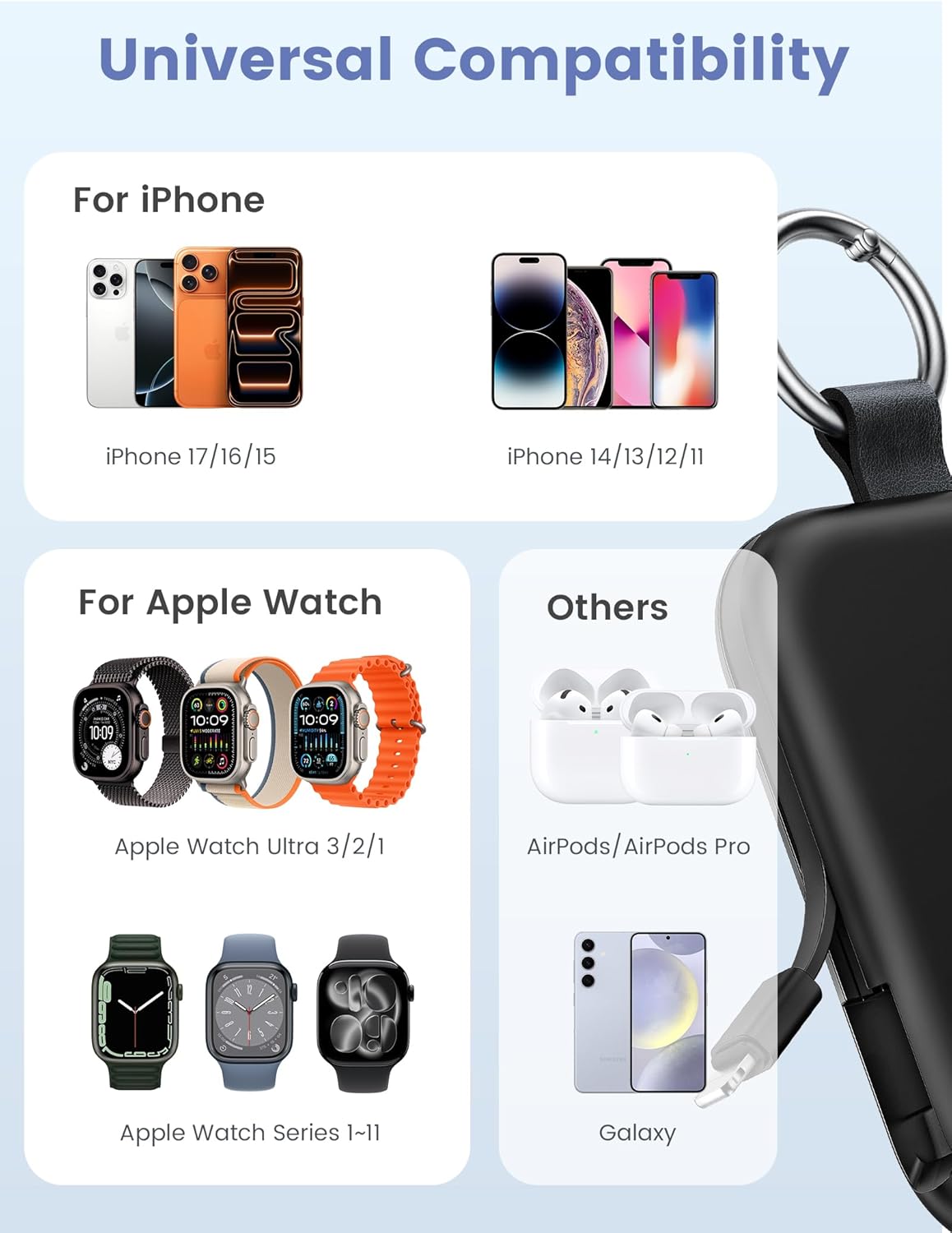
Image: Universal compatibility of the RORRY portable charger with various devices.
3. Persediaan dan Pengecasan Awal
3.1 Mengecas Power Bank
- Connect the provided USB-C to USB-C charging cable to the USB-C input port on the RORRY D2 Portable Charger.
- Connect the other end of the cable to a compatible USB-C wall adapter (not included).
- The LED indicator lights on the power bank will illuminate to show the charging status. A full charge typically takes approximately 2.5 hours.
- Once fully charged, all LED indicators will be solid. Disconnect the power bank from the charger.

Image: Charging the RORRY D2 Portable Charger using the included USB-C cable.
4. Arahan Operasi
4.1 Charging Apple Watch
- Press the power button on the side of the RORRY D2 Portable Charger to activate the wireless charging pad.
- Place your Apple Watch onto the magnetic charging pad located on the top surface of the power bank.
- Ensure the watch is properly aligned for optimal charging. The watch screen will indicate charging status.
4.2 Charging iPhone and USB-C Devices
- Locate the built-in Lightning cable (for iPhone) or USB-C cable (for Android/other USB-C devices) on the sides of the power bank.
- Gently pull out the appropriate cable.
- Connect the cable to your device's charging port. The device should begin charging automatically.
- To charge multiple devices simultaneously, use the wireless charging pad for Apple Watch and the built-in cables for other devices.

Image: RORRY D2 Portable Charger actively charging an Apple Watch and an iPhone.

Imej: Selesaiview of charging times and capacities for various devices with the RORRY D2.
4.3 Petunjuk Kuasa
The LED lights on the front of the power bank indicate the remaining battery level. Press the power button once to check the current battery status.
Video: Demonstration of the RORRY Portable Apple Watch Charger's features and usage.
5. Spesifikasi
| Nombor Model | D2 |
| Kapasiti Bateri | 5000 Miliamp jam |
| Dimensi Produk | 3.86 x 2.82 x 0.65 inci |
| Berat Barang | 4.4 auns |
| Jenis Penyambung | Built-in Cable L+C, USB-C Port |
| Ciri Khas | Compact, Built-in Cables, All-in-one, Keychain Design |
6. Safety Features and Precautions
The RORRY D2 Portable Charger is equipped with multiple safety features to protect your devices and the power bank itself:
- Perlindungan Suhu Terlebih: Mencegah pemanasan melampau semasa pengecasan dan penyahcasan.
- Perlindungan Terlebih Arus: Perlindungan terhadap aliran arus yang berlebihan.
- Lebih-Voltage Perlindungan: Melindungi daripada voltage melonjak.
- Perlindungan Litar pintas: Mati secara automatik sekiranya berlaku litar pintas.
Langkah Keselamatan Am:
- Do not disassemble, squeeze, or hit the device.
- Keep away from fire, water, and heat sources.
- Jauhkan daripada kanak-kanak.
- Do not use the power bank in extremely high or low temperatures.
- Elakkan daripada menjatuhkan peranti atau terkena impak yang kuat.
7. Penjagaan dan Penyelenggaraan
- Bersihkan bank kuasa dengan kain lembut dan kering. Jangan gunakan bahan kimia yang keras atau bahan yang melelas.
- Simpan peranti di tempat yang sejuk dan kering apabila tidak digunakan.
- If the power bank will not be used for an extended period, charge it fully at least once every three months to maintain battery health.
8. Penyelesaian masalah
Peranti tidak dicas:
- Pastikan bank kuasa dicas secukupnya. Periksa penunjuk LED.
- Verify that the charging cables are securely connected to both the power bank and your device.
- For Apple Watch, ensure it is correctly placed on the magnetic charging pad and the power button has been pressed.
- Try using a different charging cable or wall adapter to charge the power bank itself.
Pengecasan perlahan:
- Ensure you are using a compatible wall adapter for optimal charging speed.
- Mengecas berbilang peranti secara serentak boleh mengurangkan kelajuan pengecasan untuk peranti individu.
Bank kuasa tidak boleh dihidupkan:
- Charge the power bank fully. If the battery is completely depleted, it may take a few minutes for the LED indicators to light up.
9. Waranti dan Sokongan
RORRY products are designed and manufactured to the highest quality standards. For warranty information, after-sales service, or technical support, please refer to the contact details provided in the packaging or visit the official RORRY webtapak.
Maklumat Hubungan:
- Pengeluar: Shenzhen Xianyang Innovation Technology Co., Ltd
- Webtapak: www.rorry.com (Sila ambil perhatian: Ini ialah pemegang tempat URL, refer to actual product for correct webtapak)


