1. Pengenalan
Thank you for choosing the Baseus AeQur G10 TWS Earphones. This manual provides detailed instructions on how to set up, operate, maintain, and troubleshoot your new earphones. Please read this manual thoroughly before using the product to ensure optimal performance and longevity.
2. Kandungan Pakej
Carefully unpack the box and ensure all items listed below are present and in good condition. If any items are missing or damaged, please contact your retailer.
- Baseus AeQur G10 TWS Earphones (Left and Right)
- Kes Pengecasan
- USB-A/USB-C Wireless Dongle
- Kabel Pengecas USB-C
- Pelbagai Saiz Petua Telinga
- Manual Pengguna (dokumen ini)

Image 2.1: Complete package contents of the Baseus AeQur G10 TWS Earphones.
3. Produk Lebihview
Familiarize yourself with the components of your Baseus AeQur G10 TWS Earphones.
3.1 Fon telinga
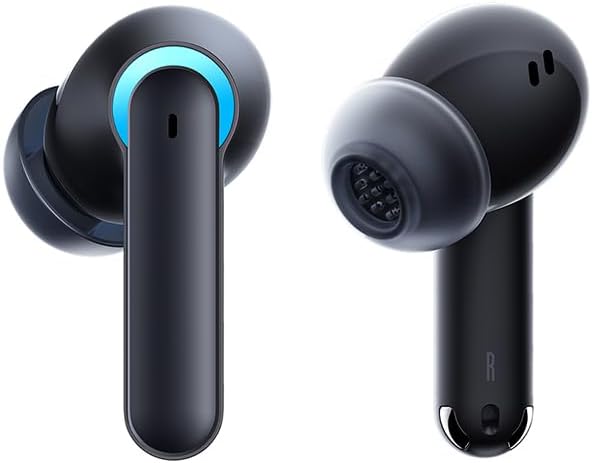
Image 3.1: Left and Right Baseus AeQur G10 Earphones. Each earphone features a touch control area, microphone, and charging contacts.
3.2 Kes Pengecasan

Image 3.2: Baseus AeQur G10 Earphones in their charging case with the lid open. The case has charging slots for each earphone and an LED indicator for battery status.
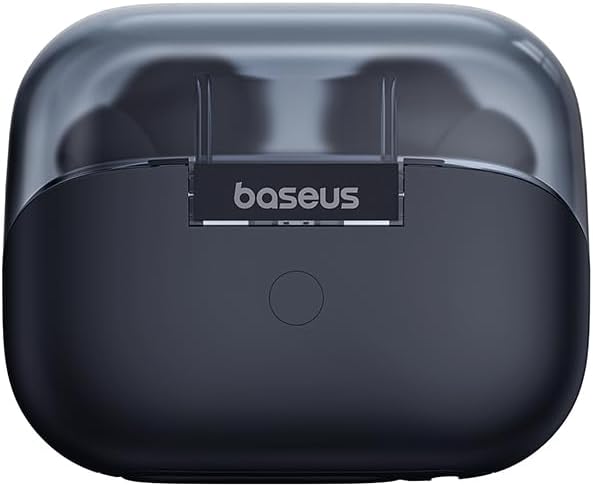
Imej 3.3: Belakang view of the Baseus AeQur G10 charging case, displaying the Baseus brand logo and a USB-C charging port (not explicitly visible but implied by common design).
3.3 USB-A/USB-C Wireless Dongle
The included wireless dongle allows for low-latency connection to various devices, including PCs, laptops, gaming consoles, and mobile devices.

Image 3.4: Compatibility diagram for the Baseus AeQur G10, illustrating connections to Type-C Androids & Tablets, Type-C/USB-A PCs & Laptops, PS5/PS4/Switch, Steam Deck, and VR devices.
4. Persediaan
4.1 Pengecasan Awal
- Letakkan kedua-dua fon telinga ke dalam bekas pengecas.
- Connect the USB-C charging cable to the charging port on the case and the other end to a USB power source (e.g., computer USB port, wall adapter).
- The LED indicator on the case will show charging status. A full charge typically takes approximately 1.5 hours for the earphones and 2 hours for the case.
4.2 Berpasangan dengan Peranti Bluetooth
- Ensure the earphones are in the charging case and the case has sufficient charge.
- Open the charging case lid. The earphones will automatically enter pairing mode (indicated by a flashing LED on the earphones or case).
- Pada peranti anda (telefon pintar, tablet, komputer riba), dayakan Bluetooth dan cari peranti baharu.
- Select "Baseus AeQur G10" from the list of available devices.
- Once connected, the LED indicator will stop flashing, and you will hear a confirmation tone.
4.3 Connecting via USB Wireless Dongle
- Insert the USB-A or USB-C end of the wireless dongle into the corresponding port on your device (PC, laptop, gaming console).
- Ensure the earphones are in the charging case and the lid is open.
- The earphones will automatically attempt to connect to the dongle. The dongle's LED indicator will show connection status.
- Once connected, the LED on the dongle will become solid, and you will hear a confirmation tone from the earphones.
5. Arahan Operasi
5.1 Hidupkan/Mati Kuasa
- Hidupkan kuasa: Open the charging case lid, or take the earphones out of the case. They will power on automatically.
- Matikan: Place the earphones back into the charging case and close the lid. They will power off automatically and begin charging.
5.2 Memakai Fon Telinga
- Identify the 'L' (left) and 'R' (right) markings on each earphone.
- Gently insert the earphones into your ear canals.
- Rotate them slightly to find a comfortable and secure fit. Choose the appropriate ear tip size for optimal sound quality and comfort.
5.3 Kawalan Sentuhan
The Baseus AeQur G10 earphones feature touch-sensitive controls on each earbud. The specific functions may vary slightly depending on the device and application.
| Tindakan | Fungsi |
|---|---|
| Ketik Tunggal (L/R) | Mainkan / Jeda muzik, Jawapan / Tamatkan panggilan |
| Ketik Dua Kali (L) | Trek Sebelumnya |
| Ketik Dua Kali (R) | Trek Seterusnya |
| Ketik Tiga Kali (L/R) | Aktifkan Pembantu Suara |
| Tekan Lama (L/R, 2s) | Tolak Panggilan |
| Tekan Lama (L/R, 3s) | Toggle Gaming/Music Mode (if applicable) |
6. Penyelenggaraan
6.1 Pembersihan
- Gunakan kain lembut, kering dan tidak berbulu untuk membersihkan fon telinga dan bekas pengecas.
- For earwax or debris in the ear tips, gently remove the ear tips and clean them with a cotton swab lightly dampened with rubbing alcohol. Ensure they are completely dry before reattaching.
- Jangan gunakan pembersih, pelarut atau semburan aerosol yang kasar.
6.2 Penyimpanan
- Always store the earphones in their charging case when not in use to protect them and keep them charged.
- Simpan di tempat yang sejuk, kering, jauh dari suhu yang melampau dan cahaya matahari langsung.
6.3 Penjagaan Bateri
- Cas fon telinga dan sarung dengan kerap, walaupun tidak digunakan dengan kerap, untuk mengekalkan kesihatan bateri.
- Elakkan daripada mencas bateri sepenuhnya untuk tempoh yang lama.
7. Penyelesaian masalah
If you encounter issues with your Baseus AeQur G10 earphones, refer to the following common solutions:
7.1 Tiada Bunyi atau Sambungan Terputus-putus
- Ensure earphones are charged and properly connected to your device (Bluetooth or dongle).
- Periksa tahap kelantangan pada kedua-dua fon telinga dan peranti anda yang disambungkan.
- Move closer to your device to avoid interference or range issues.
- Try disconnecting and re-connecting the earphones.
- For Bluetooth, forget the device on your phone and re-pair.
- For dongle, unplug and re-plug the dongle.
7.2 Fon Telinga Tidak Mengecas
- Pastikan kabel pengecasan disambungkan dengan selamat pada kedua-dua bekas dan sumber kuasa.
- Sahkan sumber kuasa aktif.
- Clean the charging contacts on both the earphones and inside the case with a dry cotton swab.
- Cuba kabel pengecasan atau penyesuai kuasa yang berbeza.
7.3 Hanya Satu Fon Telinga yang Berfungsi
- Letakkan kedua-dua fon telinga kembali ke dalam bekas pengecasan, tutup penutupnya, tunggu beberapa saat, kemudian buka penutupnya dan keluarkannya semula.
- Pastikan kedua-dua fon telinga dicas.
- Cuba tetapkan semula fon telinga (rujuk arahan pengeluar webtapak untuk arahan set semula khusus jika perlu).
8. Spesifikasi
Key technical specifications for the Baseus AeQur G10 TWS Earphones:
| Ciri | Spesifikasi |
|---|---|
| Nama Model | A00055400111-00 |
| Jenama | Baseus |
| warna | Hitam |
| Penempatan Telinga | Di Telinga |
| Faktor Bentuk | Di Telinga |
| Teknologi Ketersambungan | Wayarles (Bluetooth) |
| Teknologi Komunikasi Tanpa Wayar | Bluetooth |
| Bateri | 1 bateri Lithium Ion diperlukan (termasuk) |
| Dimensi Produk | 10 x 5 x 1.27 cm |
| Berat Barang | 220 g |
| Pengeluar | Baseus |
| Kegunaan Khusus | Perjalanan |
9. Waranti dan Sokongan
Baseus products are designed and manufactured to the highest quality standards. For information regarding warranty coverage, technical support, or service, please refer to the warranty card included with your product or visit the official Baseus webtapak. Simpan bukti pembelian anda untuk tuntutan waranti.
For further assistance, you may contact Baseus customer support through their official channels.


