1. Pengenalan
Thank you for choosing the Verbatim 500GB USB 3.2 Gen 1 Portable External Hard Drive. This device provides a high-speed, high-capacity storage solution, ideal for expanding your computer's storage or backing up important files. Its compact 2.5-inch form factor makes it highly portable, allowing you to carry your data wherever you go. This manual will guide you through the setup, operation, and maintenance of your new hard drive.
2. Maklumat Keselamatan
- Jangan dedahkan peranti kepada kelembapan, suhu melampau atau cahaya matahari langsung.
- Elakkan daripada menjatuhkan atau meletakkan peranti kepada kesan yang kuat.
- Jangan cuba membuka atau membaiki peranti sendiri. Rujuk kepada kakitangan perkhidmatan yang berkelayakan.
- Pastikan pengudaraan yang betul di sekeliling peranti semasa operasi.
- Always safely eject the hard drive from your computer before disconnecting the USB cable to prevent data loss or corruption.
3. Kandungan Pakej
Sahkan bahawa pakej anda mengandungi item berikut:
- Verbatim 500GB Portable External Hard Drive
- Kabel USB

Imej 3.1: Depan view of the Verbatim Portable Hard Drive packaging. The packaging displays the product name, capacity (500GB), USB 3.2 Gen 1 interface, and an image of the black hard drive with a green accent band. It also highlights 'Eco Friendly Packaging' and 'Nero Backup Software'.
4. Produk Lebihview
The Verbatim Portable Hard Drive is a sleek, compact device designed for easy data storage and transfer. It features a durable casing and a standard USB port for connectivity.

Imej 4.1: Atas view of the Verbatim Portable Hard Drive. The drive is black with a textured surface and features a distinctive green band across its width.
5. Keperluan Sistem
To use your Verbatim Portable Hard Drive, your computer must meet the following minimum requirements:
- Sistem pengendalian: Windows (Windows 10, 8, 7) or Mac OS (Mac OS X 10.6 or higher)
- Port USB: USB 3.2 Gen 1 (also compatible with USB 2.0 ports, but at reduced speeds)
6. Persediaan dan Pemasangan
The Verbatim Portable Hard Drive is designed for plug-and-play operation, requiring no additional drivers for most modern operating systems.
- Locate an available USB port on your computer. For optimal performance, use a USB 3.2 Gen 1 (or USB 3.0) port.
- Connect the small end of the provided USB cable to the USB port on the Verbatim Portable Hard Drive.
- Sambungkan hujung kabel USB yang lebih besar ke port USB pada komputer anda.
- Your operating system should automatically detect and install the necessary drivers. The drive will appear as a new storage device in 'My Computer' (Windows) or 'Finder' (Mac OS).
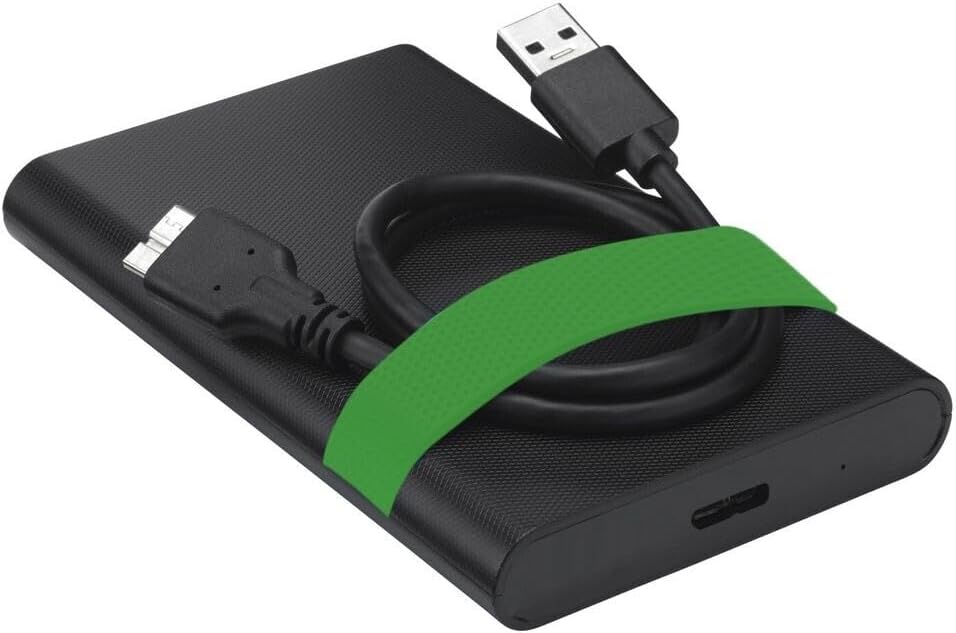
Image 6.1: The Verbatim Portable Hard Drive with its USB cable connected, illustrating the connection point on the drive.
7. Arahan Operasi
7.1 Pemindahan Data
Setelah disambungkan, anda boleh memindahkan files to and from the hard drive just like any other storage device:
- Seret dan Lepas: Klik dan seret files or folders from your computer to the hard drive's icon, or vice versa.
- Salin dan Tampal: Klik kanan pada files/folders, select 'Copy', then navigate to the desired location on the hard drive, right-click, and select 'Paste'.
7.2 Ejecting the Drive Safely
To prevent data corruption, always safely eject the hard drive before disconnecting it.
- Windows: Click the 'Safely Remove Hardware and Eject Media' icon in the system tray, then select your Verbatim drive. Wait for the 'Safe to Remove Hardware' message.
- OS Mac: Drag the hard drive icon from your desktop to the Trash, or right-click the icon and select 'Eject'.
8. Penyelenggaraan dan Penjagaan
- Keep the hard drive clean by wiping it with a soft, dry cloth. Avoid liquid cleaners.
- Store the drive in a cool, dry place away from magnetic fields.
- Regularly back up important data from the portable drive to another storage medium.
- Periksa kesihatan pemacu secara berkala menggunakan alat utiliti cakera sistem pengendalian anda.
9. Penyelesaian masalah
| Masalah | Penyelesaian yang Mungkin |
|---|---|
| Pemacu tidak dikesan oleh komputer. |
|
| Kelajuan pemindahan data yang perlahan. |
|
| Error message during file pemindahan. |
|
10. Spesifikasi
| Ciri | Perincian |
|---|---|
| Jenama | Verbatim |
| Nombor Model | 53111 |
| Kapasiti Storan Digital | 500 GB |
| Faktor Bentuk Cakera Keras | 2.5 inci |
| Jenis Cakera Keras | Mechanical Hard Disk Drive (HDD) |
| Antara muka | USB 3.2 Gen 1 (serasi dengan USB 2.0) |
| Kelajuan Putaran | 5400 RPM |
| Max Data Transfer Speed | 5000 Mbit/s (5 Gbit/s) |
| Teknologi Ketersambungan | USB |
| Peranti Serasi | Computers with Windows OS, Computers with Mac OS |
| Berat Barang | 220 g |
11. Waranti dan Sokongan
Verbatim products are designed and manufactured to the highest quality standards. For information regarding warranty coverage, technical support, or service, please refer to the official Verbatim weblaman web atau hubungi khidmat pelanggan mereka secara langsung. Simpan resit pembelian anda sebagai bukti pembelian untuk tuntutan jaminan.
Sokongan dalam talian: melawat www.verbatim.com untuk Soalan Lazim, muat turun pemacu dan maklumat hubungan.


