pengenalan
This manual provides instructions for the AVATTO GW16-W Zigbee and Bluetooth Gateway. It covers setup, operation, maintenance, and troubleshooting to ensure optimal performance and safe use of your device. The GW16-W acts as a central hub, enabling communication between various smart home devices using both Zigbee 3.0 and Bluetooth protocols.
Maklumat Keselamatan
- Baca semua arahan dengan teliti sebelum digunakan.
- Jangan dedahkan peranti kepada suhu yang melampau, kelembapan atau cahaya matahari langsung.
- Use only the specified power adapter (5V DC/1A).
- Jauhkan daripada kanak-kanak.
- Jangan cuba membuka atau membaiki peranti sendiri.
- Pastikan pengudaraan yang betul di sekeliling peranti untuk mengelakkan terlalu panas.
Kandungan Pakej
Sahkan bahawa semua item terdapat dalam pakej:
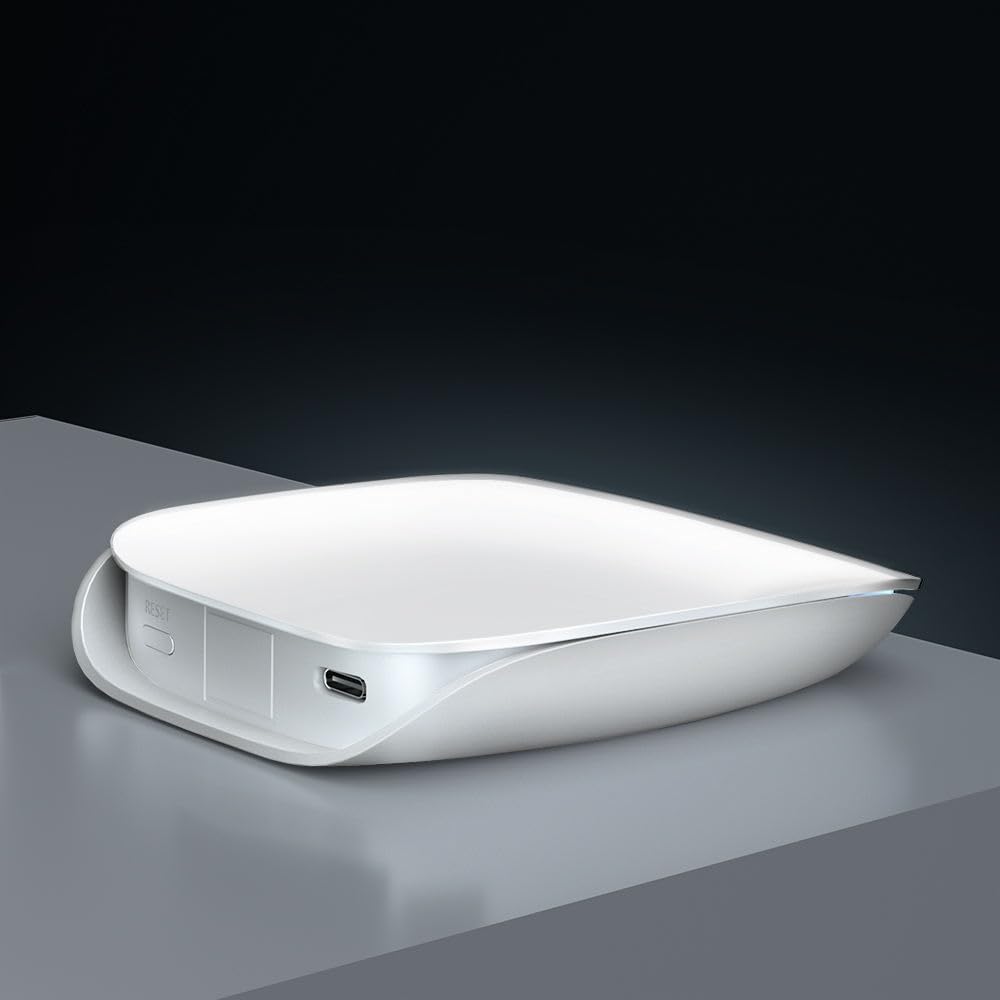
- Smart Gateway (GW16-W) x 1
- Kabel Data USB x 1
- User Manual x 1 (often a QR code or link to digital version)
Produk Selesaiview
The AVATTO GW16-W is a dual-protocol gateway that combines Zigbee and Bluetooth connectivity, allowing it to manage a wide range of smart home devices efficiently.
Komponen Peranti
- Penunjuk Status: Displays the current operational status of the gateway.
- Tetapkan semula Suis: Digunakan untuk menetapkan semula peranti kepada tetapan kilang.
- Pelabuhan Jenis-C: For power input (5V DC/1A).
Spesifikasi
| Ciri | Perincian |
|---|---|
| Nama Produk | ZigBee/Bluetooth Wireless Gateway |
| Nombor Model | GW16-W |
| Dimensi | 85mm * 100mm * 23mm |
| Input Kuasa | 5V DC/1A |
| Teknologi Tanpa Wayar | Zigbee 3.0/Bluetooth |
| Suhu Kerja | -20°C ~ 45°C |
| Suhu Penyimpanan | 5°C ~ 30°C |
| Kelembapan Kerja | 10% ~ 90% RH (Tidak pemeluwapan) |
| Kelembapan Penyimpanan | 30% ~ 70% RH |
Persediaan
1. Menghidupkan
Connect the provided USB data cable to the Type-C port on the gateway and plug the other end into a 5V DC/1A power adapter (not included). The status indicator light will illuminate, indicating the device is powered on.
2. Pemasangan Aplikasi dan Sambungan Rangkaian
- Muat turun Tuya Smart or Kehidupan Pintar app from your mobile device's app store (available on iOS and Android).
- Daftar atau log masuk ke akaun anda dalam apl.
- Follow the in-app instructions to add the GW16-W gateway. This typically involves selecting "Gateway" or "Hub" from the device list and following the pairing prompts. Ensure your phone is connected to a 2.4GHz Wi-Fi network during setup, as the gateway does not support 5GHz Wi-Fi.
3. Adding Sub-Devices (Zigbee/Bluetooth Devices)
Once the gateway is successfully connected to the app, you can add compatible Zigbee and Bluetooth sub-devices to expand your smart home system.

- In the Tuya Smart/Smart Life app, navigate to the gateway's control interface and select "Add sub-device" or a similar option.
- Put your Zigbee or Bluetooth device into pairing mode (refer to the sub-device's individual manual for specific instructions).
- The gateway will discover and add the device. Once added, you can rename it and assign it to a room within the app.
Arahan Operasi
Kawalan Jauh melalui Apl
After adding sub-devices, you can control them remotely through the Tuya Smart or Smart Life app from anywhere with an internet connection.

The app allows you to monitor device status, set schedules, create automation routines, and manage all connected smart devices from a single interface.
Integrasi Kawalan Suara
The AVATTO GW16-W gateway is compatible with popular voice assistants like Amazon Alexa and Google Assistant, providing hands-free control of your smart devices.

- To enable voice control, link your Tuya Smart/Smart Life account to your Alexa or Google Home app.
- Once linked, you can use voice commands such as "Alexa, turn on the light" or "Hey Google, set the thermostat to 22 degrees" to control your connected devices.
Penyelenggaraan
- Pastikan peranti bersih dengan mengelapnya dengan kain lembut dan kering.
- Avoid using harsh chemicals or abrasive cleaners, which can damage the device's surface.
- Pastikan pengudaraan yang betul di sekeliling peranti untuk mengelakkan terlalu panas.
- Regularly check for firmware updates through the Tuya Smart/Smart Life app to ensure optimal performance, security, and compatibility with new devices.
Menyelesaikan masalah
Gerbang tidak bersambung ke Wi-Fi:
- Ensure your Wi-Fi network is 2.4GHz. The gateway does not support 5GHz Wi-Fi.
- Check if the Wi-Fi password entered in the app is correct.
- Move the gateway closer to your Wi-Fi router to improve signal strength.
- Restart your router and the gateway, then attempt the connection process again.
Sub-device not pairing:
- Ensure the sub-device is in pairing mode (refer to its specific manual).
- Check if the sub-device is compatible with Zigbee 3.0 or Bluetooth standards.
- Move the sub-device closer to the gateway to ensure it's within range.
- Reset the sub-device to factory settings and try pairing again.
Kawalan suara tidak berfungsi:
- Verify that your Tuya Smart/Smart Life account is correctly linked to your Alexa or Google Home app.
- Ensure your voice assistant device (e.g., Amazon Echo, Google Home speaker) is online and functioning correctly.
- Check the device names in the Tuya app and ensure they are recognized by Alexa/Google. Try re-discovering devices in the voice assistant app.
Waranti dan Sokongan
For warranty information and technical support, please refer to the purchase platform or contact AVATTO customer service directly. Keep your purchase receipt or proof of purchase for any warranty claims or support inquiries.


