1. Pengenalan
Thank you for choosing the Conentool 21V Cordless Impact Drill/Driver Kit. This tool is designed for various drilling and screwdriving tasks in wood, metal, plastics, and masonry. Please read this manual carefully before operating the tool to ensure safe and efficient use. Keep this manual for future reference.

Image 1.1: The Conentool 21V Cordless Impact Drill/Driver Kit, including the drill, two 2500mAh batteries, charger, and a variety of drill bits and accessories in a carrying case.
2. Arahan Keselamatan Am
AMARAN: Baca semua amaran keselamatan, arahan, ilustrasi dan spesifikasi yang disediakan dengan alat kuasa ini. Kegagalan mematuhi semua arahan yang disenaraikan di bawah boleh mengakibatkan renjatan elektrik, kebakaran dan/atau kecederaan serius.
2.1 Keselamatan Kawasan Kerja
- Pastikan kawasan kerja bersih dan terang. Kawasan bersepah atau gelap mengundang kemalangan.
- Jangan kendalikan alatan kuasa dalam atmosfera yang mudah meletup, seperti di hadapan cecair mudah terbakar, gas atau habuk. Alat kuasa menghasilkan percikan api yang boleh menyalakan habuk atau asap.
- Jauhkan kanak-kanak dan orang ramai semasa mengendalikan alat kuasa. Gangguan boleh menyebabkan anda hilang kawalan.
2.2 Keselamatan Elektrik
- Palam alat kuasa mesti sepadan dengan alur keluar. Jangan sekali-kali mengubah suai palam dalam apa jua cara.
- Elakkan sentuhan badan dengan permukaan yang dibumikan atau dibumikan, seperti paip, radiator, julat dan peti sejuk. Terdapat peningkatan risiko kejutan elektrik jika badan anda dibumikan atau dibumikan.
- Jangan dedahkan alatan kuasa kepada hujan atau keadaan basah. Air yang memasuki alat kuasa akan meningkatkan risiko kejutan elektrik.
2.3 Keselamatan Diri
- Sentiasa pakai pelindung mata. Gunakan cermin mata keselamatan, cermin mata atau pelindung muka.
- Pakai pelindung pendengaran semasa mengendalikan alat ini untuk tempoh yang lama.
- Berpakaian dengan betul. Jangan memakai pakaian atau barang kemas yang longgar. Jauhkan rambut dan pakaian anda daripada bahagian yang bergerak.
- Sentiasa berwaspada, perhatikan perkara yang anda lakukan dan gunakan akal semasa mengendalikan alat kuasa.
3. Kandungan Pakej
Sahkan bahawa semua item yang disenaraikan di bawah disertakan dalam pakej anda. Jika ada item yang hilang atau rosak, sila hubungi sokongan pelanggan.
- 1 x Conentool 21V Cordless Impact Drill/Driver
- 2 x 2500mAh Lithium-ion Batteries
- 1 x Pengecas Bateri
- 1 x Flexible Shaft Extension
- Various Drill Bits (for wood, metal, masonry)
- Various Screwdriver Bits
- Penyesuai Soket
- Membawa Sarung
- Manual Pengguna

Image 3.1: A complete overview of the kit contents, including the drill, two batteries, charger, flexible shaft, various drill bits, screwdriver bits, and socket adapters, all neatly arranged.
4. Produk Lebihview
Familiarize yourself with the main components of your drill/driver:
- chuck: Holds drill bits and screwdriver bits.
- Cincin Pelarasan Tork: Selects the desired torque setting.
- Deringan Pemilih Mod: Switches between screwdriving, drilling, and impact drilling modes.
- Suis Pemilih Kelajuan: Changes between high and low-speed gears.
- Suis Pencetus: Activates the tool and controls speed (variable speed).
- Pemilih Hadapan/Undur: Menukar arah putaran.
- Lampu Kerja LED: Menerangi kawasan kerja.
- Pek bateri: Memberi kuasa kepada alat.
- Butang Pelepas Bateri: Untuk mengeluarkan bateri.
- pemegang: Cengkaman ergonomik untuk penggunaan yang selesa.

Imej 4.1: Satu dalaman view highlighting the brushless motor, which provides increased power, efficiency, and a quieter operation with no sparks.
5. Persediaan
5.1 Mengecas Bateri
The battery pack is not fully charged at the time of purchase. It is recommended to fully charge the battery before first use.
- Sambungkan pengecas ke salur keluar kuasa standard.
- Slide the battery pack onto the charger base. Ensure it clicks into place.
- The charger indicator light will show the charging status. A red light typically indicates charging, and a green light indicates a full charge.
- Setelah dicas sepenuhnya, cabut pengecas daripada salur keluar kuasa dan keluarkan bateri.

Image 5.1: The battery charger connected to a wall outlet, with a battery pack inserted for charging. The red light indicates charging, and the green light indicates a completed charge.
5.2 Memasang dan Melepaskan Bateri
- Untuk Memasang: Align the battery pack with the base of the tool handle and slide it in until it clicks securely into place.
- Untuk Alih Keluar: Press the battery release button (usually located at the front of the battery) and slide the battery pack out of the tool.

Image 5.2: A cutaway view of the 2500mAh battery pack, illustrating its internal lithium-ion cells and power management system, designed for up to 90 minutes of use per battery.
5.3 Installing and Removing Drill/Screwdriver Bits
- Untuk Memasang: Rotate the chuck counter-clockwise to open the jaws. Insert the desired bit into the chuck as far as it will go. Rotate the chuck clockwise to tighten the jaws firmly around the bit.
- Untuk Alih Keluar: Putar chuck lawan jam untuk melonggarkan rahang dan tarik bit keluar.
Ensure the bit is securely fastened to prevent it from slipping during operation.
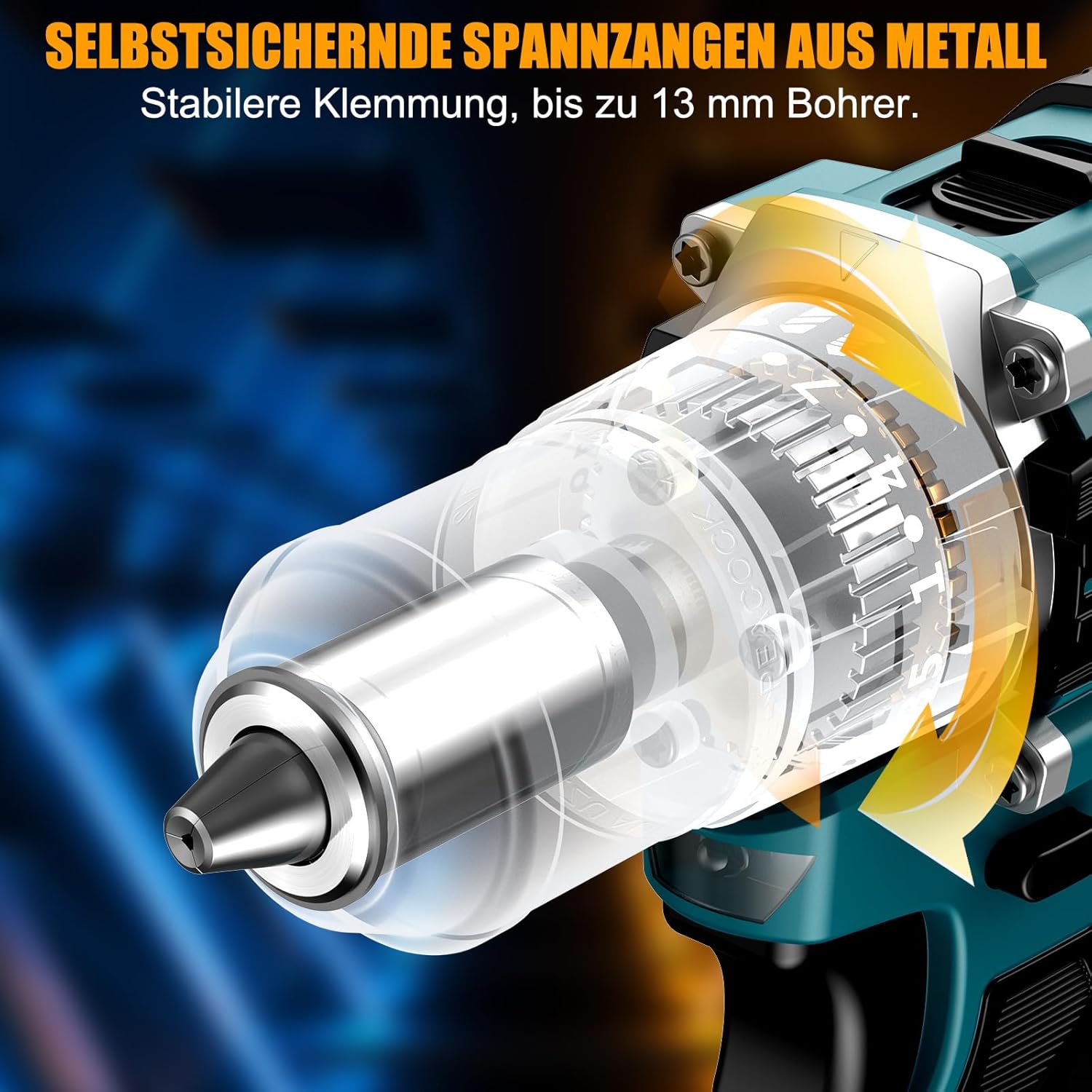
Imej 5.3: Perincian view of the self-locking metal chuck, demonstrating its stable clamping mechanism capable of holding drill bits up to 13mm securely.
6. Arahan Operasi
6.1 Menghidupkan/Mematikan dan Kawalan Kelajuan
- To turn the tool ON, press the trigger switch. The speed is variable; press the trigger further for higher speed.
- Untuk mematikan alat, lepaskan suis pencetus.
- The integrated LED work light will illuminate when the trigger is pressed, providing visibility in dimly lit areas.
6.2 Putaran Hadapan/Undur
The forward/reverse selector switch is located above the trigger. Push it to the left for forward rotation (for screwdriving and drilling) and to the right for reverse rotation (for removing screws or freeing jammed bits). Ensure the tool is stopped before changing direction.
6.3 Speed Gear Selection
The drill features a 2-speed gear selector switch on top of the tool:
- Gear 1 (Low Speed, 0-650 RPM): Ideal for high-torque applications like driving large screws or drilling large holes.
- Gear 2 (High Speed, 0-1850 RPM): Suitable for fast drilling in softer materials and smaller diameter holes.
Always select the appropriate gear for the task. Change gears only when the tool is completely stopped.
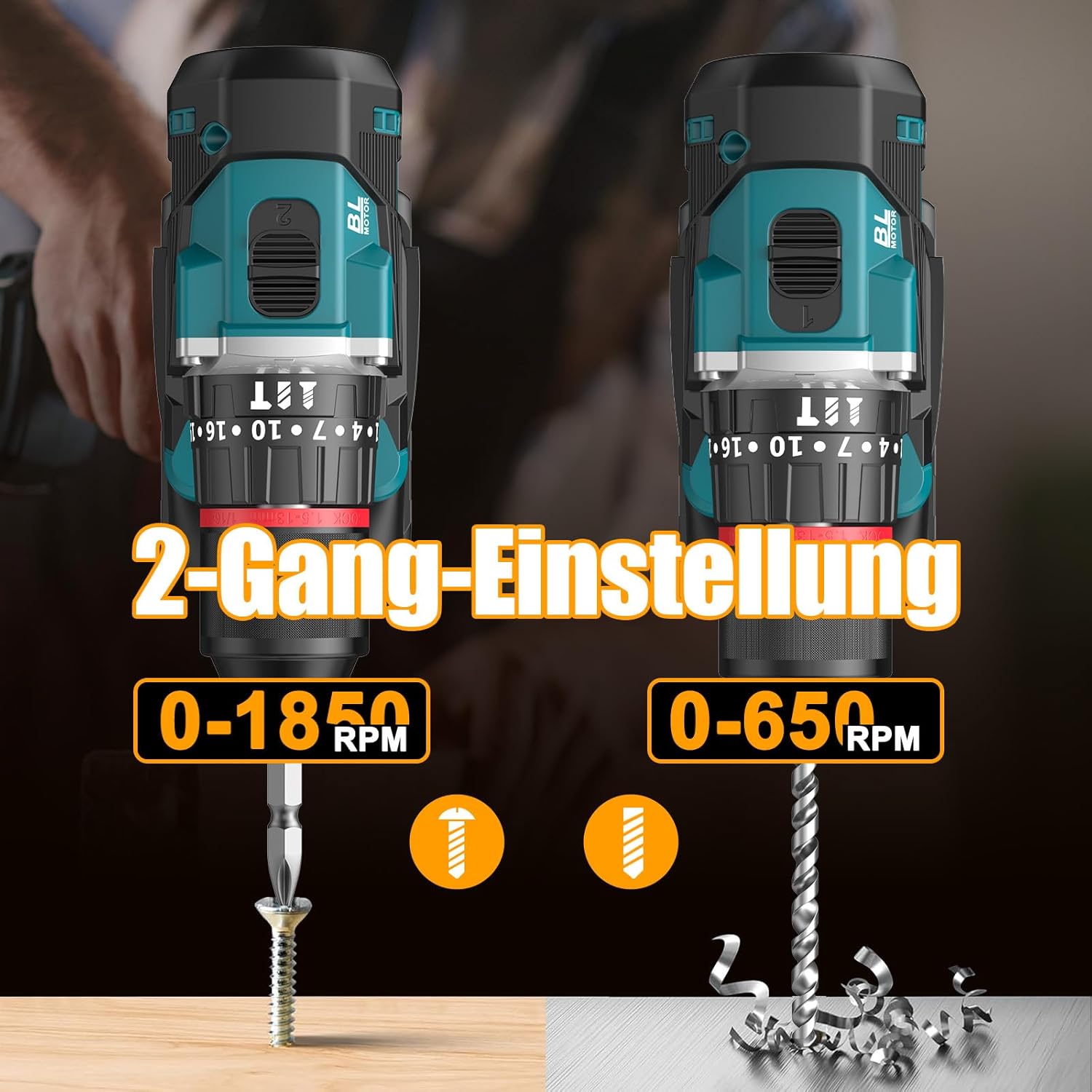
Image 6.1: An illustration demonstrating the two-speed gear settings: Gear 1 (0-650 RPM) for screwdriving and Gear 2 (0-1850 RPM) for drilling, allowing for optimal performance based on the application.
6.4 Torque Adjustment and Mode Selection
The torque adjustment ring allows you to set the desired torque for screwdriving applications, preventing overtightening or stripping screws. The mode selector ring allows you to switch between different operating modes.
- Screwdriving Mode (Torque Settings 1-35): Use these settings to match the torque to the screw size and material. Lower numbers for smaller screws/softer materials, higher numbers for larger screws/harder materials.
- Drilling Mode (Ikon Mata Gerudi): For general drilling without impact. The clutch is disengaged, providing maximum torque.
- Impact Drilling Mode (Ikon Tukul): For drilling into masonry or concrete, providing a hammering action in addition to rotation.
The drill offers 35+3 settings, including 35 torque settings for screwdriving and 3 modes (screwdriving, drilling, impact drilling).

Image 6.2: A visual representation of the 35+3 torque and mode settings, indicating precise power control and a maximum torque of 55 N.m, suitable for various materials like wood, brick, plastic, and metal.
7. Penyelenggaraan
7.1 Pembersihan
- Sentiasa putuskan sambungan pek bateri sebelum melakukan sebarang pembersihan atau penyelenggaraan.
- Pastikan bukaan pengudaraan alat bersih untuk mengelakkan terlalu panas.
- Gunakan yang lembut, damp kain untuk membersihkan alatan casing. Jangan gunakan bahan kimia yang keras atau pembersih yang kasar.
7.2 Penyimpanan
- Simpan alat dan bateri di tempat yang sejuk dan kering, jauh dari cahaya matahari langsung dan kelembapan.
- Simpan alat di dalam bekas pembawanya untuk melindunginya daripada habuk dan kerosakan.
- Jauhkan daripada kanak-kanak.

Image 7.1: A person carrying the Conentool drill kit in its durable black carrying case, designed for convenient storage and transport of the tool and its accessories.
7.3 Penjagaan Bateri
- Do not store batteries in a discharged state. Recharge them regularly, especially if not used for extended periods.
- Elakkan daripada mendedahkan bateri kepada suhu yang melampau.
- Jangan cuba membuka atau mengubah suai pek bateri.
8. Penyelesaian masalah
| Masalah | Kemungkinan Punca | Penyelesaian |
|---|---|---|
| Alat tidak bermula | Bateri tidak dicas atau tidak dipasang dengan betul. | Pastikan bateri dicas sepenuhnya dan dimasukkan dengan betul. |
| Mengurangkan kuasa atau kelajuan | Caj bateri rendah. | Cas semula bateri. |
| Sedikit tergelincir dalam chuck | Chuck tidak diketatkan secukupnya. | Tighten the chuck firmly around the bit. Ensure the bit shank is clean. |
| Terlalu panas | Slot pengudaraan yang disekat; penggunaan berat berterusan. | Bersihkan slot pengudaraan. Benarkan alat menjadi sejuk semasa penggunaan berpanjangan. |
9. Spesifikasi
| Ciri | Spesifikasi |
|---|---|
| Nombor Model | ebvc-sd-de |
| Voltage | 21 Volt |
| Jenis Bateri | Litium-ion |
| Kapasiti Bateri | 2500 mAh (setiap satu) |
| Max Torque | 55 Nm |
| Tetapan Tork | 35 + 3 Modes (Screwdriving, Drilling, Impact Drilling) |
| Kelajuan Tanpa Beban (Gear 1) | 0-650 RPM |
| Kelajuan Tanpa Beban (Gear 2) | 0-1850 RPM |
| Saiz Chuck | 13 mm (3/8 inch) Keyless |
| Dimensi Produk | 35 x 31 x 10 cm |
| Berat (dengan bateri) | 1.5 Kilogram |
10. Waranti dan Sokongan
Conentool products are manufactured to high-quality standards. In the unlikely event of a defect due to material or manufacturing fault, please contact your retailer or Conentool customer service. Please retain your proof of purchase for warranty claims.
For further assistance, technical support, or to inquire about spare parts, please refer to the contact information provided with your purchase or visit the official Conentool webtapak.


