1. Pengenalan
Thank you for choosing the Parkside PAAL 6000 C2 Rechargeable Work Light. This versatile and robust work light is designed to provide powerful illumination in various environments, featuring multiple operating modes, a USB power bank function, and durable construction. Please read this manual carefully before use to ensure proper operation and maintenance.
2. Ciri-ciri Produk
- Mudah Alih Lamp with USB Power Bank Function: Charge your mobile devices on the go.
- Powerful 20W COB LED: Provides bright and efficient illumination.
- 4 Mod Pengendalian: Max. brightness, 50% power saving mode, SOS signal, and red flashing light.
- Pelabuhan Dual USB: Includes 2 USB ports for charging external devices.
- Penunjuk Status Bateri: Located under a protective cover for easy monitoring.
- Shock-Resistant Housing: Features rubber edges for enhanced durability.
- IP65 Jet Protection: Resistant to water jets, suitable for outdoor use.
- Penyangga Magnetik Boleh Dilipat: Ensures secure placement on metallic surfaces.
- Pilihan Gantung: Can also be hung for versatile lighting angles.
3. Kandungan Pakej
Sila pastikan semua item ada dan dalam keadaan baik:
- 1 x Parkside PAAL 6000 C2 Rechargeable Work Light
- 1 x Kabel USB
- 1 x Car Charging Adapter
- 1 x Bekalan Kuasa

Image: Included accessories - USB cable, car charger, and power supply.
4. Arahan Keselamatan
- Do not look directly into the LED light when it is on, as it may cause eye damage.
- Jauhkan peranti daripada kanak-kanak.
- Do not attempt to disassemble or modify the work light. This may void the warranty and pose safety risks.
- Use only the provided charging accessories or compatible alternatives.
- Ensure the protective cover for the USB ports is securely closed when not in use, especially in wet conditions.
- Elakkan daripada mendedahkan peranti kepada suhu yang melampau atau cahaya matahari langsung untuk tempoh yang lama.
5. Produk Lebihview
Familiarize yourself with the main components of your work light:
- Depan: COB LED panel for illumination.
- Belakang: Solar panel (for charging), USB output ports, USB-C input port, power button, and battery indicator lights.
- Sisi: Rotatable stand/handle with magnetic base.

Imej: Depan view of the work light with its powerful LED panel illuminated.

Imej: Belakang view of the work light, detailing the USB ports, power button, and battery indicator lights under a protective flap.
6. Operasi
The work light features a single power button to cycle through its lighting modes.
- Power On / Max Brightness: Press the power button once to turn on the light at maximum brightness.
- 50% Power Saving Mode: Press the power button a second time to switch to 50% brightness.
- Isyarat SOS: Press the power button a third time for the white SOS flashing signal.
- Lampu Berkelip Merah: Press the power button a fourth time for the red flashing emergency light.
- Matikan: Press the power button a fifth time to turn off the light.
Using the Power Bank Function:
- Open the protective cover on the back of the unit.
- Connect your mobile device to one of the USB output ports using a compatible USB cable.
- The work light will automatically begin charging your device.
- Monitor the battery indicator lights to check the remaining power of the work light.
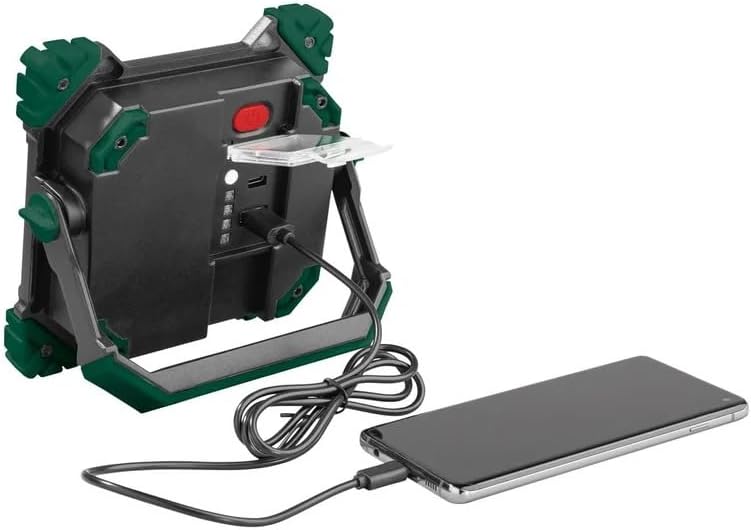
Image: The work light functioning as a power bank, charging a smartphone via its USB port.
7. Charging the Work Light
The Parkside PAAL 6000 C2 can be charged via USB-C or its integrated solar panel.
Pengecasan USB-C:
- Open the protective cover on the back of the unit.
- Connect the provided USB cable to the USB-C input port on the work light and to a power source (e.g., wall adapter, car charger, computer USB port).
- The battery indicator lights will illuminate to show the charging progress. All lights will be solid when fully charged.
Pengecasan Suria:
- Place the work light with the solar panel facing direct sunlight.
- The solar charging indicator light will show when the device is receiving power.
- Solar charging is slower than USB-C charging and is best used for maintaining charge or in emergencies.
8. Pemasangan dan Penempatan
The integrated foldable stand offers multiple positioning options:
- Lampiran Magnetik: The stand has a magnetic base, allowing the light to be securely attached to metallic surfaces for hands-free operation.
- Berdiri bebas: Fold out the stand to position the light on any flat surface.
- digantung: The stand can also be used as a handle or hook to hang the light.

Image: The work light positioned on a surface, demonstrating its adjustable stand.
9. Penyelenggaraan dan Penjagaan
- Bersihkan peranti dengan lembut, damp kain. Jangan gunakan pembersih atau pelarut yang melelas.
- Ensure the USB ports are dry before charging or using the power bank function.
- Simpan lampu kerja di tempat yang sejuk dan kering apabila tidak digunakan.
- Charge the battery at least once every three months to prolong its lifespan if stored for extended periods.
10. Penyelesaian masalah
- Lampu tidak menyala: Check battery level. Recharge the device if necessary.
- Peranti tidak dicas: Ensure the charging cable is properly connected and the power source is active. Try a different cable or power source.
- Mobile device not charging from work light: Ensure the work light has sufficient battery power. Check the connection cable.
- Kecerahan berkurangan: Bateri mungkin lemah. Cas semula peranti.
11. Spesifikasi
| Atribut | Nilai |
|---|---|
| Jenama | Crivit |
| Nombor Model | 390334 |
| Dimensi Produk | 16.5 x 15 x 4.4 cm |
| bahan | Aluminium, Plastik |
| Jenis Sumber Cahaya | COB LED (20W) |
| Fluks Bercahaya | 2000 lumen |
| Voltage | 12 Volt (DC) |
| Sumber Kuasa | DC Adapter, Solar |
| Peringkat Perlindungan Ingress (IP). | IP65 |
| Ciri Khas | Adjustable brightness, SOS signal, red flashing light, shockproof, water-resistant, power bank function, magnetic mount |
12. Video Produk Rasmi
Watch these official videos for a visual guide on using your Parkside PAAL 6000 C2 Rechargeable Work Light:
Video: Unboxing and demonstration of the work light's features, including its handle, ports, and lighting modes.
Video: Selesaiview of the work light's design, charging capabilities, and various light settings.
Video: Demonstration of the work light's different brightness levels, SOS mode, and power bank function.
Video: Features and applications of the rechargeable work light, including its use in various settings.
Video: Multifunctional rechargeable LED work light showcasing ciri-ciri dan fleksibilitinya.
Video: Detailed look at the rechargeable work light, highlighting its robust design and functionality.
Video: Another demonstration of the rechargeable work light's features and practical uses.
13. Waranti dan Sokongan
Untuk maklumat jaminan dan sokongan pelanggan, sila rujuk dokumentasi yang disediakan bersama pembelian anda atau hubungi peruncit. Simpan bukti pembelian anda untuk sebarang tuntutan jaminan.


