1. Pengenalan
This manual provides essential instructions for the safe operation, setup, maintenance, and troubleshooting of your CREATE THERA MATIC TOUCH automatic coffee machine. Please read this manual thoroughly before first use and retain it for future reference.
Maklumat Keselamatan
Always observe basic safety precautions when using electrical appliances to reduce the risk of fire, electric shock, and injury. Ensure the appliance is placed on a stable, level surface. Do not immerse the appliance, power cord, or plug in water or other liquids. Keep out of reach of children. Unplug the machine before cleaning or when not in use for extended periods.
2. Produk Lebihview
The CREATE THERA MATIC TOUCH is a fully automatic coffee machine designed to deliver fresh coffee from whole beans. It features a 20-bar pressure system, an integrated grinder, a 1.5-liter water tank, and a steam wand for milk frothing and hot water dispensing. The touch control panel allows for easy operation and customization of coffee intensity and volume.
Komponen Utama
- Coffee Bean Hopper with integrated grinder
- Tangki Air (kapasiti 1.5 L)
- Sentuh Panel Kawalan
- Muncung Kopi
- Tongkat Wap / Dispenser Air Panas
- Dulang Titis dan Bekas Kopi

Rajah 2.1: Depan view of the coffee machine, showing the coffee spout, drip tray, and touch control panel.

Rajah 2.2: Bersudut view of the coffee machine, illustrating the removable water tank.

Gambar 2.3: Lebihview of the machine's removable parts for cleaning and maintenance.
3. Persediaan
3.1 Membongkar dan Pembersihan Awal
- Keluarkan semua bahan pembungkusan dari mesin kopi dengan berhati-hati.
- Wash the water tank, drip tray, and coffee grounds container with warm soapy water, then rinse thoroughly and dry.
- Lap bahagian luar mesin dengan iklanamp kain.
3.2 Mengisi Tangki Air
- Keluarkan tangki air dari sisi mesin.
- Isi tangki dengan air minuman yang segar dan sejuk sehingga penunjuk aras MAX.
- Letakkan tangki air kembali ke tempatnya, pastikan ia diletakkan dengan selamat.
3.3 Menambah Biji Kopi
- Open the lid of the coffee bean hopper located on top of the machine.
- Pour whole coffee beans into the hopper. The hopper has a capacity of 180g.
- Close the lid securely to maintain bean freshness.

Figure 3.1: Adding coffee beans to the integrated hopper.
3.4 Penggunaan Pertama / Priming
- Pasangkan mesin ke soket kuasa yang dibumikan.
- Press the power button on the touch control panel. The machine will perform an initial rinse cycle.
- Place a container under the coffee spout and steam wand to collect the water.
- Once the rinse cycle is complete, the machine is ready for use.
4. Arahan Operasi
4.1 Sentuh Panel Kawalan
The touch control panel provides access to all machine functions. Indicators will illuminate to show status or warnings such as 'no beans', 'no water', 'cleaning required', or 'drip tray full'.
4.2 Membuat Kopi
- Ensure the water tank is filled and the bean hopper contains enough coffee beans.
- Letakkan cawan di bawah muncung kopi.
- Select your desired coffee type (e.g., Espresso, Lungo) from the touch panel.
- You can adjust the coffee intensity and volume via the touch panel before brewing.
- Press the start button. The machine will grind the beans, brew, and dispense the coffee.
4.3 Menggunakan Tongkat Stim
The steam wand can be adjusted between 0° and 42° for optimal milk frothing or hot water dispensing.
4.3.1 Susu Berbuih
- Isikan jag susu dengan susu sejuk.
- Letakkan tongkat stim ke dalam susu, betul-betul di bawah permukaan.
- Select the steam function on the touch panel.
- Gerakkan periuk ke atas dan ke bawah untuk menghasilkan buih.
- Once desired foam is achieved, turn off the steam function.
- Immediately clean the steam wand after use.
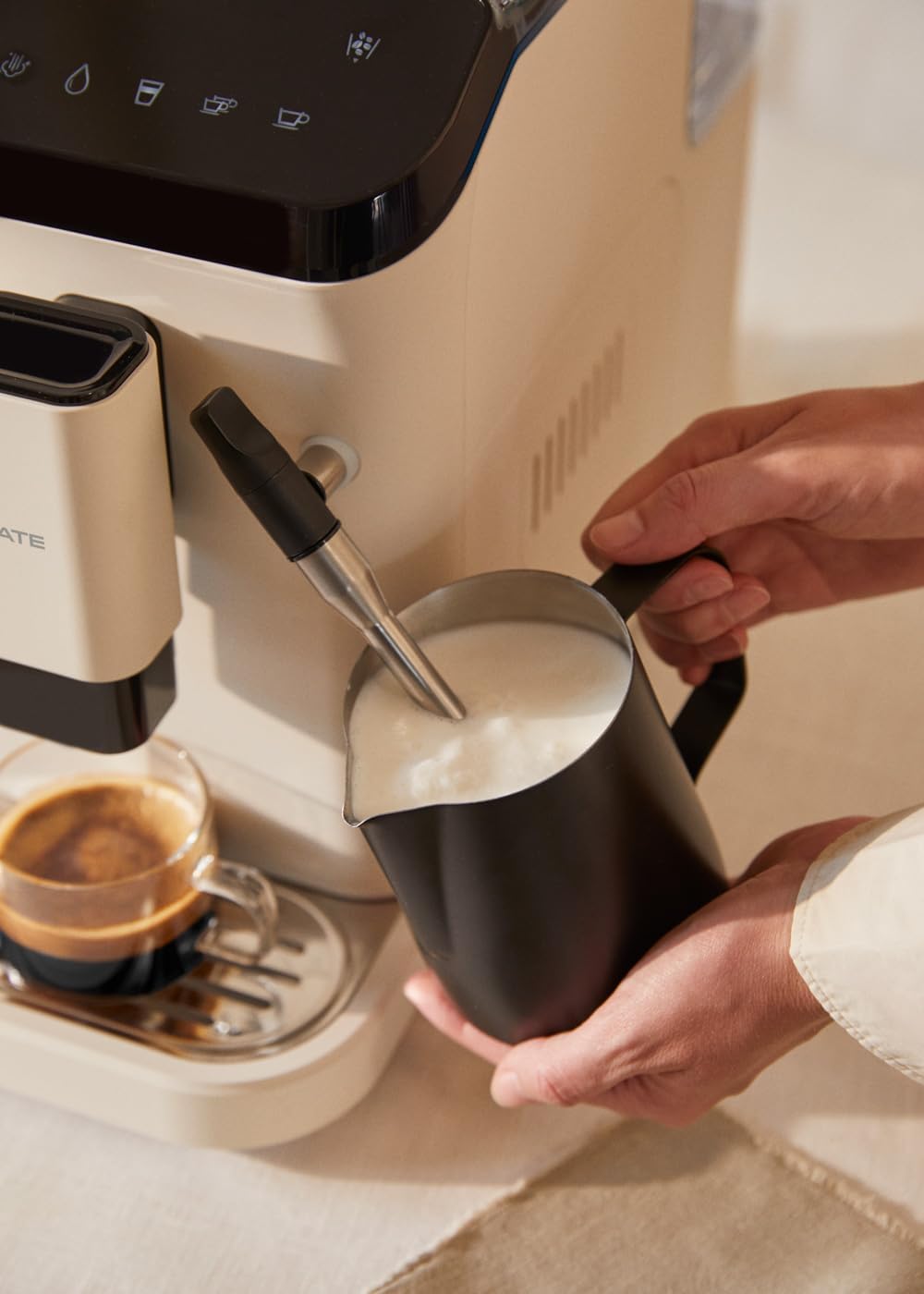
Figure 4.1: Frothing milk using the adjustable steam wand.
4.3.2 Mendispens Air Panas
- Letakkan cawan di bawah tongkat wap.
- Select the hot water function on the touch panel.
- The machine will dispense hot water for teas or other infusions.

Figure 4.2: Dispensing hot water for beverages.
5. Penyelenggaraan dan Pembersihan
Pembersihan dan penyelenggaraan yang kerap memastikan prestasi optimum dan jangka hayat mesin kopi anda.
5.1 Fungsi Pembersihan Kendiri
The machine is equipped with a self-cleaning function. Follow the prompts on the touch control panel when the cleaning indicator illuminates. This cycle helps maintain internal hygiene.
5.2 Drip Tray and Coffee Grounds Container
- When the 'drip tray full' indicator appears, carefully remove the drip tray.
- Empty the liquid from the drip tray and the used coffee grounds from the container.
- Wash both components with warm soapy water, rinse, and dry before reinserting.
5.3 Membersihkan Tongkat Stim
Selepas setiap penggunaan, lap tongkat stim denganamp cloth to remove any milk residue. Periodically, remove the outer nozzle and rinse it under running water to prevent blockages.
5.4 Penyahkelasan
Over time, mineral deposits can build up in the machine. The machine will indicate when descaling is required. Use a suitable descaling solution designed for coffee machines and follow the instructions provided with the descaling product and the machine's display prompts.
6. Penyelesaian masalah
Rujuk bahagian ini untuk isu biasa dan penyelesaiannya. Jika masalah berterusan, hubungi sokongan pelanggan.
| Masalah | Kemungkinan Punca | Penyelesaian |
|---|---|---|
| Tiada kopi yang dikeluarkan | Water tank empty / No coffee beans / Clogged coffee spout | Refill water tank / Add coffee beans / Clean coffee spout |
| Kopi lemah | Insufficient coffee quantity / Coarse grind setting | Adjust coffee intensity setting / Adjust grinder to a finer setting |
| Mesin tidak dihidupkan | Tidak dipasang / Kuasa keluartage | Check power connection / Check circuit breaker |
| 'No water' indicator | Water tank empty or not properly inserted | Refill water tank and ensure it is correctly seated |
| 'No beans' indicator | Corong kacang kosong | Refill coffee bean hopper |
| 'Cleaning' indicator | Self-cleaning cycle required | Initiate the self-cleaning program as per display instructions |
| 'Drip tray full' indicator | Drip tray or coffee grounds container is full | Empty and clean the drip tray and coffee grounds container |
7. Spesifikasi
| Ciri | Spesifikasi |
|---|---|
| Jenama | CIPTA |
| Nama Model | THERA MATIC TOUCH |
| Nombor Model | 161966_361774 |
| warna | Cream-white |
| Dimensi Produk (L x W x H) | 32.5 x 19 x 44 cm |
| Berat badan | 9.05 kg |
| Kapasiti Tangki Air | 1.5 Liter |
| Kapasiti Corong Biji Kopi | 180 gram |
| Tekanan | 20 bar |
| Kuasa/Wattage | 1350 watt |
| Voltage | 240 Volt |
| bahan | AS + ABS |
| Ciri Khas | Removable tank, Milk frother, Integrated grinder, Self-cleaning function, Touch control panel |
8. Waranti dan Sokongan
8.1 Maklumat Waranti
Your CREATE THERA MATIC TOUCH coffee machine is covered by a manufacturer's warranty. Please refer to the warranty card included with your purchase for specific terms, conditions, and duration. Retain your proof of purchase for warranty claims.
8.2 Sokongan Pelanggan
For technical assistance, spare parts, or any questions regarding your product, please contact CREATE customer support. Contact details can typically be found on the manufacturer's webtapak atau pada pembungkusan produk.
Note: Specific contact information is not provided in this manual. Please refer to your product packaging or the official CREATE webtapak untuk butiran sokongan.


