1. Arahan Keselamatan Penting
Please read these instructions carefully before using the Goldair Remote Wall Fan. Failure to follow these safety guidelines may result in electric shock, fire, or injury.
- Bekalan Kuasa: Ensure the fan is connected to a power supply that matches the voltage dinyatakan pada label penilaian.
- penempatan: Do not place the fan near curtains, drapes, or any objects that may be drawn into the fan blades.
- Kanak-kanak: Perkakas ini tidak dimaksudkan untuk digunakan oleh orang (termasuk kanak-kanak) yang kurang keupayaan fizikal, deria atau mental, atau kurang pengalaman dan pengetahuan, melainkan mereka telah diberi pengawasan atau arahan mengenai penggunaan perkakas oleh orang yang bertanggungjawab untuk keselamatan mereka. Kanak-kanak harus diawasi untuk memastikan mereka tidak bermain dengan perkakas.
- Pembersihan: Sentiasa cabut plag kipas dari salur keluar kuasa sebelum membersihkan atau melakukan sebarang penyelenggaraan.
- kerosakan: Do not operate the fan with a damaged cord or plug. If the supply cord is damaged, it must be replaced by the manufacturer, its service agent, or similarly qualified persons to avoid a hazard.
- Air: Do not immerse the fan in water or other liquids. Do not use the fan in wet or damp persekitaran.
- Pengudaraan: Ensure adequate ventilation around the fan during operation.
- Pembongkaran: Jangan cuba membaiki atau membuka kipas sendiri. Hubungi kakitangan servis yang berkelayakan untuk pembaikan.
2. Produk Lebihview
The Goldair Remote Wall Fan (GWFR-160) is designed to provide efficient cooling with convenient remote control operation. It features a modern design and 90-degree oscillation.
2.1 Komponen
- Fan Head (with blades and grille)
- Pendakap Pemasangan Dinding
- Alat Kawalan Jauh
- Kord Kuasa
- Perkakasan Pemasangan (skru, palam dinding)
2.2 Ciri-ciri
- 40 cm fan size
- Remote controlled operation
- Full 90-degree oscillation
- Tetapan kelajuan berbilang
- Fungsi pemasa
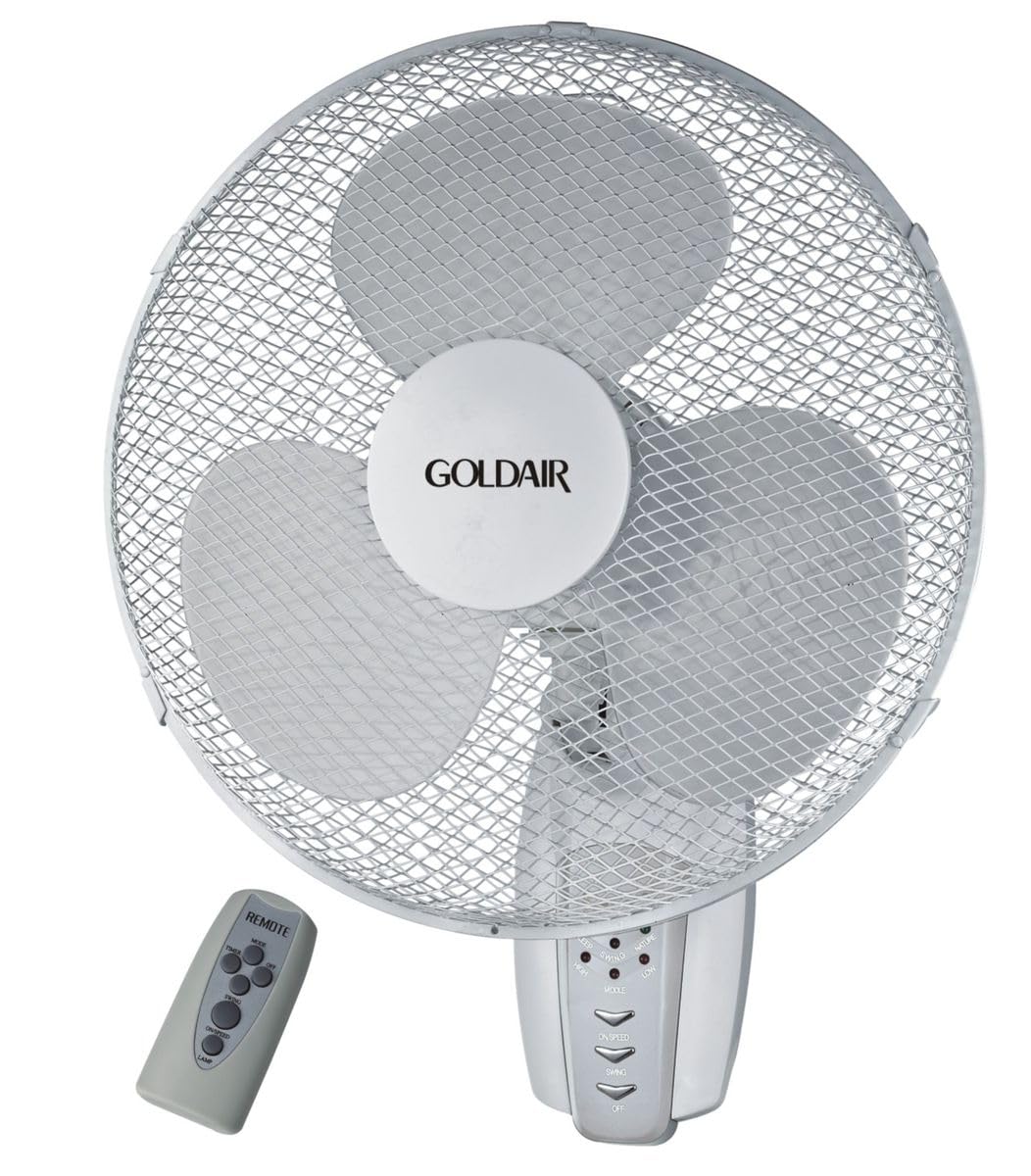
Rajah 1: Depan view of the Goldair Remote Wall Fan GWFR-160. This image shows the fan head, grille, and the central control panel.
3. Persediaan dan Pemasangan
Before installation, ensure you have the necessary tools: drill, screwdriver, and a pencil.
3.1 Memilih Lokasi
- Select a sturdy wall surface capable of supporting the fan's weight (approximately 5 kg).
- Ensure the location is within reach of a power outlet and allows for optimal airflow distribution.
- Avoid areas with excessive moisture or direct sunlight.
3.2 Pemasangan Dinding
- Hold the wall mounting bracket against the desired wall location and mark the drill holes with a pencil.
- Drill pilot holes into the marked positions. Use an appropriate drill bit size for the provided wall plugs.
- Masukkan palam dinding ke dalam lubang yang digerudi.
- Align the mounting bracket with the holes and secure it to the wall using the provided screws. Ensure the bracket is firmly attached.
- Carefully lift the fan unit and align the mounting slots on the back of the fan with the hooks or slots on the wall bracket.
- Slide the fan down onto the bracket until it locks securely into place.
3.3 Sambungan Kuasa
Once the fan is securely mounted, plug the power cord into a standard electrical outlet. Ensure the outlet is easily accessible.
4. Arahan Operasi
The Goldair Remote Wall Fan can be operated using either the control panel on the fan unit or the supplied remote control.
4.1 Operasi Kawalan Jauh
Before first use, insert 2x AAA batteries (not included) into the remote control, observing polarity.
- Butang HIDUP/MATI: Tekan untuk menghidupkan atau mematikan kipas.
- Butang SPEED: Press repeatedly to cycle through fan speeds (e.g., Low, Medium, High).
- Butang MOD: Select different fan modes (e.g., Normal, Natural, Sleep).
- Butang OSC: Press to activate or deactivate the oscillation function (90-degree swing).
- Butang PEMASA: Set the fan to operate for a specific duration (e.g., 1 hour, 2 hours, up to 7.5 hours).
4.2 Panel Kawalan Manual
The control panel on the fan unit typically mirrors the functions of the remote control. Refer to the icons on the panel for specific button functions.
5. Penyelenggaraan dan Pembersihan
Regular cleaning will help maintain the fan's performance and extend its lifespan. Always unplug the fan before cleaning.
5.1 Membersihkan Kipas
- Cabut plag: Putuskan sambungan kipas daripada bekalan kuasa.
- Luaran: Lap permukaan luar kipas dengan lembut, damp kain. Jangan gunakan pembersih atau pelarut yang melelas.
- Gril dan Bilah: To clean the fan blades, you may need to carefully remove the front grille. Consult the diagram in the packaging for grille removal instructions. Use a soft brush or vacuum cleaner to remove dust from the blades and grilles.
- Pasang semula: Reattach the front grille securely before plugging the fan back in.
5.2 Penyimpanan
When not in use for extended periods, store the fan in its original packaging or cover it to protect it from dust. Store in a cool, dry place.
6. Penyelesaian masalah
If you encounter issues with your Goldair Remote Wall Fan, refer to the following common problems and solutions:
| Masalah | Kemungkinan Punca | Penyelesaian |
|---|---|---|
| Kipas tidak dihidupkan. | Tiada bekalan kuasa. Bateri kawalan jauh sudah mati. | Periksa sama ada kord kuasa dipasang dengan selamat ke soket yang berfungsi. Gantikan bateri kawalan jauh. |
| Aliran udara yang lemah. | Kelajuan kipas terlalu rendah. Grille or blades are dusty. | Increase fan speed setting. Clean the fan grille and blades as per maintenance instructions. |
| Kipas bising. | Bahagian longgar. Kipas tidak dipasang dengan selamat. | Check for any loose components. Ensure the fan is securely mounted to the wall bracket. |
| Alat kawalan jauh tidak berfungsi. | Bateri mati atau tidak dimasukkan dengan betul. Halangan antara alat kawalan jauh dan kipas. | Gantikan bateri, pastikan polariti yang betul. Remove any obstacles blocking the signal. Ensure you are within range. |
Jika masalah berterusan selepas mencuba penyelesaian ini, sila hubungi khidmat pelanggan Goldair.
7. Spesifikasi
| Jenama | Goldair |
| Nombor Model | GWFR-160 |
| warna | putih |
| Saiz Kipas | 40 sm |
| bahan | logam |
| Ciri Khas | Remote Controlled, 90-degree Oscillation |
| Berat Barang | 5 kg |
| Dimensi Produk | 42D x 15W x 43H sentimeter |
| Sumber Kuasa | Elektrik Bertali |
| Jenis Pemasangan | Lekap di dinding |
8. Waranti dan Sokongan
For warranty information and customer support, please refer to the warranty card included with your product or visit the official Goldair webtapak. Simpan resit pembelian anda sebagai bukti pembelian.
Goldair Official Webtapak: www.goldair.co.za (Nota: Ini ialah pemegang tempat URL, please refer to your product documentation for the correct regional webtapak.)
Hubungi Sokongan: For technical assistance or service inquiries, please contact Goldair customer service through their official channels.


