1. Pengenalan
Terima kasih kerana membeliasing the Goldair GRPF-1632 Rechargeable Pedestal Fan. This manual provides essential information for the safe and efficient operation, assembly, maintenance, and troubleshooting of your fan. Please read these instructions thoroughly before use and retain them for future reference.
2. Arahan Keselamatan Penting
- Sentiasa pastikan kipas diletakkan di atas permukaan yang stabil dan rata untuk mengelakkannya daripada terbalik.
- Do not insert fingers or any objects through the fan grille when the fan is operating.
- Keep the fan away from water or other liquids. Do not use in wet environments.
- Unplug the fan from the power source before cleaning, maintenance, or when not in use.
- Do not operate the fan with a damaged cord or plug. Contact qualified service personnel for repair.
- Perkakas ini tidak dimaksudkan untuk digunakan oleh orang (termasuk kanak-kanak) yang kurang keupayaan fizikal, deria atau mental, atau kurang pengalaman dan pengetahuan, melainkan mereka telah diberi pengawasan atau arahan mengenai penggunaan perkakas oleh orang yang bertanggungjawab untuk keselamatan mereka.
- Kanak-kanak harus diawasi untuk memastikan bahawa mereka tidak bermain dengan perkakas.
- Use only the charging adapter supplied with the fan.
- Jangan sekat bukaan udara.
3. Produk Lebihview
The Goldair GRPF-1632 is a 16-inch rechargeable pedestal fan designed for versatile cooling. It features a robust construction, multiple speed settings, and an adjustable head for directional airflow. Its rechargeable battery provides cordless operation, enhancing portability.
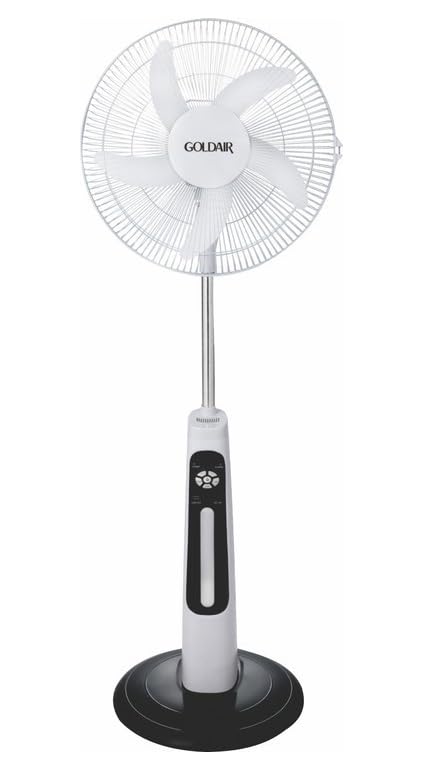
This image displays the complete Goldair Rechargeable Pedestal Fan. It features a white fan head with a protective grille and five blades, an adjustable silver-colored pole, a white and black control panel housing the fan's functions, and a stable black round base.
4. Kandungan Pakej
- Fan Head Assembly (including blades and grilles)
- Adjustable Pedestal Pole
- Tapak Bulat
- Skru Pembetulan Pangkalan
- Penyesuai Kuasa/Pengecas
- Manual Pengguna
5. Persediaan dan Pemasangan
Follow these steps to assemble your Goldair Pedestal Fan:
- Lampirkan Pangkalan: Place the pedestal pole onto the round base. Align the holes and secure the pole to the base using the provided fixing screw from underneath the base. Tighten securely.
- Pasang Kepala Kipas: Carefully slide the fan head assembly onto the top of the pedestal pole. Ensure it clicks into place or is secured according to the specific design (some models may have a screw or locking mechanism).
- Semak Kestabilan: Once assembled, gently test the fan's stability on a flat surface.
6. Arahan Operasi
Familiarize yourself with the control panel on the fan body:
- Butang Kuasa: Tekan untuk menghidupkan atau mematikan kipas.
- Tetapan Kelajuan: Press the speed button repeatedly to cycle through different fan speeds (e.g., Low, Medium, High). Indicator lights will show the current speed.
- Butang ayunan: Press to activate or deactivate the oscillation function, which allows the fan head to sweep from side to side.
- Butang Pemasa: If available, press to set a timer for automatic shutdown (e.g., 1 hour, 2 hours, 4 hours).
- Pelarasan Kecondongan: Manually adjust the angle of the fan head up or down to direct airflow as desired. Hold the fan head firmly and tilt it to the desired position.
7. Mengecas Bateri
The Goldair GRPF-1632 fan is equipped with a rechargeable battery for cordless operation. To charge the fan:
- Ensure the fan is turned OFF.
- Connect the power adapter to the charging port on the fan body.
- Palamkan penyesuai ke soket elektrik standard.
- The charging indicator light will illuminate (e.g., red for charging, green for fully charged).
- Allow the fan to charge completely before its first cordless use. Charging time may vary.
The fan can also operate while connected to the power adapter.
8. Penyelenggaraan dan Pembersihan
Regular cleaning ensures optimal performance and extends the life of your fan.
- Sebelum Pembersihan: Always unplug the fan from the power outlet and ensure it is turned off.
- Pembersihan Luaran: Lap permukaan luar kipas dengan lembut, damp kain. Jangan gunakan pembersih yang melelas, pelarut atau bahan kimia yang keras, kerana ini boleh merosakkan kemasan.
- Gril dan Bilah: To clean dust from the fan blades and inside the grilles, you may need to carefully remove the front grille. Refer to the assembly instructions in reverse for safe removal. Use a soft brush or vacuum cleaner with a brush attachment to remove accumulated dust. Ensure all parts are dry before reassembling.
- Storan: Apabila tidak digunakan untuk tempoh yang lama, simpan kipas di tempat yang sejuk dan kering, sebaik-baiknya dalam pembungkusan asalnya, untuk melindunginya daripada habuk dan kerosakan.
9. Penyelesaian masalah
If you encounter issues with your fan, refer to the following table for common problems and solutions:
| Masalah | Kemungkinan Punca | Penyelesaian |
|---|---|---|
| Kipas tidak dihidupkan. | Tiada bekalan kuasa atau bateri lemah. | Ensure the power adapter is securely plugged in and the outlet is functional. Charge the fan battery if operating wirelessly. |
| Aliran udara yang lemah. | Fan speed is too low or grilles are obstructed. | Increase the fan speed setting. Clean any dust or debris from the front and rear grilles and blades. |
| Kipas bising. | Loose parts or dust accumulation. | Ensure all assembly screws are tightened. Clean the fan blades and grilles to remove any dust buildup. |
| Ayunan tidak berfungsi. | Fungsi ayunan tidak diaktifkan. | Tekan butang ayunan untuk mengaktifkan fungsi tersebut. |
10. Spesifikasi
- Jenama: Goldair
- Nombor Model: GRPF-1632
- Reka Bentuk Kipas Elektrik: Kipas lantai
- Panjang Bilah: 16 Inci
- Bilangan bilah: 3
- Bahan: aluminium
- Jenis Pengawal: Kawalan Butang
- Berat Barang: 4 kg
- Dimensi Produk: 62.8D x 13W x 56.5H sentimeter
- warna: Multicolor (as per product specifications)
11. Waranti dan Sokongan Pelanggan
Goldair products are manufactured to high standards and are warranted against defects in materials and workmanship. For specific warranty terms and conditions, please refer to the warranty card included with your purchase or visit the official Goldair website. For technical support, spare parts, or service inquiries, please contact Goldair customer support through their official channels.


