Arahan Keselamatan Penting
Please read these instructions carefully before using the Goldair GIWF-26A Wall Fan and retain them for future reference. Failure to follow these instructions may result in electric shock, fire, or serious injury.
- Pastikan bekalan kuasa voltage sepadan dengan label penarafan pada kipas.
- Jangan kendalikan kipas dengan kord atau palam yang rosak. Jika kord rosak, ia mesti digantikan oleh pengilang, ejen servisnya atau orang yang berkelayakan untuk mengelakkan bahaya.
- Unplug the fan from the power outlet before cleaning, servicing, or moving.
- Do not insert fingers or any objects through the grille when the fan is operating.
- Keep the fan away from water and moisture. Do not use it in bathrooms or other wet environments.
- Ensure the fan is mounted securely to a solid wall structure capable of supporting its weight.
- Perkakas ini tidak dimaksudkan untuk digunakan oleh orang (termasuk kanak-kanak) yang kurang keupayaan fizikal, deria atau mental, atau kurang pengalaman dan pengetahuan, melainkan mereka telah diberi pengawasan atau arahan mengenai penggunaan perkakas oleh orang yang bertanggungjawab untuk keselamatan mereka.
- Kanak-kanak harus diawasi untuk memastikan bahawa mereka tidak bermain dengan perkakas.
Produk Selesaiview
The Goldair GIWF-26A is a high-power 26-inch wall-mounted fan designed for efficient air circulation. Its robust construction and multiple speed settings provide optimal cooling performance.
Kandungan Pakej
- Goldair GIWF-26A Wall Fan Unit
- Pendakap Pemasangan
- Perkakasan Pemasangan (skru, sauh dinding)
- Manual Pengguna (dokumen ini)
Ciri-ciri Utama
- 3 Speed settings for varied airflow control.
- Automatic oscillation for wide area coverage.
- Modern design suitable for various environments.
- High quality aluminum blades for durability and efficient air movement.
- Lightweight construction for easier installation.
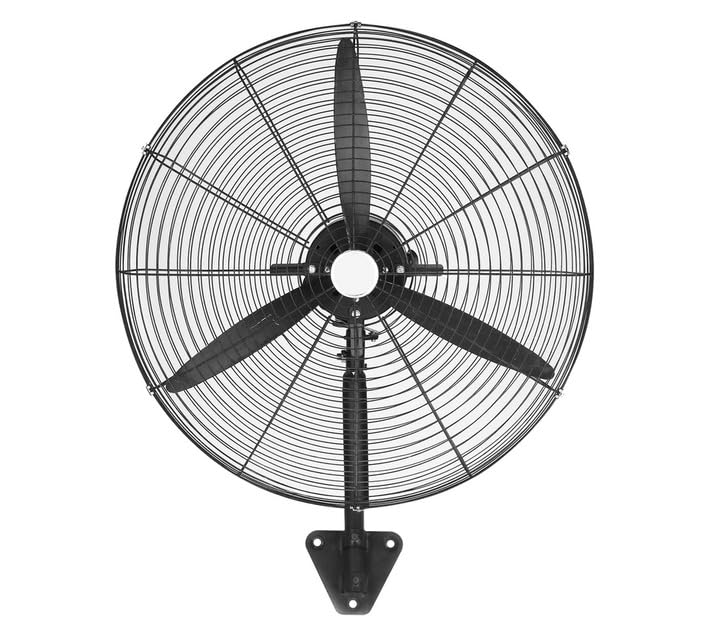
Image: Goldair GIWF-26A High Power 26-Inch Wall Fan, showcasing its black finish and robust design. This image illustrates the overall appearance of the fan unit.
Persediaan
Memasang Kipas
The Goldair GIWF-26A Wall Fan must be securely mounted to a sturdy wall surface. Choose a location that allows for optimal airflow and is away from obstructions.
- Pilih Lokasi Pemasangan: Identify a suitable wall location, ensuring it is structurally sound and can support the fan's weight (approximately 10.8 kg).
- Tandakan Titik Penggerudian: Hold the mounting bracket against the wall at the desired height and use a pencil to mark the positions for drilling holes.
- Lubang gerudi: Drill pilot holes at the marked positions using an appropriate drill bit for your wall type. Insert wall anchors if necessary.
- Pasang Pendakap Pelekap: Securely fasten the mounting bracket to the wall using the provided screws. Ensure it is level and firmly attached.
- Pasang Kipas: Carefully lift the fan unit and align its mounting points with the bracket. Secure the fan to the bracket according to the specific design (e.g., sliding into place and tightening screws).
Sambungan elektrik
Before connecting the fan to power, ensure all mounting steps are complete and the fan is stable.
- Ensure your hands are dry before handling the power cord or plug.
- Plug the fan's power cord into a standard 230 Volt AC electrical outlet.
- Avoid using extension cords if possible. If an extension cord is necessary, ensure it is rated for the fan's power requirements (200 watts) and is in good condition.
Arahan Operasi
Panel Kawalan
The Goldair GIWF-26A Wall Fan is operated via a button control panel located on the fan unit. This panel typically includes buttons for power, speed selection, and oscillation control.
Hidupkan/Mati Kuasa
- Untuk memutar kipas ON, press the Power button once.
- Untuk memutar kipas DIMATIKAN, press the Power button again.
Tetapan Kelajuan
The fan offers three distinct speed settings to adjust airflow intensity:
- Kelajuan 1 (Rendah): Provides a gentle breeze for quiet operation and minimal air movement.
- Kelajuan 2 (Sederhana): Menawarkan aliran udara sederhana untuk penyejukan umum.
- Kelajuan 3 (Tinggi): Delivers maximum airflow for rapid cooling or larger spaces.
To change the speed, press the Speed button repeatedly until the desired setting is reached.
Automatic Oscillation
The oscillation feature allows the fan head to sweep from side to side, distributing air across a wider area.
- To activate oscillation, press the Oscillation button.
- To stop oscillation, press the Oscillation button again. The fan head will stop in its current position.
Penyelenggaraan
Regular maintenance ensures the longevity and efficient operation of your Goldair GIWF-26A Wall Fan. Always unplug the fan before performing any maintenance.
Pembersihan
- Pembersihan Luaran: Lap permukaan luar kipas dengan lembut, damp kain. Jangan gunakan pembersih atau pelarut yang melelas, kerana ini boleh merosakkan kemasan.
- Pembersihan Bilah: Periodically, dust may accumulate on the fan blades. To clean, carefully remove the front grille (refer to assembly instructions if needed) and gently wipe the blades with a soft, dry or slightly damp kain. Pastikan bilah kering sepenuhnya sebelum memasang semula gril.
- Jangan rendam kipas di dalam air atau biarkan air menitis ke dalam perumahan motor.
Penyimpanan
Apabila tidak digunakan untuk tempoh yang lama, simpan kipas di tempat yang sejuk dan kering, sebaik-baiknya dalam pembungkusan asalnya, untuk melindunginya daripada habuk dan kerosakan.
Menyelesaikan masalah
If you encounter issues with your Goldair GIWF-26A Wall Fan, please consult the following table before contacting customer support.
| Masalah | Kemungkinan Punca | Penyelesaian |
|---|---|---|
| Kipas tidak dihidupkan. | Tiada bekalan kuasa. Butang kuasa tidak ditekan. | Check if the fan is plugged into a live outlet. Tekan butang Kuasa dengan kuat. |
| Aliran udara yang lemah. | Tetapan kelajuan rendah. Pengumpulan habuk pada bilah. | Tingkatkan tetapan kelajuan. Clean the fan blades and grille as per maintenance instructions. |
| Kipas bising. | Bahagian longgar. Kipas tidak dipasang dengan selamat. | Check for any loose screws or components and tighten them. Ensure the fan is securely mounted to the wall bracket. |
| Ayunan tidak berfungsi. | Oscillation button not activated. Halangan. | Tekan butang Ayunan. Ensure there are no obstructions preventing the fan head from moving. |
Spesifikasi
Technical specifications for the Goldair GIWF-26A High Power 26-Inch Wall Fan:
| Jenama | Goldair |
| Nombor Model | GIWF-26A |
| warna | Hitam |
| Kuasa / Wattage | 200 watt |
| Voltage | 230 Volt |
| bahan | aluminium |
| Berat Barang | 10.8 kg |
| Dimensi Produk | 72D x 19W x 96H sentimeter |
| Bilangan Bilah | 3 |
| Jenis Pemasangan | Lekap di dinding |
| Jenis Pengawal | Kawalan Butang |
Waranti dan Sokongan
Goldair products are manufactured to high-quality standards. For information regarding warranty coverage, please refer to the warranty card included with your purchase or visit the official Goldair webtapak.
If you require technical assistance, troubleshooting beyond this manual, or spare parts, please contact Goldair customer support. Contact details can typically be found on the product packaging or the official Goldair webtapak.
Please have your model number (GIWF-26A) and purchase date available when contacting support.


