1. Arahan Keselamatan
Please read all safety instructions carefully before using the mollie Robot Vacuum Cleaner. Keep this manual for future reference.
- Perkakas ini tidak dimaksudkan untuk digunakan oleh orang (termasuk kanak-kanak) yang kurang keupayaan fizikal, deria atau mental, atau kurang pengalaman dan pengetahuan, melainkan mereka telah diberi pengawasan atau arahan mengenai penggunaan perkakas oleh orang yang bertanggungjawab untuk keselamatan mereka.
- Kanak-kanak harus diawasi untuk memastikan bahawa mereka tidak bermain dengan perkakas.
- Do not operate the vacuum cleaner in areas with open flames, flammable or explosive materials.
- Do not allow the vacuum cleaner to pick up large objects, liquids, or burning/smoking materials.
- Ensure the charging dock is placed against a wall on a level surface and is not obstructed.
- Only use the original AC adapter and charging dock provided by the manufacturer.
- Jangan rendamkan pembersih vakum atau komponen elektroniknya di dalam air.
- Regularly clean the dustbin and filter to maintain optimal performance.
- The product is certified safe and reliable with CE, FCC, and RoHS certifications.
2. Kandungan Pakej
Sahkan bahawa semua komponen terdapat dalam pakej:
- mollie Robot Vacuum Cleaner
- Alat Kawalan Jauh
- Penyesuai AC
- Dok Pengecasan
- Berus Sisi (2 pasang)
- Manual Pengguna
- Dry Mop
3. Produk Lebihview
The mollie Robot Vacuum Cleaner is designed for efficient and hassle-free cleaning across various floor types.
Ciri-ciri Utama:
- Enhanced Brushless Suction System: Delivers powerful cleaning without hair entanglement.
- Penapisan Kecekapan Tinggi: Equipped with a 310ml dustbin and HEPA filter for cleaner air.
- Reka bentuk Slim: At just 2.8 inches (7.1 cm) in height, it easily cleans under furniture.
- Navigasi Pintar: Uses a 'Bow-Shaped' trajectory and anti-falling technology.
- Operasi Bising-Senyap: Operates at approximately 68 dB, similar to a casual conversation.
- Pengecasan Automatik: Returns to the charging dock when battery is low or cleaning is complete.

Image 3.1: The mollie Robot Vacuum's slim design allows it to effectively navigate and clean under furniture.

Imej 3.2: Bahagian bawah view illustrating the swivel wheel, dual side brushes, vacuum inlet, drive suspension tires, and mopping cloth for 2-in-1 functionality.

Image 3.3: The robot vacuum effectively picks up debris with its 1300Pa powerful suction for thorough cleaning.

Image 3.4: The robot vacuum features a spacious 310ml dustbin designed to capture and retain more debris during cleaning cycles.

Image 3.5: The mollie Robot Vacuum is suitable for deep cleaning on various surfaces including hardwood, marble, ceramic tile, and low-to-medium pile carpets.

Image 3.6: The robot vacuum operates silently, providing noise-free cleaning performance that won't disrupt daily activities.
4. Persediaan
4.1 Membongkar dan Persediaan Awal
- Remove the robot vacuum and all accessories from the packaging.
- Remove any protective films or stickers from the robot and charging dock.
- Attach the side brushes by pressing them into their respective slots on the underside of the vacuum until they click into place.
4.2 Meletakkan Dok Pengecasan
- Letakkan dok pengecas pada dinding di atas permukaan yang keras dan rata.
- Ensure there is at least 1 meter (3 feet) of clear space on both sides of the dock and 2 meters (6 feet) in front of it.
- Plug the AC adapter into the charging dock and then into a wall outlet.
- Ensure the power indicator on the charging dock illuminates.
4.3 Pengecasan Awal
- Place the robot vacuum onto the charging dock, ensuring the charging contacts on the robot align with those on the dock.
- The robot will begin charging automatically. Allow 3-5 hours for a full charge before first use.
- The indicator light on the robot will change to indicate charging status (refer to the robot's specific indicator light guide in the manual for details).

Image 4.1: The robot vacuum automatically returns to its charging dock for recharging, ensuring uninterrupted cleaning sessions.
5. Arahan Operasi
5.1 Menghidupkan/Mematikan
- Hidupkan kuasa: Press and hold the power button on the robot for a few seconds until the indicator light illuminates.
- Matikan: Press and hold the power button on the robot for a few seconds until the indicator light turns off.
5.2 Memulakan Kitaran Pembersihan
- Press the power button on the robot once, or the 'Start/Pause' button on the remote control, to begin cleaning in Auto mode.
- The robot will automatically navigate and clean your space using its intelligent 'Bow-Shaped' trajectory.
5.3 Mod Pembersihan
Use the remote control to select different cleaning modes:
- Mod Auto: The default cleaning mode, suitable for general cleaning. The robot intelligently plans its path.
- Mod Fokus: The robot will clean a specific area more intensely, moving in a spiral pattern.
- Mod Tepi: The robot will clean along walls and furniture edges.
5.4 Menggunakan Alat Kawalan Jauh
The remote control provides convenient access to all functions:
- Mula / Jeda: Start or pause the cleaning cycle.
- Butang Arah: Manually control the robot's movement.
- kembali: Send the robot back to the charging dock.
- Pemilihan Mod: Buttons for Auto, Focus, and Edge cleaning modes.
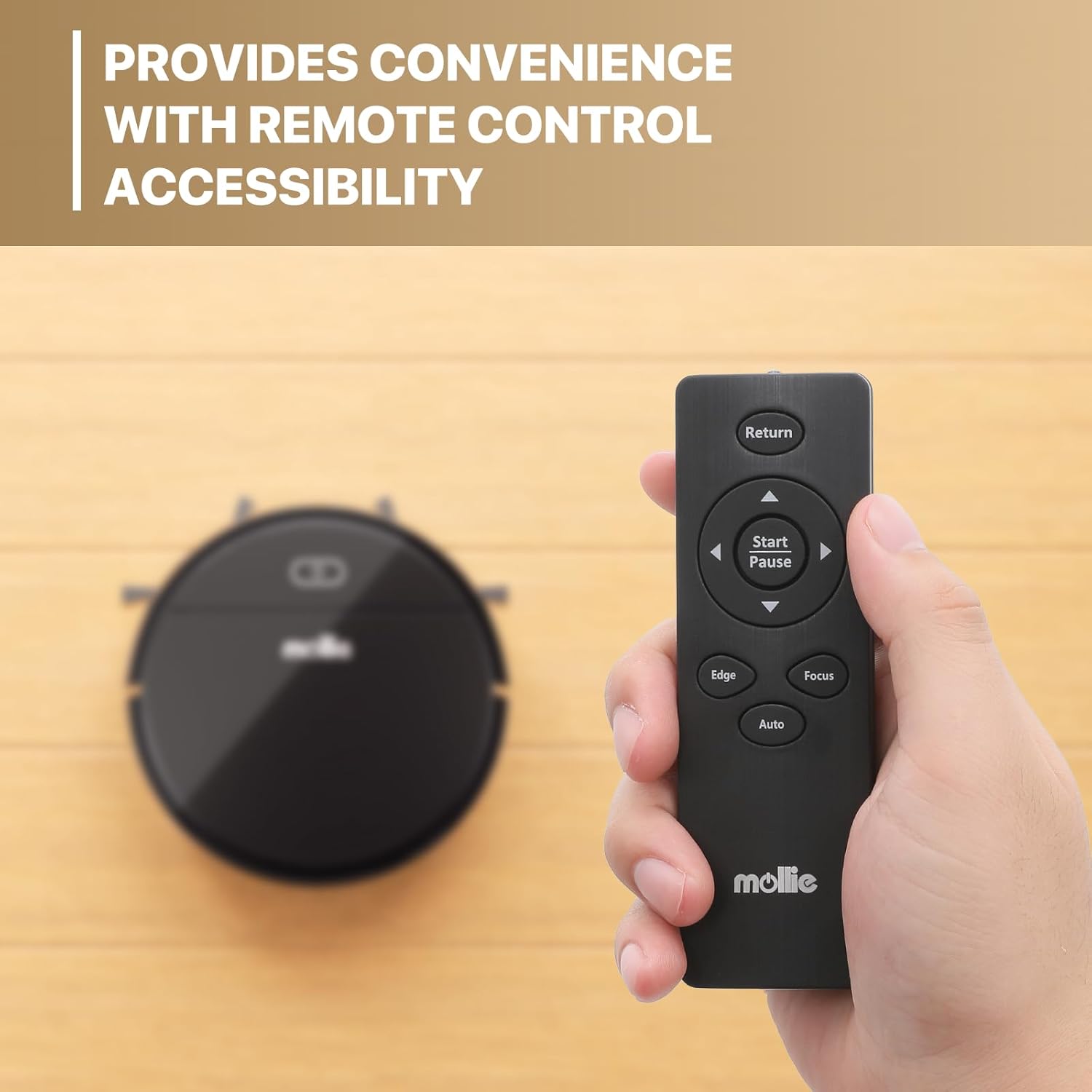
Image 5.1: The remote control offers convenient accessibility for managing the robot vacuum's functions and cleaning modes.
5.5 Anti-Falling Technology
The robot is equipped with sensors to detect drops and ledges, preventing it from falling down stairs or off elevated surfaces.
6. Pembersihan dan Penyelenggaraan
Penyelenggaraan tetap memastikan prestasi optimum dan memanjangkan jangka hayat vakum robot anda.
6.1 Mengosongkan Tong Sampah
- Tekan butang pelepas tong sampah dan tarik keluar tong sampah.
- Buka penutup tong sampah dan buang isinya ke dalam tong sampah.
- Rinse the dustbin with water if necessary, ensuring it is completely dry before reinserting.
6.2 Membersihkan Penapis HEPA
- Keluarkan penapis HEPA dari tong sampah.
- Tap the filter gently to remove dust and debris. Do not wash the HEPA filter with water.
- Replace the HEPA filter every 3-6 months, depending on usage.
6.3 Membersihkan Berus Sisi
- Periksa berus sisi secara berkala untuk rambut kusut atau serpihan.
- Carefully remove any obstructions. If brushes are damaged, replace them with new ones.
6.4 Membersihkan Penderia dan Mengecas Kenalan
- Wipe the anti-drop sensors, bumper sensors, and charging contacts on both the robot and the charging dock with a clean, dry cloth.
- Ensure these components are free of dust and debris for proper operation.
7. Penyelesaian masalah
If you encounter issues with your mollie Robot Vacuum, refer to the following common problems and solutions:
| Masalah | Kemungkinan Punca | Penyelesaian |
|---|---|---|
| Robot does not power on | Bateri lemah; Butang kuasa tidak ditekan cukup lama | Charge the robot fully; Press and hold the power button for several seconds. |
| Robot tidak mengecas | Charging contacts dirty; Charging dock not powered; Robot not properly aligned | Clean charging contacts; Ensure dock is plugged in; Realign robot on dock. |
| Poor suction or leaves debris | Dustbin full; Filter clogged; Side brushes tangled | Empty dustbin; Clean/replace filter; Clean side brushes. |
| Robot kerap tersangkut | Obstacles in path; Too many cables/rug fringes | Clear obstacles; Tidy up cables and loose rug fringes before cleaning. |
| Robot jatuh dari tangga | Sensor anti-jatuh kotor atau tersumbat | Clean the anti-drop sensors on the underside of the robot. |
Jika masalah berterusan selepas mencuba penyelesaian ini, sila hubungi sokongan pelanggan.
8. Spesifikasi
| Ciri | Spesifikasi |
|---|---|
| Nama Model | mollie A03-RV-001-18W |
| Faktor Bentuk | Robotik |
| Dimensi Produk (L x W x H) | 27.9L x 27.9W x 7.1H Centimetres (2.8" height) |
| warna | Hitam |
| Jenis Pengawal | Alat Kawalan Jauh |
| Jenis Penapis | Penapis HEPA |
| Kapasiti tong sampah | 310 ml |
| Hayat Bateri | Sehingga 90 minit |
| Masa Mengecas | 3-5 jam |
| Kawasan Pembersihan | Sehingga 1290 kaki² |
| Keluaran Bunyi | 68 dB |
| Syor Permukaan | Low Pile Carpet, Hard Floors, Wood Floor, Tile Floor |
| Ciri Khas | Cordless, Anti-falling Technology |
| Pensijilan | CE, FCC, RoHS |
| ASIN | B0CKYH32SL |
9. Waranti & Sokongan
The mollie Robot Vacuum Cleaner comes with a standard manufacturer's warranty. For detailed warranty information, including terms and conditions, please refer to the warranty card included in your package or contact mollie customer support.
If you have any questions, require technical assistance, or need to report an issue, please contact our customer support team through the contact information provided on the mollie official webtapak atau platform pembelian anda.


