1. Pengenalan
Thank you for choosing the Stealth Cam STC-VL22 Trail Camera. This manual provides detailed instructions for setting up, operating, and maintaining your camera to ensure optimal performance. The STC-VL22 is designed for wildlife surveillance and outdoor monitoring, featuring 22MP image capture, 720p video recording, motion detection, and night vision capabilities. This bundle also includes a high-speed card reader for convenient data transfer.
2. Persediaan
2.1. Pemasangan Bateri
The STC-VL22 camera operates on 8 AA batteries. For best performance and extended battery life, use high-quality alkaline or lithium batteries.
- Open the camera housing latch located on the side of the unit.
- Carefully open the battery compartment door.
- Masukkan 8 bateri AA, pastikan kekutuban (+/-) betul seperti yang ditunjukkan di dalam petak.
- Close the battery compartment door securely and then close the main camera housing latch.

Image: The Stealth Cam STC-VL22 with its side panel open, revealing the battery compartment and SD card slot. Ensure batteries are inserted with correct polarity.
2.2. Sisipan Kad SD
A compatible SD card (not included, but a card reader is provided in the bundle) is required to store images and videos. The camera supports standard SD cards.
- Dengan perumah kamera terbuka, cari slot kad SD.
- Masukkan kad SD ke dalam slot dengan label menghadap ke atas sehingga ia klik pada tempatnya.
- To remove, push the card in gently until it springs out.
2.3. Hidupkan Awal dan Tetapan Asas
After installing batteries and an SD card, you can power on the camera and configure basic settings.
- With the camera housing open, locate the power switch and turn the camera ON.
- The internal display will activate. Use the MENU, DOWN, UP, and ENTER buttons to navigate and select options.
- It is recommended to format the SD card upon first use. Navigate to the 'Format SD' option in the menu and confirm.
- Set the current date and time to ensure accurate timestamps pada media yang anda rakam.

Image: The Stealth Cam STC-VL22 with its front panel open, showing the LCD screen and control buttons (MENU, DOWN, UP, ENTER) for configuration.
2.4. Memasang Kamera
The STC-VL22 features an integrated Python latch for secure mounting.
- Choose a suitable location, such as a tree or post, that provides a clear view kawasan yang anda ingin pantau.
- Secure the camera using a mounting strap (not included) through the designated slots on the back of the camera, or utilize the Python latch for a cable lock system.
- Ensure the camera is stable and pointed correctly. Adjust the angle as needed.
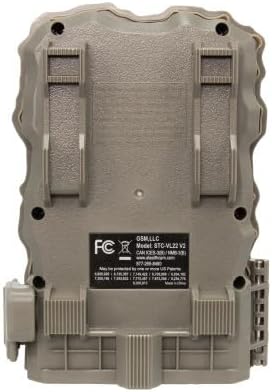
Imej: Bahagian belakang view of the Stealth Cam STC-VL22, highlighting the mounting slots and the integrated Python latch for secure attachment to a tree or post.
3. Mengendalikan Kamera
3.1. Navigasi Menu
Use the control buttons to navigate the camera's menu system:
- MENU: Enters or exits the menu, or goes back to the previous screen.
- BAWAH ATAS: Scrolls through menu options or adjusts settings.
- MASUK: Mengesahkan pilihan atau memasuki sub-menu.
3.2. Image and Video Settings
Configure the camera to capture images or videos according to your needs.
- Resolusi: Select image resolution up to 22MP. Video resolution is 720p at 30 frames per second (FPS).
- Kelajuan Pencetus: The camera features a fast 0.8-second trigger speed to capture fast-moving subjects.
- Mod Letusan: Set the camera to take 1 to 3 images per trigger event.
- Julat Pengesanan: The camera has an 80-foot detection and IR (Infrared) range for effective monitoring.
- Masa Pemulihan: Adjust the delay between consecutive captures after a trigger event.
3.3. Penglihatan Malam
The STC-VL22 is equipped with infrared LEDs for night vision, allowing it to capture clear images and videos in low-light or no-light conditions without disturbing wildlife.
- Penglihatan malam diaktifkan secara automatik apabila tahap cahaya ambien rendah.
- Images and videos captured in night vision mode will be in black and white.
3.4. Using the Card Reader
The included high-speed card reader allows you to easily transfer files from your SD card to a computer or other device.
- Keluarkan kad SD daripada kamera.
- Insert the SD card into the appropriate slot on the card reader.
- Sambungkan pembaca kad ke port USB komputer anda.
- Akses ke files pada kad SD melalui komputer anda file penjelajah.

Image: A high-speed USB card reader, designed to accept SD cards for transferring captured media to a computer.
4. Penyelenggaraan
4.1. Penggantian Bateri
Replace batteries when the low battery indicator appears on the display or when performance degrades. Always replace all 8 AA batteries at once with new ones to ensure consistent power.
4.2. Pengurusan Kad SD
- Regularly check the available space on your SD card.
- Format the SD card periodically (e.g., once a month or after each significant use) to maintain optimal performance and prevent data corruption. Remember to back up all important files sebelum memformat.
4.3. Pembersihan
- Lap bahagian luar kamera dengan kain lembutamp kain untuk menghilangkan kotoran dan serpihan.
- Gently clean the camera lens and IR sensors with a lens cleaning cloth to ensure clear image quality. Avoid abrasive materials.
- Ensure the battery compartment and SD card slot are free from moisture and debris.
4.4. Penjagaan Alam Sekitar
While designed for outdoor use, protect the camera from extreme weather conditions when possible. Ensure all latches are securely closed to maintain water resistance.
5. Penyelesaian masalah
| Masalah | Kemungkinan Punca | Penyelesaian |
|---|---|---|
| Kamera tidak dihidupkan | Bateri mati atau tidak dipasang dengan betul. | Gantikan kesemua 8 bateri AA dengan yang baharu, memastikan kekutuban yang betul. |
| Kualiti imej/video yang lemah | Dirty lens, low light, incorrect settings. | Clean the lens. Check light conditions. Adjust resolution settings. Ensure night vision is active in low light. |
| Kamera tidak mengesan gerakan | PIR sensor blocked, incorrect sensitivity settings, subject out of range. | Ensure no obstructions in front of the PIR sensor. Adjust motion sensitivity in settings. Verify subject is within the 80-foot detection range. |
| Kesalahan kad SD | Corrupted card, incompatible card, full card. | Format the SD card (back up data first). Try a different, compatible SD card. Delete old files untuk mengosongkan ruang. |
| Difficulty with custom programming | Complex menu options. | Refer to the 'Operating the Camera' section for detailed menu navigation. Proceed step-by-step and confirm each setting. |
| Hayat bateri pendek | Frequent triggers, cold weather, low-quality batteries. | Reduce trigger frequency if possible. Use high-quality lithium batteries in cold environments. |
6. Spesifikasi
| Ciri | Perincian |
|---|---|
| Nombor Model | FC-CR1_K1486 (STC-VL22) |
| Resolusi Imej | Sehingga 22 Megapiksel |
| Resolusi Video | 720p pada 30 FPS |
| Kecepatan Pencetus | 0.8 saat |
| Mod Letusan | 1-3 images per trigger |
| Julat Pengesanan | 80 kaki |
| Julat IR | 80 kaki |
| Ciri Khas | Sensor Gerakan, Penglihatan Malam |
| Sumber Kuasa | 8 Bateri AA (diperlukan) |
| Dimensi (Produk) | 23.11 x 23.11 x 23.11 cm (9.1 x 9.1 x 9.1 inci) |
| Berat (Produk) | 938.94 g (939 g) |
| Pengeluar | Stealth Cam |
7. Waranti dan Sokongan
7.1. Maklumat Waranti
For detailed warranty information regarding your Stealth Cam STC-VL22 Trail Camera, please refer to the warranty card included with your product or visit the official Stealth Cam webtapak. Terma dan syarat jaminan mungkin berbeza.
7.2. Sokongan Pelanggan
If you encounter any issues not covered in this manual or require further assistance, please contact Stealth Cam customer support through their official webtapak atau maklumat hubungan yang diberikan dalam pembungkusan produk anda.


