1. Pengenalan
This manual provides detailed instructions for the assembly, operation, and maintenance of your FLEXISPOT Electric Standing Desk. Please read this manual thoroughly before use to ensure proper function and safety. Keep this manual for future reference.
2. Maklumat Keselamatan
Langkah-langkah Keselamatan Penting:
- Always keep the desk area clear of obstructions to prevent collisions during height adjustments.
- Do not use the desk at its maximum height without proper anchoring to prevent tip-overs.
- Follow the assembly instructions carefully to ensure the desk is properly set up and stable.
- Ensure all cables are managed to avoid entanglement during movement.
- Jauhkan kanak-kanak dan haiwan peliharaan dari meja semasa operasi.
3. Kandungan Pakej
Sahkan bahawa semua komponen hadir sebelum memulakan pemasangan. Jika mana-mana bahagian yang hilang atau rosak, sila hubungi sokongan pelanggan.
- Desktop (Natural Desktop + White Frame, 48 inch)
- Desk Legs/Frame (Alloy Steel)
- Control Panel with USB Ports
- Laci Storan Tarik Keluar
- Perkakasan Pemasangan (skru, alatan)
- Penyesuai Kuasa
- Manual Arahan
4. Persediaan dan Pemasangan
The FLEXISPOT Electric Standing Desk is designed for quick assembly. All necessary tools are included.
- Step 1: Attach Desk Legs to Desktop
Carefully place the desktop upside down on a soft, clean surface to prevent scratches. Attach the desk legs to the designated mounting points on the underside of the desktop using the provided screws. Ensure all connections are secure.
Image: Fully assembled FLEXISPOT Electric Standing Desk, showcasing the natural desktop, white frame, integrated drawer, and control panel with USB ports.
- Step 2: Install Control Panel and Drawer
Mount the control panel to the front edge of the desktop as indicated in the diagrams. Connect the motor and power cables to the control panel. Slide the pull-out storage drawer into its designated slot beneath the desktop.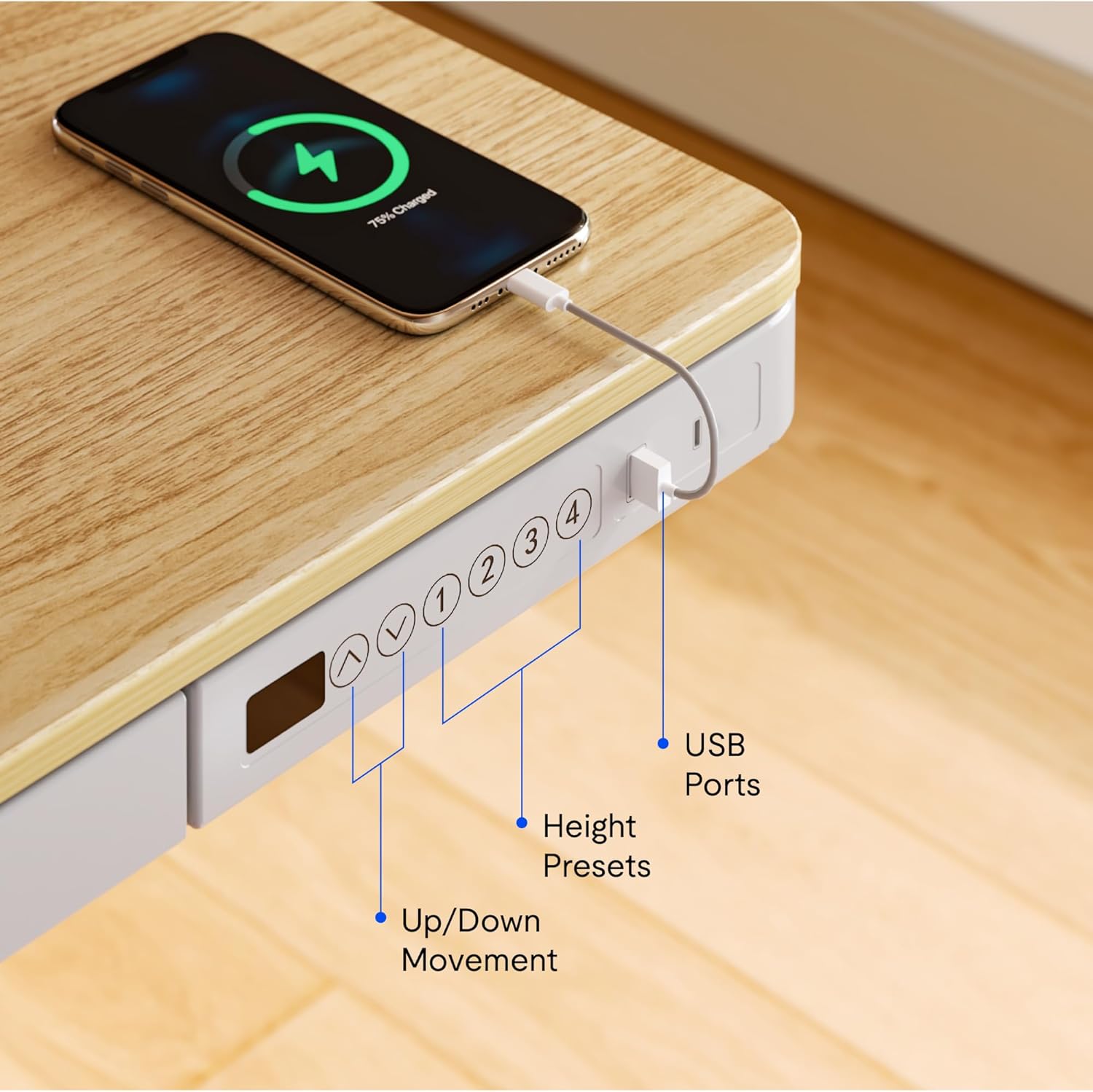
Imej: Jarak dekat view of the desk's control panel, highlighting the up/down movement buttons, four height preset buttons, and the integrated USB charging ports.
- Step 3: Connect Power and Cable Management
Connect the power adapter to the control panel and then to a power outlet. Organize cables using the provided cable management solutions to ensure they do not interfere with desk movement.
Image: The desk frame from below, showing the crossbar and anti-collision system designed to enhance stability and safety during height adjustments.
5. Arahan Operasi
Your FLEXISPOT Electric Standing Desk offers convenient features for adjusting height and charging devices.
5.1 Pelarasan Ketinggian
- Pergerakan Atas/Bawah: Gunakan Up dan Bawah arrow buttons on the control panel to manually adjust the desk height. The desk can transition smoothly between 28.3 inches and 47.6 inches.
- Height Presets: The control panel features four programmable memory presets. To save a desired height, adjust the desk to the preferred level, then press and hold one of the numbered preset buttons (1, 2, 3, or 4) until the display flashes or a beep is heard. To recall a saved height, simply press the corresponding preset button.
- Sistem Anti-Perlanggaran: The desk is equipped with an anti-collision system that automatically stops movement if an obstruction is detected, preventing damage to the desk or objects.
5.2 Port Pengecasan USB
The integrated control panel includes USB charging ports. Connect your electronic devices to these ports for convenient charging directly from your desk.
5.3 Fungsi Kunci Kanak-kanak
To activate the child lock, press and hold the "Lock" button (often represented by a padlock icon) on the control panel for a few seconds until the display indicates it is locked. Repeat the process to unlock.
5.4 Integrated Storage Drawer
Utilize the pull-out storage drawer for organizing office supplies and keeping your workspace tidy. The drawer is designed to blend seamlessly with the desk's aesthetic.

Imej: Terperinci view of the integrated pull-out drawer, showing its dimensions (approximately 23.6 inches wide, 11.2 inches deep, and 2 inches high) and its capacity for storing various office items.
6. Penyelenggaraan
- Pembersihan: Lap desktop dan bingkai dengan lembut, damp kain. Elakkan pembersih yang melelas atau bahan kimia yang keras.
- Pengurusan Kabel: Periksa dan susun semula kabel secara berkala untuk mengelakkan kekusutan dan memastikan operasi yang lancar.
- Pemeriksaan: Regularly inspect all screws and connections to ensure they remain tight and secure.
7. Penyelesaian masalah
Jika anda menghadapi sebarang masalah dengan meja anda, rujuk penyelesaian biasa berikut:
- Meja Tidak Bergerak:
- Periksa sama ada kabel kuasa disambungkan dengan selamat ke kedua-dua meja dan salur keluar kuasa.
- Pastikan kunci kanak-kanak tidak diaktifkan.
- Reset the desk by unplugging it for 30 seconds and then plugging it back in.
- Uneven Movement or Noise:
- Pastikan meja diletakkan di atas permukaan yang rata.
- Check for any obstructions beneath or around the desk legs.
- Pastikan semua skru pemasangan diketatkan.
- Port USB Tidak Mengecas:
- Sahkan meja telah dihidupkan.
- Try a different USB cable or device to rule out a faulty accessory.
If problems persist, please contact FLEXISPOT customer support.
8. Spesifikasi
| Ciri | Perincian |
|---|---|
| Jenama | FLEXISPOT |
| Nombor Model | B0CKW2Q436 |
| Desktop Surface Dimensions (W x D) | 47.4"L x 23.8"D |
| Dimensi Keseluruhan Produk (D x L x T) | 48"D x 48"W x 28.3"H (Note: Desktop surface is 47.4"W x 23.8"D) |
| warna | Natural/White |
| Bahan Asas | Keluli Aloi |
| Jenis Bahan Atas | Buluh |
| Berat Barang | 74 paun |
| Ketinggian Minimum | 28.3 Inci |
| Ketinggian Maksimum | 47.6 Inci |
| Ketebalan Atas Meja | 2.6 Inci |
| Cadangan Berat Maksimum | 110 paun |
| Komponen yang Disertakan | Pull-out storage drawer, USB ports |
| Perhimpunan yang Diperlukan | Ya (Termasuk semua alat pemasangan) |

Image: Summary of key specifications including desktop size (47.4"x23.8"), height range (28.3"-48"), max loading capacity (100 lbs), and 5-year warranty.
9. Waranti dan Sokongan
9.1 Maklumat Waranti
The FLEXISPOT Electric Standing Desk typically comes with a 5-year warranty, covering manufacturing defects and motor functionality. For specific warranty terms and conditions, please refer to the documentation included with your product or contact FLEXISPOT customer service.
9.2 Sokongan Pelanggan
For technical assistance, warranty claims, or any questions regarding your FLEXISPOT product, please contact FLEXISPOT customer support. Contact information can usually be found on the manufacturer's webtapak atau pada pembungkusan.
You may also refer to the seller, FlexiSpot, for support inquiries. They offer 30-day easy returns.