Powerwave Wireless Controller Purple Rush
Manual Pengguna
1. Pengenalan
Terima kasih kerana membeliasing the Powerwave Wireless Controller. This controller is designed to enhance your gaming experience on PlayStation 4 consoles, offering advanced features such as motion sensing, dual motor vibration, and a built-in speaker. Please read this manual carefully to ensure proper use and maintenance of your device.
This controller is compatible with PS4, PS4 Slim, and PS4 Pro models. Please note that PlayStation Lightbar, PSVR, turbo functionality, and PS5 compatibility are not supported.
2. Kandungan Pakej
- 1 x Powerwave Wireless Controller (Purple Rush)
- 1 x Kabel Pengecas USB
- 1 x Manual Pengguna (dokumen ini)

Image: The Powerwave Wireless Controller shown within its retail packaging, highlighting the product and its box.
3. Ciri-ciri Pengawal
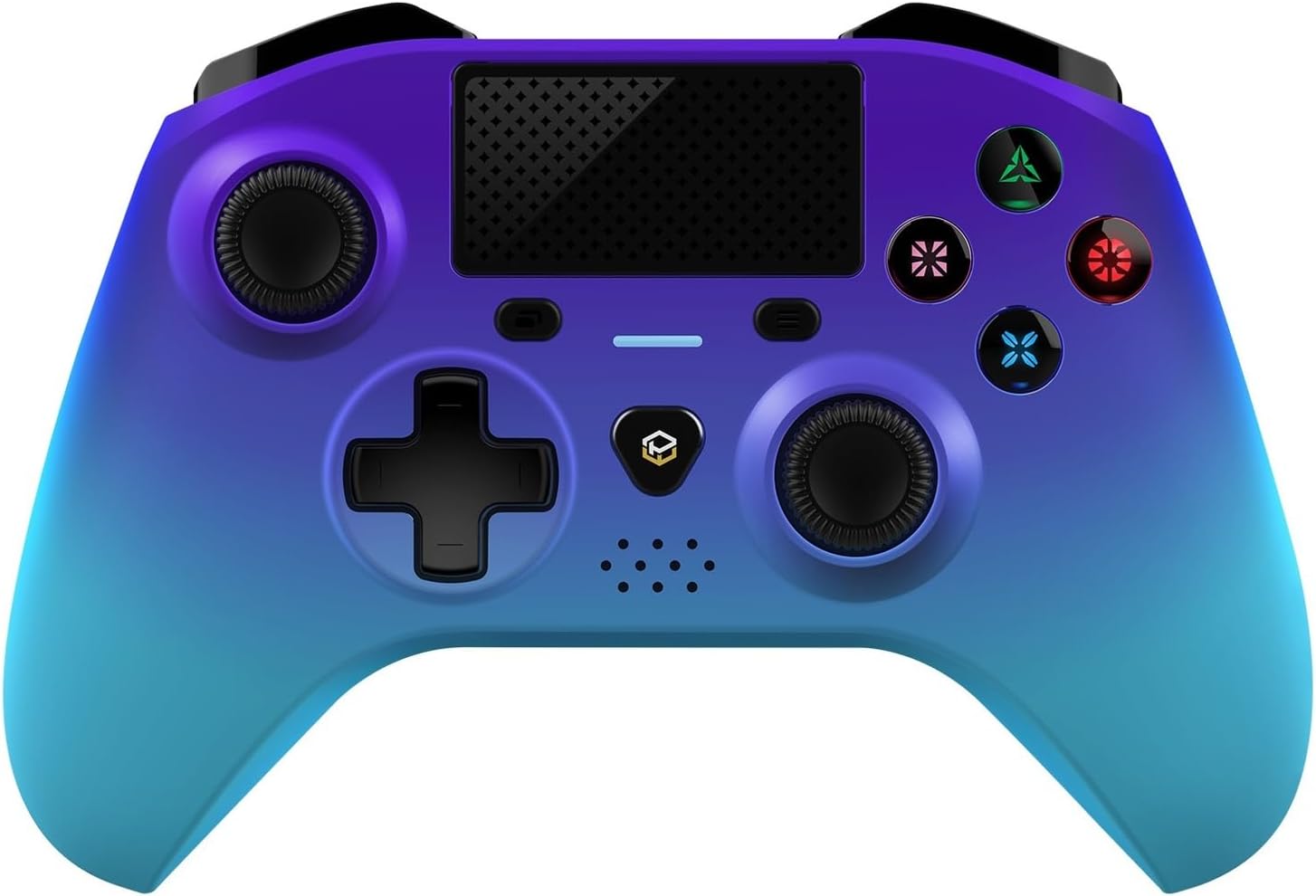
Imej: Bahagian hadapan terperinci view of the Powerwave Wireless Controller in Purple Rush color, showcasing its buttons, joysticks, touchpad, and LED display.
- Kesambungan Bluetooth Wayarles: For seamless gaming without cables.
- LED Display Buttons: Illuminated buttons for enhanced visibility.
- Bateri boleh dicas semula: Built-in lithium polymer battery for extended playtime.
- Teknologi Penderiaan Pergerakan: Integrated sensors for intuitive control in compatible games.
- Getaran Motor Dwi: Provides immersive haptic feedback during gameplay.
- Pad sentuh: Interactive surface for unique gameplay mechanics.
- Pembesar Suara Terbina dalam: Enhances audio experience directly from the controller.
- 3.5mm Stereo Audio Jack: For connecting headphones or headsets.
4. Panduan Persediaan
4.1 Mengecas Pengawal
- Connect the small end of the supplied USB charging cable to the micro-USB port on the front of the controller.
- Connect the larger end of the USB cable to an available USB port on your PlayStation 4 console or a compatible USB wall adapter (5V/1A recommended).
- The controller's LED indicator will show charging status. It will typically turn off or change color once fully charged.
4.2 Pairing with PlayStation 4
- Pastikan konsol PlayStation 4 anda dihidupkan.
- Connect the controller to the PS4 console using the supplied USB charging cable.
- Tekan ke Butang PS (the button with the PlayStation logo) in the center of the controller.
- The controller will automatically pair with the console. Once paired, you can disconnect the USB cable for wireless play.
- To pair additional controllers, repeat the steps above.
Note: If the controller does not pair, ensure it is fully charged and try connecting it to a different USB port on the console.
5. Mengendalikan Pengawal
5.1 Kawalan Asas
The Powerwave Wireless Controller features standard PlayStation layout buttons, including:
- Pad Arah (D-Pad): Untuk input arah.
- Butang Tindakan (Segitiga, Bulatan, Palang, Petak): Untuk tindakan dalam permainan.
- Kayu Analog Kiri dan Kanan: Untuk pergerakan yang tepat dan kawalan kamera.
- L1/R1 and L2/R2 Buttons: Shoulder and trigger buttons.
- Butang SHARE: For sharing gameplay moments.
- Butang OPTIONS: For accessing in-game menus.
- Butang PS: For accessing the PS4 home screen and power options.
- Pad sentuh: Functions as a clickable button and multi-touch surface.
5.2 Fungsi Lanjutan
- Penderiaan Pergerakan: Tilt and move the controller to interact with games that support motion controls.
- Maklum Balas Getaran: Experience realistic vibrations during gameplay, such as impacts or explosions.
- Output Audio: Connect a 3.5mm headset to the audio jack for in-game sound and voice chat. Adjust volume through the PS4 system settings.
6. Penyelenggaraan dan Penjagaan
- Pembersihan: Gunakan kain lembut dan kering untuk membersihkan pengawal. Untuk kotoran degil, sedikit dampLap kain dengan air. Jangan gunakan bahan kimia yang keras atau pembersih yang kasar.
- Storan: Simpan pengawal di tempat yang sejuk dan kering jauh dari cahaya matahari langsung dan suhu yang melampau.
- Penjagaan Bateri: Untuk memanjangkan hayat bateri, elakkan daripada menyahcas sepenuhnya pengawal dengan kerap. Mengecasnya dengan kerap, walaupun tidak digunakan untuk tempoh yang lama.
- Elakkan Titisan: Lindungi pengawal daripada kejutan fizikal dan jatuhan, yang boleh merosakkan komponen dalaman.
7. Penyelesaian masalah
| Masalah | Penyelesaian yang Mungkin |
|---|---|
| Pengawal tidak dihidupkan. | Ensure the controller is fully charged. Connect it to the PS4 via USB cable and try pressing the PS button. |
| Pengawal tidak berpasangan dengan PS4. |
|
| Input lag or disconnection during wireless play. |
|
| Vibration or motion sensing not working. | Check in-game settings and PS4 system settings to ensure these features are enabled. Some games may not support these features. |
8. Spesifikasi
| Ciri | Perincian |
|---|---|
| Ketersambungan | Bluetooth tanpa wayar |
| Keserasian | PlayStation 4, PS4 Slim, PS4 Pro |
| Jenis Bateri | 1 bateri Polimer Litium (termasuk) |
| Dimensi (lebih kurang) | 17.5 x 15.6 x 6.9 cm |
| Berat (lebih kurang) | 987 Gram |
| Port Audio | Bicu Audio Stereo 3.5mm |
| Pengenal Model (ASIN) | B0CKPF5X2N |
9. Waranti dan Sokongan
For warranty information and customer support, please refer to the documentation provided with your purchase or visit the official Powerwave webtapak. Simpan bukti pembelian anda untuk tuntutan waranti.
Untuk bantuan lanjut, anda juga boleh menghubungi peruncit tempat produk itu dibeli.
Tiada video penjual rasmi ditemui untuk produk ini.


