1. Pengenalan
Terima kasih kerana membeliasing the Omron HEM-6124 Wrist Blood Pressure Monitor. This device is designed to measure blood pressure and pulse rate simply and accurately at the wrist. Please read this manual thoroughly before using the unit to ensure safe and correct operation. Keep this manual for future reference.
2. Maklumat Keselamatan Penting
Always consult your physician. Self-diagnosis and treatment based on measurement results can be dangerous. Do not modify the device. Do not use this device on infants or individuals who cannot express their consent. Keep out of reach of children. Avoid using the device in areas with strong electromagnetic fields.
3. Komponen Produk dan Lebihview
The Omron HEM-6124 monitor consists of the main unit with an integrated wrist cuff. The package also includes AAA batteries and an instruction manual.

Rajah 1: Main unit and components. This diagram illustrates the key parts of the Omron HEM-6124, including the main unit, battery compartment, memory button, wrist cuff, display screen, and START/STOP button. It also shows the two AAA alkaline batteries and the instruction manual included in the package.
- Unit Utama: Contains the display, control buttons, and measurement sensor.
- Display (Visor): Shows blood pressure readings (SYS, DIA), pulse rate, and time.
- Memory Button (Botão Memória): Used to recall previous measurements.
- START/STOP Button (Botão "START/STOP"): Powers the unit on/off and starts/stops a measurement.
- Wrist Cuff (Braçadeira de pulso): Integrated cuff for wrist measurements.
- Battery Compartment (Compartimento das pilhas): Located on the side/back for AAA batteries.
4. Persediaan
4.1. Pemasangan Bateri
- Buka penutup petak bateri.
- Insert two "AAA" alkaline batteries according to the polarity markings (+/-).
- Tutup penutup petak bateri dengan selamat.
4.2. Memakai Manset Pergelangan Tangan
Correct cuff placement is essential for accurate readings. The cuff circumference for this model is 13.5 cm to 21.5 cm.
Rajah 2: Proper wrist cuff application. The top image shows the correct placement of the wrist cuff, with the monitor positioned on the inside of the wrist, approximately 1-2 cm from the palm, and at heart level. The two lower images illustrate incorrect placements, such as placing the monitor too far up the arm or with the wrist bent.
- Remove any tight clothing from your wrist.
- Apply the cuff to your left wrist (if you are right-handed) with the display facing upwards.
- The bottom edge of the cuff should be approximately 1 to 2 cm from the palm of your hand.
- Fasten the cuff snugly around your wrist using the hook and loop fastener. Ensure it is not too tight or too loose.
5. Arahan Operasi
5.1. Mengambil Pengukuran
- Sit Correctly: Sit in a chair with your feet flat on the floor. Rest your arm on a table so that the cuff is at the same level as your heart. Relax and avoid talking or moving during the measurement.
- Letakkan Monitor: Ensure the monitor is positioned correctly on your wrist as shown in Figure 2.
- Mulakan Pengukuran: Press the "START/STOP" button. The cuff will begin to inflate automatically.
- Kekal Diam: Stay still and quiet until the measurement is complete.
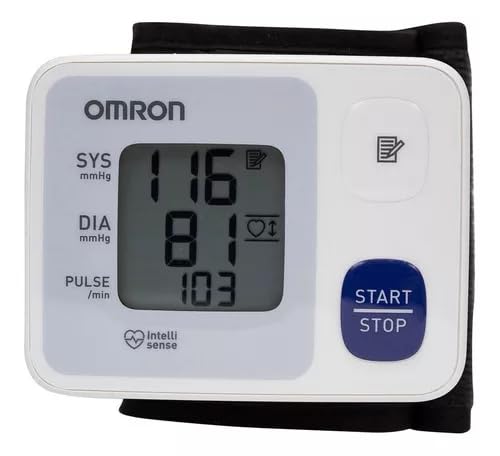
- View Keputusan: The systolic pressure (SYS), diastolic pressure (DIA), and pulse rate (PULSE) will be displayed on the screen.
- Matikan: Press the "START/STOP" button again to turn off the unit, or it will automatically shut off after a few minutes of inactivity.

Rajah 3: Displaying measurement results. This image shows the Omron HEM-6124 monitor with its digital display active, showing typical blood pressure readings (SYS and DIA) and pulse rate after a measurement has been taken.
5.2. Using the Memory Function
Kepada view previous measurements:
- With the unit off, press the "Memory" button.
- Ukuran terkini akan dipaparkan dahulu.
- Press the "Memory" button repeatedly to scroll through older readings.
6. Penyelenggaraan
6.1. Pembersihan
Wipe the monitor and cuff with a soft, dry cloth. If necessary, use a cloth lightly dampened with water or a mild detergent, then wipe dry. Do not use abrasive cleaners or immerse the unit in water.
6.2. Penyimpanan
Store the unit in a clean, dry place. Avoid extreme temperatures, humidity, direct sunlight, and dust. Do not store the unit with the cuff tightly rolled or twisted.
6.3. Penggantian Bateri
When the low battery indicator appears on the display, replace both batteries with new "AAA" alkaline batteries. Ensure correct polarity.
7. Penyelesaian masalah
| Masalah | Kemungkinan Punca | Penyelesaian |
|---|---|---|
| Unit tidak dihidupkan. | Bateri mati atau tidak dimasukkan dengan betul. | Gantikan bateri dengan yang baharu, memastikan kekutuban yang betul. |
| Mesej ralat pada paparan. | Cuff tidak digunakan dengan betul, pergerakan semasa pengukuran, atau nadi tidak teratur. | Reapply cuff, remain still, or consult physician if irregular pulse persists. |
| Bacaan tidak konsisten. | Improper body position, talking during measurement, or environmental factors. | Ensure correct posture, relax, and take multiple measurements at different times. |
8. Spesifikasi
- model: HEM-6124
- Wrist Cuff Circumference: 13.5 cm hingga 21.5 cm
- Sumber Kuasa: 2 "AAA" alkaline batteries
- Dimensi Produk: Kira-kira 20 cm (Panjang) x 14 cm (Lebar) x 8 cm (Tinggi)
Catatan: Spesifikasi boleh berubah tanpa notis.
9. Waranti dan Sokongan
Untuk maklumat jaminan atau sokongan teknikal, sila rujuk kad jaminan yang disertakan dengan produk anda atau hubungi pengilang secara langsung. Simpan resit pembelian anda sebagai bukti pembelian.


