1. Maklumat Keselamatan Penting
Sila baca dan fahami semua arahan keselamatan sebelum memasang atau menggunakan produk ini. Kegagalan mematuhi arahan ini boleh mengakibatkan kecederaan atau kerosakan pada produk.
- Keselamatan Elektrik: Always unplug the charging station when not in use or before cleaning. Do not expose the charging station to liquids. Ensure the power cord is not pinched or damaged.
- Kestabilan: Do not overload the nightstand with heavy items, especially on the top surface or in drawers, to prevent tip-over. Always place the nightstand on a flat, stable, and level surface.
- Sumber Haba: Keep the nightstand away from direct heat sources, open flames, and excessive moisture.
- Mata Cubit: Exercise caution when opening and closing drawers to avoid pinching fingers or other objects.
- Perhimpunan: Always follow the assembly instructions carefully to ensure the nightstand's structural integrity and stability. Do not use power tools for assembly unless specifically instructed, as this may overtighten screws and damage components.
- Kanak-kanak dan Haiwan Kesayangan: Keep small parts and packaging materials away from children and pets during assembly.
2. Produk Lebihview
The Irontar Rattan Nightstand is a versatile piece of furniture designed for bedrooms, offering both storage and convenient charging capabilities. It features a blend of rattan-decorated drawers and a sturdy frame, providing a farmhouse aesthetic.
Ciri-ciri Utama:
- Stesen Pengecasan Bersepadu: Dilengkapi dengan 2 soket AC dan 2 port USB untuk pengecasan peranti yang mudah.
- Storan yang Luas: Features three large drawers with metal sliding rails for organized storage of personal items.
- Pembinaan Tahan Lama: Made from EPA-grade Particleboard and natural rattan.
- Reka Bentuk Serbaguna: Suitable for use as a bedside table, end table, or small storage cabinet.

Rajah 2.1: Depan view of the Irontar Rattan Nightstand, showcasing its design and charging station.
Dimensi:
The overall dimensions of the nightstand are approximately 23.6 inches (L) x 15.7 inches (W) x 28.5 inches (H).
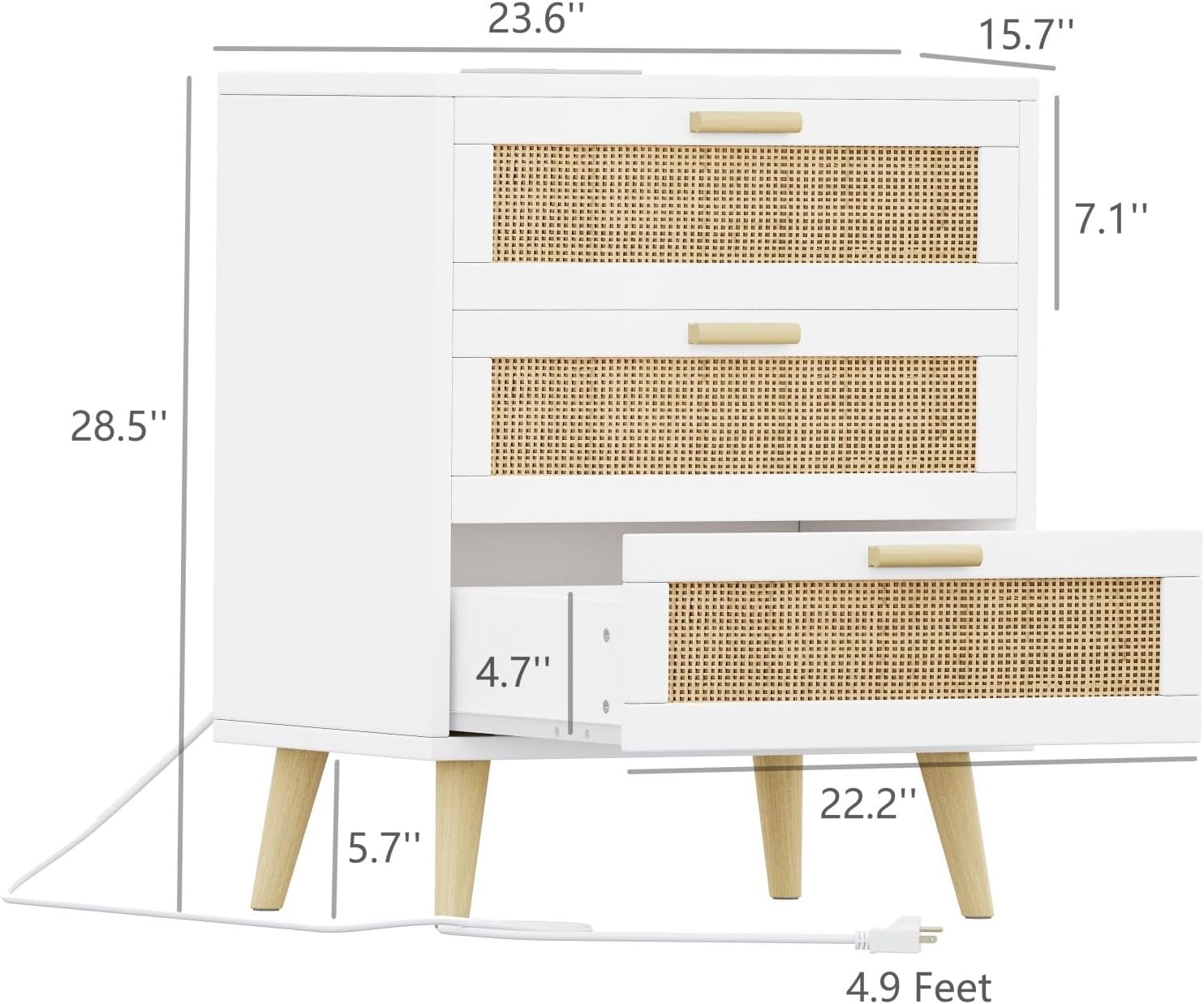
Figure 2.2: Detailed diagram showing the dimensions of the nightstand.
3. Persediaan dan Pemasangan
The Irontar Rattan Nightstand requires assembly. It is recommended to assemble the unit in the room where it will be used to avoid moving it after completion. Ensure you have ample space and a clean, soft surface to prevent scratching the components.
Sebelum Anda Bermula:
- Semak Kandungan: Unpack all components and hardware. Compare them with the parts list provided in your assembly manual to ensure nothing is missing or damaged. If any parts are missing or damaged, contact customer support immediately.
- Alat yang Diperlukan: Typically, a Phillips head screwdriver is needed. Some models may include an Allen wrench.
- Bantuan: While assembly can often be done by one person, having a second person can make the process easier and safer.
Langkah-langkah Pemasangan (Panduan Umum):
- Pasang Kaki: Securely attach the four wooden legs to the base of the nightstand frame using the provided screws.
- Pasang Bingkai: Connect the side panels, back panel, and top panel to form the main frame of the nightstand. Ensure all connections are tight and stable.
- Pasang Slaid Laci: Attach the metal drawer slides to the inside of the nightstand frame according to the instructions. Pay attention to the orientation of the slides.
- Pasang Laci: Construct each drawer by attaching the front, back, and side panels, then securing the bottom panel. Install the corresponding drawer slides onto the assembled drawers.
- Sisipkan Laci: Carefully slide the assembled drawers into the nightstand frame, ensuring they glide smoothly.
- Install Charging Station: Integrate the charging station unit into the designated slot on the top or back panel, securing it with screws if necessary.
- Semakan Akhir: Once assembled, gently shake the nightstand to ensure it is stable. Tighten any loose screws, but do not overtighten.

Figure 3.1: The nightstand fully assembled and placed in a bedroom environment.
4. Arahan Operasi
Menggunakan Stesen Pengecasan:
Stesen pengecasan bersepadu menyediakan akses kuasa yang mudah untuk peranti elektronik anda.
- Sambungan Kuasa: Plug the nightstand's power cord (approximately 4.9 feet long) into a standard wall outlet.
- Cawangan AC: Use the two 120V/12A AC outlets to power devices such as lampkomputer riba atau peralatan kecil yang lain.
- Port USB: Use the two 5V/2A USB ports to charge smartphones, tablets, e-readers, and other USB-powered devices.
- Peletakan Peranti: Place devices on the nightstand's surface while charging to ensure proper ventilation and prevent overheating.

Figure 4.1: Detail of the integrated charging station with AC outlets and USB ports.
Menggunakan Laci:
The three drawers offer ampruang penyimpanan untuk pelbagai barang.
- Pembukaan/Penutup: Gently pull the handles to open and push to close the drawers. The metal sliding rails ensure smooth operation.
- Kapasiti Storan: Utilize the drawers for storing books, personal accessories, electronics, or other bedside essentials.
- Pengagihan Berat: Distribute weight evenly within the drawers to maintain balance and prevent strain on the drawer slides.
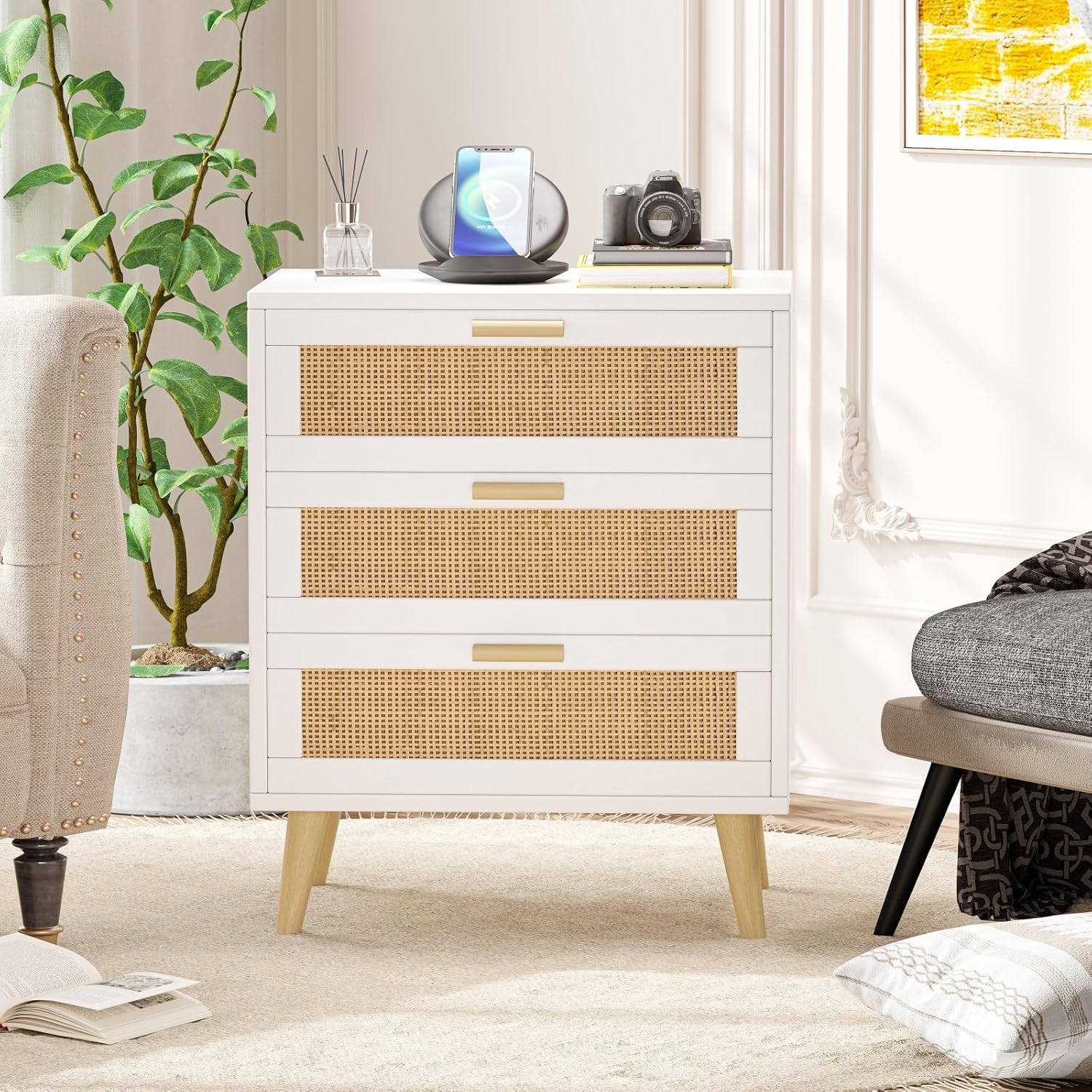
Figure 4.2: The nightstand with drawers partially open, illustrating the spacious interior.
5. Penyelenggaraan
Regular maintenance will help preserve the appearance and functionality of your Irontar Rattan Nightstand.
- Membersihkan Permukaan: Wipe the nightstand's surfaces with a soft, damp kain. Elakkan menggunakan pembersih yang kasar, bahan kimia yang keras atau pengilat yang boleh merosakkan kemasan.
- Penjagaan rotan: For the rattan elements, gently dust with a soft brush or cloth. If necessary, wipe with a slightly damp kain dan keringkan segera. Elakkan kelembapan berlebihan.
- Rel Laci: Periodically check the drawer slides for any debris or dust that might impede smooth operation. You may apply a small amount of silicone spray to the rails if they become stiff.
- Pemeriksaan perkakasan: Every few months, check all screws and fasteners to ensure they are tight. Retighten if necessary, but do not overtighten.
- Tumpahan: Immediately wipe up any spills to prevent staining or damage to the wood and rattan.
6. Penyelesaian masalah
This section addresses common issues you might encounter with your nightstand.
| Masalah | Kemungkinan Punca | Penyelesaian |
|---|---|---|
| Stesen pengecasan tidak berfungsi. | Not plugged in; loose connection; power outage; overloaded circuit. | Ensure the nightstand's power cord is securely plugged into a working wall outlet. Check for loose connections at the charging station unit. Try plugging another device into the wall outlet to confirm power. Reduce the number of devices plugged into the charging station. |
| Drawers are difficult to open/close or stick. | Misaligned drawer slides; debris in rails; overtightened screws; uneven assembly. | Check if drawers are inserted correctly onto the slides. Inspect rails for any obstructions and clean them. Loosen screws on drawer slides slightly if they appear too tight. Verify that the nightstand frame is assembled squarely and is on a level surface. |
| Nightstand feels wobbly or unstable. | Pengikat longgar; lantai tidak rata; pemasangan yang salah. | Check and tighten all assembly screws. Ensure the nightstand is placed on a flat, level surface. If the floor is uneven, use furniture pads or shims under the legs to stabilize. Review arahan pemasangan untuk memastikan semua langkah telah diikuti dengan betul. |
| Rattan appears damaged or frayed. | Physical impact; excessive moisture/dryness. | Avoid sharp objects or excessive force on the rattan. Keep away from extreme humidity or dryness. For minor fraying, carefully trim loose strands with small scissors. For significant damage, contact customer support. |
7. Spesifikasi
| Jenama | Irontar |
| Nombor Model | BZZ006102 |
| warna | Putih dan Semula Jadi |
| Dimensi Produk (L x W x H) | 59.94 x 39.88 x 70.1 cm (23.6 x 15.7 x 28.5 inci) |
| Berat Barang | 17.96 kg (39.6 lbs) |
| Cadangan Berat Maksimum | 75 Paun (lebih kurang 34 kg) |
| bahan | EPA-grade Particleboard, Rattan |
| Ciri Khas | Charging Station, Storage, USB Port |
| Kedai AC | 2 (120V/12A) |
| Port USB | 2 (5V/2A) |
| Panjang Kord Kuasa | 4.9 Kaki |
8. Waranti dan Sokongan
For information regarding product warranty, please refer to the documentation included with your purchase or contact the manufacturer directly. Warranty terms and conditions may vary.
Sokongan Pelanggan:
If you have any questions, require assistance with assembly, or need to report missing/damaged parts, please contact Irontar customer support through their official website or the retailer from whom you purchased the product. Please have your model number (BZZ006102) and purchase details ready when contacting support.


