pengenalan
Thank you for choosing the Zimati 14-inch 63 LED Snowflake Window Light. This manual provides detailed instructions for the safe and effective use of your new decoration. Please read it thoroughly before installation and operation.

Image: The Zimati 14-inch 63 LED Snowflake Window Light, showcasing its cool white illumination and intricate design, ready for festive display.
Apa yang Termasuk
Your Zimati Snowflake Window Light package includes the following components:
- 1 x 14-inch Snowflake LED Light (with 63 cool white LEDs)
- 1 x Alat Kawalan Jauh
- 1 x Cangkuk Cawan Sedutan
- 1 x USB Power Cable (10 feet long)

Image: A visual representation of all items included in the package: the snowflake light, remote control, suction cup, and USB power cable.
Spesifikasi
| Ciri | Perincian |
|---|---|
| Nombor Model | 0202002 |
| Dimensi (L x W x H) | 14 x 0.2 x 14.4 inci |
| Berat Barang | 11.7 auns |
| Warna Cerah | Putih Sejuk |
| Bilangan LED | 63 |
| Bahan Bingkai | logam |
| Sumber Kuasa | USB (5 Volt) |
| Panjang Kabel USB | 10 kaki |
| Bateri Kawalan Jauh | 1 x bateri CR2 (termasuk) |
| Ciri Khas | 8 Lighting Modes, Timer Function, Remote Control |
Persediaan
1. Battery Installation for Remote Control
- Cari petak bateri di belakang alat kawalan jauh.
- Open the compartment and insert 1 CR2 battery, ensuring correct polarity.
- Tutup petak bateri dengan selamat.
2. Mounting the Snowflake Light
- Clean the desired surface (glass door, window, or ceramic wall) thoroughly to ensure the suction cup adheres properly.
- Tekan cawan sedutan dengan kuat ke atas permukaan yang bersih.
- Hang the snowflake light using the top hanging hole on the suction cup hook.
- Alternatively, if not using the suction cup, the light can be hung from a pin or screw in a wall using the integrated hanging loop.
3. Sambungan Kuasa
- Connect the USB power cable to any standard USB power source (e.g., USB charger, USB socket, power bank, computer).
- Nota: A USB adapter is not included with this product.

Image: Illustration of the snowflake light's USB power compatibility with various devices like USB chargers, power banks, and computers.

Image: A snowflake light securely attached to a window using its suction cup hook, ready for illumination.
Video: This video demonstrates the installation process of the snowflake window lights, including battery insertion and mounting with the suction cup.
Arahan Operasi
Fungsi Kawalan Jauh:
- HIDUP/MATI: Tekan untuk menghidupkan atau mematikan lampu.
- MOD (1-8): Select from 8 distinct lighting modes:
- Gabungan
- Dalam Gelombang
- Berurutan
- Cahaya Perlahan
- kilat
- Pudar perlahan
- Kelip-kelip
- Tetap Hidup
- Brightness Adjustment (DIM +/-): Laraskan keamatan cahaya mengikut pilihan anda.
- PEMASA: Activate the timer function. The lights will stay on for 6 hours and then automatically turn off for 18 hours, repeating the cycle daily.
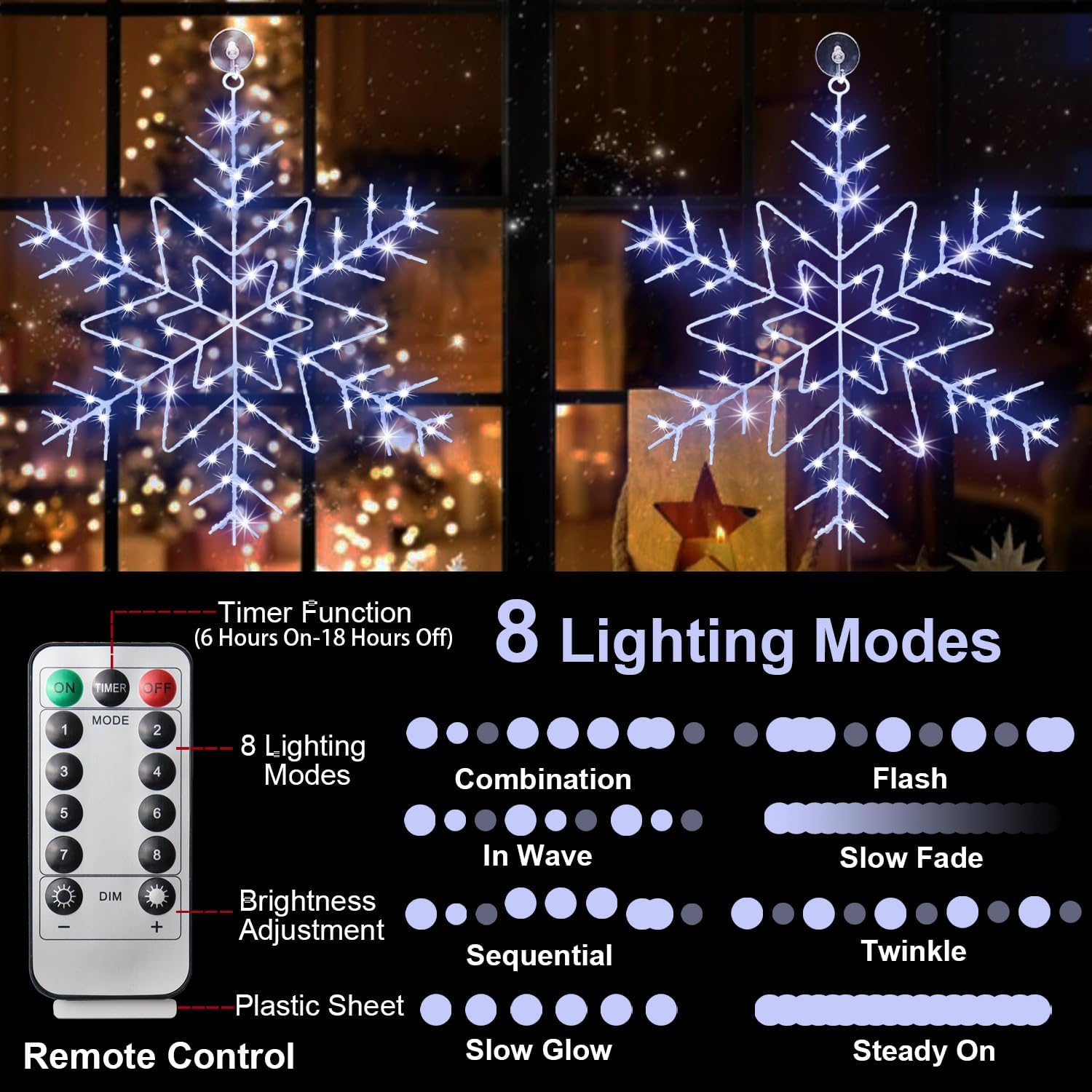
Image: The remote control displaying its various buttons for mode selection, brightness adjustment, and timer activation, alongside the illuminated snowflake lights.
Video: This video showcases the various lighting modes and effects of the Zimati snowflake window lights.
Penyelenggaraan
- Pembersihan: Gently wipe the snowflake light with a soft, dry cloth. Avoid using abrasive cleaners or solvents.
- Storan: When not in use, store the light in its original packaging or a protective container in a cool, dry place to prevent tangling and damage.
- Penggantian Bateri: If the remote control's functionality diminishes, replace the CR2 battery.
Menyelesaikan masalah
| Masalah | Kemungkinan Punca | Penyelesaian |
|---|---|---|
| Lampu tidak menyala. | No power to the USB connection. | Ensure the USB cable is securely plugged into a working power source. Try a different USB port or adapter. |
| Alat kawalan jauh tidak berfungsi. | Bateri alat kawalan jauh mati atau dipasang dengan salah. | Replace the CR2 battery in the remote control, ensuring correct polarity. Remove any plastic tab if it's new. Ensure there are no obstructions between the remote and the light's receiver. |
| Timer function is inaccurate. | Internal clock deviation. | Reset the timer by turning the lights off and on, then reactivating the timer function at the desired time. |
Maklumat Keselamatan
For outdoor use, ensure the USB power source is suitable for outdoor conditions and protected from moisture. Keep the product away from flammable materials. Follow local guidelines for battery disposal.
Waranti dan Sokongan
For warranty information or technical support, please refer to the product packaging or contact Zimati customer service directly. Keep your purchase receipt for warranty claims.