pengenalan
This manual provides detailed instructions for the setup, operation, and maintenance of the Geevon Digital Indoor Outdoor Thermometer, models 228646 and 23190. This device is designed to monitor indoor and outdoor temperature and humidity, helping you maintain comfortable and healthy living conditions.
The thermometer features a large display, wireless sensors, and various alert functions to keep you informed about environmental changes.
Kandungan Pakej
- Unit Paparan Utama (1)
- Wireless Outdoor Sensors (3)
- USB Power Cable (for Model 23190)
- Manual Pengguna (Dokumen ini)
Nota: Bateri AAA diperlukan untuk operasi dan tidak disertakan.
Produk Selesaiview

Imej 1: Main display units (white and black models) with three wireless outdoor sensors. The white unit features a larger display, while the black unit is more compact.

Imej 2: Terperinci view of the black display unit, highlighting features such as indoor/outdoor temperature and humidity, comfort level, Max/Min record, temperature trends, °C/°F selector, temperature/humidity alert, and multi-channel display for sensors 1, 2, and 3.
Persediaan
1. Menghidupkan Unit Utama
The main display unit can be powered by either AAA batteries or a USB cable (for Model 23190).
- Kuasa Bateri: Insert 3 AAA batteries (not included) into the battery compartment on the back of the main unit, observing correct polarity (+/-).
- USB Power (Model 23190 only): Connect the provided USB cable to the main unit and a USB power source (e.g., charger, notebook, power bank). Using USB power will keep the backlight on continuously.

Imej 3: Illustration of the two power supply modes: USB power (charger, notebook, tablet, power bank) and 3 AAA battery power (batteries not included).
2. Powering the Wireless Sensors
Each wireless sensor requires batteries for operation.
- Open the battery compartment on the back of each wireless sensor.
- Insert 2 AAA batteries (not included) into each sensor, ensuring correct polarity.
- Tutup petak bateri dengan selamat.
3. Penempatan dan Penggandingan Sensor
The main unit supports connection with up to three wireless sensors, allowing you to monitor different locations simultaneously. The wireless transmission range is up to 200 feet (60 meters) in open air.
- Place the wireless sensors in desired locations such as a greenhouse, basement, or other rooms. Ensure they are within the transmission range of the main unit.
- The main unit will automatically attempt to connect to the sensors upon power-up. If a sensor does not connect, press the "CH/A" button on the main unit to cycle through channels or press the reset button on the sensor.
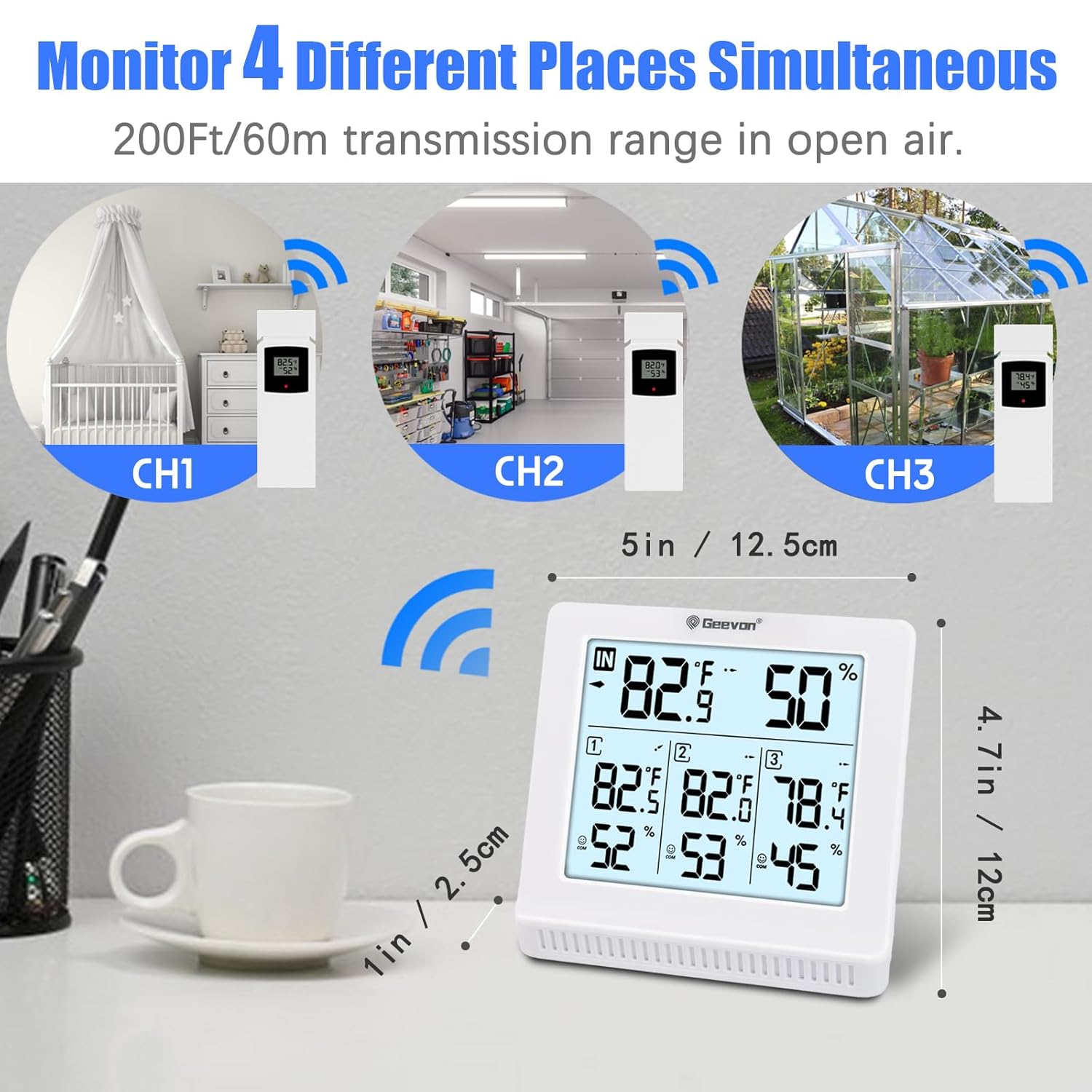
Imej 4: The white main unit displaying readings from three wireless sensors (CH1, CH2, CH3) placed in different environments like a baby's room, garage, and greenhouse. The transmission range is 200ft/60m.

Imej 5: The black main unit monitoring four different places simultaneously, demonstrating its capability to receive data from multiple remote sensors within a 200ft/60m range.
4. Main Unit Placement
The main unit offers flexible placement options:
- Stand Atas Meja: Gunakan penyangga bersepadu untuk meletakkan unit di mana-mana permukaan rata.
- Pemasangan Dinding: Utilize the mounting hole on the back to hang the unit on a wall.

Imej 6: Various placement options for the main unit: wall mount, tabletop stand, and hanging, illustrating its adaptability to different environments.
Arahan Operasi
1. Ciri Paparan
- Suhu & Kelembapan Dalaman: Displays the current temperature and humidity at the main unit's location.
- Outdoor Sensor Readings: Shows temperature and humidity for up to three remote sensors (CH1, CH2, CH3).
- Backlight (Model 23190): The 5-inch large LCD display features a backlight for easy reading, especially in low-light conditions. When powered by USB, the backlight remains on.
- Rekod Maks/Min: The device records the maximum and minimum temperature and humidity readings over the past 24 hours. These records update daily.
- Anak Panah Trend: Arrows indicate whether temperature and humidity are rising, falling, or remaining stable.
- Penunjuk Keselesaan: A face icon indicates the comfort level based on current temperature and humidity:
- :) COMFORT: 40% ≤ Humidity ≤ 70% and 20°C ≤ Temperature ≤ 28°C (68°F ≤ Temperature ≤ 82.4°F)
- :( DRY: Kelembapan < 40%
- :( WET: Kelembapan > 70%

Imej 7: The white main unit's 5-inch large LCD display with backlight, illustrating its readability in both bright and dark environments. The "LIGHT" button is shown being pressed to activate the backlight.

Imej 8: Explanation of the face icon comfort indicator: DRY (humidity ≤ 40%), COMFORT (40% ≤ humidity ≤ 70% and 68°F ≤ temperature ≤ 82.4°F), and WET (humidity ≥ 70%).
2. Fungsi Butang
- MEM / ▼ Button:
- Tekan untuk view Max/Min temperature and humidity records.
- Press and hold to clear Max/Min records.
- In settings mode, use to decrease values.
- Press to switch between °C and °F.
- CH / ▲ Button:
- Press to cycle through the outdoor sensor channels (CH1, CH2, CH3, or auto-cycle).
- In settings mode, use to increase values.
- ALERT Button (if present):
- Press to activate/deactivate temperature and humidity alerts.
- Press and hold to enter alert setting mode, then use MEM/▼ and CH/▲ to set desired high/low alert values.
3. Temperature and Humidity Alerts
Both models feature audible alarms for high/low temperature and humidity. You can manually set the maximum and minimum alert values. The alarm will sound when the measured value reaches the pre-set threshold.
Penyelenggaraan
- Pembersihan: Wipe the display unit and sensors with a soft, dry cloth. Do not use abrasive cleaners or solvents.
- Penggantian Bateri: Replace batteries in the main unit and sensors when the low battery indicator appears on the display. Ensure correct polarity.
- Storan: Jika menyimpan peranti untuk tempoh yang lama, keluarkan semua bateri untuk mengelakkan kebocoran.
- Keadaan Persekitaran: Avoid exposing the device to extreme temperatures, direct sunlight, or excessive moisture, which can affect accuracy and lifespan.
Menyelesaikan masalah
| Masalah | Kemungkinan Punca | Penyelesaian |
|---|---|---|
| Tiada paparan pada unit utama. |
|
|
| Outdoor sensor not connecting. |
|
|
| Bacaan yang tidak tepat. |
|
|
Spesifikasi
| Ciri | Perincian |
|---|---|
| Jenama | Geevon |
| model | 228646, 23190 |
| Penggunaan yang Disyorkan | Home temperature and humidity monitoring |
| Kegunaan Khusus | Humidity, Temperature |
| Sumber Kuasa (Unit Utama) | 3 x AAA Batteries (not included), USB Powered (Model 23190) |
| Sumber Kuasa (Sensor) | 2 x AAA Batteries per sensor (not included) |
| Ciri Khas | Alarm, Max/Min Record, Backlight (Model 23190) |
| Teknologi Ketersambungan | Wayarles, 433 MHz |
| Julat Penghantaran Tanpa Wayar | Up to 200ft / 60m (in open air) |
| Ketepatan Suhu | ±1 °C |
| Komponen yang Disertakan | Main Display Unit, Wireless Sensors, USB Cable (Model 23190) |
Hubungi dan Sokongan
For further assistance, troubleshooting, or warranty information, please refer to the contact details provided with your purchase or visit the official Geevon webtapak.


