pengenalan
This manual provides detailed instructions for the operation and maintenance of your Sharp Alarm Clock. Please read this manual thoroughly before using the product to ensure proper function and longevity. This alarm clock is designed for ease of use and features convenient charging options for your devices.
Ciri-ciri Utama
- Super Fast USB-C Charging: Equipped with a USB Type-C port for rapid charging of compatible smartphones, including the latest models.
- Cepat 2 Amp Pengecasan USB-A: Includes a standard USB Type-A port delivering 2 Amps for efficient charging of various devices.
- Dwi Penggera: Tetapkan dua penggera bebas untuk waktu bangun yang berbeza.
- Tunda 9 Minit: Provides a convenient snooze function for extra rest.
- 3-Step Dimmer: Adjustable display brightness with three levels to suit your preference.
- Easy-to-Read Green LED Display: Clear 0.7-inch green LED numbers for visibility day or night.
- Sandaran Bateri Pilihan: Retains time and alarm settings during power outages (requires 2 x AAA batteries, not included).
Produk Selesaiview
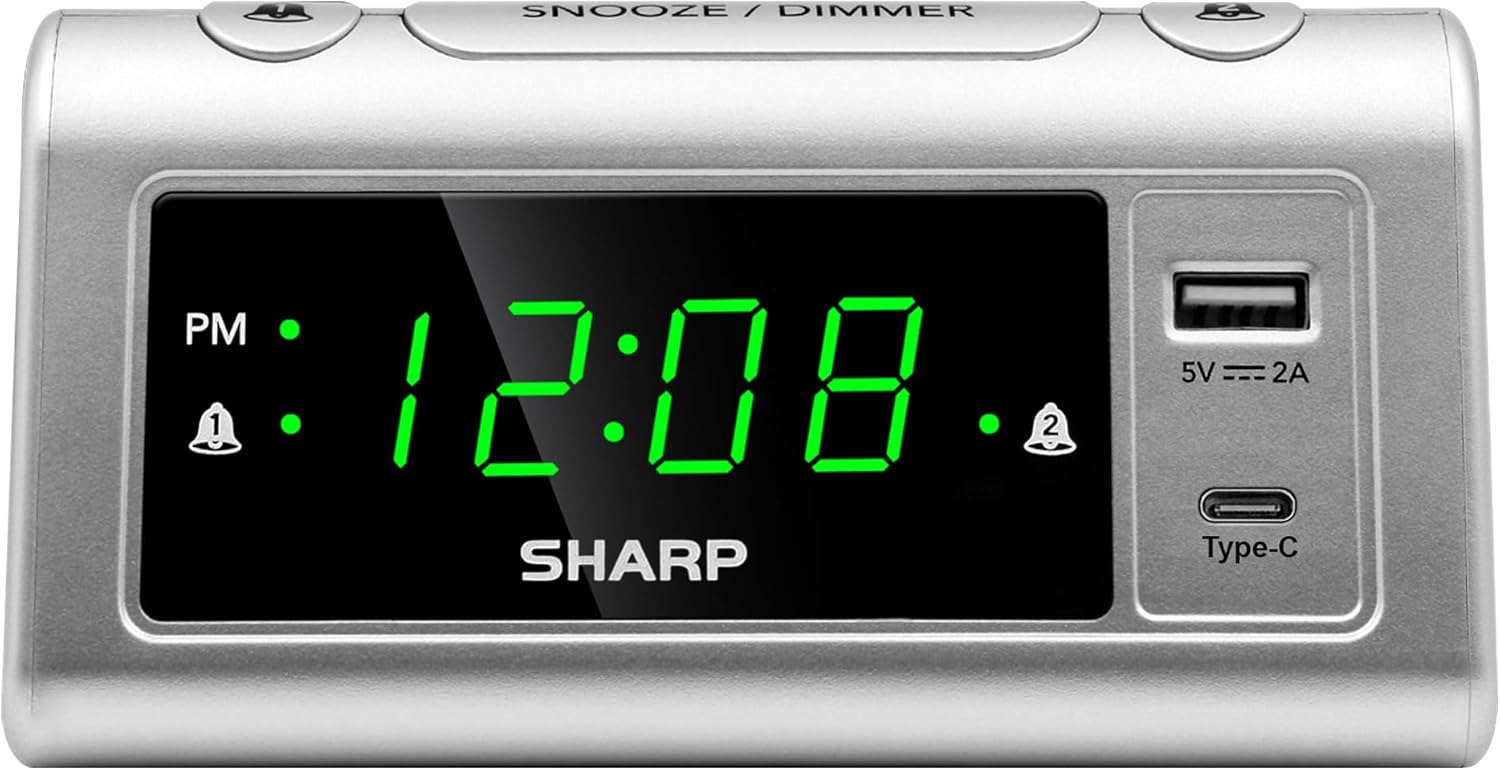
Depan view of the Sharp Alarm Clock, showcasing the large green LED time display, PM indicator, alarm indicators, and the integrated USB-A and USB-C charging ports on the right side.

Atas ke bawah view of the alarm clock with labels indicating the 'Time Set', 'Time Advancing', 'Time Receding', 'Alarm 1 Set ON/OFF', 'Alarm 2 Set ON/OFF', 'Snooze/Dimmer Control (3-Levels of Brightness)', 'Super Fast Charging USB-C', and 'Fast Charging 2 Amp USB'. Dimensions are also shown as 5.65 inches wide and 2.95 inches high.
Persediaan
1. Sambungan Kuasa
Plug the AC power cord into a standard 120V AC wall outlet. The clock display will illuminate, and the time will default to 12:00 AM.
2. Pemasangan Sandaran Bateri
For optional battery backup, insert 2 x AAA batteries (not included) into the battery compartment located on the bottom of the unit. This feature ensures that time and alarm settings are retained during a power interruption. The display will not be lit during battery backup, but the alarm will still sound.

The bottom of the alarm clock, revealing the battery compartment for 2 AAA batteries (not included) to provide backup power for settings.
Arahan Operasi
1. Menetapkan Masa
- Tekan dan tahan butang MASA DITETAPKAN butang. Angka jam akan mula berkelip.
- Sambil pegang MASA DITETAPKAN, tekan butang JAM butang berulang kali untuk melaraskan jam. Perhatikan penunjuk PM untuk tetapan AM/PM yang betul.
- Sambil pegang MASA DITETAPKAN, tekan butang MINIT butang berulang kali untuk melaraskan minit.
- Lepaskan MASA DITETAPKAN butang untuk mengesahkan masa.
2. Menetapkan Penggera (Penggera Dwi)
This clock features two independent alarms (Alarm 1 and Alarm 2).
- Tekan dan tahan butang PENGGERA 1 SET button. The hour digits for Alarm 1 will flash.
- Sambil pegang PENGGERA 1 SET, tekan butang JAM butang untuk menetapkan jam penggera yang diingini.
- Sambil pegang PENGGERA 1 SET, tekan butang MINIT butang untuk menetapkan minit penggera yang diingini.
- Lepaskan PENGGERA 1 SET butang untuk mengesahkan.
- Untuk mengaktifkan Penggera 1, tekan butang PENGGERA 1 HIDUP/MATI button until the alarm indicator (bell icon) appears next to 'AL1' on the display.
- Ulang langkah 1-5 untuk PENGGERA 2 SET dan PENGGERA 2 HIDUP/MATI to set and activate the second alarm.
3. Fungsi Tunda
Apabila penggera berbunyi, tekan butang besar TUNDA / DIMMER button on top of the clock. The alarm will pause for 9 minutes and then sound again.
4. Paparan Dimmer
To adjust the brightness of the LED display, repeatedly press the TUNDA / DIMMER button when the alarm is not sounding. Cycle through the three brightness levels (High, Medium, Low) and an Off setting.

The Sharp Alarm Clock displaying the time, with a hand adjusting the dimmer function on the top of the unit. This allows for comfortable viewdalam pelbagai keadaan pencahayaan.
5. Port Pengecasan USB
The alarm clock features both a USB Type-C port and a standard USB Type-A port for charging your electronic devices. Simply connect your device's charging cable to the appropriate port on the right side of the clock.
- USB Jenis-C: Provides super-fast charging for compatible devices like the iPhone 15 or Galaxy smartphones.
- USB Jenis-A: Menghantar 2 Amps of fast charging power for other USB-powered devices.

The Sharp Alarm Clock with a smartphone connected to its USB-C port, indicating active charging. The clock also features a USB-A port for additional device charging.
Penyelenggaraan
- Pembersihan: Lap jam dengan kain lembut dan kering. Jangan gunakan pembersih atau pelarut yang kasar.
- Kord Kuasa: Periksa kord kuasa secara kerap untuk sebarang kerosakan. Jika rosak, hentikan penggunaan dan hubungi sokongan pelanggan.
- Penggantian Bateri: Replace AAA backup batteries annually or when the clock's settings are no longer retained during power outages.
Menyelesaikan masalah
| Masalah | Penyelesaian |
|---|---|
| Paparan jam kosong. | Ensure the AC power cord is securely plugged into a working outlet. Check if the dimmer is set to 'Off'. |
| Penggera tidak berbunyi. | Verify that the alarm is set and activated (bell icon visible). Check the alarm time is correct (AM/PM). |
| USB ports are not charging. | Ensure the clock is powered via AC. Check the charging cable and device compatibility. |
| Masa/tetapan hilang selepas kuasa outage. | Install fresh AAA batteries for the backup function. |
Spesifikasi
- Jenama: tajam
- model: B0CHXR25FJ
- warna: Perak
- Jenis Paparan: LED (Hijau)
- Dimensi Produk: 5.56"W x 2.67"H
- Sumber Kuasa: Elektrik Bertali
- Bateri tambahan: 2 x bateri AAA (tidak termasuk)
- Output USB-C: Pengecasan Super Cepat
- Keluaran USB-A: 2 Amps Fast Charging
- Ciri Khas: Charging Port, Corded, Dual Alarms, 3-Step Dimmer, Snooze
Video Produk Rasmi
An official video from Sharp, titled 'Sharp Clocks - Keeps the Rhythm of Your Day', showcasing the features and design of Sharp alarm clocks, including this model.
Waranti dan Sokongan
For warranty information or technical support, please refer to the documentation included with your product or visit the official Sharp webtapak. Simpan resit pembelian anda sebagai bukti pembelian untuk sebarang tuntutan waranti.


