1. Pengenalan
Terima kasih kerana membeliasing the COLSUR 3-in-1 Wireless Charging Station, Model S28-BK. This device is designed to provide convenient wireless charging for your compatible smartphone, smartwatch, and wireless earbuds, along with an integrated alarm clock and night light function. Please read this manual carefully before use to ensure proper operation and to maximize the product's lifespan.
2. Maklumat Keselamatan
- Jangan buka atau ubah suai peranti.
- Jauhkan peranti daripada air, kelembapan dan suhu tinggi.
- Use only the provided power adapter (QC3.0 adapter recommended for optimal performance).
- Avoid placing metal objects, magnets, or credit cards between the charging surface and your device, as this may interfere with charging or damage the device.
- Pastikan pengudaraan yang betul di sekitar stesen pengecasan semasa penggunaan.
3. Kandungan Pakej
Sahkan bahawa semua item terdapat dalam pakej anda:
- COLSUR 3-in-1 Wireless Charging Station (S28-BK)
- Kabel Pengecasan USB Jenis-C
- Penyesuai Kuasa QC3.0
- Cable Storage Case (for watch/earbud cables)
- Manual Pengguna
Note: Cables for earbuds and smartwatches are not included and must be supplied by the user. For optimal fit, these cables should be shorter than 0.9 meters.
4. Produk Lebihview
The COLSUR S28-BK integrates multiple functions into a compact design, providing a centralized solution for charging and bedside convenience.

Imej 4.1: Depan view of the COLSUR 3-in-1 Wireless Charging Station, showing a smartphone, smartwatch, and earbuds charging simultaneously, with the digital clock and night light illuminated.
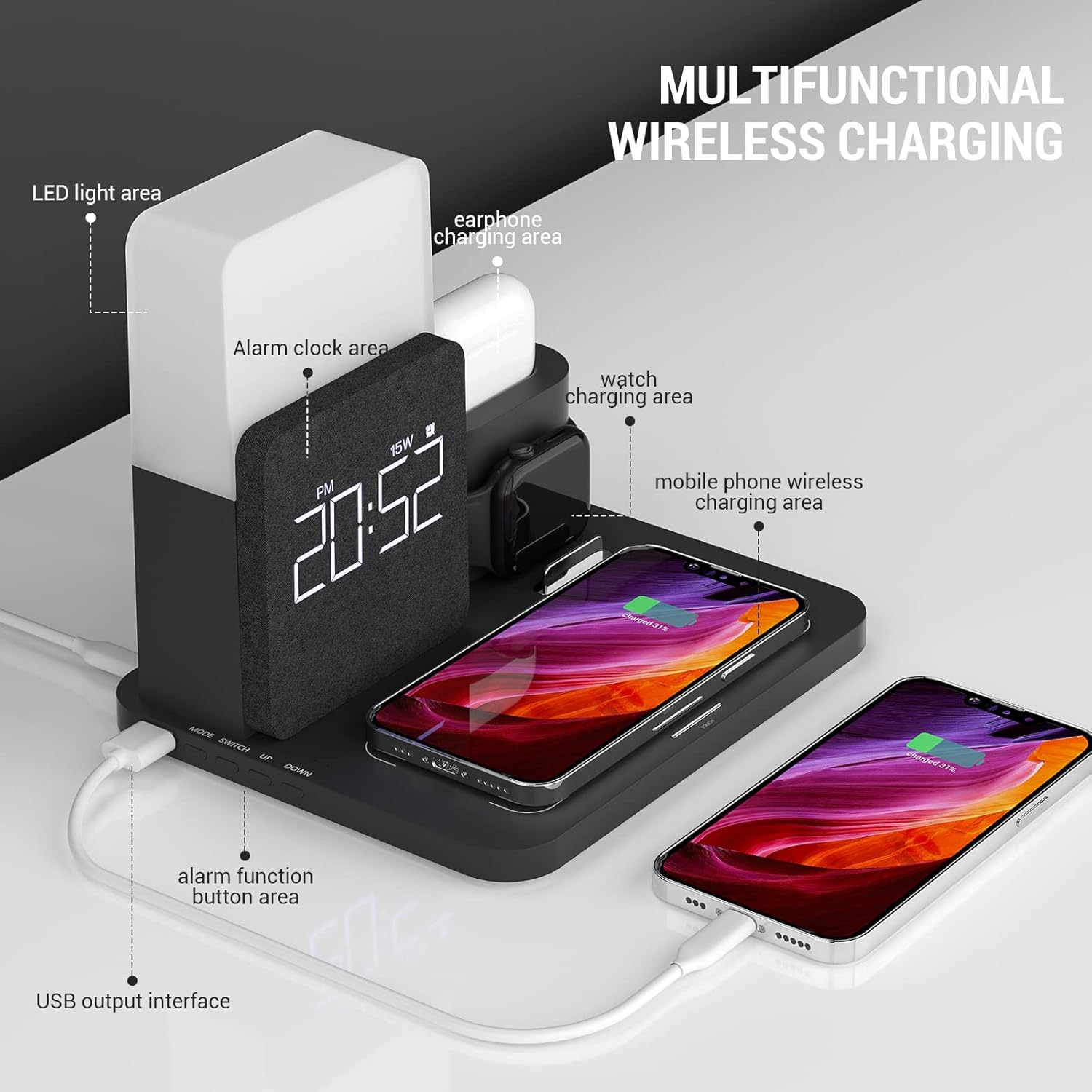
Image 4.2: Detailed diagram highlighting the LED light area, alarm clock area, earphone charging area, watch charging area, mobile phone wireless charging area, alarm function button area, and USB output interface.
Komponen Utama:
- Pad Pengecasan Wayarles: For Qi-compatible smartphones (up to 15W).
- Smartwatch Charging Stand: Integrated area for compatible smartwatches.
- Earbud Charging Dock: Dedicated slot for wireless earbud cases.
- Jam Penggera Digital: Displays time and alarm settings.
- Cahaya Malam: Kecerahan dan suhu warna boleh laras.
- Port Keluaran USB: For additional wired charging.

Image 4.3: Illustration demonstrating case compatibility for smartphone wireless charging. Cases up to 5mm thickness are supported, while metal cases, magnets, grips, and credit cards should be avoided.
5. Arahan Persediaan
5.1 Sambungan Kuasa
- Connect the provided USB Type-C cable to the input port on the back of the charging station.
- Plug the other end of the USB Type-C cable into the QC3.0 power adapter.
- Insert the power adapter into a wall outlet. The digital display will illuminate, indicating the device is powered on.
5.2 Smartwatch and Earbud Cable Installation
The charging station requires your original smartwatch and earbud charging cables to be installed for their respective charging functions.

Imej 5.1: Jarak dekat view of the independent input interfaces for smartwatch and earbud charging, illustrating where to connect your own charging cables.
- Open the cable storage case on the charging station.
- Carefully route your smartwatch charging cable and earbud charging cable through the designated channels.
- Connect the USB ends of these cables to the internal USB ports within the storage case.
- Secure the cables and close the storage case. Ensure the charging pucks/connectors are properly positioned in their respective docks.
6. Arahan Operasi
6.1 Wireless Charging for Smartphones
Place your Qi-compatible smartphone horizontally on the main charging pad. Ensure the phone is centered on the pad for optimal charging. The charging indicator on your phone will confirm charging has begun. This pad supports up to 15W fast wireless charging.
6.2 Charging for Smartwatches and Earbuds
- Jam pintar: Place your smartwatch onto the dedicated stand. Ensure the watch's charging area aligns with the installed charging puck.
- Earbud: Insert your wireless earbud case into the earbud charging dock. Ensure the charging port of the case connects with the installed cable connector.
Note: If charging is slow or inconsistent, verify that your device is correctly positioned on the charging area. Phone cases thicker than 5mm, or those containing metal, magnets, grips, or credit cards, may interfere with wireless charging.
6.3 Fungsi Jam Penggera
The digital display shows the current time. Refer to the buttons on the device (e.g., 'SET', 'UP', 'DOWN') to adjust the time and set alarms. Specific button functions may vary; consult the quick start guide included with your product for detailed instructions on setting the alarm and time.
6.4 Night Light Operation
The integrated night light offers adjustable brightness and color temperature. Locate the touch control area, typically on the top or side of the light panel.
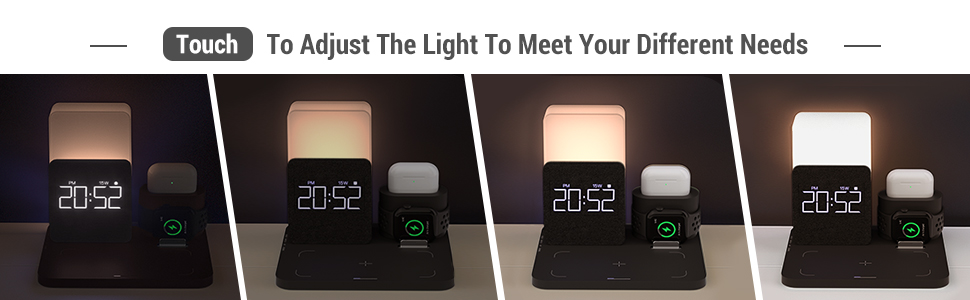
Image 6.1: Visual representation of the night light's adjustable brightness and color temperature settings (2000K, 4000K, 6000K).
- Hidupkan/Matikan: Tap the touch control area.
- Laraskan Kecerahan: Long press the touch control area to cycle through brightness levels (1% to 100%). Release when desired brightness is reached.
- Tukar Suhu Warna: Short press the touch control area to switch between different color temperatures (e.g., warm white, natural white, cool white).
6.5 USB Output Interface
A standard USB output port is located on the side of the charging station. This port can be used to charge other devices via a USB cable, providing an additional charging option.
7. Penyelenggaraan
- Pembersihan: Disconnect the power before cleaning. Use a soft, dry cloth to wipe the surface of the charging station. Do not use abrasive cleaners or solvents.
- Storan: Apabila tidak digunakan untuk tempoh yang lama, simpan peranti di tempat yang sejuk dan kering jauh dari cahaya matahari langsung.
8. Penyelesaian masalah
| Masalah | Kemungkinan Punca | Penyelesaian |
|---|---|---|
| Peranti tidak dicas secara wayarles | Incorrect device placement; phone case too thick or contains metal; incompatible device; power adapter not sufficient. | Reposition device to center it on the charging pad. Remove thick or metallic cases. Ensure device is Qi-compatible. Use the provided QC3.0 adapter. |
| Kelajuan pengecasan perlahan | Device not optimally aligned; background apps consuming power; using a non-QC3.0 adapter. | Ensure precise alignment. Close unnecessary apps. Use the provided QC3.0 adapter for fast charging. |
| Smartwatch/Earbuds not charging | Cables not properly installed; device not correctly seated; faulty cable. | Check cable connections within the storage case. Ensure smartwatch/earbud case is correctly placed. Try a different cable if available. |
| Lampu malam tidak berfungsi | Not powered on; touch control not responding. | Ensure the main power is connected. Tap or long-press the touch control area. |
| Alarm clock display off | Peranti tidak dihidupkan. | Verify the power adapter is connected and plugged into a working outlet. |
9. Spesifikasi
| Ciri | Perincian |
|---|---|
| Nombor Model | S28-BK |
| Jenama | COLSUR |
| Input Voltage | 9 Volt |
| Input Amppemadam | 2 A |
| Output Pengecasan Tanpa Wayar | Up to 15W (for compatible smartphones) |
| Peranti Serasi | Smartphones (Qi-compatible, e.g., iPhone 8-16 series, Samsung S10-S21, Note 10, Google Pixel 3/3XL/4XL), Smartwatches (iWatch SE 9/8/7/6/5/4/3/2), Wireless Earbuds (AirPods 2/Pro/Pro Max). |
| Ciri Khas | Fast Charging, Charging Indicator, Alarm Clock, Night Light (adjustable brightness/color temperature), USB Output Port |
| warna | Hitam |
10. Waranti dan Sokongan
COLSUR products are designed for reliability and performance. This product comes with a standard manufacturer's warranty. For detailed warranty information, please refer to the warranty card included in your package or visit the official COLSUR webtapak.
If you encounter any issues or have questions regarding your COLSUR 3-in-1 Wireless Charging Station, please contact our customer support team. You can typically find contact information on the product packaging, the COLSUR brand store on Amazon, or the official COLSUR webtapak.
When contacting support, please have your product model number (S28-BK) and purchase details ready.


