1. Pengenalan dan Lebihview
The Dyson V15 Detect Absolute is a high-performance cordless vacuum cleaner engineered for deep cleaning across various floor types. It features advanced technology to detect microscopic dust particles and display real-time cleaning data, ensuring a thorough clean every time. This manual provides essential information for the safe and efficient operation and maintenance of your Dyson V15 Detect Absolute.
2. Persediaan
2.1 Membongkar dan Memasang
Carefully remove all components from the packaging. The Dyson V15 Detect Absolute comes with several attachments designed for different cleaning tasks. Assemble the main unit by connecting the wand to the motorhead and the desired cleaning head. Ensure all connections click securely into place.

Figure 1: Assembled Dyson V15 Detect Absolute with long wand and floor head.

Gambar 2: Lebihview of the various cleaning attachments for versatile use.
2.2 Mengecas Bateri
Before first use, fully charge the vacuum's Lithium-Ion battery. Connect the charger to a power outlet and then to the charging port on the vacuum. The LED display will indicate the charging status. A full charge typically takes several hours. It is recommended to charge the vacuum after every use to ensure optimal performance.
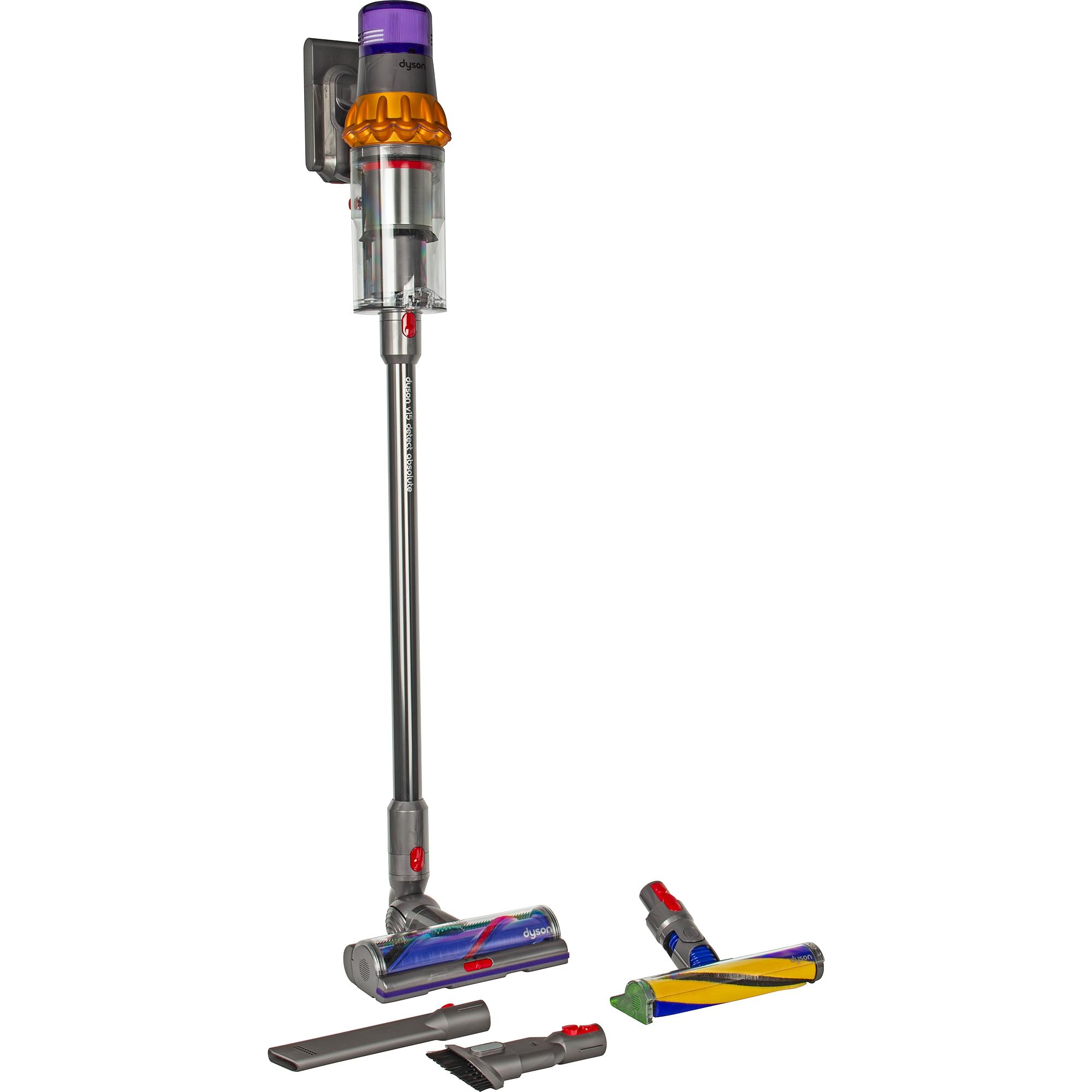
Figure 3: The main unit of the Dyson V15 Detect Absolute, ready for charging or use.
3. Arahan Operasi
3.1 Menghidupkan dan Mematikan
To turn on the vacuum, press the power button located on the main unit. Press it again to turn off the vacuum.
3.2 Selecting Power Modes
The Dyson V15 Detect Absolute offers multiple power modes to suit different cleaning needs:
- Mod Eko: Provides the longest run time for lighter cleaning tasks.
- Mod Auto: Intelligently adapts suction power based on floor type and debris level, balancing power and run time.
- Mod Rangsangan: Delivers maximum suction for intensive spot cleaning or heavily soiled areas. Note that Boost mode will deplete the battery faster.
Cycle through the modes using the mode selection button on the display.
3.3 Using the Detect Feature
The Fluffy Optic™ cleaner head features a precisely angled laser that reveals microscopic dust on hard floors, making invisible dust visible. This allows for more thorough cleaning. The LCD screen on the main unit displays the size and quantity of dust particles collected, providing scientific proof of a deep clean.
3.4 Attaching and Detaching Tools
To attach a cleaning tool, align it with the end of the wand or the main unit and push until it clicks into place. To detach, press the red release button on the tool and pull it away.

Figure 4: The main unit with a brush attachment, suitable for various surfaces.
4. Penyelenggaraan
4.1 Mengosongkan Tong Sampah
The Dyson V15 Detect Absolute features a bagless dustbin. To empty, hold the vacuum over a trash can, push the red lever forward to release the bin, and then push it down to open the base and empty the contents. Close the bin until it clicks securely.
4.2 Washing the Filter
For optimal performance, wash the filter at least once a month. Twist the filter counter-clockwise to remove it from the main unit. Wash the filter under cold running water until the water runs clear. Squeeze and twist to remove excess water. Allow the filter to air dry completely for at least 24 hours before reinserting it into the vacuum. Do not use a washing machine, tumble dryer, or microwave.
5. Penyelesaian masalah
If your Dyson V15 Detect Absolute is not performing as expected, please check the following:
- Tiada Kuasa: Ensure the battery is fully charged. Check that the charger is properly connected to both the vacuum and the power outlet.
- Sedutan Berkurangan: Check the dustbin and empty it if full. Inspect the filter and wash it if dirty, ensuring it is completely dry before reassembly. Look for blockages in the cleaner head, wand, or main unit and clear any obstructions.
- Cleaner Head Not Spinning: Check for blockages in the cleaner head brush bar. Ensure the cleaner head is correctly attached.
- Mesej Ralat: Refer to the LCD screen for specific error codes or messages and consult the Dyson support webtapak untuk penyelesaian terperinci.
6. Spesifikasi
| Ciri | Spesifikasi |
|---|---|
| Jenama | Dyson |
| Nombor Model | 446986-01 |
| Adakah Cordless? | ya |
| Kapasiti | 0.76 Liter |
| warna | Hitam |
| Jenis Bateri | Litium-Ion |
| Tahap Kebisingan | 68 Desibel |
| Jenis Pengawal | Butang Tekan |
| Berat Barang | 6.6 paun (3 Kilogram) |
| Voltage | 25.2 Volt |
7. Waranti dan Sokongan
Your Dyson V15 Detect Absolute comes with a manufacturer's warranty. Please refer to the warranty card included in your product packaging for specific terms and conditions. For technical support, spare parts, or to register your product, visit the official Dyson website or contact Dyson customer service. Keeping your product registered can assist with warranty claims and support.
Untuk maklumat lanjut, lawati Dyson Store on Amazon.


