1. Pengenalan
This manual provides detailed instructions for the installation, operation, and maintenance of your Fortdows 4+32GB Car Radio. This head unit features a 10.1-inch HD touchscreen, Android 12 operating system, wireless CarPlay/Android Auto, Bluetooth, GPS, FM radio, DSP sound processing, and support for steering wheel controls and backup cameras. Please read this manual thoroughly before use to ensure proper functionality and safety.
2. Maklumat Keselamatan
- Sentiasa kendalikan peranti dengan penuh tanggungjawab dan mengikut undang-undang lalu lintas tempatan. Pemanduan yang terganggu boleh mengakibatkan kemalangan.
- Ensure all wiring connections are secure and properly insulated to prevent short circuits and electrical hazards.
- Jangan cuba membuka atau mengubah suai unit. Ini boleh membatalkan jaminan dan menyebabkan kerosakan.
- Pastikan skrin bersih dan bebas daripada halangan untuk mengekalkan keterlihatan yang jelas.
- If you encounter any issues, refer to the troubleshooting section or contact customer support.
3. Kandungan Pakej
Sahkan bahawa semua item yang disenaraikan di bawah disertakan dalam pakej anda:
- Fortdows Car Stereo Radio x1
- Canbus x1
- Mikrofon Luaran x1
- Antena GPS x1
- Bar linggis x1
- Kabel Kuasa x1
- Backup Camera x1
- Kabel RCA x1
- Kabel USB x2
- Manual Arahan x1
- Antenna Adapter Cable (if applicable)
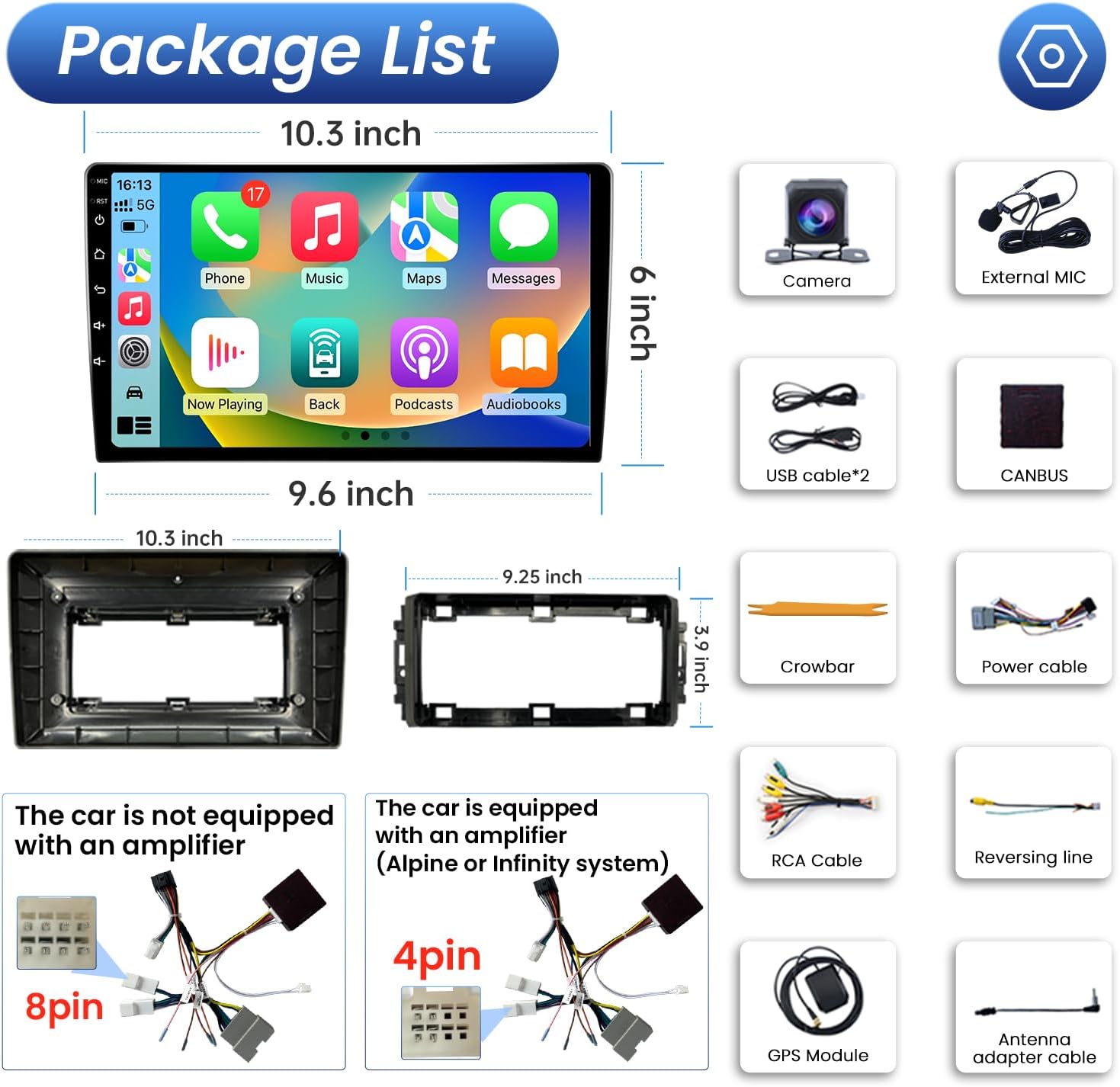
Rajah 3.1: Illustration of the Fortdows Car Radio and its included accessories, such as the camera, external microphone, USB cables, CANBUS, crowbar, power cable, backup camera, RCA cable, and GPS module.
4. Persediaan dan Pemasangan
This head unit is designed for specific Jeep and Dodge models, offering a plug-and-play installation with the factory power harness. Professional installation is recommended.
4.1 Applicable Car Models
- Jeep Wrangler 2007-2018
- Jeep Compass 2009-2016
- Jeep Patriot 2009-2016
- Jeep Grand Cherokee 2005-2011
- Jeep Liberty 2008-2011
- Jeep Commander 2008-2011
- Chrysler Sebring 2007-2010
- Town&Country 2007-2010
- Dodge Grand Caravan 2011-2014
- Pengecas Dodge 2008-2010
- Dodge Ram Pickup 1500/2500/3500 2009-2012
4.2 Langkah Pemasangan (Umum)
- Penyediaan: Putuskan sambungan bateri kenderaan untuk mengelakkan seluar pendek elektrik.
- Keluarkan Unit Lama: Carefully remove the existing car radio using the provided crowbar or appropriate tools.
- Sambungan Pendawaian: Connect the new head unit's power harness to the vehicle's factory wiring. Ensure proper connection for CANBUS, GPS antenna, external microphone, USB cables, RCA cables, and backup camera. Note that vehicles with an amplifier (e.g., Alpine or Infinity system) may require a specific 4-pin power harness, while others use an 8-pin harness.
- Kefungsian Ujian: Before fully securing the unit, reconnect the battery and test basic functions like power, sound, and screen display.
- Unit Selamat: Pasang unit kepala baharu dengan selamat ke dalam bukaan papan pemuka.
- Perhimpunan Akhir: Reassemble any removed trim pieces.
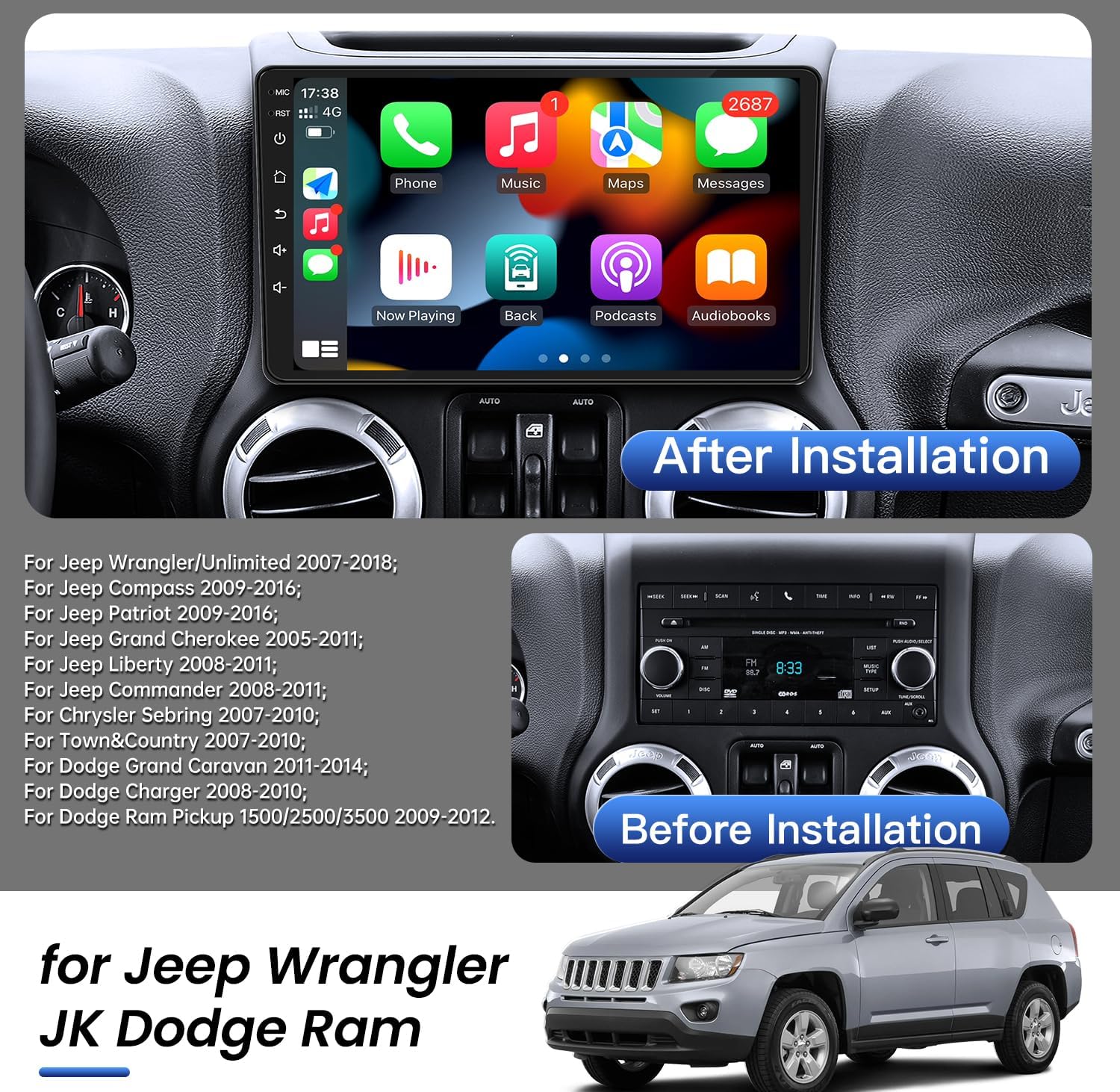
Rajah 4.1: Visual comparison of a car dashboard before and after the installation of the Fortdows car radio, highlighting the integrated appearance.
Rajah 4.2: Diagram showing the two types of power cables (8-pin for cars without an amplifier and 4-pin for cars with an amplifier like Alpine or Infinity systems) included with the Fortdows car radio.
5. Arahan Operasi
5.1 CarPlay Wayarles & Android Auto
The head unit supports both wireless and wired CarPlay and Android Auto. This feature allows seamless integration with your smartphone for navigation, calls, messages, and music playback via voice control or the touchscreen.
- Sambungan: Connect your iPhone or Android phone via Bluetooth and/or Wi-Fi as prompted by the unit.
- Kawalan Suara: Use voice commands (e.g., "Hey Siri" or "OK Google") to control phone functions without taking your hands off the wheel.
- ciri-ciri: Access GPS navigation, make calls, send messages, and play music directly from your phone's interface displayed on the car radio screen.
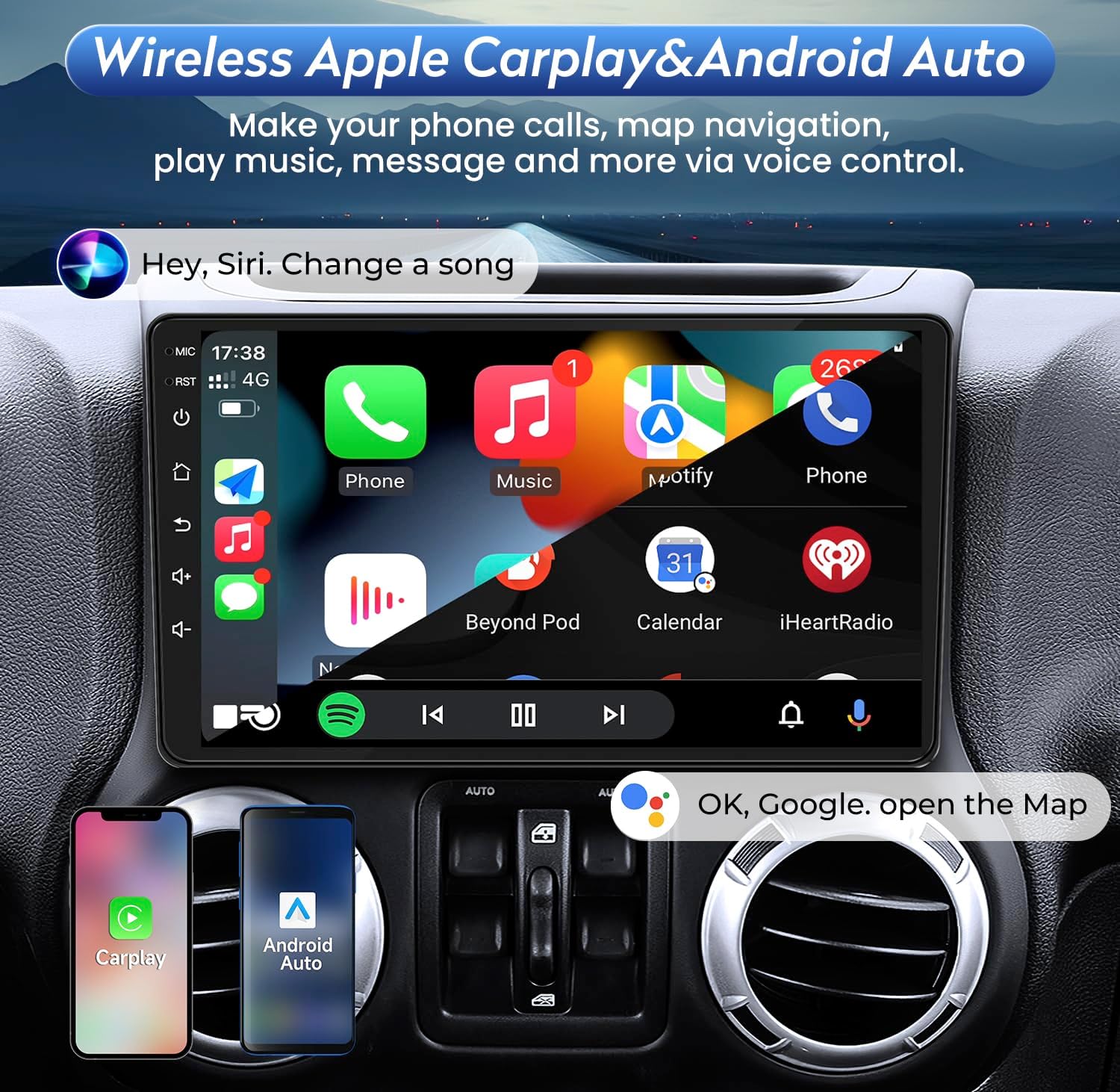
Rajah 5.1: The Fortdows car radio display showing the integrated Wireless Apple CarPlay and Android Auto interface, demonstrating voice control capabilities for navigation, music, and calls.
5.2 Android 12 System & HD Touchscreen
The unit operates on Android 12, providing a familiar and intuitive user experience. The 10.1-inch 1280*800 IPS touchscreen offers high fluency, clear visuals, and vivid colors.
- Navigasi: Swipe and tap gestures are used for navigating menus and applications.
- Pemasangan Apl: Download and install additional applications from the Google Play Store.
- Prestasi: The 4GB RAM and 8-core processor ensure smooth operation, while 32GB ROM provides ample storage for apps and media.
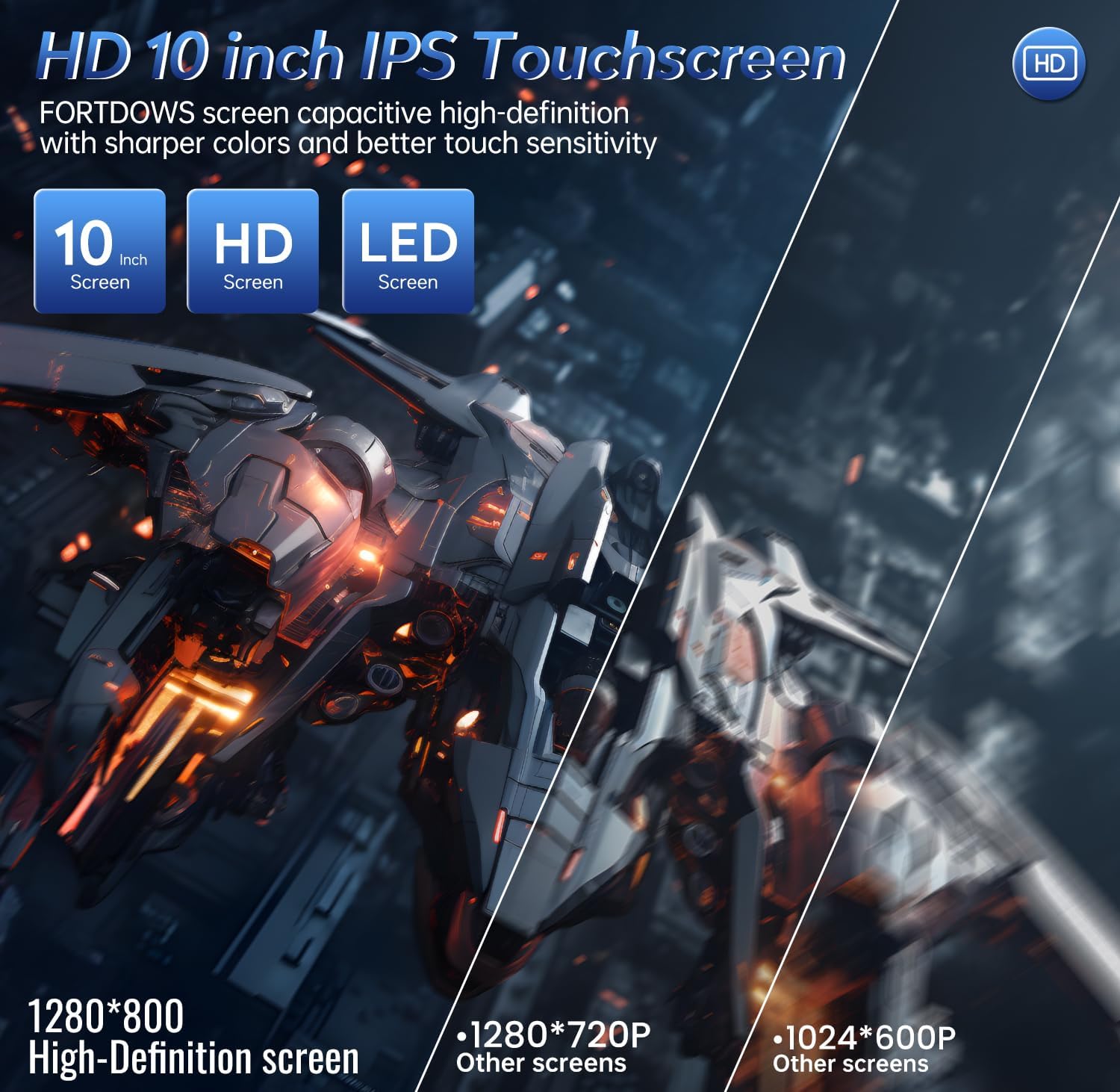
Rajah 5.2: A visual representation highlighting the 10-inch HD IPS touchscreen of the Fortdows car radio, emphasizing its 1280x800 resolution and superior clarity compared to other screens.
5.3 FM Radio & DSP Sound
Enjoy high-quality audio with the built-in FM radio and Digital Signal Processing (DSP) technology.
- Radio FM: Access the FM radio function to search for stations automatically or semi-automatically (frequency range 87.5-108MHz).
- DSP Sound: The DSP feature allows for advanced audio customization, including equalizer settings, sound field adjustments, and bass/subwoofer controls. You can adjust the position of the voice point according to the seat for an optimized listening experience.
- Splitscreen Audio: The system's ability to split sound channels allows for customized audio output in different vehicle areas.

Rajah 5.3: The Fortdows car radio display showing the Professional DSP interface, allowing users to adjust sound settings like EQ, sound field, stereo sound enhancement, bass, and sound filters for a customized audio experience.
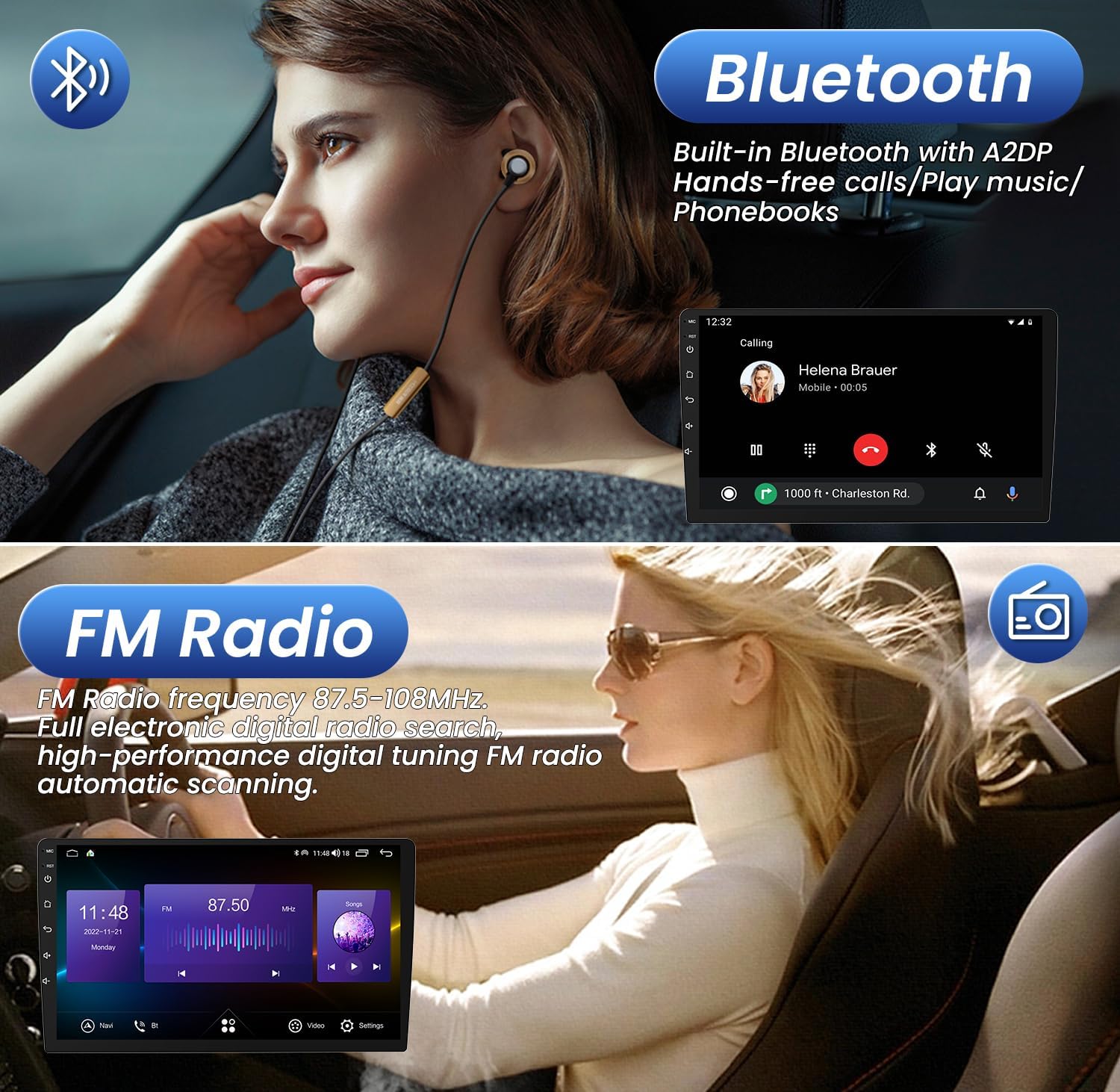
Rajah 5.4: The Fortdows car radio display showing the Bluetooth calling interface and the FM Radio interface, demonstrating hands-free communication and digital radio tuning.
5.4 GPS Navigation & WiFi Function
Navigate with ease using the built-in GPS and stay connected with Wi-Fi.
- Navigasi GPS: The unit comes with an offline map pre-installed. You can also download preferred navigation apps from the Google Play Store for online navigation.
- Kesambungan WiFi: Connect to a Wi-Fi network or use your mobile phone's hotspot to access online content, stream music/videos, browse the internet, and download apps.

Rajah 5.5: The Fortdows car radio display illustrating the WiFi function for downloading apps and the GPS navigation interface with a map view.
5.5 Steering Wheel Control (SWC) & Backup Camera
Enhance driving safety and convenience with integrated SWC and backup camera support.
- SWC: Program your vehicle's steering wheel buttons to control the head unit's functions (e.g., volume, track skip, answer/end calls) without diverting attention from the road.
- Kamera Sandaran: Unit secara automatik memaparkan bahagian belakang view when the vehicle is put into reverse, providing a clear view and enhancing safety during parking maneuvers.
5.6 Bluetooth & Splitscreen Function
Stay connected and multitask efficiently.
- Bluetooth: Pair your smartphone via Bluetooth for hands-free calling and audio streaming. Access your phone's contacts directly from the head unit.
- Splitscreen: Utilize the splitscreen feature to run two applications simultaneously, such as navigation on one side and music playback on the other, for improved efficiency.
6. Penyelenggaraan
Penyelenggaraan yang betul memastikan jangka hayat dan prestasi optimum radio kereta anda.
- Pembersihan Skrin: Gunakan kain lembut dan tidak berbulu sedikit dampened with water or a screen cleaner to wipe the touchscreen. Avoid abrasive materials or harsh chemicals.
- Kemas Kini Perisian: Periodically check for and install software updates to ensure the system runs efficiently and has the latest features and security patches. Updates can typically be found through the system settings or the manufacturer's webtapak.
- Penjagaan Am: Elakkan daripada mendedahkan unit kepada suhu yang melampau, cahaya matahari langsung untuk tempoh yang lama, atau kelembapan yang berlebihan.
7. Penyelesaian masalah
Jika anda menghadapi masalah, rujuk kepada masalah dan penyelesaian biasa berikut:
| Masalah | Kemungkinan Punca | Penyelesaian |
|---|---|---|
| Unit tidak dihidupkan. | Sambungan kuasa longgar, fius pecah, masalah bateri kenderaan. | Check all power cable connections. Inspect vehicle fuses. Ensure vehicle battery is charged. |
| Tiada bunyi dari pembesar suara. | Pendawaian pembesar suara tidak betul, kelantangan terlalu rendah, senyap diaktifkan, tetapan DSP. | Verify speaker connections. Increase volume. Check if mute is active. Adjust DSP settings. |
| Isyarat GPS hilang atau tidak tepat. | GPS antenna not properly installed or obstructed, outdated maps. | Pastikan antena GPS mempunyai jernih view langit. Kemas kini data peta jika perlu. |
| Isu sambungan Bluetooth. | Device not in pairing mode, interference, incorrect pairing process. | Pastikan kedua-dua peranti berada dalam mod berpasangan. Padamkan gandingan sebelumnya dan cuba lagi. Bergerak lebih dekat dengan unit. |
| Skrin sentuh tidak bertindak balas. | System freeze, dirty screen, software glitch. | Restart the unit (if possible). Clean the screen. If persistent, perform a factory reset (data loss may occur). |
If the problem persists after attempting these solutions, please contact Fortdows customer support.
8. Spesifikasi
Key technical specifications for the Fortdows 4+32GB Car Radio:
- Jenama: Fortdows
- Jenis Perkhidmatan Kenderaan: kereta
- Saiz Skrin: 10.1 Inci
- Resolusi: 1280 x 800 (HD Display)
- Sistem pengendalian: Android 12
- Pemproses: 8 teras
- RAM: 4GB
- ROM: 32GB
- Ciri Khas: CarPlay & Android Auto, Touchscreen, DSP Sound
- Teknologi Ketersambungan: Bluetooth, USB, Wi-Fi
- Jenis Peta: North America (built-in offline map)
- Mod Output Audio: Stereo
- Jenis Pemasangan: Pemasangan Papan Pemuka
9. Maklumat Waranti
For detailed warranty terms and conditions, please refer to the warranty card included with your product or visit the official Fortdows webtapak. Simpan bukti pembelian anda untuk tuntutan waranti.
10. Sokongan
If you require further assistance or have questions not covered in this manual, please contact Fortdows customer support through their official webtapak atau maklumat hubungan yang diberikan bersama dokumentasi pembelian anda.


