1. Pengenalan
Thank you for choosing the OMMO OM-LL14 16 Lines Green Laser Level. This precision tool is designed to provide accurate and reliable leveling for a wide range of applications, from home renovation to professional construction projects. Featuring 4x360° green laser lines, self-leveling capabilities, and a durable design, the OM-LL14 enhances efficiency and accuracy in your work. Please read this manual thoroughly before use to ensure safe and optimal operation.

Figure 1: OMMO OM-LL14 16 Lines Green Laser Level
2. Maklumat Keselamatan
AMARAN: This is a Class II laser product. Avoid direct eye exposure to the laser beam. Do not stare into the beam or view directly with optical instruments. Always operate the device in a safe manner.
- Do not disassemble the laser level. Repairs should only be performed by authorized service personnel.
- Jauhkan peranti daripada capaian kanak-kanak.
- Use only the specified batteries and charger.
- Pastikan kawasan kerja bebas daripada halangan dan potensi bahaya.
3. Kandungan Pakej
Sahkan bahawa semua item yang disenaraikan di bawah disertakan dalam pakej anda:
- 1 x OMMO OM-LL14 16 Lines Green Laser Level
- 1 x Magnetic Wall Bracket
- 2 x 3600mAh Rechargeable Li-ion Batteries
- 1 x Adjustable Lifting Base
- 1 x Manual Pengguna
- 1 x Membawa Beg
- 1 x Penyesuai Kuasa (Pengecas)
- 1 x Alat Kawalan Jauh
- 1 x Hang Up Converter (for tripod mounting)
- 1 x 1/4" Thread Adapter (for tripod mounting)
- 1 x Bracket Patch (Wall Mounting Plate)

Figure 2: OMMO Laser Level and included accessories.
4. Produk Lebihview
The OMMO OM-LL14 features a robust design with intuitive controls for various leveling tasks.
4.1 Ciri-ciri Utama
- 4x360° Green Laser Lines: Provides two horizontal and two vertical 360-degree laser planes for comprehensive coverage.
- Rotatable Laser Window: Each laser window can be rotated 360° to avoid blocked lines and vignetting, ensuring continuous laser projection.
- Mod Meratakan Sendiri: Automatically levels within a tilt angle of ±3°. An alarm sounds if the tilt exceeds this range.
- Mod Manual/Sendeng: Allows projection of inclined lines at any angle by locking the pendulum.
- Kecerahan boleh laras: Three brightness levels to suit different working conditions.
- Reka bentuk tahan lasak: Shockproof, waterproof, and dustproof for reliable performance in various environments.
- Bateri boleh dicas semula: Equipped with two 3600mAh Lithium-ion batteries for extended operation.
- Kawalan Jauh: Conveniently switch between laser lines and adjust brightness from a distance.
4.2 Kawalan dan Penunjuk
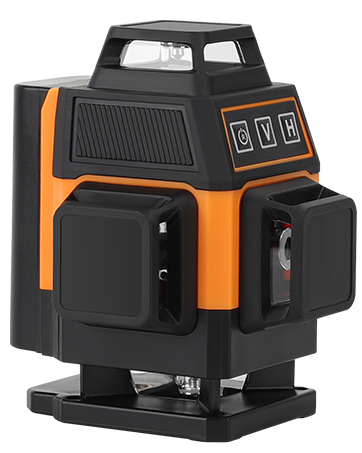
Rajah 3: Depan view of the OMMO OM-LL14 showing control panel.
- Penunjuk Bateri: Displays remaining battery life (4 bars = full, 1 bar = low).
- 'V' Button (Vertical Line): Activates/deactivates vertical laser lines.
- 'H' Button (Horizontal Line): Activates/deactivates horizontal laser lines.
- Power Button (Brightness Adjustment): Cycles through three brightness modes.
- Mode Switch (Side Slider): Toggles between Self-leveling (unlocked pendulum) and Manual/Tilt (locked pendulum) modes.
- Power On/Off Button (Bottom): Suis kuasa utama untuk peranti.
Video 1: This video demonstrates the OMMO 16 Lines Laser Level's features, including its rotatable laser windows, self-leveling and manual modes, brightness adjustment, and various mounting options. It also shows the remote control functionality and charging process.
5. Persediaan
5.1 Pemasangan dan Pengecasan Bateri
- Locate the battery compartment on the side of the laser level.
- Insert a fully charged 3600mAh Li-ion battery into the compartment, ensuring correct polarity. Slide it in until it clicks securely.
- To charge the battery, connect the power adapter to the charging port on the laser level or directly to the battery. The indicator light on the charger will show charging status (e.g., red for charging, green for fully charged).
- The battery indicator on the device's control panel will also show the current charge level.
5.2 Pilihan Pemasangan
The OMMO OM-LL14 offers versatile mounting options for different applications:
- Adjustable Lifting Base: For precise height adjustments on flat surfaces. The base can raise the laser from 1 inch to 3 inches.

Figure 4: The laser level mounted on its adjustable lifting base.
- Magnetic Wall Bracket: Attach the bracket to any magnetic surface (e.g., steel beams, refrigerator) for flexible positioning. It features adjustable knobs for fine-tuning horizontal and vertical angles.

Figure 5: The laser level attached to a magnetic wall bracket.
- Wall Mounting Plate: If a magnetic surface is unavailable, screw the metal plate into a wall, then attach the magnetic bracket to the plate.
- Pemasangan Tripod: Use the 1/4" thread adapter or hang up converter to mount the laser level onto a standard tripod (not included) for elevated or specialized setups.
6. Arahan Operasi
6.1 Hidupkan/Mati Kuasa
- To power on, slide the main power switch (located on the side/bottom) to the 'ON' position.
- To power off, slide the main power switch to the 'OFF' position.
6.2 Switching Modes (Self-leveling / Manual)
- Mod meratakan diri: Slide the mode switch to the unlocked pendulum icon. The device will automatically level itself. If the tilt angle exceeds ±3°, the laser lines will flash and an alarm will sound.
- Mod Manual/Sendeng: Slide the mode switch to the locked pendulum icon. The self-leveling function is deactivated, allowing you to project inclined lines at any desired angle without an alarm.

Figure 6: Illustration of Self-leveling Mode and Manual/Tilt Mode.
6.3 Activating Laser Lines
Use the 'V' and 'H' buttons on the control panel or remote control to activate specific laser lines:
- Press 'V' to cycle through vertical laser lines (one vertical, two vertical, off).
- Press 'H' to cycle through horizontal laser lines (one horizontal, two horizontal, off).
- You can combine vertical and horizontal lines as needed.

Figure 7: Various combinations of 360° vertical and horizontal laser lines.
6.4 Melaraskan Kecerahan
Press the Power button (brightness adjustment) on the control panel or the corresponding button on the remote control to cycle through three different brightness levels for the laser lines.
6.5 Menggunakan Alat Kawalan Jauh
The included remote control allows for convenient operation from a distance. It has dedicated buttons for vertical lines, horizontal lines, and brightness adjustment, mirroring the functions on the device's control panel.
7. Penyelenggaraan
- Pembersihan: Bersihkan tingkap laser dan badan peranti secara berkala dengan kain lembut dan kering. Jangan gunakan pembersih atau pelarut yang kasar.
- Storan: When not in use, store the laser level in its carry bag in a cool, dry place, away from direct sunlight and extreme temperatures. Ensure the pendulum is locked (Manual/Tilt mode) during storage and transport to prevent damage.
- Penjagaan Bateri: Charge batteries fully before long-term storage. If storing for extended periods, recharge every 3-6 months to maintain battery health.
- Penentukuran: If you suspect the laser level is out of calibration, consult a professional or contact OMMO customer support.
8. Penyelesaian masalah
| Masalah | Kemungkinan Punca | Penyelesaian |
|---|---|---|
| Laser not turning on. | Bateri lemah atau tidak dipasang dengan betul. | Charge the battery or ensure it is properly inserted. Check the main power switch. |
| Laser lines flashing and beeping in Self-leveling mode. | Device is tilted beyond its self-leveling range (±3°). | Place the device on a flatter surface or adjust the lifting base until it is within the self-leveling range. |
| Alat kawalan jauh tidak bertindak balas. | Remote battery is dead or out of range. | Replace the remote control battery. Ensure you are within the remote's operating range. |
| Laser lines are dim. | Tetapan kecerahan adalah rendah. | Press the brightness adjustment button to cycle to a brighter setting. |
9. Spesifikasi
| Ciri | Perincian |
|---|---|
| Jenama | OMMO |
| Nombor Model | OM-LL14 |
| Garisan Laser | 16 Lines (4x360° Green Laser) |
| Julat Meningkat Diri | ±3° |
| Mod Operasi | Automatic (Self-leveling) / Manual |
| Jenis Bateri | 2 x Lithium Ion (3600mAh each) |
| Sumber Kuasa | Dikuasakan Bateri |
| bahan | Akrilonitril Butadiena Stirena |
| Ciri Khas | Green-line, Self-leveling, Waterproof, Dustproof, Shockproof |
| Berat Barang | 2.51 paun |
| Dimensi Pakej | 8.86 x 8.15 x 3.82 inci |
| Tarikh Mula-mula Tersedia | 30 Ogos 2023 |
10. Waranti dan Sokongan
For warranty information, technical support, or any questions regarding your OMMO OM-LL14 laser level, please refer to the official OMMO brand store or contact their customer service directly.
Visit the OMMO Store: OMMO Official Store


