Produk Selesaiview
The VeriFone M400 Multiport Berg Adapter and Cable Assembly (MSC445-032-01-A) is designed to provide enhanced connectivity for Verifone Vx820 devices. This assembly includes an Ethernet Latch Lock 6P Din F 2M Cable, facilitating reliable data transmission and connection management. It is an essential component for integrating your Verifone Vx820 terminal into a network infrastructure.
Ciri-ciri utama termasuk:
- Ethernet Latch Lock 6P Din F 2M Cable for Verifone Vx820
- Part Number: CBL282-060-01-A
- Panjang Kabel: 2 Meter
Arahan Persediaan
Follow these steps to properly set up your VeriFone M400 Multiport Berg Adapter and Cable Assembly:
- Unpack the Assembly: Carefully remove the VeriFone M400 Multiport Berg Adapter and Cable Assembly from its packaging. Inspect for any visible damage.
- Kenal pasti Pelabuhan: Locate the Ethernet Latch Lock 6P Din F connector on the cable and the corresponding port on your Verifone Vx820 device. The adapter itself features multiple Ethernet ports for connection.
- Connect to Verifone Vx820: Insert the Ethernet Latch Lock 6P Din F connector of the cable into the designated port on your Verifone Vx820 terminal. Ensure the latch locks securely into place to prevent accidental disconnection.
- Sambungkan Kabel Rangkaian: Use standard Ethernet cables (not included) to connect your network devices (e.g., router, switch) to the Ethernet ports on the Multiport Berg Adapter. The adapter typically has multiple numbered ports (e.g., 1, 2, 3) as shown in the image below.
- Penempatan Selamat: Place the adapter in a stable location, ensuring cables are not strained or kinked.
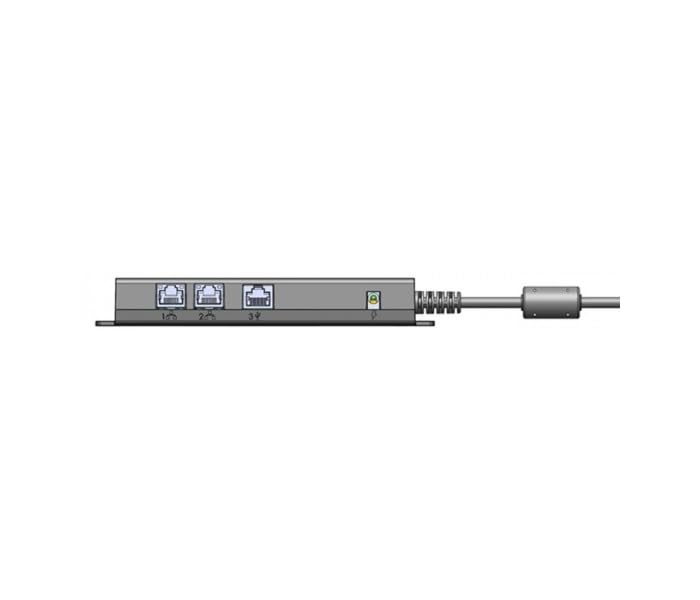
Image: The VeriFone M400 Multiport Berg Adapter showing its three Ethernet ports (labeled 1, 2, 3) and the attached cable assembly extending to the right. This adapter facilitates multiple network connections for compatible devices.
Arahan Operasi
Once the VeriFone M400 Multiport Berg Adapter and Cable Assembly is properly connected, its operation is largely passive, facilitating network communication for the connected Verifone Vx820 device.
- Kesambungan Rangkaian: The adapter acts as a bridge, allowing the Verifone Vx820 to communicate with your network via the connected Ethernet cables.
- Penghantaran Data: Data will flow through the adapter to and from the Verifone Vx820 terminal, enabling transactions and other network-dependent functions.
- Petunjuk Status: Some network devices or the Verifone Vx820 itself may have LED indicators to show network activity or connection status. Refer to the Verifone Vx820 manual for specific indicator meanings.
Penyelenggaraan
The VeriFone M400 Multiport Berg Adapter and Cable Assembly requires minimal maintenance to ensure optimal performance and longevity.
- Pembersihan: Periodically wipe the adapter and cable with a soft, dry, lint-free cloth. Do not use liquid cleaners, aerosols, or harsh chemicals, as these can damage the components.
- Pemeriksaan Kabel: Regularly inspect the cable for any signs of wear, fraying, or damage. Ensure the connectors are clean and free of debris.
- Keadaan Persekitaran: Store and operate the adapter in a dry environment, away from extreme temperatures, direct sunlight, and excessive dust.
- Sambungan Selamat: Ensure all cable connections remain secure. Loose connections can lead to intermittent network issues.
Menyelesaikan masalah
If you encounter issues with your VeriFone M400 Multiport Berg Adapter and Cable Assembly, consider the following troubleshooting steps:
- Tiada Kesambungan Rangkaian:
- Verify that the Ethernet Latch Lock cable is securely connected to both the Verifone Vx820 and the adapter.
- Ensure that the Ethernet cables from your network devices are properly plugged into the adapter's ports.
- Check the status of your network router or switch to confirm it is operational.
- Try using different Ethernet cables to rule out faulty cables.
- Sambungan Terputus-putus:
- Inspect all cable connections for looseness.
- Ensure the cable is not bent sharply or pinched, which can damage internal wires.
- Periksa gangguan elektromagnet daripada peranti elektronik lain.
- Kerosakan Fizikal:
- If the adapter or cable shows signs of physical damage, discontinue use and contact support for replacement.
Spesifikasi
| Ciri | Perincian |
|---|---|
| Jenama | VeriFone |
| Nombor Model | MSC445-032-01-A |
| Peranti Serasi | Verifone Vx820, Router |
| Jenis Kabel | Multiport Berg Adaptor, Ethernet Latch Lock 6P Din F 2M Cable |
| Jenis Penyambung | Ethernet |
| Panjang Kabel | 2 Meter |
| Berat Barang | 1 paun |
Maklumat Waranti
This VeriFone product is covered by a standard manufacturer's warranty. For specific details regarding warranty terms, duration, and claim procedures, please refer to the documentation provided with your original purchase or visit the official VeriFone webtapak. Simpan bukti pembelian anda untuk tuntutan waranti.
Sokongan Pelanggan
For technical assistance, troubleshooting beyond this manual, or inquiries regarding your VeriFone M400 Multiport Berg Adapter and Cable Assembly, please contact VeriFone customer support. Contact information can typically be found on the official VeriFone webtapak atau dalam pembungkusan produk.


