Introduction to Your Pixel 8 Pro
The Google Pixel 8 Pro is an advanced Android smartphone designed by Google, featuring a powerful Google Tensor G3 chip, a sophisticated triple camera system, and intelligent AI capabilities. This manual provides essential information for setting up, operating, maintaining, and troubleshooting your device.
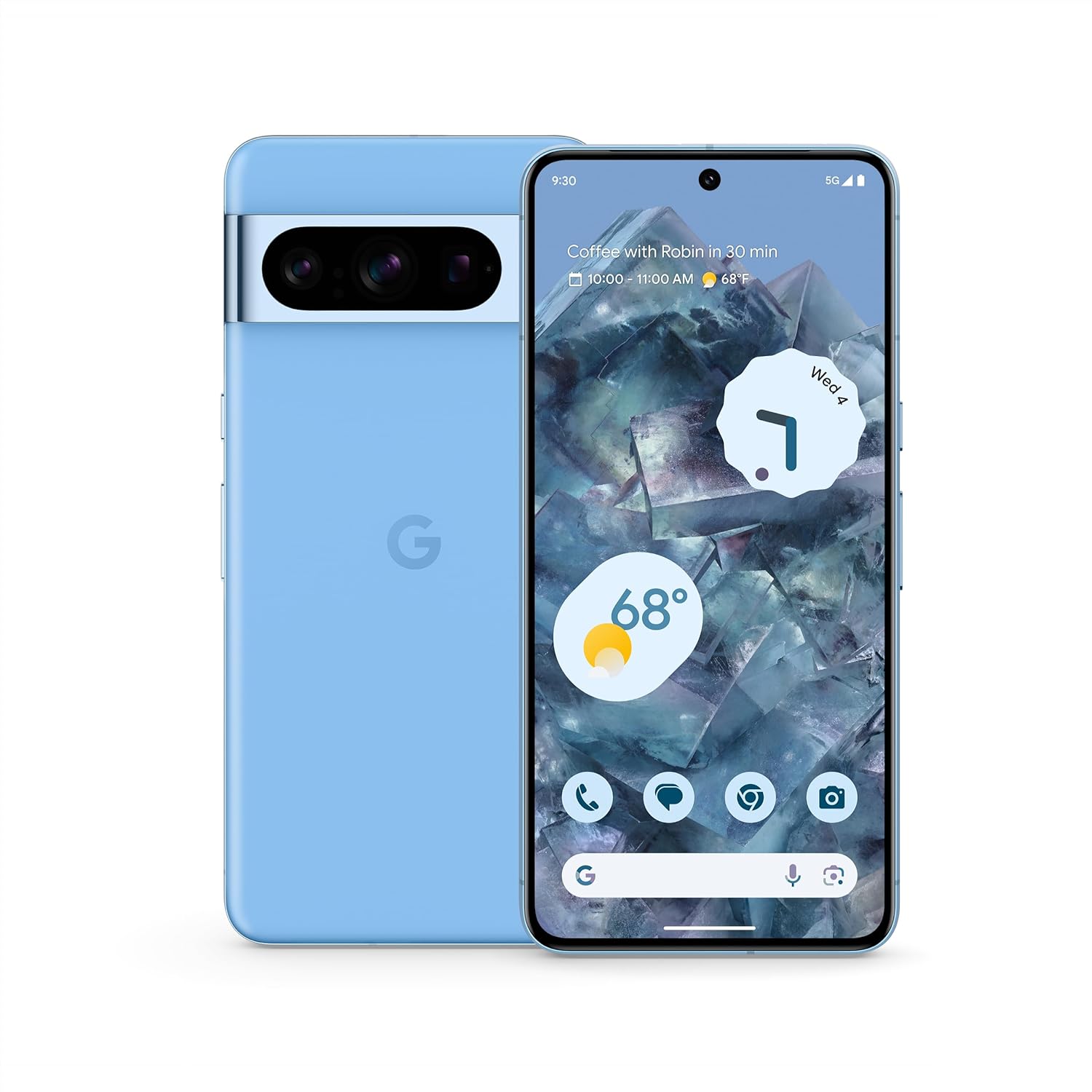
Imej: Depan dan belakang view of the Google Pixel 8 Pro in Bay color, showcasing its sleek design and camera bar.
Video: Perbincangan ringkasview of the Google Pixel 8 Pro, highlighting its key features and design elements.
Apa yang ada dalam Kotak
Your Google Pixel 8 Pro package includes the following items:
- Google Pixel 8 Pro Smartphone
- Ejector Dulang SIM
- Kabel USB (USB-C ke USB-C)
- Quick Switch Adapter (USB-A to USB-C)
Persediaan
Persediaan Awal
- Masukkan Kad SIM: Use the provided SIM tray ejector tool to open the SIM tray. Place your nano-SIM card into the tray and reinsert it into the phone.
- Hidupkan kuasa: Press and hold the Power button on the side of the device until the Google logo appears.
- Ikuti Gesaan Pada Skrin: The phone will guide you through selecting your language, connecting to a Wi-Fi network, and signing in with your Google Account.
- Buka kunci cap jari: Set up your fingerprint for secure and convenient unlocking.
- Pemindahan Data: If you're switching from another device, use the Quick Switch Adapter and follow the prompts to transfer your data, contacts, and apps.
Operating Your Pixel 8 Pro
Navigasi Asas
Your Pixel 8 Pro uses intuitive gesture navigation. Swipe up from the bottom to go home, swipe up and hold to view recent apps, and swipe from the left or right edge to go back.
Ciri Kamera
The Pixel 8 Pro features a triple camera system with a dedicated 5x telephoto lens, improved autofocus, and advanced photography controls.

Image: Detailed breakdown of the Pixel 8 Pro's camera system, including megapixel counts for main, ultrawide, telephoto, and front cameras.
- Pro Controls: Access advanced settings for full-resolution photos, including shutter speed, ISO, and focus.
- Audio Magic Eraser: Utilize Google AI to reduce distracting noises in your videos, such as wind or traffic.
Video: Demonstrates how to edit videos on your Pixel phone, including trimming, adjusting, and applying effects like Audio Magic Eraser.
Ciri AI
Google AI enhances your Pixel 8 Pro experience with smart features designed for convenience and efficiency.
- Call Assist: Get help making and screening calls.
- Terjemahan Langsung: Translate languages in real-time.
- Bulatan untuk Carian: Instantly search what you see on your phone by circling, highlighting, or scribbling on images, text, or videos.

Imej: Visual examples of the Pixel 8 Pro's AI capabilities, including call screening, Google Assistant integration, and real-time language translation.
Penderia Suhu
The Pixel 8 Pro includes a dedicated temperature sensor for measuring the surface temperature of everyday objects.
Video: Instructions on how to use the Pixel 8 Pro's temperature sensor to measure the temperature of objects around you.
Penyelenggaraan
Kemas Kini Perisian
Google provides 7 years of security updates and OS upgrades for your Pixel 8 Pro to ensure your device remains secure and up-to-date with the latest features.
- Ensure your device is connected to Wi-Fi and has sufficient battery life before initiating updates.
- Navigasi ke Tetapan > Sistem > Kemas kini sistem untuk menyemak dan memasang kemas kini yang tersedia.
Penjagaan Bateri
The Pixel 8 Pro features an all-day battery (5050 mAh) with fast charging and wireless charging capabilities.
- Use certified chargers and cables for optimal charging performance and safety.
- Avoid extreme temperatures, as they can affect battery life and performance.
- Enable Adaptive Battery in settings to optimize battery usage based on your habits.
Pembersihan
To keep your Pixel 8 Pro clean and in good condition:
- Lap skrin dan badan dengan kain lembut dan tidak berbulu.
- Elakkan menggunakan bahan kimia yang keras atau bahan yang melelas.
Menyelesaikan masalah
If you encounter issues with your Pixel 8 Pro, refer to the common solutions below:
| Isu | Penyelesaian yang Mungkin |
|---|---|
| Telefon tidak dihidupkan | Pastikan bateri dicas. Tekan dan tahan butang Kuasa selama 10-15 saat untuk memaksa mulakan semula. |
| Apl ranap atau beku | Clear app cache/data (Settings > Apps > [App Name] > Storage). Update the app or uninstall/reinstall. |
| Hayat bateri yang lemah | Check battery usage in settings to identify draining apps. Reduce screen brightness, disable unnecessary features (GPS, Bluetooth, Wi-Fi when not in use). |
| Isu sambungan (Wi-Fi/Bluetooth) | Toggle Wi-Fi/Bluetooth off and on. Restart the phone. Forget and reconnect to the network/device. |
| Pengimbas cap jari tidak berfungsi | Ensure your finger is clean and dry. Re-register your fingerprints in settings. |
Spesifikasi
| Ciri | Perincian |
|---|---|
| Nama Model | Pixel 8 Pro |
| Dimensi | 6.4 x 3.01 x 0.35 inci |
| Berat Barang | 7.5 auns |
| Saiz Paparan | 6.7 Inches Super Actua Display |
| Resolusi | 1344 x 2992 |
| Kadar Segar Semula | 1-120 Hz adaptive |
| Sistem Operasi | Android 13.0 (ships with) |
| Pemproses | Google Tensor G3 |
| RAM | 12 GB |
| Kapasiti Storan | 128 GB (as per current product) |
| Kapasiti Bateri | 5050 mAh |
| Kamera | Triple Camera System (50MP Main, 48MP Ultrawide, 48MP Telephoto), 10.5MP Front |
| Ketersambungan | 5G, Wi-Fi, Bluetooth, NFC |
Maklumat Keselamatan dan Kawal Selia
For detailed safety, regulatory, and warranty information, please refer to the official Google Pixel support website or the documentation included with your device.
Waranti dan Sokongan
Your Google Pixel 8 Pro comes with a manufacturer's warranty. For warranty details, technical support, or service inquiries, please visit the official Google Support webtapak:


