pengenalan
This manual provides detailed instructions for the setup, operation, and maintenance of your Mesqool CR1008iR Vibrating Alarm Clock. Please read this manual thoroughly before using the product to ensure proper function and longevity.
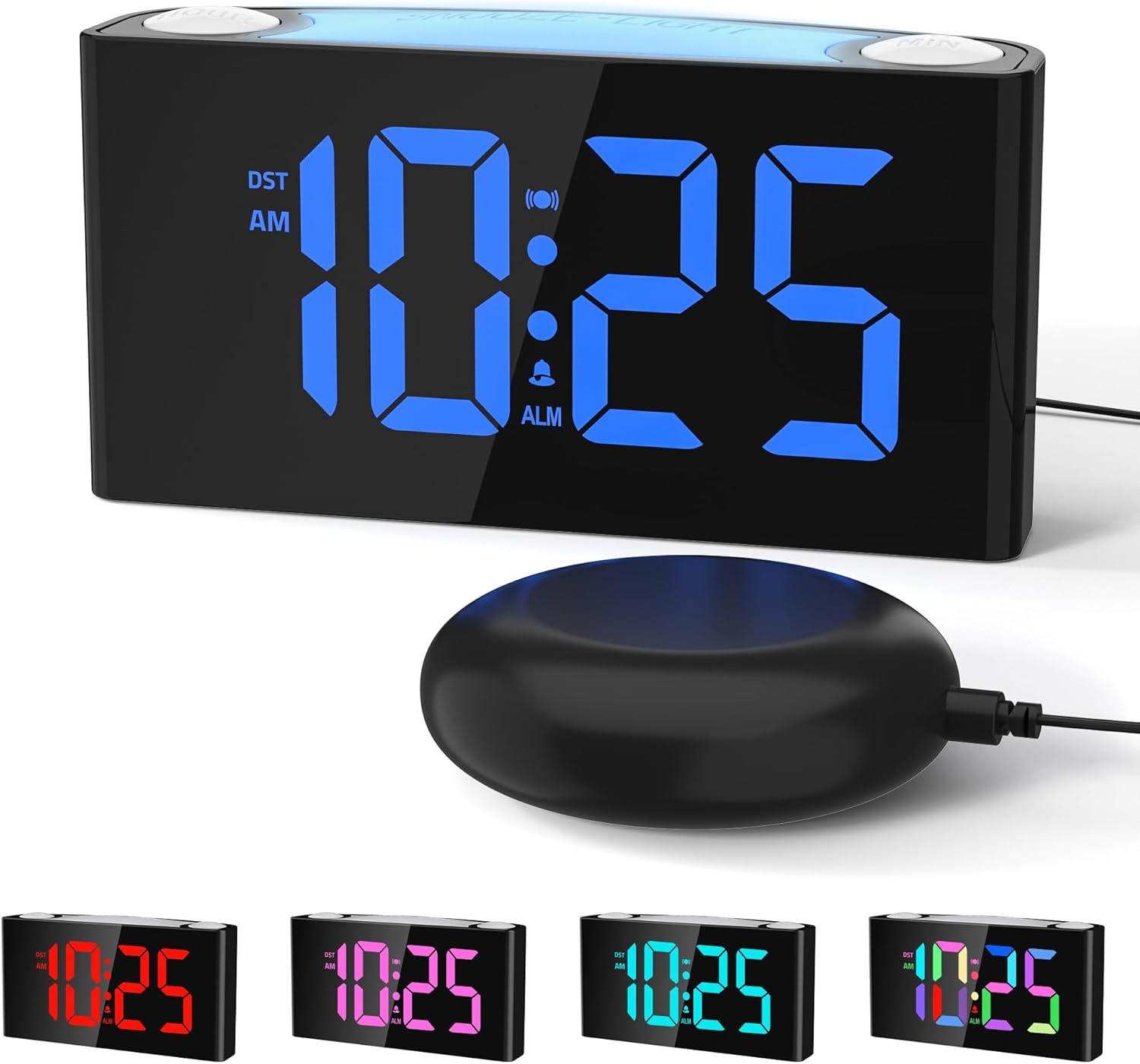
Image: The Mesqool CR1008iR Vibrating Alarm Clock, featuring a large digital display and an external bed shaker.
Produk Selesaiview
The Mesqool CR1008iR is a versatile alarm clock designed for various users, including heavy sleepers, seniors, and the hearing impaired. Key features include:
- Pelbagai Mod Bangun: Choose from loud buzzer, powerful bed shaker, or a combination of both.
- Customizable RGB Display: Large LED screen with 8-color options and dynamic display modes.
- Lampu Malam 8 Warna: Soft bottom glow with adjustable brightness.
- Port Pengecasan USB Dwi: Includes USB-A and USB-C ports for convenient device charging.
- Bateri tambahan: Mengekalkan tetapan masa dan penggera semasa kuasa dimatikantages (requires 2x AAA batteries, not included).
- Fungsi Tunda: Up to 81 minutes of extra rest with 9-minute snooze intervals.
- 12/24-Hour Format & DST: Easy switching between time formats and Daylight Saving Time activation.
Persediaan
- Sambungan Kuasa: Connect the provided power adapter to the DC 5V port on the back of the alarm clock and plug it into a standard wall outlet. The display will illuminate.
- Pemasangan Sandaran Bateri: Open the battery compartment on the bottom of the clock. Insert two (2) AAA batteries (not included), ensuring correct polarity (+/-). These batteries will preserve your time and alarm settings during a power interruption but will not power the display or night light.
- Sambungan Penggoncang Katil: Plug the bed shaker cable into the designated shaker port on the back of the alarm clock. Place the bed shaker under your pillow or mattress for optimal vibration.

Image: The back of the Mesqool alarm clock, illustrating the battery compartment for backup AAA batteries.
Arahan Operasi
1. Menetapkan Masa
- Tekan dan tahan butang MASA DITETAPKAN button (located on the back) until the hour digits flash.
- Gunakan JAM button (top right) to adjust the hour.
- Gunakan MIN button (top left) to adjust the minute.
- Tekan MASA DITETAPKAN sekali lagi untuk mengesahkan dan keluar dari mod tetapan masa.
2. Menetapkan Penggera
- Tekan dan tahan butang SET ALARM button (located on the back) until the alarm hour digits flash.
- Gunakan JAM butang untuk menyesuaikan jam penggera.
- Gunakan MIN butang untuk menyesuaikan minit penggera.
- Tekan SET ALARM sekali lagi untuk mengesahkan masa penggera.
- Immediately after setting the alarm time, press the MODUL ALARM button (on the back) repeatedly to cycle through the alarm modes: Buzzer only, Vibration only, or Buzzer + Vibration. The corresponding icon will appear on the display.
- Tekan SET ALARM one more time to exit alarm setting mode.

Image: Visual representation of the three available wake-up modes: audible buzzer, physical bed shaker, and a combination of both.
3. Fungsi Tunda
Apabila penggera berbunyi, tekan besar SNOOZE / CAHAYA button on top of the clock to activate the snooze function. The alarm will pause for 9 minutes and then sound again. This can be repeated up to 9 times for a maximum of 81 minutes of snooze time.

Image: A hand pressing the large snooze button on the alarm clock, illustrating the snooze function and adjustable volume settings.
4. Melaraskan Kecerahan Paparan
Tekan ke DIMMER button (on the back) repeatedly to cycle through the 7 levels of display brightness, from brightest to off.
5. Fungsi Lampu Malam
Tekan ke SNOOZE / CAHAYA button (on top) to turn the night light on/off. Press and hold the SNOOZE / CAHAYA button to cycle through the 8 available colors or activate the RGB breathing light mode. The night light has 3 adjustable brightness levels.

Image: The Mesqool alarm clock showcasing its 8-color dimmable night light feature, providing ambient illumination.
6. Port Pengecasan USB
The alarm clock features one USB-A and one USB-C charging port on the back. These ports can be used to charge compatible electronic devices such as smartphones, smartwatches, or earbuds. Ensure your device's charging cable is properly connected.

Image: The back of the Mesqool alarm clock with a smartphone and earbuds charging via its integrated USB-A and USB-C ports.
7. 12/24-Hour Format and Daylight Saving Time (DST)
- Untuk bertukar antara format masa 12 jam dan 24 jam, tekan butang 12/24J button (on the back).
- To activate or deactivate Daylight Saving Time, press the DST button (on the back). The time will adjust by one hour, and the DST indicator will appear/disappear on the display.

Image: The Mesqool alarm clock showing examples of its 12-hour, 24-hour, and Daylight Saving Time (DST) display options.
Penyelenggaraan
- Pembersihan: Lap jam dengan kain lembut dan kering. Jangan gunakan pembersih atau pelarut yang kasar.
- Storan: If storing the clock for an extended period, remove the AAA backup batteries to prevent leakage.
- Persekitaran: Jauhkan jam daripada cahaya matahari langsung, suhu melampau dan kelembapan tinggi.
Menyelesaikan masalah
| Masalah | Penyelesaian |
|---|---|
| Clock display is off or flickering. | Ensure the power adapter is securely plugged into both the clock and the wall outlet. Check if the power outlet is functional. |
| Alarm does not sound/vibrate. | Verify that the alarm is set and activated (alarm icon visible on display). Check the alarm mode (buzzer, vibration, or both). Ensure the bed shaker is properly connected. |
| Time/alarm settings reset after power outage. | Install two (2) fresh AAA batteries for backup. The backup batteries only save settings, they do not power the display. |
| Port pengecasan USB tidak berfungsi. | Ensure the clock is powered by the AC adapter. The USB ports require main power to function. Check the charging cable and device compatibility. |
| Paparan terlalu terang/malap. | Tekan ke DIMMER button on the back to adjust the display brightness through its 7 levels. |
Spesifikasi
- Jenama: Mesqool
- model: CR1008iR
- Jenis Paparan: LED digital
- Sumber Kuasa: Pemalam (penyesuai AC)
- Bateri tambahan: 2 x AAA batteries (not included) for settings retention
- Dimensi Produk: 3.39"W x 1.93"H
- Berat Barang: 15.5 auns
- Bahan: Akrilonitril Butadiena Stirena (ABS)
- Ciri Khas: Vibrating Alarm, Loud Buzzer, 8-Color Night Light, Dual USB Charging (Type-A & Type-C), Dimmable Display, Snooze Function, 12/24H & DST.
Maklumat Waranti
This Mesqool CR1008iR Vibrating Alarm Clock comes with a Waranti Terhad. For specific details regarding warranty coverage, duration, and claims process, please refer to the warranty card included in your product packaging or contact Mesqool customer support.
Sokongan Pelanggan
If you encounter any issues or have questions not covered in this manual, please contact Mesqool customer support for assistance. You can typically find contact information on the product packaging, the official Mesqool webtapak, atau melalui platform pembelian anda.
Untuk sumber tambahan, anda boleh melawati Mesqool Store on Amazon.


