pengenalan
Thank you for choosing the MEGATEK Portable CD Player. This device is designed to provide a versatile and high-quality audio experience, supporting various media formats and offering multiple connectivity options. Please read this manual carefully to ensure proper use and maintenance of your new CD player.

Image: The MEGATEK Portable CD Player, showcasing its compact design, integrated speakers, control buttons, and included accessories like headphones and USB-C charging cables.
Maklumat Keselamatan
Untuk memastikan operasi yang selamat dan mengelakkan kerosakan, sila patuhi langkah berjaga-jaga berikut:
- Jangan dedahkan peranti kepada suhu yang melampau, kelembapan atau cahaya matahari langsung.
- Elakkan daripada menjatuhkan atau meletakkan peranti kepada kesan yang kuat.
- Jangan buka atau cuba membaiki peranti ini sendiri. Rujuk semua servis kepada kakitangan yang berkelayakan.
- Gunakan hanya kabel pengecas dan penyesuai kuasa yang disediakan.
- Jauhkan peranti daripada air dan cecair lain.
- Bersihkan peranti dengan kain lembut dan kering. Jangan gunakan pembersih atau pelarut yang melelas.
- Mendengar berpanjangan pada tahap kelantangan tinggi boleh menyebabkan kerosakan pendengaran. Laraskan kelantangan ke tahap yang selamat.
Kandungan Pakej
Sahkan bahawa semua item terdapat dalam pakej:
- MEGATEK Portable CD Player - Black
- Fon Kepala Berwayar
- Kabel Pengecas USB-C
- Manual Pengguna

Image: A visual representation of the package contents, including the CD player, headphones, USB-C cable, and user manual.
Produk Selesaiview
Familiarize yourself with the various parts and controls of your MEGATEK Portable CD Player.
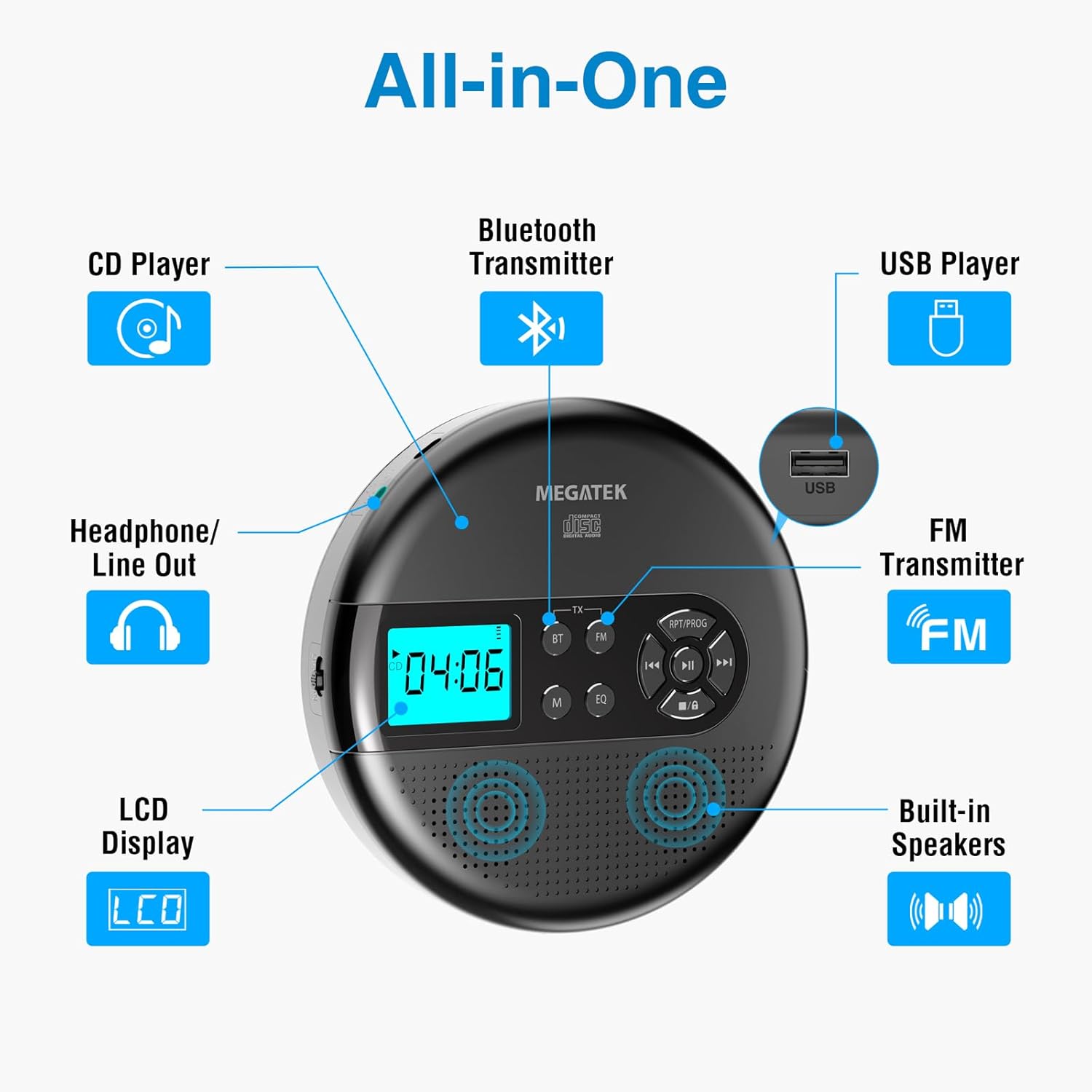
Image: An "All-in-One" diagram highlighting key features such as the CD Player, Bluetooth Transmitter, USB Player, FM Transmitter, Built-in Speakers, LCD Display, and Headphone/Line Out port.
Kawalan dan Pelabuhan:
- Paparan LCD: Shows track number, time, mode, and battery status.
- Butang Main/Jeda: Memulakan atau menjeda main balik.
- Butang Sebelumnya/Seterusnya: Melangkau trek atau mara pantas/undur.
- Butang Berhenti: Menghentikan main balik.
- RPT/PROG Button: Controls repeat modes and programming tracks.
- Butang BT: Activates Bluetooth transmission mode.
- Butang FM: Activates FM transmission mode.
- Butang M (Mod): Switches between CD, USB, Bluetooth, and FM modes.
- Butang EQ: Kitaran melalui pratetap penyamaan.
- Kawalan Kelantangan: Melaraskan tahap output audio.
- Port USB: Untuk memainkan audio files daripada pemacu USB.
- Port Pengecasan Jenis-C: Untuk mengecas bateri dalaman.
- 3.5mm Audio Out Jack: Untuk menyambungkan fon kepala atau pembesar suara luaran.
- Pembesar Suara Stereo Terbina dalam: For direct audio playback.
Persediaan
Mengecas Bateri:
The device is equipped with a built-in 2000mAh rechargeable Li-ion battery. Before first use, fully charge the player.
- Connect the provided USB-C charging cable to the Type-C charging port on the player.
- Sambungkan hujung kabel USB-C yang satu lagi ke penyesuai kuasa USB (tidak disertakan) atau port USB komputer.
- The battery indicator on the LCD display will show charging status. A full charge provides up to 15 hours of playtime at medium volume.

Image: The portable CD player connected to a power source via its USB-C cable, resting on a nightstand next to a bed.
Inserting a CD:
- Locate the CD compartment latch/button on the side of the player and slide/press it to open the lid.
- Carefully place the CD onto the center spindle with the label side facing up.
- Tekan CD dengan lembut sehingga ia berbunyi klik di tempatnya.
- Tutup penutup petak CD dengan kuat sehingga ia terselak.

Image: The portable CD player with its lid open, showing a blue CD disc inserted into the compartment, ready for playback.
Arahan Operasi
Main balik CD:
- Masukkan CD seperti yang diterangkan dalam bahagian Persediaan.
- Tekan ke Main/Jeda butang untuk memulakan main semula.
- Gunakan Sebelumnya/Seterusnya buttons to navigate between tracks. Hold to fast-forward or rewind.
- Tekan ke RPT/PROG button to cycle through repeat modes (repeat one, repeat all, random) or to program a custom playback order.
- Tekan ke Berhenti butang untuk menamatkan main balik.
- Adjust volume using the dedicated volume control.
Main balik USB:
The player supports MP3, WMA, and WAV audio files daripada pemacu USB.
- Masukkan pemacu kilat USB ke dalam port USB.
- Tekan ke M (Mod) butang untuk bertukar kepada mod USB.
- Gunakan Main/Jeda, Sebelumnya/Seterusnya, dan RPT/PROG butang seperti yang anda lakukan untuk main balik CD.
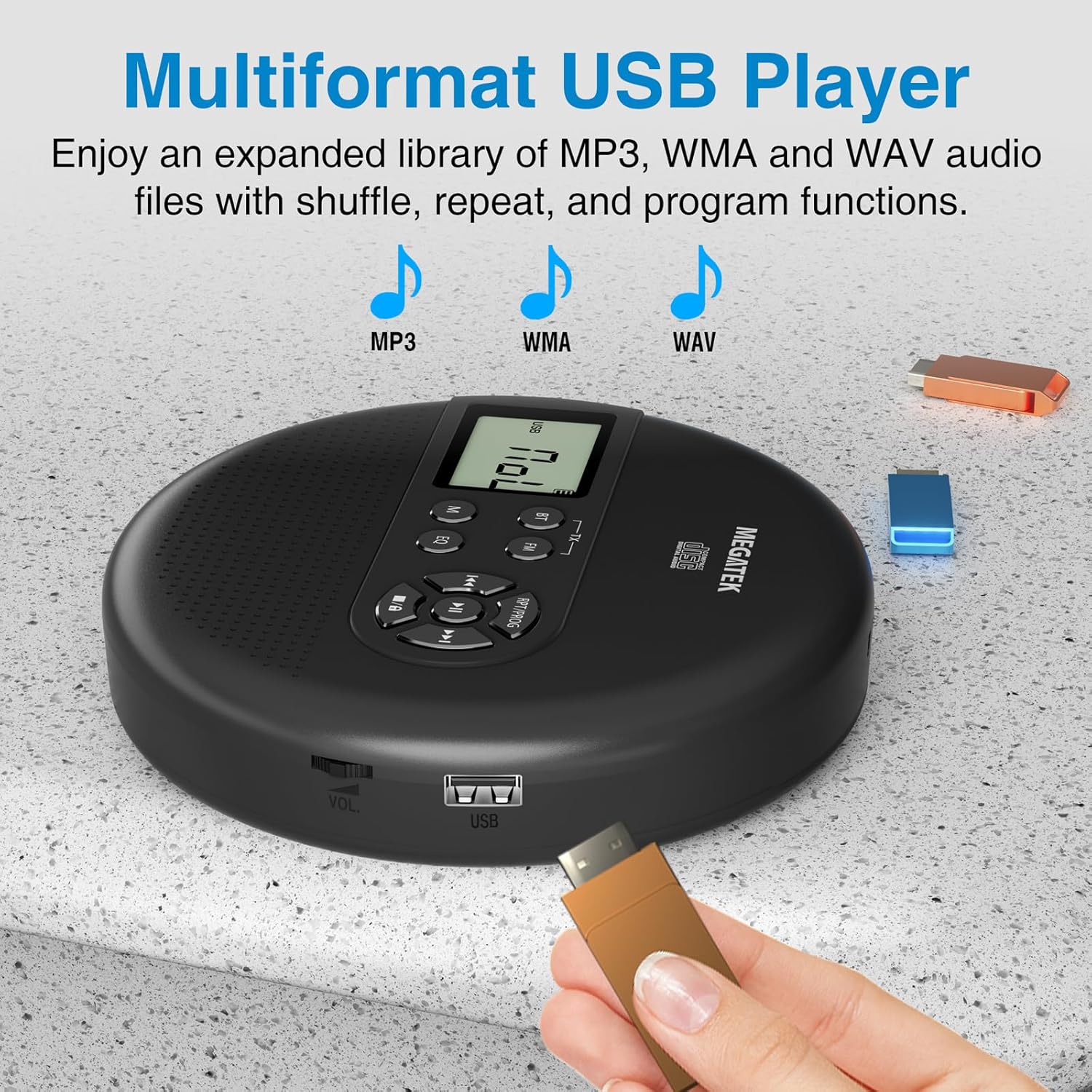
Image: The portable CD player with a USB flash drive inserted into its side port, illustrating its multi-format USB playback capability.
Penghantaran Bluetooth:
Stream audio wirelessly to Bluetooth-enabled headphones or speakers. Note: This feature does not support connections to car stereo systems.
- Pastikan fon kepala atau pembesar suara Bluetooth anda berada dalam mod berpasangan.
- On the CD player, press the BT button. The Bluetooth indicator on the display will flash.
- The player will automatically search for and connect to nearby Bluetooth devices. Once connected, the indicator will stop flashing.

Image: The portable CD player wirelessly transmitting audio to two external Bluetooth speakers, demonstrating its Bluetooth transmission capability.
Penghantaran FM:
Transmit audio signals to nearby FM radios, including car FM stereos and home stereo systems.
- Tekan ke FM button on the CD player. The display will show an FM frequency.
- Tune your FM radio (car stereo, home stereo) to the same frequency displayed on the CD player.
- Adjust the frequency on the CD player using the Sebelumnya/Seterusnya buttons if interference occurs or to find a clearer channel.

Image: The portable CD player placed on a car dashboard, transmitting audio to the car's FM stereo system, indicated by an FM frequency on the car's display.
Using Headphones/External Speakers:
For private listening or connecting to wired audio systems:
- Plug the included wired headphones into the 3.5mm audio out jack.
- Alternatively, connect an audio cable (not included) from the 3.5mm audio out jack to the AUX input of external speakers or an audio system.
- The built-in speakers will automatically mute when headphones or external speakers are connected.

Image: A close-up of the portable CD player, visually representing sound waves emitting from its dual stereo speakers, emphasizing the built-in audio capability.
Penyelenggaraan
- Pembersihan: Use a soft, dry, lint-free cloth to clean the exterior of the player. For the CD lens, use a specialized CD lens cleaner. Do not use liquids or aerosol cleaners directly on the device.
- Storan: Apabila tidak digunakan untuk tempoh yang lama, simpan pemain di tempat yang sejuk dan kering, jauh daripada cahaya matahari langsung dan suhu yang melampau.
- Penjagaan Bateri: Untuk memanjangkan hayat bateri, elakkan daripada menyahcas sepenuhnya bateri dengan kerap. Cas peranti dengan kerap, walaupun tidak digunakan secara aktif.
Menyelesaikan masalah
| Masalah | Kemungkinan Punca | Penyelesaian |
|---|---|---|
| Pemain tidak dihidupkan. | Bateri habis. | Charge the player using the USB-C cable. |
| Tiada bunyi daripada pembesar suara/fon kepala. | Volume is too low; headphones not fully plugged in; incorrect mode selected. | Increase volume; ensure headphones are securely connected; press the M (Mod) butang untuk memilih sumber yang betul. |
| CD melangkau atau tidak dimainkan. | CD is dirty, scratched, or inserted incorrectly; anti-skip function overwhelmed. | Clean the CD; ensure CD is properly seated; avoid strong vibrations. |
| Isu sambungan Bluetooth. | Device not in pairing mode; too far from player; interference. | Ensure receiving device is in pairing mode; move closer to the player; restart both devices. |
| FM transmission static/poor quality. | Interference; incorrect frequency. | Adjust the FM frequency on the player and receiver to find a clear channel. |
Spesifikasi
| Ciri | Perincian |
|---|---|
| Nombor Model | CP27BR |
| Dimensi Produk | 5.91 x 5.91 x 1.32 inci |
| Berat Barang | 10.9 auns |
| Bateri | 2000mAh Lithium Ion (boleh dicas semula) |
| Masa bermain | Sehingga 15 jam (pada volum sederhana) |
| Supported CD Formats | CD, CD-R/RW, MP3 CD, Audio Book CD |
| Format USB yang Disokong | MP3, WMA, WAV |
| Perlindungan Anti-Skip | 60 saat |
| Ketersambungan | USB, Bluetooth Transmitter, FM Transmitter, 3.5mm Audio Out |
| Ciri Khas | Built-in Stereo Speakers, Resume Play, Shuffle, Repeat, Program Functions, 5 EQ Options |
Waranti dan Sokongan
MEGATEK offers comprehensive support for its products:
- Penggantian 12 Bulan: In case of product defects or issues within 12 months of purchase.
- Sokongan Teknikal Seumur Hidup: Assistance with product usage, troubleshooting, and general inquiries.
- Perkhidmatan Pelanggan 24/7: Available through Amazon buyer-seller messaging.
For any questions or problems, please contact MEGATEK customer service via the Amazon platform or refer to the contact information provided in the product packaging.
Image: A graphic detailing MEGATEK's customer support, including 12-month replacement, lifetime technical support, and 24/7 Amazon buyer-seller messaging, alongside an image of customer service representatives.


