Manual Pengguna Jam Tangan Pintar Quican
Model: IDW208 Plus
Produk Selesaiview
The Quican Smartwatch IDW208 Plus is a versatile fitness tracker and smartwatch designed for daily use. It features a 1.8-inch HD display, built-in Alexa, Bluetooth call functionality, and comprehensive health monitoring. This manual provides essential information for setting up, operating, and maintaining your device.

Image: The Quican Smartwatch IDW208 Plus in Baby Pink, showing its square display and silicone band. Insets show call and Alexa listening screens.
Apa yang ada dalam Kotak
- Quican Smartwatch IDW208 Plus
- Kabel Pengecasan
- Manual Pengguna (dokumen ini)
Panduan Persediaan
Pengecasan Awal
Before first use, fully charge your smartwatch. The device charges quickly in approximately 2.5 hours.

Image: The Quican Smartwatch connected to its magnetic charging cable, illustrating the charging process.
Berpasangan dengan Telefon Pintar Anda
The Quican Smartwatch is compatible with devices running iOS 9.0 or above and Android 6.0 or above. Follow these steps to pair your watch:
- Download the "Veryfit" App: Cari untuk "Veryfit" in your smartphone's app store (Apple App Store for iOS, Google Play Store for Android) and install it.
- Dayakan Bluetooth: On your smartphone, go to your settings and ensure Bluetooth is turned on.
- Open the App and Add Device: Launch the "Veryfit" app. Navigate to the device pairing section (often labeled "Device" or "Add Device").
- Scan and Connect: The app will search for nearby devices. Select "IDW208 Plus" from the list. You may be prompted to scan a QR code displayed on the smartwatch screen to complete the pairing process.

Image: A visual guide showing the steps to download the Veryfit app, enable Bluetooth, and connect the smartwatch by scanning a QR code.
Mengendalikan Jam Pintar Anda
Navigasi Asas
The smartwatch features a 1.8-inch HD touchscreen for intuitive navigation. Swipe across the screen to access different functions and menus. Use the physical button on the side to return to the home screen or power on/off the device.

Image: The smartwatch display showing the current time, date, and activity metrics like steps and calories burned.
Ciri Pintar
- Bluetooth Calls & Notifications: Make and answer calls directly from your wrist. Receive SMS and app notifications (messaging or text responses are not supported).
- Alexa Terbina dalam: Utilize voice commands for weather forecasts, alarms, timers, music control, and smart home device management.
- Kawalan Muzik & Kamera: Control music playback on your phone and remotely trigger your phone's camera shutter from the watch.
- Daily Utilities: Access features like stopwatch, flashlight, sedentary reminder, alarm clock, and find phone functionality.
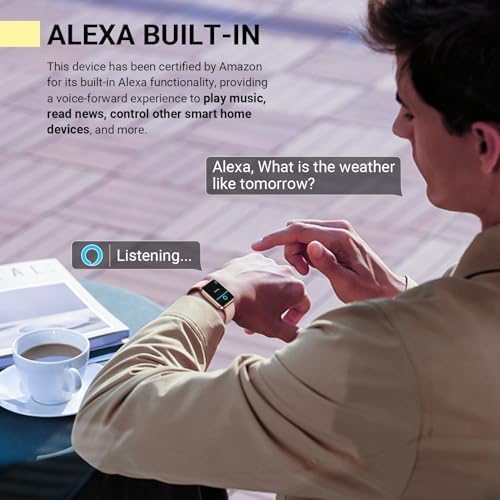
Image: The smartwatch screen showing "Listening..." with the Alexa wave animation, indicating voice command readiness.

Image: A collage of smartwatch screens demonstrating various utility features: weather forecast, alarm setting, drinking reminder, and the 'Find Your Phone' function.
Fitness Tracking & Health Monitoring
The smartwatch offers comprehensive health and fitness tracking capabilities:
- 120 Mod Sukan: Track various activities including running, walking, hiking, yoga, and more. Monitor exercise time, steps, distance, and calories burned.
- Pemantauan Denyut Jantung: Continuous 24/7 heart rate tracking to help you understand your cardiovascular health and optimize workouts.
- Pemantauan Oksigen Darah (SpO2): Provides insights into your blood oxygen levels, an important indicator of respiratory health.
- Penjejakan Tidur: Memantau tidur stages (light, deep, REM) and wakefulness, providing a detailed analysis of your sleep architecture.
- Stress Monitoring & Breathing Training: Track stress levels and engage in guided breathing exercises to promote relaxation.
- Penjejakan Kitaran Haid Wanita: Record and predict menstrual periods, helping women stay organized and monitor cycle patterns.

Image: The smartwatch screen showing a list of workout modes, including outdoor run, outdoor cycle, and pool swim, highlighting its fitness tracking capabilities.

Imej: Persembahan ilustrasicasing the various health monitoring features of the smartwatch, including heart rate, stress, blood oxygen, sleep tracking, breathing training, and women's health tracking.
Penyelenggaraan
Membersihkan Jam Pintar Anda
To maintain the appearance and functionality of your smartwatch, clean it regularly:
- Wipe the screen and watch body with a soft, damp, kain tidak berbulu.
- For the silicone band, you can use mild soap and water, then rinse thoroughly and dry completely before reattaching to the watch.
- Avoid using abrasive cleaners or solvents that may damage the watch's finish.
Rintangan Air (IP68)
The Quican Smartwatch is IP68 waterproof, meaning it is resistant to dust and can withstand immersion in water up to 1.5 meters for up to 30 minutes. This makes it suitable for daily activities like hand washing and light rain. However, it is not recommended for hot showers, saunas, or diving, as steam and high water pressure can compromise the seals.

Image: The smartwatch being worn by individuals engaged in outdoor activities like running and cycling, emphasizing its IP68 waterproof and durable design.
Menyelesaikan masalah
Isu dan Penyelesaian Biasa
| Isu | Kemungkinan Punca / Penyelesaian |
|---|---|
| Tonton tidak dihidupkan | Bateri mungkin kehabisan kuasa. Sambungkan ke pengecas dan biarkan ia dicas selama sekurang-kurangnya 10 minit sebelum cuba dihidupkan. |
| Tidak dapat berpasangan dengan telefon | Ensure Bluetooth is enabled on your phone and the watch is within range. Restart both the watch and phone. Check if the "Veryfit" app has necessary permissions. |
| Pemberitahuan tidak muncul | Verify notification permissions are enabled in the "Veryfit" app and your phone's settings. Ensure the app is running in the background. |
| Inaccurate health data (HR, SpO2, Sleep) | Ensure the watch is worn snugly but comfortably on your wrist, about one finger's width above the wrist bone. Avoid excessive movement during measurements. Note that these are not medical devices and data is for reference only. |
| Hayat bateri pendek | Kurangkan kecerahan skrin, lumpuhkan pemantauan kadar denyutan jantung berterusan jika tidak diperlukan dan hadkan pemberitahuan yang berlebihan. Pastikan muat semula aplikasi latar belakang dioptimumkan. |
Spesifikasi
| Ciri | Perincian |
|---|---|
| Nombor Model | IDW208 Plus |
| Saiz Paparan | 1.8 Inci |
| Resolusi Paparan | 240 x 280 |
| Ketersambungan | Bluetooth 5.3 |
| Kapasiti Bateri | 300 Miliamp jam |
| Hayat Bateri (Penggunaan Biasa) | Sehingga 7 hari |
| Hayat Bateri (Bersedia) | Sehingga 30 hari |
| Masa Mengecas | lebih kurang 2.5 jam |
| Tahan Air | IP68 |
| Keserasian Sistem Pengendalian | iOS 9.0+ / Android 6.0+ |
| Berat Barang | 1.38 auns (39 gram) |
| Dimensi Produk | 10.7 x 3.5 x 0.7 inci |
Waranti dan Sokongan
Quican provides a Waranti 5 Tahun for this smartwatch. If you encounter any issues with your fitness smartwatch, please do not hesitate to contact Quican customer support for assistance.
For further support, you may also refer to the official user guide PDF available online: Quican Smartwatch User Guide (PDF)