pengenalan
This manual provides comprehensive instructions for the Mibro 3 True Wireless Bluetooth Earbuds. It covers essential information regarding setup, operation, maintenance, troubleshooting, and product specifications to ensure optimal performance and longevity of your device. The Mibro 3 earbuds offer a perfect blend of style and functionality, featuring an attractive design, long battery life, an LED display, and impressive sound quality.
Produk Selesaiview
Familiarize yourself with the components of your Mibro 3 True Wireless Bluetooth Earbuds.
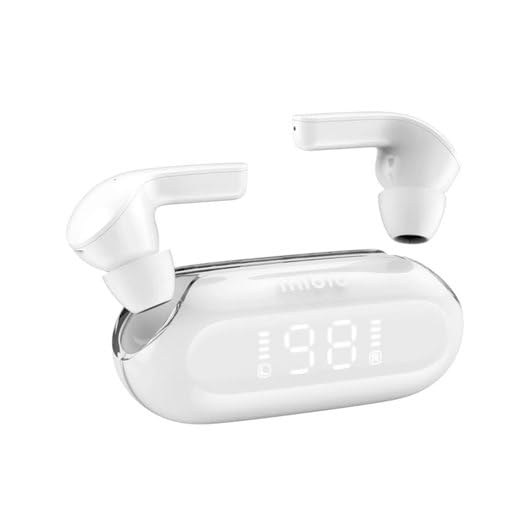
Rajah 1: Mibro 3 True Wireless Bluetooth Earbuds and Charging Case. This image displays the white earbuds, one removed from the charging case and one partially visible, alongside the sleek white charging case which features a clear lid and an LED display showing '98', indicating battery percentage.
Komponen:
- Earbud: Left and Right True Wireless Earbuds.
- Sarung Pengecasan: Portable case for charging and storing earbuds, with an integrated LED display.
- Kabel Pengecasan: (Typically USB-C, though not specified) For charging the case.
- Telinga: (Various sizes, though not specified) For comfortable fit.
Persediaan
1. Pengecasan Awal
- Letakkan kedua earbud ke dalam cas pengecasan.
- Connect the charging cable (not included in product details, but standard) to the charging port on the case and a power source.
- The LED display on the charging case will indicate the charging status. Ensure the case and earbuds are fully charged before first use.
2. Berpasangan dengan Peranti
- Open the charging case. The earbuds will automatically enter pairing mode (indicated by a flashing light on the earbuds, if applicable).
- Pada peranti anda (telefon pintar, tablet, komputer), dayakan Bluetooth.
- Cari untuk "Mibro 3" or a similar name in the list of available Bluetooth devices.
- Select "Mibro 3" to connect. Once connected, a voice prompt or indicator light will confirm successful pairing.
- If pairing fails, place the earbuds back in the case, close the lid, wait a few seconds, and then repeat the steps.
Arahan Operasi
Hidupkan/Mati Kuasa
- Hidupkan kuasa: Open the charging case, and the earbuds will automatically power on and connect to the last paired device. Alternatively, press and hold the touch control area on both earbuds for 2-3 seconds.
- Matikan: Place the earbuds back into the charging case and close the lid. They will automatically disconnect and power off. Alternatively, press and hold the touch control area on both earbuds for 5 seconds.
Touch Controls (Typical Functions)
The Mibro 3 earbuds feature intuitive touch controls. Specific functions may vary slightly, but common operations include:
- Main/Jeda: Ketik sekali pada salah satu fon telinga.
- Lagu Seterusnya: Ketik dua kali pada fon telinga kanan.
- Trek Sebelumnya: Ketik dua kali pada fon telinga kiri.
- Jawab/Tamatkan Panggilan: Ketik sekali pada salah satu fon telinga semasa panggilan masuk.
- Tolak Panggilan: Tekan dan tahan pada mana-mana fon telinga selama 2 saat semasa panggilan masuk.
- Aktifkan Pembantu Suara: Ketik tiga kali pada salah satu fon telinga.
- Kawalan Kelantangan: (If supported) Tap and hold on the right earbud to increase volume, tap and hold on the left earbud to decrease volume.
Memakai Earbud
Gently insert the earbuds into your ear canal. Rotate them slightly until they fit snugly and comfortably. Ensure the microphone is pointing towards your mouth for optimal call quality.
Penyelenggaraan
Pembersihan
- Gunakan kain lembut, kering dan tidak berbulu untuk mengelap fon telinga dan bekas pengecas.
- Untuk kotoran degil, sedikit dampen kain dengan air atau pembersih yang lembut dan tidak melelas.
- Jangan gunakan bahan kimia yang keras, alkohol atau bahan yang melelas.
- Regularly clean the eartips and the mesh covers to prevent wax buildup, which can affect sound quality.
Penyimpanan
- Sentiasa simpan fon telinga dalam bekas pengecas apabila tidak digunakan untuk melindunginya dan memastikan ia dicas.
- Simpan peranti di tempat yang sejuk dan kering, jauh daripada cahaya matahari langsung, suhu yang melampau dan kelembapan.
Penjagaan Bateri
- Elakkan menyahcas sepenuhnya bateri dengan kerap.
- Cas peranti dengan kerap, walaupun tidak kerap digunakan, untuk mengekalkan kesihatan bateri.
- Do not expose the device to extreme heat or cold, as this can degrade battery performance.
Menyelesaikan masalah
If you encounter issues with your Mibro 3 earbuds, try the following solutions:
| Masalah | Penyelesaian yang Mungkin |
|---|---|
| Fon telinga tidak berpasangan dengan peranti. |
|
| Hanya satu fon telinga berfungsi. |
|
| Tiada bunyi atau kelantangan rendah. |
|
| Kes pengecas tidak dicas. |
|
Spesifikasi
Key technical specifications for the Mibro 3 True Wireless Bluetooth Earbuds:
| Ciri | Perincian |
|---|---|
| Nombor Model | sol-me3 |
| Jenama | Mibro |
| Teknologi Ketersambungan | Wayarles (Bluetooth) |
| Faktor Bentuk | Dalam Telinga |
| warna | putih |
| bahan | plastik |
| Berat Barang | 100 Gram |
| Ciri Khas | Ringan |
| Bateri boleh dicas semula | ya |
| Jenis Kawalan | Volume Control (and touch controls for playback/calls) |
Waranti dan Sokongan
Maklumat Waranti
The Mibro 3 True Wireless Bluetooth Earbuds are covered by a standard manufacturer's warranty. Please refer to the warranty card included with your purchase or visit the official Mibro webtapak untuk terma dan syarat terperinci mengenai perlindungan dan tempoh waranti.
Sokongan Pelanggan
For technical assistance, product inquiries, or warranty claims, please contact Mibro customer support. Contact information can typically be found on the official Mibro website or within the product packaging. When contacting support, please have your product model number (sol-me3) and purchase details ready.