pengenalan
This manual provides detailed instructions for the safe and efficient operation, installation, and maintenance of your Silonn Commercial Ice Maker, model SLIM12T. Please read this manual thoroughly before using the appliance and retain it for future reference.
The Silonn SLIM12T is designed to produce up to 150 lbs of ice per day with a 33 lbs storage capacity, suitable for various commercial and home settings.

Image: Silonn Commercial Ice Maker SLIM12T, showcasing its stainless steel exterior and the included accessories: an ice scoop, drain hose, water quick connector, and water hose.

Image: A visual representation of the Silonn ice maker's versatility, showing its application in diverse environments such as coffee shops, food trucks, bars, and outdoor entertaining areas.
Ciri-ciri Utama
The Silonn SLIM12T Commercial Ice Maker incorporates advanced design and technology for efficient and reliable ice production:
- Kapasiti Tinggi: Produces up to 150 lbs of ice in 24 hours with a 33 lbs storage bin.
- Fast Ice Production: Ice ready in 8-15 minutes per cycle.
- Adjustable Ice Thickness: Customize ice cubes to thin, medium, or thick.
- Pembersihan Diri Automatik: Simplifies maintenance and ensures hygiene.
- Dual Water Supply Options: Manual fill or direct connection to a water source.
- Intuitive LCD Control Panel: Easy operation with timer and light functions.
- Pembinaan Tahan Lama: Made with stainless steel for longevity.

Image: An illustration detailing the four key system upgrades that contribute to the ice maker's efficient ice production and fast cooling, including air cooling, a high-efficiency compressor, multi-fan cooling, and a thickened insulation layer.
Maklumat Keselamatan Penting
Untuk mengurangkan risiko kebakaran, kejutan elektrik atau kecederaan apabila menggunakan pembuat ais anda, ikut langkah berjaga-jaga asas ini:
- Baca semua arahan sebelum digunakan.
- Sambung ke alur keluar yang dibumikan sahaja.
- Do not immerse the power cord, plug, or the appliance in water or other liquids.
- Awasi kanak-kanak apabila perkakas sedang digunakan.
- Jangan beroperasi dengan kord atau palam yang rosak.
- Jangan gunakan di luar rumah.
- Pastikan pengudaraan yang betul di sekeliling unit.
- Hanya gunakan air yang boleh diminum.
- Cabut plag sebelum membersihkan atau menservis.
Kandungan Pakej
Sahkan bahawa semua item terdapat dalam pembungkusan:
- Silonn Commercial Ice Maker (SLIM12T)
- Skop Ais
- Hos Saliran (6.6 kaki)
- Water Quick Connector
- Water Hose (9.1 ft)
- Manual Arahan (dokumen ini)
Persediaan dan Pemasangan
1. penempatan
- Letakkan pembuat ais pada permukaan yang rata dan stabil.
- Ensure adequate clearance (at least 5 inches) around the unit for proper ventilation.
- Elakkan cahaya matahari langsung atau sumber haba.
- The ambient temperature should be between 10°C (50°F) and 32°C (90°F).
2. Sambungan Bekalan Air
The SLIM12T offers two water supply options:
- Manual Water Addition: Open the top lid and pour potable water directly into the water reservoir. The unit will alert you when water runs low.
- Sambungan Air Terus: For continuous operation, connect the ice maker to a potable water source.
- Locate the water inlet port at the back of the unit.
- Attach the provided water hose to the water quick connector, then connect it to your water supply.
- Pastikan semua sambungan selamat untuk mengelakkan kebocoran.
3. Sambungan Hos Saliran
Connect the provided drain hose to the drain outlet at the back of the unit. Route the drain hose to a suitable drain point, ensuring it has a continuous downward slope for proper water drainage.

Imej: Terperinci view of the rear panel connections, illustrating the tap water inlet hose, power cord, and water drain hose. An installation guide for hose connections is also shown.
4. Pembersihan Awal
Before first use, it is recommended to clean the ice maker. Refer to the "Maintenance" section for detailed cleaning instructions, including how to use the self-cleaning function.
Arahan Operasi
Panel Kawalan Terlaluview
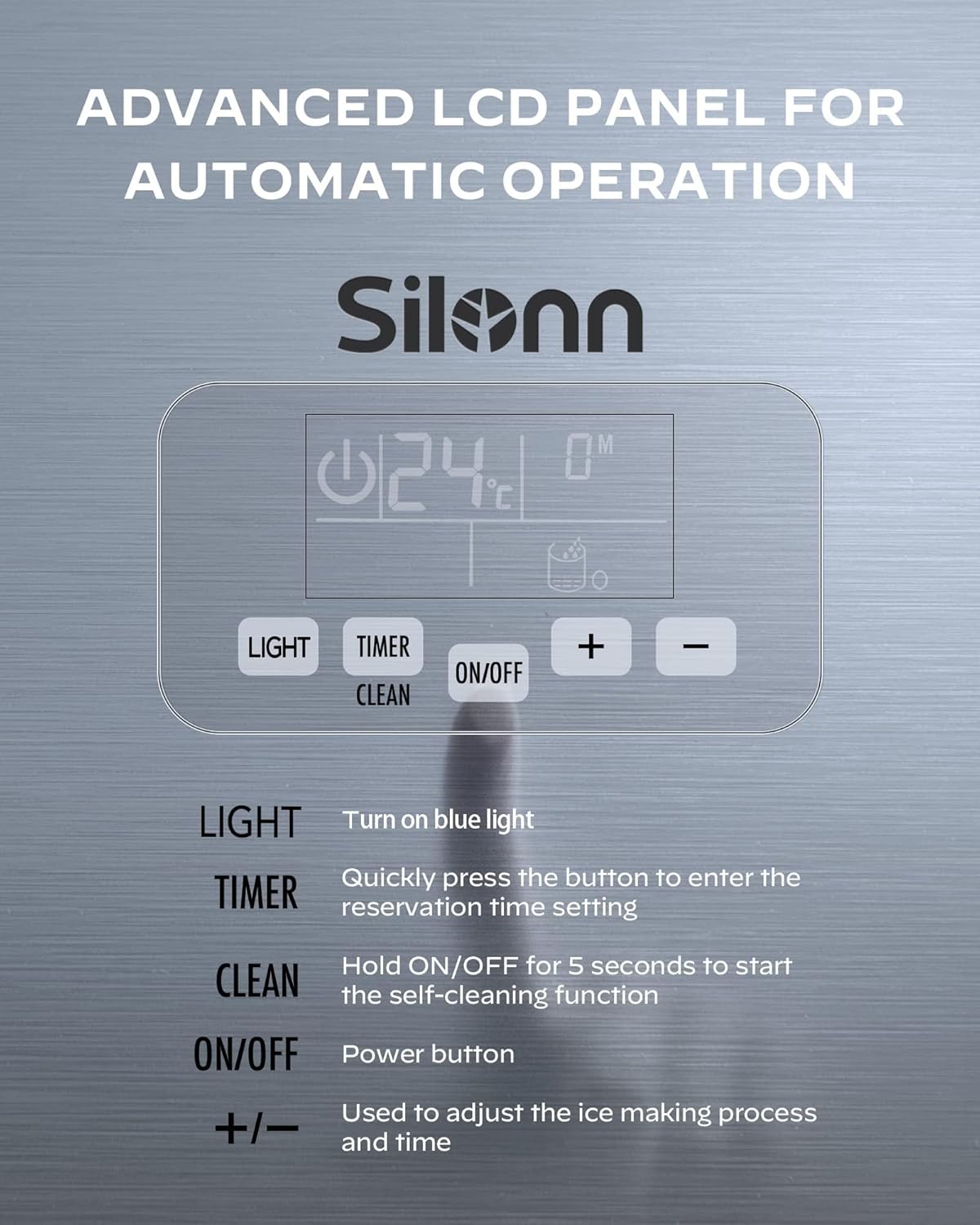
Image: Close-up of the Silonn ice maker's advanced LCD control panel, detailing the functions of the LIGHT, TIMER, ON/OFF (with CLEAN function), and +/- buttons for adjusting settings.
- CAHAYA: Press to turn the internal blue light on or off.
- PEMASA: Quickly press to enter the reservation time setting mode.
- HIDUP/MATI: Tekan untuk menghidupkan atau mematikan unit.
- BERSIH: Hold the ON/OFF button for 5 seconds to activate the self-cleaning function.
- , Use these buttons to adjust the ice making process duration and time settings (e.g., ice thickness, timer).
Proses Membuat Ais
- Ensure the water supply is connected or the reservoir is filled.
- Tekan ke HIDUP/MATI button to start the ice making cycle.
- Adjust ice thickness (thin, medium, or thick) using the +/- buttons if desired. The ice making cycle typically takes 8-15 minutes.
- The unit will automatically produce ice until the ice bin is full or the water level is low.
- An alarm will sound if the water runs out, prompting a refill.

Image: Illustration demonstrating the adjustable ice thickness settings (Thin, Medium, Thick) and their corresponding production times, allowing customization for various beverage types.

Image: Infographic highlighting the Silonn ice maker's daily production capacity, indicating it can produce over 7000 ice cubes, sufficient for more than 800 drinks per day.
Fungsi Pemasa
The timer function allows you to set a reservation time for the ice maker to start or stop.
- Tekan ke PEMASA butang.
- Gunakan +/- buttons to set the desired delay time (e.g., 8 hours, 10 hours).
- The unit will automatically begin or end operation after the set time.

Image: Visual representation of the 24-hour time reservation feature, demonstrating how users can schedule ice production for specific times during the day or night.
Penyelenggaraan
Fungsi Pembersihan Diri
Pembuat ais dilengkapi dengan fungsi pembersihan kendiri automatik untuk memudahkan penyelenggaraan.
- Ensure the unit is connected to a water supply or the reservoir is filled.
- Pegang HIDUP/MATI button for 5 seconds. The unit will enter self-cleaning mode.
- The cleaning cycle will run automatically. Once complete, drain any remaining water.
Pembersihan Berkala
- Luaran: Lap bahagian luar dengan lembut, damp kain. Jangan gunakan pembersih atau pelarut yang melelas.
- Ice Bin: Periodically remove the ice bin and wash it with mild soap and water. Rinse thoroughly and dry before replacing.
- Takungan Air: If using manual fill, regularly clean the water reservoir to prevent mineral buildup.
- Saliran: Ensure the drain hose is clear and free of obstructions.
For optimal performance and hygiene, perform regular cleaning and utilize the self-cleaning function as needed.
Menyelesaikan masalah
Sebelum menghubungi sokongan pelanggan, sila rujuk isu dan penyelesaian biasa berikut:
| Masalah | Kemungkinan Punca | Penyelesaian |
|---|---|---|
| Pembuat ais tidak menghasilkan ais. | No water supply; unit not powered on; ambient temperature too high. | Check water connection/reservoir; ensure unit is plugged in and turned on; move to a cooler location. |
| Ice cubes are too small or soft. | Water temperature too high; ice making cycle too short. | Use colder water; adjust ice thickness setting to "Thick" using the +/- buttons. |
| Penunjuk "Tambah Air" sedang dihidupkan. | Water reservoir is empty or water supply is interrupted. | Refill water reservoir or check direct water connection. |
| Unit bising. | Unit tidak rata; operasi pemampat biasa. | Ensure unit is on a level surface; some noise during operation is normal. |
Spesifikasi

Image: Diagram illustrating the physical dimensions (Width, Depth, Height) and weight of the Silonn ice maker, along with a visual list of included accessories.
| Ciri | Perincian |
|---|---|
| Nombor Model | SLIM12T |
| Kapasiti Pengeluaran Ais | 150 paun / 24 jam |
| Kapasiti Penyimpanan Ais | 33 paun |
| Dimensi Produk (W x D x H) | 40 cm x 44.8 cm x 79.8 cm (15.7 x 17.6 x 31.4 inci) |
| Berat Produk | 31 kg (68.3 lbs) |
| Wattage | 320 watt |
| Voltage | 115 Volt |
| Bahan penyejuk | R290 |
| bahan | Keluli Tahan Karat |
| UPC | 850054443991 |
Waranti dan Sokongan Pelanggan
Silonn provides excellent customer care. For warranty information, product support, or assistance with setup and operation, please contact our U.S.-based customer care team. Refer to your purchase documentation or the Silonn webtapak untuk butiran hubungan khusus.
Please have your model number (SLIM12T) and purchase date available when contacting support.


