pengenalan
This manual provides comprehensive instructions for the setup, operation, maintenance, and troubleshooting of your Akko 5075B Plus Dracula Castle Mechanical Keyboard. Designed for versatility and performance, this keyboard features multi-mode connectivity, hot-swappable switches, and customizable RGB lighting to enhance your computing experience.

Figure 1: Akko 5075B Plus Dracula Castle Mechanical Keyboard with Creamy Yellow Switches.
Kandungan Pakej
Sila sahkan bahawa semua item terdapat dalam pakej:
- Papan Kekunci Mekanikal Akko 5075B Plus
- Kabel Jenis-C USB
- Penerima Tanpa Wayar 2.4GHz
- Extra Novelty Keycaps (Dracula Castle themed)
- Penarik Kekunci
- Penarik Suis
Video 1: Unboxing the Akko 5075B Plus Dracula Keyboard, showcasing its contents and initial appearance.
Persediaan
1. Mod Kesambungan
The Akko 5075B Plus supports three connectivity modes: Bluetooth 5.0, 2.4GHz wireless (via USB receiver), and wired Type-C. You can easily switch between devices and modes.

Gambar 2: Lebihview of Bluetooth, 2.4GHz, and Type-C wired connectivity options.

Figure 3: Visual representation of seamless switching between multiple connected devices.
- Mod Berwayar: Connect the keyboard directly to your device using the provided USB Type-C cable. The port is located on the top edge of the keyboard.
- Mod Wayarles 2.4GHz: Locate the USB receiver stored in the slot on the underside of the keyboard. Plug the receiver into an available USB port on your device.
- Mod Bluetooth: Ensure the keyboard is in Bluetooth mode using the switch on the underside. Follow your device's Bluetooth pairing instructions to connect.

Figure 4: USB Type-C port for wired connection and charging.
2. Suis Keserasian OS
A switch on the underside of the keyboard allows you to select between Mac, USB, and Windows modes for optimal compatibility and functionality.

Figure 5: OS compatibility switch located on the keyboard's underside.
3. Persediaan Fizikal
Papan kekunci ini mempunyai kaki boleh laras di bahagian bawahnya, membolehkan anda menetapkan sudut menaip pilihan anda untuk keselesaan ergonomik.

Figure 6: Flip-out feet for adjusting keyboard height and angle.
Arahan Operasi
1. Keycaps
The keyboard comes with PBT Double Shot ASA Profile keycaps, known for their durability and resistance to shine. The Dracula Castle theme features vintage gray base colors with novelty keys like bats, horror pumpkins, and ghosts.

Figure 7: Diagram illustrating the ASA Profile keycap dimensions.

Figure 8: PBT Double-Shot keycaps ensuring legends do not fade easily.

Figure 9: Collection of Dracula Castle themed novelty keycaps included with the keyboard.
2. Suis
The keyboard features Akko V3 Creamy Yellow Pro switches, which are linear and pre-lubed for a smooth typing experience. The 5-pin hot-swappable sockets allow for easy replacement of switches without desoldering.

Figure 10: Hot-swappable PCB allowing users to easily replace switches.

Figure 11: Demonstration of removing and installing hot-swappable switches.

Rajah 12: Terperinci view of the Akko V3 Creamy Yellow Pro switch.
3. Pencahayaan RGB
The keyboard features built-in and side-LED RGB backlighting with customizable light animation effects. Per-key RGB is supported and can be configured through the Akko Cloud Driver software.
4. Knob Functionality
The multi-function knob allows for quick adjustments. By default, it controls audio volume. It can also be re-mapped via the Akko Cloud Driver for other functions, such as adjusting RGB brightness.
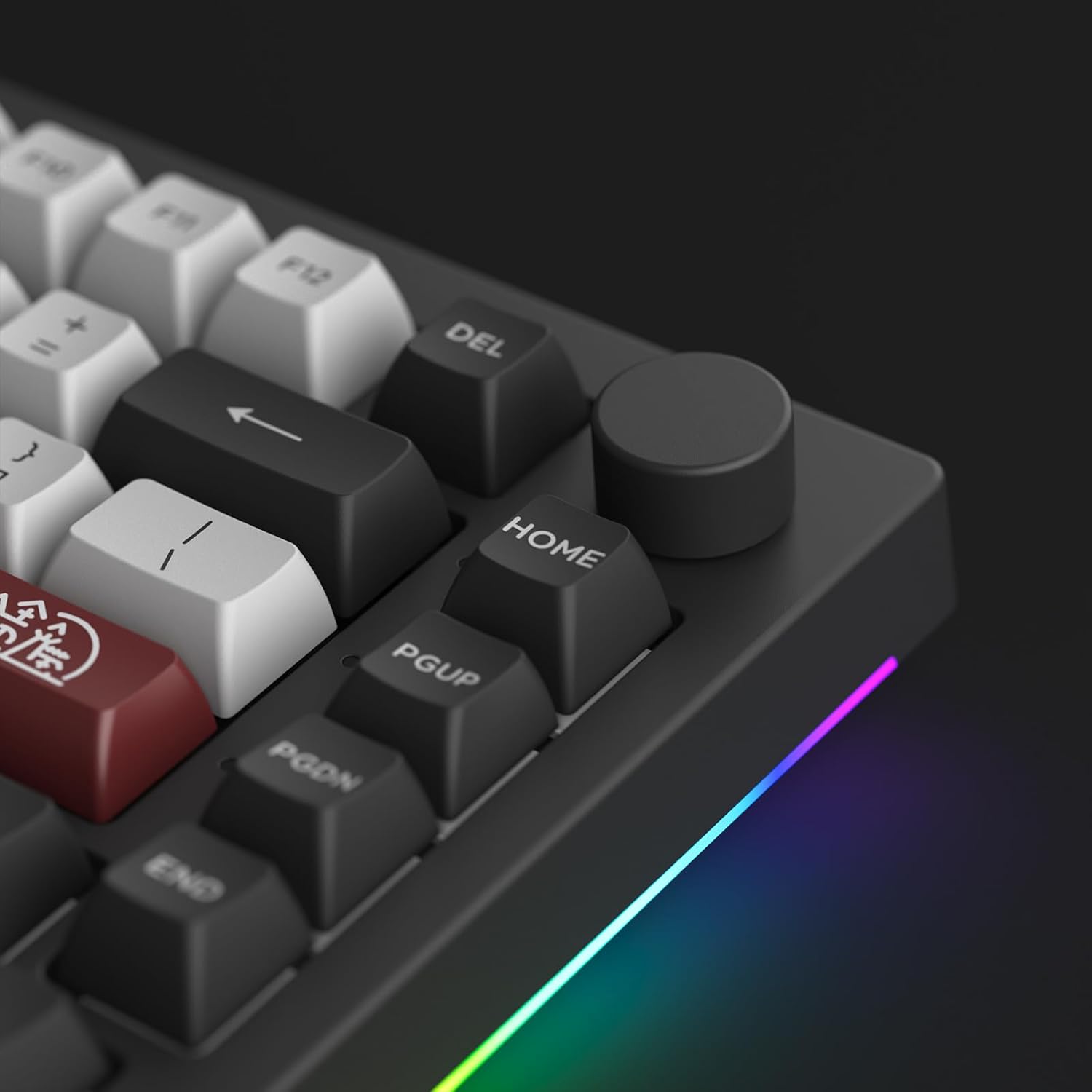
Rajah 13: Terperinci view of the programmable knob.

Figure 14: Visual demonstration of the knob's rotation and press functions.
5. Programmable Features (Akko Cloud Driver)
All keys and the knob can be re-mapped, and macros can be set using the Akko Cloud Driver software. This software provides extensive customization options for lighting effects, key assignments, and more.
Download the Akko Cloud Driver from the official Akko webtapak (www.akkogear.com) to unlock full customization capabilities.
Penyelenggaraan
1. Pembersihan
Regular cleaning helps maintain the keyboard's performance and appearance. Use a soft brush or compressed air to remove dust and debris from between the keycaps. For deeper cleaning, carefully remove the keycaps using the provided keycap puller and wipe them with a damp kain.
2. Penggantian Suis dan Penutup Kekunci
Thanks to the hot-swappable design, individual switches can be replaced if they become faulty or if you wish to try different switch types. Use the switch puller to gently remove switches. Ensure new switches are aligned correctly before pressing them into place. Keycaps can be removed and replaced using the keycap puller.
Menyelesaikan masalah
Jika anda menghadapi masalah dengan papan kekunci anda, sila rujuk penyelesaian biasa berikut:
- Isu Ketersambungan: Ensure the keyboard is in the correct mode (Wired, 2.4GHz, or Bluetooth) for your device. For wireless connections, check battery level and ensure the receiver is properly plugged in or Bluetooth is paired.
- Masalah Pencahayaan RGB: Verify that the keyboard is connected via USB for full RGB customization through the Akko Cloud Driver. Adjust brightness using the knob or software.
- Key Not Responding: If a specific key is not responding, it may be a faulty switch. Utilize the hot-swappable feature to replace the switch.
- Pengecaman Perisian: Ensure the keyboard is connected via USB when attempting to use the Akko Cloud Driver for firmware updates or extensive customization.
For more detailed troubleshooting or technical support, please visit the Akko official webtapak atau hubungi perkhidmatan pelanggan mereka.
Spesifikasi
| Ciri | Perincian |
|---|---|
| Dimensi Produk | 16.93 x 6.69 x 2.36 inci |
| Berat Barang | 3.05 paun |
| Pengeluar | Akko |
| Nombor Model Item | 5075B Plus |
| Teknologi Ketersambungan | USB-C, Bluetooth 5.0, 2.4GHz Wireless |
| Penerangan Papan Kekunci | Ergonomic, 75% Layout |
| Ciri Khas | Hot-Swappable, Programmable RGB, Knob |
| Keycap Profile | ASA Profile, Pukulan Berganda PBT |
| Jenis Suis | Akko V3 Creamy Yellow Pro (Linear, Pre-lubed) |
| Kapasiti Bateri | 3000mAh |

Figure 15: Internal structure of the Akko 5075B Plus keyboard, showing various layers for optimized noise reduction and typing feel.
Waranti dan Sokongan
For warranty information, product registration, or technical assistance, please visit the official Akko webtapak atau hubungi pasukan sokongan pelanggan mereka. Simpan resit pembelian anda untuk tuntutan waranti.
Akko Rasmi Webtapak: www.akkogear.com


