pengenalan
This manual provides detailed instructions for the setup, operation, and maintenance of your ATTACK SHARK M71 75% TKL Wireless Mechanical Keyboard. Please read this guide thoroughly to ensure proper use and to maximize your keyboard's performance and lifespan.

Image: The ATTACK SHARK M71 keyboard showcasing its 68% layout and key features like aluminum alloy body, three-mode connection, and RGB backlight.
Kandungan Pakej
Sahkan bahawa semua item terdapat dalam pakej:
- ATTACK SHARK M71 Wireless Mechanical Keyboard
- Kabel Jenis-C
- Penerima Wayarles 2.4G
- Keycap Puller / Switch Puller (Two-in-one tool)
- Complimentary 61 additional PBT OEM keycaps (different color layout)
- Manual Pengguna

Image: A visual representation of the items included in the ATTACK SHARK M71 keyboard package, including the keyboard, cables, and extra keycaps.
Video: Unboxing the Blueberry version of the M71 keyboard, showing the package contents and a demonstration of its typing sound.
Produk Selesaiview
The ATTACK SHARK M71 is a 75% TKL wireless mechanical keyboard featuring a full aluminum CNC chassis, multi-mode connectivity, hot-swappable switches, and RGB lighting. Its compact design and robust construction are engineered for both gaming and productivity.
Ciri-ciri Utama:
- Full Aluminum CNC Body: Constructed from international standard 6063 aluminum alloy for durability and a premium feel.
- Kesambungan Tiga Mod: Supports Bluetooth 5.0/3.0, 2.4G wireless, and wired USB-C connections.
- Suis Boleh Tukar Panas: Compatible with 3/5-pin switches, allowing for easy customization without soldering.
- Struktur Pemasangan Gasket: Incorporates anti-static IPEX switch pads, PORON sound-absorbing cotton, and PET acoustic switch pads to enhance typing feel and reduce noise.
- Pencahayaan LED RGB: Features customizable RGB backlighting and a side LED light strip.
- Bateri 4600mAh: Provides extended wireless usage.
- PBT OEM Keycaps: Durable keycaps with GMK-like characters.
Komponen:
Familiarize yourself with the main components of your keyboard:
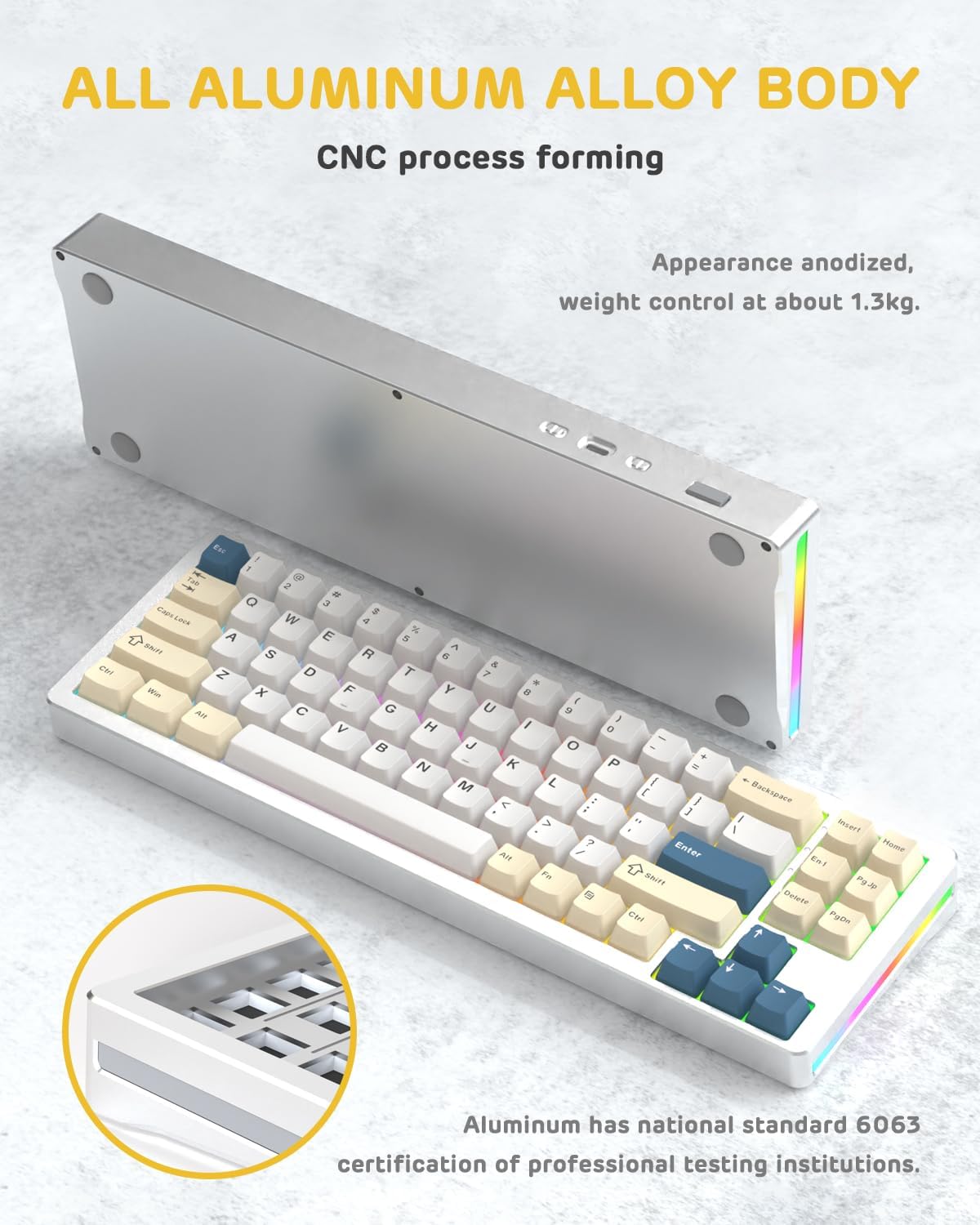
Imej: Sebelah view of the M71 keyboard highlighting its full aluminum alloy body and CNC process forming.

Imej: Meletup view illustrating the multi-layered gasket mount structure, including the PBT keycaps, aluminum alloy upper cover, customized switch body, PC positioning board, PORON filled cotton, anti-static IPEX switch underpad, PET singing pad, PCB board, PORON shaft seat cushion, PET sound backing pad, wing light strip, and aluminum alloy base.
Persediaan
1. Connectivity Modes:
The M71 keyboard supports three connection modes: Bluetooth, 2.4G wireless, and wired USB-C.
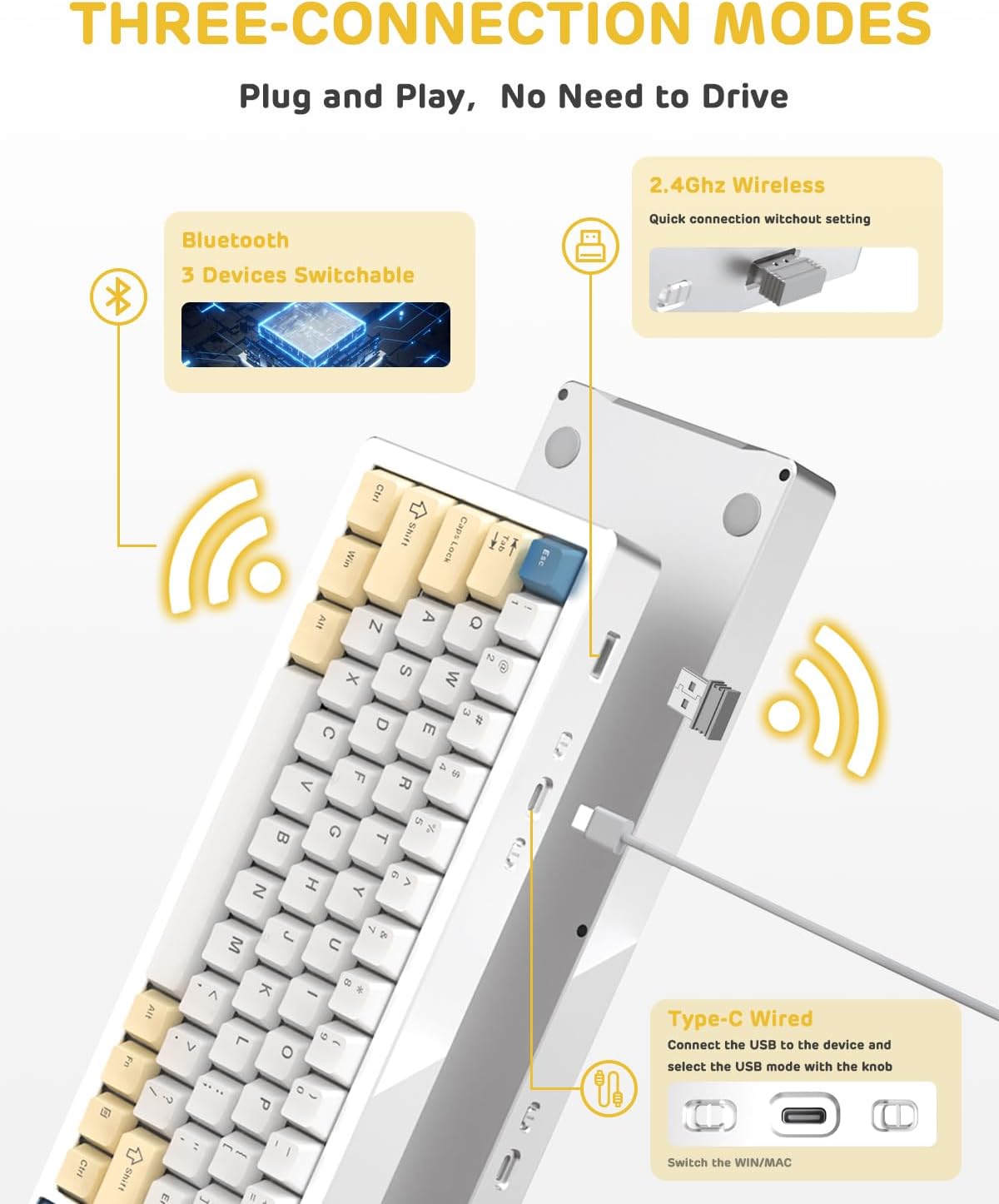
Image: A visual guide to the three connectivity options: Bluetooth for up to 3 devices, 2.4GHz wireless with a receiver, and wired Type-C connection.
Sambungan Berwayar:
- Connect the provided Type-C cable to the keyboard's USB-C port and to your computer's USB port.
- Ensure the mode switch on the keyboard is set to the wired (USB-C) position.
- Papan kekunci akan dikenali secara automatik oleh sistem anda.
Sambungan Wayarles 2.4G:
- Cari penerima wayarles 2.4G (dongle) dalam pakej.
- Palamkan penerima 2.4G ke dalam port USB yang tersedia pada komputer anda.
- Set the mode switch on the keyboard to the 2.4G wireless position.
- Papan kekunci sepatutnya bersambung secara automatik.
Sambungan Bluetooth:
- Set the mode switch on the keyboard to the Bluetooth position.
- Pada komputer atau peranti anda, buka tetapan Bluetooth dan cari peranti baharu.
- The keyboard should appear as "ATTACK SHARK M71" or similar. Select it to pair.
- The keyboard can connect to up to 3 Bluetooth devices. Use Fn + 1/2/3 untuk bertukar antara peranti berpasangan.
2. Battery Charging and Status:
The M71 keyboard is equipped with a 4600mAh battery. To charge, connect the keyboard via the USB-C cable to a power source (e.g., computer USB port, USB wall adapter).

Image: A diagram showing how to check the battery level using Fn+ALT(R) and the visual indicators on the keyboard's side LED strip.
- Untuk memeriksa tahap bateri dalam mod wayarles, tekan Fn + ALT (Right). The side LED strip will indicate the charge level.
- Battery life is approximately 1-2 weeks with lighting enabled and up to 4 weeks with lighting disabled.
Arahan Operasi
1. Multimedia Keys:
The keyboard features 12 multimedia keys accessible via the Fn kombinasi kunci:
- Fn + F1-F12: Access various multimedia functions (e.g., volume control, play/pause, calculator, email).
- Fn + 1/2: Kawal kecerahan skrin.
2. Kawalan Pencahayaan RGB:
Customize the keyboard's RGB backlight and side LED strip:

Image: The M71 keyboard displaying its RGB backlight and side LED strip, along with a close-up of the PBT keycaps.
- Fn + Ctrl (Right): Switch between different side LED light strip modes.
- Fn + Tab: Toggle white light mode.
- Refer to the full user manual for additional lighting effect controls and customization options via the programmable software.
3. Programmable Software:
The keyboard supports a dedicated driver program for advanced customization. You can download the software from the official ATTACK SHARK website to personalize lighting effects, key assignments, and macros. The keyboard is compatible with Windows 2000/XP/Vista/7/8/10/11, Android, and iOS.
Penyelenggaraan
1. Pembersihan:
- Gunakan kain lembut dan kering untuk mengelap permukaan papan kekunci.
- Untuk pembersihan yang lebih mendalam, keluarkan penutup kekunci menggunakan penarik penutup kekunci yang disediakan dan gunakan udara termampat untuk membersihkan serpihan dari antara suis.
- Elakkan menggunakan bahan kimia yang keras atau bahan yang melelas.
2. Hot-Swapping Switches:
The M71 keyboard features hot-swappable sockets, allowing you to change switches without soldering.

Imej: Dari dekat view of the hot-swappable White Jade linear switches on the M71 keyboard, demonstrating how they can be easily removed and replaced.
- Matikan papan kekunci atau putuskan sambungannya daripada peranti anda.
- Gunakan alat penarik suis untuk memegang suis dengan berhati-hati dan tariknya lurus ke atas.
- Align the pins of the new switch with the holes on the PCB and press down gently until it clicks into place. Ensure pins are not bent.
- The PCB supports both 3-pin and 5-pin switches.
Video: A demonstration of the disassembly process for the M71 keyboard, showing how to remove keycaps and switches, revealing the gasket mount structure.
Menyelesaikan masalah
| Isu | Penyelesaian yang Mungkin |
|---|---|
| Papan kekunci tidak bertindak balas dalam mod wayarles. |
|
| Kunci tidak mendaftar atau menaip dua kali. |
|
| Pencahayaan RGB tidak berfungsi atau tidak betul. |
|
| Isu berpasangan Bluetooth. |
|
Spesifikasi
| Ciri | Perincian |
|---|---|
| Model | M71 |
| Susun atur | 75% TKL (71 keys) |
| Ketersambungan | Bluetooth 5.0/3.0, 2.4G Wireless, USB-C Wired |
| Suis | Hot-swappable (3/5-pin compatible), Pre-lubed Linear White Jade Switch |
| Kekunci Kekunci | Kekunci PBT OEM |
| Gaya Pemasangan | Pemasangan Gasket |
| Bahan Casis | Full Aluminum CNC (6063 alloy) |
| Kapasiti Bateri | 4600mAh |
| Pencahayaan | RGB Backlight, RGB LED Side Light Strip |
| Keserasian | Windows 2000/XP/Vista/7/8/10/11, Android, iOS, Mac |
| Dimensi Produk | 13.78"L x 4.53"W x 1.22"H |
| Berat Barang | 2.86 paun |
Waranti dan Sokongan
Untuk maklumat jaminan dan sokongan teknikal, sila rujuk laman web rasmi ATTACK SHARK webtapak atau hubungi perkhidmatan pelanggan mereka secara langsung. Simpan resit pembelian anda sebagai bukti pembelian untuk sebarang tuntutan waranti.
Pengeluar: SERANGAN JEUNG
Penjual: Ajazz US
Tarikh Mula-mula Tersedia: 4 Ogos 2023


