1. Pengenalan
Thank you for choosing the Acekool Portable Air Conditioner. This 3-in-1 unit provides powerful cooling, efficient dehumidification, and effective air circulation through its fan mode. Designed for convenience and portability, it is ideal for cooling rooms up to 35 square meters. Please read this manual thoroughly before operation to ensure proper use, maintenance, and safety.
2. Maklumat Keselamatan
Untuk mengurangkan risiko kebakaran, kejutan elektrik atau kecederaan apabila menggunakan penghawa dingin anda, ikut langkah berjaga-jaga asas ini:
- Sentiasa pasangkan unit ke soket AC 220V yang dibumikan. Jangan gunakan wayar sambungan atau palam penyesuai.
- Jangan kendalikan unit dengan kord atau palam yang rosak.
- Jangan halang saluran masuk atau keluar udara. Pastikan ruang yang mencukupi di sekeliling unit untuk aliran udara yang betul.
- Jauhkan unit daripada sumber haba, cahaya matahari langsung dan bahan mudah terbakar.
- Jangan masukkan jari atau objek asing ke dalam saluran masuk atau alur keluar udara.
- Cabut plag unit sebelum membersihkan atau melakukan sebarang penyelenggaraan.
- Perkakas ini tidak dimaksudkan untuk digunakan oleh orang (termasuk kanak-kanak) yang kurang keupayaan fizikal, deria atau mental, atau kurang pengalaman dan pengetahuan, melainkan mereka telah diberi pengawasan atau arahan mengenai penggunaan perkakas oleh orang yang bertanggungjawab untuk keselamatan mereka.
- Pastikan unit diletakkan di atas permukaan yang rata dan stabil untuk mengelakkan terbalik.
3. Ciri-ciri Produk
- Powerful and Efficient: Delivers strong cooling power to quickly and effectively cool your room. Enjoy personal comfort at the touch of a button.
- Flexible and Mobile: Equipped with wheels for easy movement between rooms. Provides a pleasant climate in bedrooms, living rooms, or offices. Adjustable settings allow customization of cooling needs.
- Easy to Use and Control: Features an intuitive control panel and remote control for setting temperature, timer, and fan speed. The convenient timer function allows pre-programming for energy saving.
- Energy-efficient and Environmentally Friendly: Designed for low power consumption, helping to reduce energy costs. Uses R290 refrigerant, contributing to environmental protection.
- Elegan dan Padat: Boasts a sleek and modern design that blends seamlessly into any room, making it an attractive addition to your home or office.

Image: The unit's compact size delivers high cooling performance, suitable for rooms up to 300 sq. ft. with 9000 BTU cooling capacity and 350m³/h airflow.

Image: The unit uses environmentally friendly R290 refrigerant, promoting energy efficiency and cost savings.

Image: The 3-in-1 operation system includes cooling (down to 16°C), dehumidifying (up to 42L/day), and fan (2 speeds) functions.
4. Spesifikasi Produk
| Spesifikasi | Nilai |
|---|---|
| Jenama | Acekool |
| Nombor Model | CF9 |
| Dimensi Produk (L x W x H) | 45 x 89 x 44 cm |
| Berat badan | 26 Kilogram |
| Penilaian Kecekapan Tenaga | A |
| Kapasiti Penyejukan | 9000 BTU |
| Kapasiti Dehumidifikasi | 42 Liter/hari |
| Penggunaan Kuasa Tahunan | 1000 Watt |
| Tahap Kebisingan | 55 dB |
| Jenis Pemasangan | Tingkap |
| Ciri Khas | Dehumidifier |
| warna | Hitam |
| Voltage | 220 Volt |
| kuasa | 1000 Watt |
| Nisbah Kecekapan Tenaga Bermusim (SEER) | 2.6 |
5. Kandungan Pakej
Sila pastikan semua komponen ada dan dalam keadaan baik:
- Unit Penghawa Dingin Mudah Alih Acekool
- Hos Ekzos
- Window Seal Kit (includes window slider kit and adapter)
- Alat Kawalan Jauh
- Hos Saliran (untuk saliran berterusan dalam mod penyahlembapan)
- Manual Pengguna (dokumen ini)
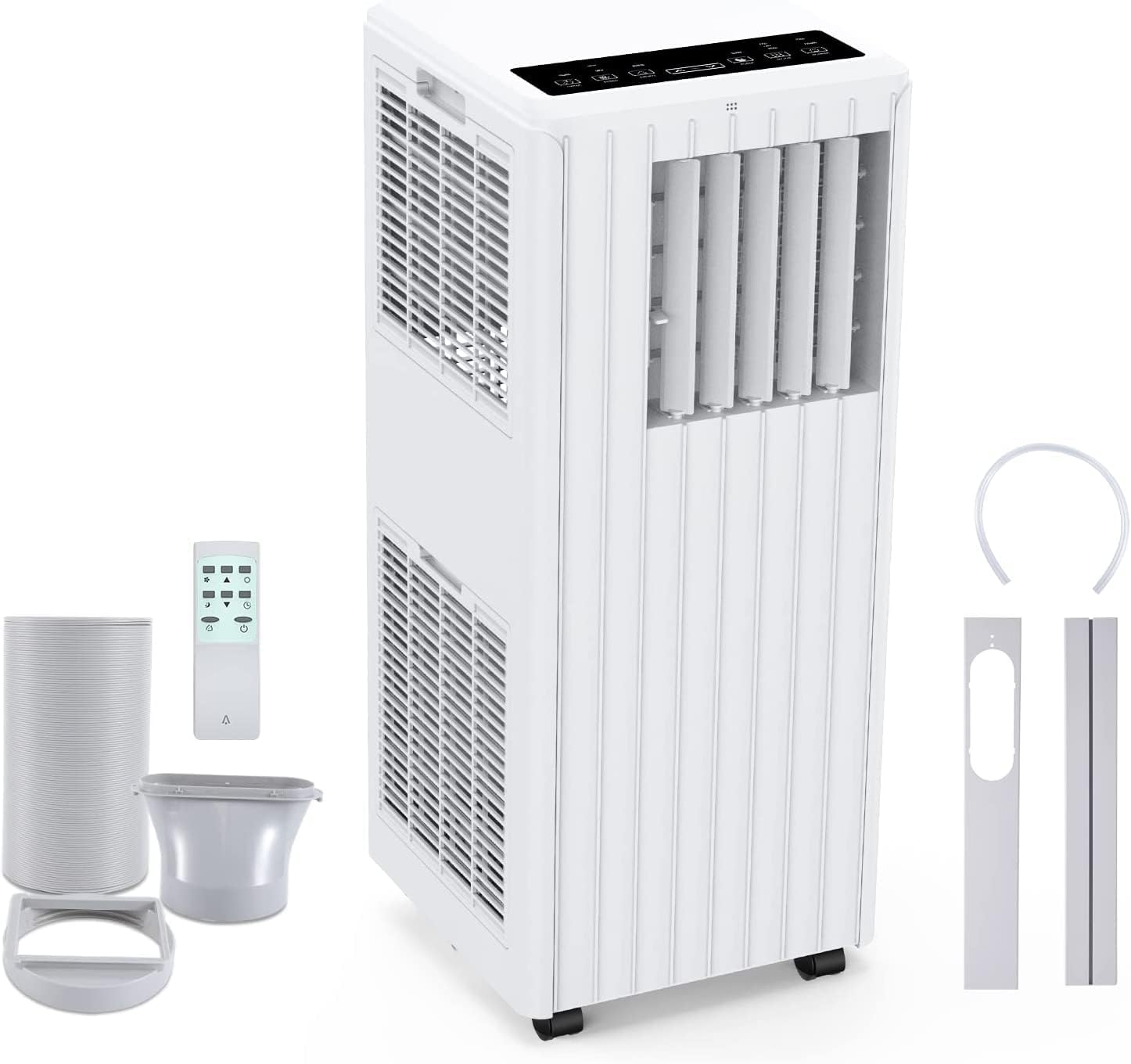
Image: All components included in the package: the main unit, exhaust hose, window sealing plate, remote control, and drain bucket.
6. Persediaan dan Pemasangan
Ikuti langkah ini untuk menyediakan penghawa dingin mudah alih anda:
- Kedudukan: Place the air conditioner on a flat, stable surface near a window and a grounded electrical outlet. Ensure there is at least 20 cm (8 inches) of space around the unit for proper airflow.
- Pasang Hos Ekzos: Screw one end of the exhaust hose into the air outlet on the back of the unit.
- Install Window Seal Kit: Laraskan kit gelangsar tingkap agar sesuai dengan bukaan tingkap anda. Pasangkannya di tempatnya.
- Sambungkan Hos Ekzos ke Kit Tingkap: Attach the other end of the exhaust hose to the adapter on the window slider kit, ensuring a tight seal to prevent hot air from re-entering the room.
- Sambungan Kuasa: Palamkan kord kuasa ke salur keluar AC 220V yang dibumikan.

Image: Visual guide for easy installation, showing how to connect the exhaust hose to the unit and the window sealing plate.
7. Arahan Operasi
Your Acekool Portable Air Conditioner can be operated using the control panel on the unit or the included remote control.
Panel Kawalan dan Alat Kawalan Jauh
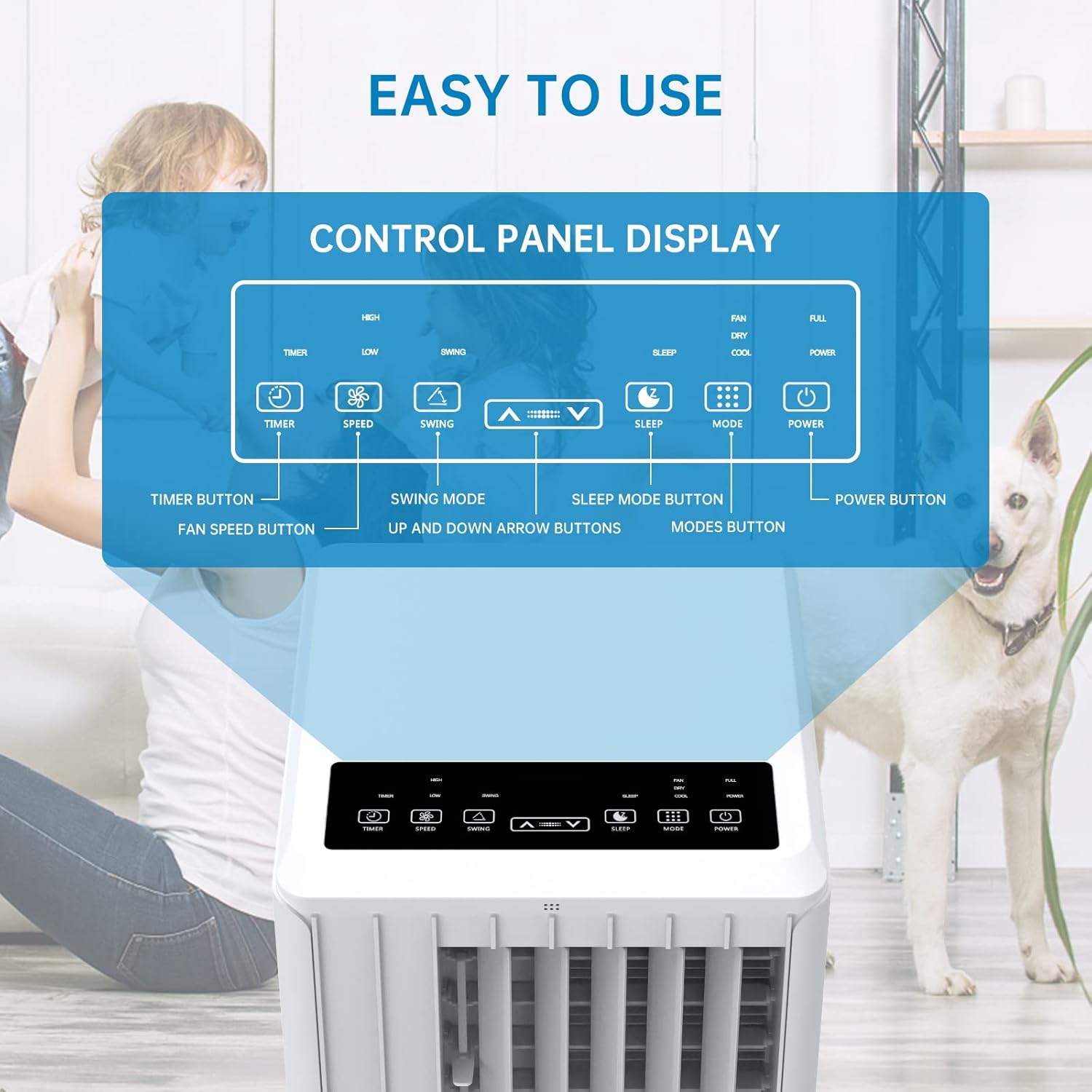
Imej: Terperinci view of the control panel display, indicating buttons for Timer, Speed, Swing, Sleep, Mode, and Power.

Image: The unit can be conveniently controlled via the remote control, and features a swing mode for wider air distribution.
Mod Pengendalian

Imej: Selesaiview of the main operating modes: Cool, Fan, Dry (Dehumidifying), and Sleep, along with smart timer functionality.
- Mod Sejuk: Press the "Mode" button until the snowflake icon appears. Use the Up/Down arrows to set your desired temperature (16°C - 30°C). The unit will cool the room to the set temperature.
- Mod Kipas: Press the "Mode" button until the fan icon appears. In this mode, the unit circulates air without cooling. Use the "Speed" button to adjust fan speed (Low/High).
- Dehumidify Mode (Dry): Press the "Mode" button until the water drop icon appears. The unit will remove excess moisture from the air. In this mode, the fan speed cannot be adjusted. Ensure the continuous drainage hose is connected for prolonged use.
- Mod tidur: Press the "Sleep" button. In this mode, the unit operates quietly and gradually increases the temperature by 1°C after the first hour and another 1°C after the second hour, maintaining this temperature for 6 hours before returning to normal operation. This mode is ideal for nighttime use.

Image: The sleep mode offers automatic shut-off, quiet operation (55dB), and a 24-hour smart timer for comfortable nighttime use.
Fungsi Tambahan
- Fungsi Pemasa: Press the "Timer" button to set the desired operating time (1-24 hours) for automatic turn on/off.
- Kelajuan Kipas: In Cool or Fan mode, press the "Speed" button to cycle through Low and High fan speeds.
- Fungsi Ayunan: Press the "Swing" button to activate or deactivate the automatic vertical oscillation of the air louvers, distributing air more evenly.
8. Penyelenggaraan
Penyelenggaraan tetap memastikan prestasi optimum dan memanjangkan jangka hayat penghawa dingin anda. Sentiasa cabut plag unit sebelum membersihkan.
Membersihkan Penapis Udara
Penapis udara hendaklah dibersihkan setiap dua minggu atau lebih kerap bergantung pada penggunaan dan kualiti udara.
- Keluarkan penapis udara dari bahagian belakang unit.
- Basuh penapis dengan air suam dan sabun. Bilas sebersih-bersihnya.
- Benarkan penuras kering sepenuhnya sebelum memasukkannya semula ke dalam unit.
Mengeringkan Air
The unit has an internal water tank that collects condensed water. When the tank is full, the unit will stop operating and display a "FULL" indicator. You will need to drain the water manually.
- Place a shallow pan or bucket under the drain port at the bottom rear of the unit.
- Tanggalkan palam longkang untuk membolehkan air mengalir keluar.
- Setelah disalirkan, pasangkan palam saliran dengan selamat.
For continuous dehumidification, attach the provided drain hose to the continuous drain port.
Membersihkan Bahagian Luar Unit
Lap bahagian luar unit dengan lembut, damp kain. Jangan gunakan bahan kimia yang keras atau pembersih yang kasar.
Penyimpanan
Jika menyimpan unit untuk tempoh yang lama:
- Drain all water from the unit.
- Bersihkan penapis udara.
- Store the unit in a dry, cool place, away from direct sunlight.
9. Penyelesaian masalah
Sebelum menghubungi khidmat pelanggan, sila rujuk panduan penyelesaian masalah berikut untuk isu-isu biasa:
| Masalah | Kemungkinan Punca | Penyelesaian |
|---|---|---|
| Unit tidak dihidupkan | No power supply; Power cord unplugged; Circuit breaker tripped; Water tank full. | Periksa soket kuasa; Pasangkan kord kuasa dengan kukuh; Tetapkan semula pemutus litar; Toskan tangki air. |
| Unit tidak menyejukkan dengan berkesan | Air filter dirty; Exhaust hose not properly installed/sealed; Room too large; Doors/windows open; Air inlet/outlet blocked. | Clean air filter; Ensure exhaust hose is properly installed and sealed; Close doors/windows; Clear obstructions from air inlets/outlets. |
| Unit bising | Unit bukan pada permukaan rata; Penapis udara kotor; Komponen dalaman bergetar. | Letakkan unit di atas permukaan yang rata dan stabil; Bersihkan penapis udara; Jika bunyi bising berterusan, hubungi khidmat pelanggan. |
| Kebocoran air dari unit | Drain plug loose; Continuous drain hose not properly connected or blocked. | Ensure drain plug is secure; Check continuous drain hose for proper connection and clear any blockages. |
| Alat kawalan jauh tidak berfungsi | Bateri mati atau salah dimasukkan; Halangan antara alat kawalan jauh dan unit. | Replace batteries; Ensure line of sight between remote and unit. |
10. Waranti dan Sokongan
For warranty information and customer support, please refer to the warranty card included with your product or visit the official Acekool website. Do not attempt to repair the unit yourself, as this may void the warranty and pose safety risks. For any issues not covered in this manual, please contact Acekool customer service.


