pengenalan
Welcome to the user manual for your Technical Pro RXM7BT Home Receiver and Rockville HC85 In-Ceiling Speakers bundle. This comprehensive guide provides detailed instructions for setting up, operating, and maintaining your new audio system. Please read this manual thoroughly before use to ensure proper installation and optimal performance.
Arahan Keselamatan Penting
To reduce the risk of electric shock, fire, or injury, always follow basic safety precautions when using electronic equipment. Keep these instructions for future reference.
- Baca semua arahan sebelum mengendalikan perkakas.
- Jangan gunakan alat ini berhampiran air.
- Bersihkan hanya dengan kain kering.
- Jangan sekat sebarang bukaan pengudaraan. Pasang mengikut arahan pengilang.
- Jangan pasang berhampiran mana-mana sumber haba seperti radiator, daftar haba, dapur, atau radas lain (termasuk amppenghidup) yang menghasilkan haba.
- Jangan kalahkan tujuan keselamatan palam terkutub atau jenis pembumian. Palam terkutub mempunyai dua bilah dengan satu lebih lebar daripada yang lain. Palam jenis pembumian mempunyai dua bilah dan serampang pembumian ketiga. Bilah lebar atau serampang ketiga disediakan untuk keselamatan anda. Jika palam yang disediakan tidak sesuai dengan alur keluar anda, rujuk juruelektrik untuk menggantikan alur keluar usang.
- Lindungi kord kuasa daripada berjalan atau tersepit, terutamanya pada palam, bekas kemudahan dan tempat keluar dari radas.
- Hanya gunakan lampiran/aksesori yang ditentukan oleh pengilang.
- Cabut plag radas ini semasa ribut petir atau apabila tidak digunakan untuk jangka masa yang lama.
- Rujuk semua servis kepada kakitangan perkhidmatan yang berkelayakan. Servis diperlukan apabila radas telah rosak dalam apa jua cara, seperti kord bekalan kuasa atau palam rosak, cecair telah tertumpah atau objek jatuh ke dalam radas, radas telah terdedah kepada hujan atau lembapan, tidak beroperasi seperti biasa. , atau telah digugurkan.

Imej: Sisi view of the RXM7BT receiver, showing a warning label indicating that opening the unit will void the warranty. This emphasizes the importance of not attempting internal repairs.
Kandungan Pakej
Sahkan bahawa semua item yang disenaraikan di bawah disertakan dalam pakej anda. Jika ada item yang hilang atau rosak, sila hubungi sokongan pelanggan.
- 1 x Technical Pro RXM7BT Home Receiver
- 4 x Rockville HC85 8" In-Ceiling Speakers
- 1 x Alat Kawalan Jauh
- 1 x Kabel Kuasa
- Manual Pengguna (dokumen ini)

Image: The complete bundle, including the RXM7BT receiver, four HC85 in-ceiling speakers, and the system's remote control, as they appear when unboxed.
Produk Selesaiview
RXM7BT Receiver Front Panel

Imej: A terperinci view of the RXM7BT receiver's front panel, highlighting the display, input selection buttons, volume knobs, microphone inputs, and tone controls.
The front panel of the RXM7BT receiver provides access to all primary controls and indicators. This includes the digital display for FM tuning and input status, master volume control, microphone volume and tone adjustments, and input selection buttons for RCA, Bluetooth, USB, SD Card, and MP3 (AUX) sources. USB and SD card slots are conveniently located on the front for easy access.
RXM7BT Receiver Rear Panel

Image: The rear panel of the RXM7BT receiver, displaying the various input and output ports, including RCA audio inputs, speaker binding posts, FM antenna connection, and voltagpemilih e.
The rear panel houses all necessary connections for your audio system. This includes RCA inputs for two audio sources (e.g., DVD, Line), banana binding posts for speaker connections, RCA line out, and an FM antenna input. A voltage selector switch (110/220V) is also present, factory-set for your region.
Rockville HC85 In-Ceiling Speakers

Image: A pair of Rockville HC85 in-ceiling speakers, one with its paintable sheer grill attached and the other with the grill removed to show the 8-inch polypropylene cone woofer and Mylar dome tweeter.
The Rockville HC85 speakers are designed for in-ceiling installation, providing clear and rich audio without visible speaker cabinets. Each speaker features an 8-inch polypropylene cone woofer for deep bass and clear mids, and a ½-inch Mylar dome tweeter for crisp highs. The paintable flush-mount grills allow for seamless integration with any room decor. Spring-loaded push terminals ensure a secure connection.
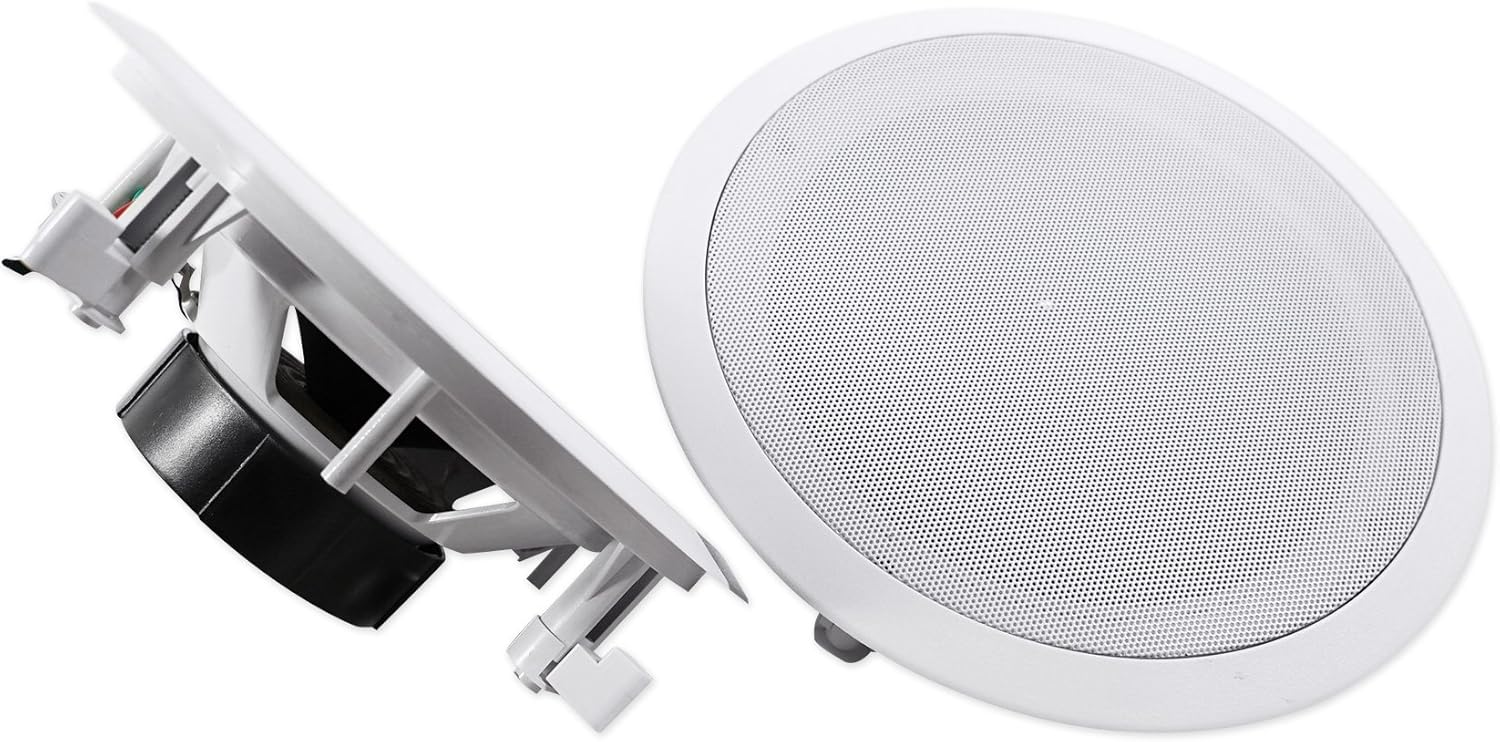
Imej: Pro sampinganfile of the Rockville HC85 in-ceiling speaker, illustrating the robust mounting clips that secure the speaker firmly within the ceiling cutout.
Alat Kawalan Jauh
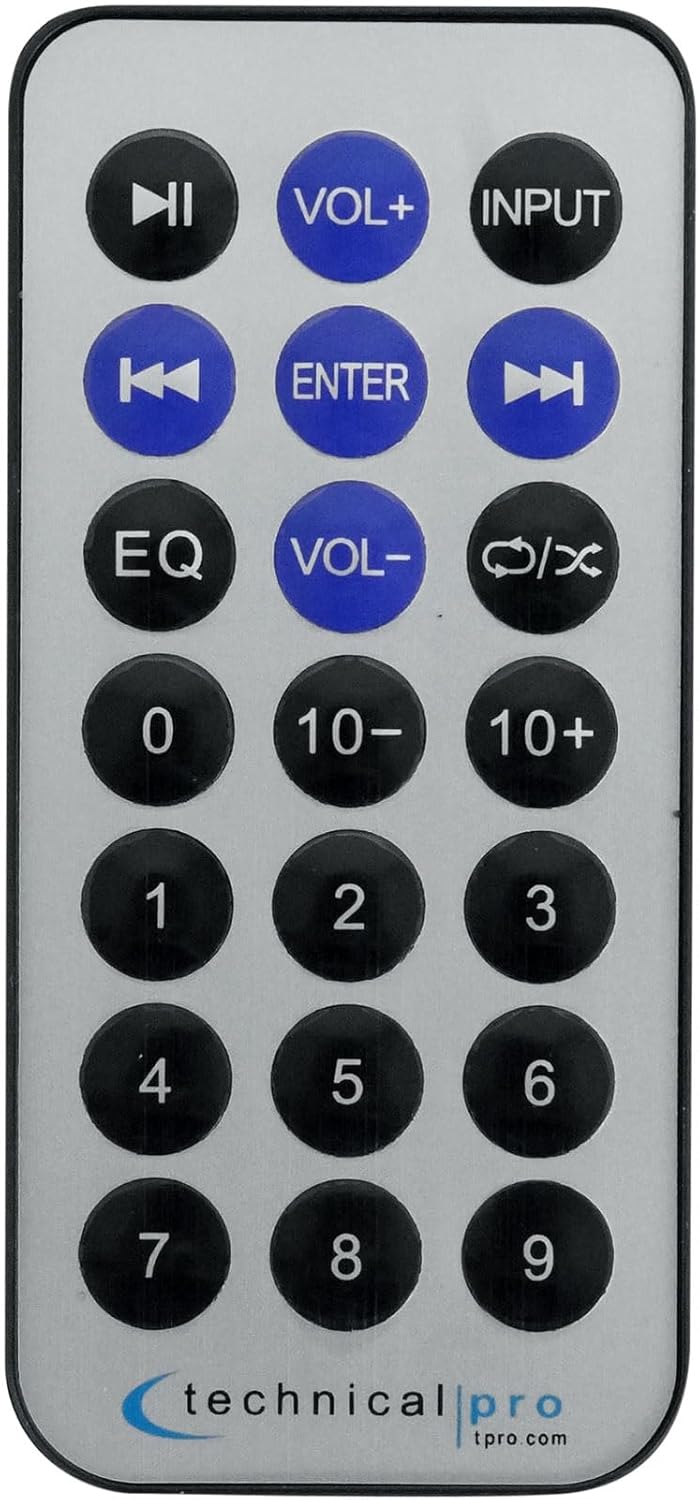
Image: The compact remote control for the RXM7BT receiver, featuring buttons for power, input selection, volume adjustment, track control, EQ settings, and numerical input for FM stations.
The included remote control provides convenient wireless operation of your RXM7BT receiver. Functions include power on/off, input selection, volume control, track navigation for USB/SD playback, and FM tuner controls.
Persediaan
Speaker Installation (Rockville HC85)
Before installing, ensure you have appropriate wiring (16-gauge or thicker speaker wire recommended) and tools (drill, drywall saw, wire strippers).
- Pilih Lokasi: Select a suitable location in your ceiling, avoiding joists, electrical wires, or plumbing. Ensure adequate clearance behind the speaker for proper air circulation.
- Lubang Potong: Use the provided template (if available, or refer to specifications for cut-out diameter) to mark the desired hole. Carefully cut the hole in the drywall using a drywall saw. The cut-out diameter is 9.3 inches.
- Run Wires: Route speaker wires from the receiver location to each speaker cutout. Leave enough slack for easy connection.
- Connect Speaker: Strip approximately ½ inch of insulation from the speaker wire ends. Press down on the spring-loaded push terminals on the speaker and insert the bare wire ends. Connect the positive (+) terminal on the speaker to the positive (+) terminal on the receiver, and the negative (-) terminal on the speaker to the negative (-) terminal on the receiver. Ensure polarity is consistent for all speakers.
- Pemasangan Pembesar Suara: Carefully insert the speaker into the cutout. The mounting clips will automatically flip out and secure the speaker to the drywall as you push it in. For a tighter fit, some models may require tightening screws on the front baffle to engage the dog-leg clamps.
- Attach Grill: Once the speaker is securely mounted, attach the magnetic grill. The grill can be painted to match your ceiling color.
Receiver Connections (Technical Pro RXM7BT)
Ensure the receiver is unplugged from the power outlet before making any connections.
- Sambungan Pembesar Suara: Connect the speaker wires from your HC85 speakers to the "MAIN SPEAKERS" banana binding posts on the rear of the RXM7BT receiver. Match positive (+) to positive (+) and negative (-) to negative (-). The RXM7BT supports 8-ohm speakers.
- Audio Source Connection (RCA): Connect external audio devices (e.g., DVD player, CD player, TV audio out) to the "INPUT" RCA jacks (DVD or LINE) on the rear panel using RCA cables.
- Sambungan Antena FM: Connect the included FM antenna to the "FM ANTENNA" terminal on the rear panel for radio reception. Extend the antenna for better signal.
- Sambungan Kuasa: Once all audio and speaker connections are made, plug the receiver's power cord into a standard 110/220V AC power outlet (ensure the voltage selector switch is set correctly for your region).
Arahan Operasi
Hidupkan/Mati Kuasa
Tekan ke KUASA butang pada panel hadapan atau alat kawalan jauh untuk menghidupkan atau mematikan unit.
Pemilihan Input
Tekan ke INPUT button on the front panel or remote control repeatedly to cycle through available audio sources: RCA (DVD/LINE), Bluetooth, USB, SD Card, and MP3 (AUX).
Kawalan Kelantangan
Laraskan kelantangan induk menggunakan besar JILID tombol pada panel hadapan atau pada VOL+ / vol- butang pada alat kawalan jauh.
Gunakan BASS dan TREBLE knobs on the front panel to adjust the tone of the audio output. The BAKI knob adjusts the left/right speaker balance.
Berpasangan Bluetooth
- Pilih Bluetooth as the input source using the INPUT button. The display will show "BT INPUT" or "BLUETOOTH".
- Pada peranti berdaya Bluetooth anda (telefon pintar, tablet, dll.), dayakan Bluetooth dan cari peranti yang tersedia.
- Select "RXM7BT" from the list of devices.
- Once paired, the display will indicate a successful connection, and you can play audio from your device through the receiver. The Bluetooth range is approximately 30 feet.
Main Semula USB/Kad SD
Insert a USB drive or SD card (up to 128GB) containing .mp3, .wav, or .wma audio files into the respective slot on the front panel. The receiver will automatically switch to USB/SD input and begin playback. Use the track navigation buttons (SEBELUM, SETERUSNYA, MAIN/JEDA) on the front panel or remote control.
Penala FM
Pilih FM sebagai sumber input. Gunakan CH- dan CH+ buttons to manually tune to stations. Press IMBAS FM to automatically scan and save available stations.
Penggunaan Mikrofon
Sambungkan sehingga dua mikrofon ke MIC1 dan MIC2 inputs on the front panel. Adjust microphone volume using the MIC.VOLUME tombol. Menggunakan MIC.BASS, MIC.TREBLE, dan ECHO knobs to fine-tune the microphone sound.
Penyelenggaraan
Proper care and maintenance will ensure the longevity and optimal performance of your audio system.
- Pembersihan: Disconnect the power before cleaning. Use a soft, dry cloth to wipe the exterior surfaces of the receiver and speakers. Do not use liquid cleaners, aerosols, or abrasive chemicals, as they may damage the finish or internal components.
- Pengudaraan: Ensure the receiver's ventilation openings are not blocked. Adequate airflow is crucial to prevent overheating.
- Storan: Jika menyimpan unit untuk tempoh yang lama, cabut plagnya dari salur keluar kuasa dan simpannya di tempat yang sejuk dan kering jauh daripada cahaya matahari langsung dan suhu yang melampau.
- Pemanggang Pembesar Suara: The speaker grills can be carefully removed for painting. Ensure they are fully dry before reattaching.
Menyelesaikan masalah
If you encounter any issues with your system, refer to the table below for common problems and their solutions. If the problem persists, contact customer support.
| Masalah | Kemungkinan Punca | Penyelesaian |
|---|---|---|
| Tiada kuasa | Power cord not connected; Power outlet not active; Unit is off. | Ensure power cord is securely plugged in; Check power outlet with another device; Press the POWER button. |
| Tiada suara dari pembesar suara | Incorrect input selected; Volume too low; Speaker wires loose or incorrectly connected; Mute function active. | Select correct input; Increase volume; Check speaker wire connections (polarity); Ensure unit is not muted. |
| Bluetooth tidak bersambung | Receiver not in Bluetooth mode; Device too far; Device already connected to another unit; Interference. | Select Bluetooth input; Move device closer (within 30ft); Disconnect from other devices; Restart receiver and device. |
| Isu main balik USB/SD | Tidak disokong file format; USB/SD card corrupted; Card size exceeds limit. | pastikan files are .mp3, .wav, or .wma; Try a different USB/SD card; Ensure card size is 128GB or less. |
| Penerimaan FM yang lemah | Antena tidak disambungkan atau dipanjangkan; Isyarat lemah. | Connect and fully extend FM antenna; Try repositioning the antenna; Use auto-scan feature. |
Spesifikasi Teknikal
Below are the detailed specifications for the Technical Pro RXM7BT Receiver and Rockville HC85 Speakers.
Technical Pro RXM7BT Receiver
| Kuasa RMS | 150 watts RMS Both Channels Driven @ 1.0% THD @ 8 ohms |
| Kuasa Puncak | 1000 watt |
| Input | RCA (2 audio sources), Bluetooth, USB, SD Card, MP3 (AUX) |
| Keluaran | Banana binding post (2 speakers), RCA (Line Out) |
| USB & SD Card Max Size | 128GB |
| Disokong File Jenis | .mp3, .wav, .wma |
| Julat Bluetooth | 30 Kaki |
| Respons Kekerapan | 20Hz-20KHz |
| Output Fon Kepala | 1/8'' Jack |
| Voltage | 110/220v (Switchable) |
| Dimensi (L x W x H) | 9.10" L x 10.25" W x 4.1" H |
| Berat Barang | 6 lbs (Receiver only) |
Rockville HC85 In-Ceiling Speakers
| Pengendalian Kuasa Puncak | 350 Watts (setiap pembesar suara) / 700 Watts (sepasang) |
| Pengendalian Kuasa RMS | 120 Watts (setiap pembesar suara) / 240 Watts (sepasang) |
| Woofer | Kon Polipropilena 8" dengan Keliling Getah |
| Tweeter | ½" Mylar Dome Tweeter |
| Gegelung Suara | Aluminium 1" |
| Magnet | 20 oz. Ferit |
| Impedans | 8 ohm |
| Respons Kekerapan | 40Hz - 20KHz |
| Sensitiviti | 89 dB @ 1w / 1m |
| Kedalaman Pemasangan | 3.03" |
| Diameter Potongan | 9.3" |
| warna | Putih (boleh dicat) |
Maklumat Waranti
This product is covered by a manufacturer's warranty. Please refer to the warranty card included in your original packaging for specific terms and conditions, including warranty duration and coverage details. Keep your proof of purchase for warranty claims.
- Pelan Perlindungan 2 Tahun: Tersedia untuk pembelian secara berasingan.
- Pelan Perlindungan 3 Tahun: Tersedia untuk pembelian secara berasingan.
Sokongan Pelanggan
For technical assistance, troubleshooting beyond this manual, or warranty inquiries, please contact Technical Pro customer support. Contact information can typically be found on the manufacturer's official webtapak atau pada pembungkusan produk.
When contacting support, please have your product model number (RXM7BT+(2) HC85) and proof of purchase readily available.


