1. Pengenalan
Thank you for choosing the Haplized Kitchen Island Cart. This manual provides detailed instructions for the assembly, operation, and maintenance of your new kitchen island. Please read this manual thoroughly before assembly and use to ensure safe and correct operation.
This versatile kitchen island cart features a spacious rubber wood countertop, two storage drawers, a towel rack, a three-tier spice rack, an enclosed cabinet with an adjustable shelf, and smooth-rolling lockable casters for mobility and stability. It is designed to enhance your kitchen's functionality and storage capacity.
2. Maklumat Keselamatan
Sila patuhi langkah berjaga-jaga keselamatan berikut untuk mengelakkan kecederaan dan kerosakan pada produk:
- Baca semua arahan dengan teliti sebelum pemasangan dan penggunaan.
- Jauhkan semua bahan pembungkusan daripada kanak-kanak untuk mengelakkan bahaya tercekik.
- Pasang unit pada permukaan yang lembut dan bersih untuk mengelakkan calar.
- Pastikan semua skru dan pengikat diketatkan dengan kukuh sebelum digunakan. Periksa secara berkala dan ketatkan semula jika perlu.
- Do not overload shelves or drawers. Distribute weight evenly.
- Always lock the wheels when the cart is in a stationary position to prevent accidental movement.
- Keep liquids away from electrical outlets integrated into the countertop.
- Jangan berdiri atau memanjat unit.
- Use only as intended for kitchen storage and preparation.
3. Kandungan Pakej
Sebelum memulakan pemasangan, pastikan semua bahagian ada dan tidak rosak. Jika mana-mana bahagian hilang atau rosak, sila hubungi khidmat pelanggan.
- Main Frame Panels (Side panels, back panel, bottom panel)
- Meja Kayu Getah
- Drop-Leaf Extension Panel
- Drawer Components (Fronts, sides, backs, bottoms)
- Pintu Kabinet
- Rak boleh laras
- Rak tuala
- Spice Rack Shelves (3 tiers)
- Pemegang Gelas Wain
- Casters (4, with 2 lockable)
- Power Outlet Unit (if included)
- Hardware Pack (Screws, dowels, cam locks, drawer slides, hinges, handles, etc.)
- Assembly Tools (Hex key, screwdriver - usually not included, but sometimes a basic one is)
4. Arahan Perhimpunan
Assembly typically requires two adults. Follow the numbered steps provided in the separate assembly guide included with your product. The general sequence is as follows:
- Sediakan Ruang Kerja: Kosongkan kawasan yang luas dan susun atur semua komponen dan perkakasan.
- Pasang Bingkai Asas: Connect the side panels, bottom panel, and back panel using the provided hardware.
- Pasang Kastor: Attach the four casters to the bottom of the assembled base frame. Ensure the two lockable casters are positioned on the front side for easy access.
- Pasang Laci: Construct the two drawers and install the drawer slides onto both the drawers and the main frame. Insert the drawers into their respective slots.
- Pasangkan Pintu Kabinet: Install hinges onto the cabinet door and attach it to the main frame.
- Install Shelves and Racks: Place the adjustable shelf inside the cabinet. Attach the towel rack, spice rack shelves, and wine glass holders to their designated positions.
- Mount Countertop: Secure the main rubber wood countertop to the top of the frame.
- Attach Drop-Leaf Extension: Install the drop-leaf extension panel to the side of the main countertop, ensuring the support mechanism functions correctly.
- Install Power Outlet (if applicable): If your model includes a power outlet, carefully install it into the pre-cut opening on the countertop and route the power cord.
- Pemeriksaan Akhir: Verify all connections are secure and the unit is stable.

Image 4.1: Fully assembled Haplized Kitchen Island Cart, showcasing its storage features and countertop.

Image 4.2: The kitchen island cart with its drop-leaf extension unfolded, demonstrating its use as an expanded surface.

Image 4.3: Detail of the adjustable open storage rack, showing how shelves can be repositioned.

Image 4.4: The kitchen island cart with its drop-leaf extension folded down, illustrating its compact configuration.
5. Arahan Operasi
5.1 Moving the Cart
To move the kitchen island cart, ensure the two lockable casters are in the "UNLOCKED" position. Gently push the cart to your desired location. Once positioned, push the levers on the two lockable casters to the "LOCKED" position to secure the cart and prevent accidental movement.
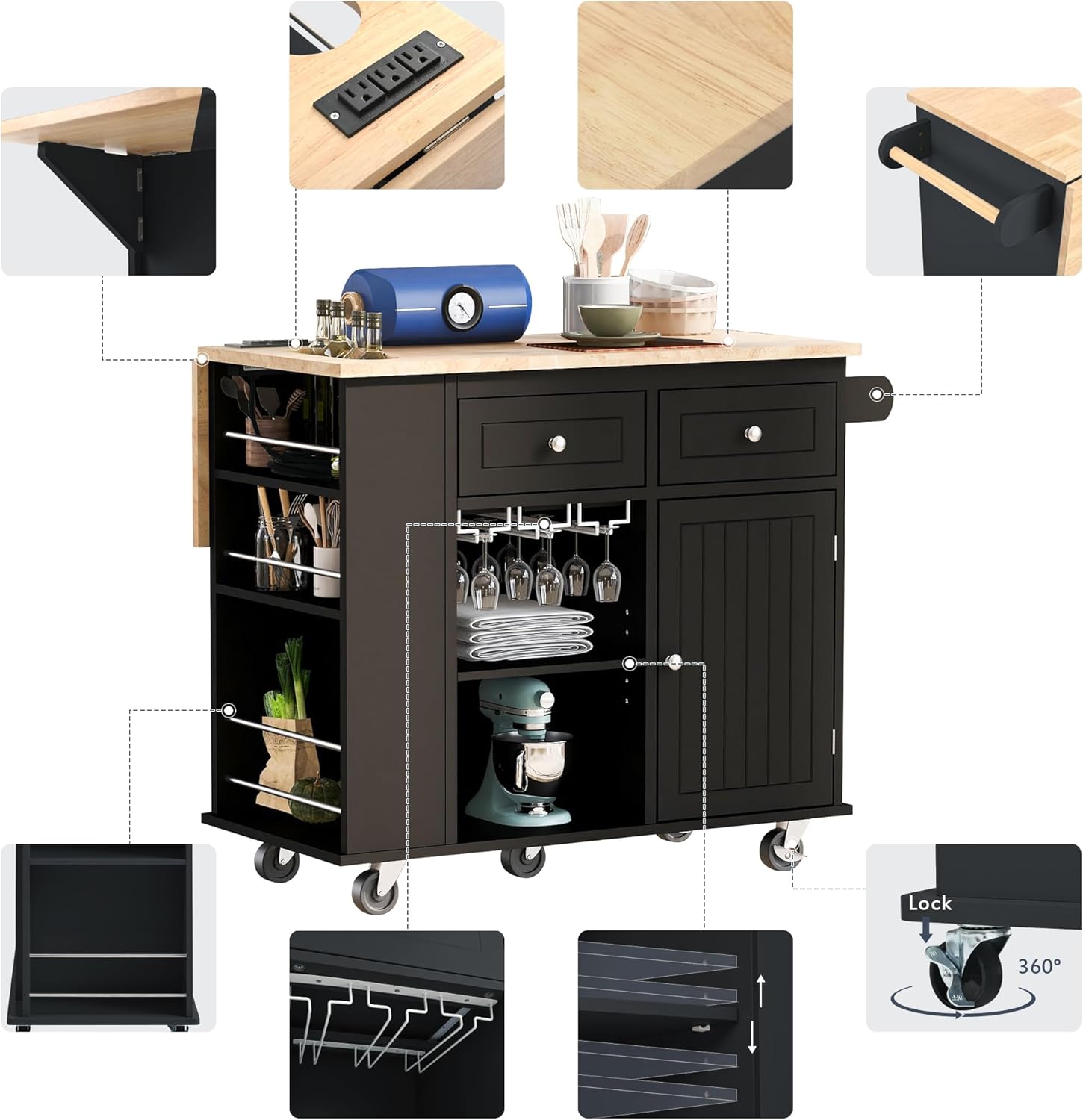
Image 5.1: Detail of a lockable caster, showing the "Lock" and "Unlock" mechanism.
5.2 Using the Drop-Leaf Countertop Extension
The cart features a drop-leaf extension to provide additional workspace or dining area. To extend, lift the drop-leaf panel until it is level with the main countertop and engage the support mechanism underneath. To fold down, disengage the support and gently lower the panel.
5.3 Utilizing Storage Features
- Laci: Use the two smooth-gliding drawers for storing utensils, cutlery, or other small kitchen items.
- Kabinet: The enclosed cabinet provides discreet storage. The internal shelf is adjustable; reposition it to accommodate items of various heights.
- Rak Rempah: The three-tier open spice rack is ideal for organizing spices, oils, or small bottles for easy access.
- Rak Tuala: Use the side-mounted towel rack for kitchen towels or cloths.
- Pemegang Gelas Wain: Hang wine glasses upside down in the designated holders for convenient storage and display.
5.4 Power Outlet (if applicable)
If your model includes an integrated power outlet, plug the cart's power cord into a standard wall outlet. You can then use the outlets on the countertop to power small kitchen appliances. Ensure the power cord is not a tripping hazard and avoid exposing the outlets to liquids.

Imej 5.2: Satu meletup view highlighting various features of the kitchen island cart, such as the power outlet, towel rack, and storage options.
6. Penyelenggaraan dan Penjagaan
Penjagaan yang betul akan memanjangkan hayat dan penampilan troli pulau dapur anda.
- Pembersihan: Wipe surfaces with a dry, soft cloth. For stubborn stains, a slightly damp cloth followed by immediate drying is recommended. Avoid abrasive cleaners or harsh chemicals.
- Tumpahan: Clean up spills immediately to prevent damage to the wood and engineered wood surfaces.
- Perkakasan: Periodically check all screws, bolts, and fasteners to ensure they are tight. Re-tighten as necessary to maintain stability.
- Kastor: Keep casters free of debris to ensure smooth movement.
- Atas meja: The rubber wood countertop is durable but can be damaged by excessive heat or sharp objects. Use cutting boards and trivets as needed.
7. Penyelesaian masalah
If you encounter any issues with your Haplized Kitchen Island Cart, refer to the following common problems and solutions:
| Masalah | Kemungkinan Punca | Penyelesaian |
|---|---|---|
| Troli goyah atau tidak stabil. | Pengikat longgar; lantai tidak rata. | Ensure all screws and bolts are securely tightened. Move the cart to a level surface. |
| Laci tidak meluncur dengan lancar. | Drawer slides misaligned; debris in tracks. | Check that drawer slides are correctly installed and aligned. Clean any debris from the tracks. |
| Roda tidak bergolek dengan bebas. | Debris caught in wheels; casters locked. | Remove any hair or debris from the caster wheels. Ensure lockable casters are in the "UNLOCKED" position. |
| Drop-leaf panel does not stay up. | Support mechanism not fully engaged. | Ensure the support bracket is fully extended and locked into place under the drop-leaf panel. |
If the problem persists or is not listed here, please contact Haplized customer support for assistance.
8. Spesifikasi
- Nombor Model: WF305556AAG-AV
- Jenama: Bahagia
- Dimensi Produk (Dilanjutkan): 40"D x 29.33"W x 33.7"H (101.6cm D x 74.5cm W x 85.6cm H)
- Bahan Bingkai: Engineered Wood, Rubberwood, Wood
- Bahan atas meja: Kayu Getah
- warna: Hitam
- Jenis Rak: Tiered Shelf (Spice Rack), Adjustable Shelf (Cabinet)
- Kastor: 4 universal casters, 2 with locking mechanism
- ciri-ciri: 2 Drawers, 3-Tier Open Spice Rack, Towel Rack, Door Cabinet, Wine Glass Holders, Drop-Leaf Extension, Integrated Power Outlet (model dependent)
- Arahan Penjagaan: Lap dengan Kain Kering
- UPC: 650076196635
Image 8.1: Dimensional drawing of the kitchen island cart, showing key measurements and features.
9. Waranti dan Sokongan
Haplized stands behind the quality of its products. For specific warranty information, please refer to the warranty card included with your purchase or visit the official Haplized website. If you have any questions, require replacement parts, or need technical assistance, please contact Haplized customer support:
- Webtapak: Visit the Haplized Store on Amazon (untuk pertanyaan umum dan maklumat produk)
- E-mel/Telefon: Please refer to your product packaging or the Haplized webtapak untuk maklumat hubungan terkini.


