1. Pengenalan
This manual provides detailed instructions for the installation, operation, and maintenance of your SECULINK C17-4MP Dual-Band WiFi Dome Security Camera. This camera is designed for outdoor surveillance, featuring 4MP resolution, pan/tilt/zoom capabilities, automatic tracking, human detection, and color night vision. Please read this manual thoroughly before use to ensure proper functionality and safety.
2. Kandungan Pakej
Sahkan bahawa semua item terdapat dalam pakej anda:
- SECULINK C17-4MP Dome Security Camera
- Penyesuai Kuasa (Pengecas)
- Skru Pemasangan dan Palam Dinding
- Kit Kalis Air untuk Kabel Rangkaian (jika berkenaan)
- Panduan Mula Pantas
3. Produk Lebihview
The SECULINK C17-4MP camera features a robust dome design suitable for outdoor environments. Key components include:
- Kanta Kamera: Tangkap video footage.
- LED inframerah: Menyediakan pencahayaan untuk penglihatan malam.
- White Light LEDs (Floodlight): Enhance color night vision and act as a deterrent.
- mikrofon: Untuk input audio dan komunikasi dua hala.
- Penceramah: Untuk output audio dan komunikasi dua hala.
- Antena: For dual-band 2.4GHz/5GHz Wi-Fi connectivity.
- Slot Kad Mikro SD: Supports local storage up to 256GB.
- Butang Tetapkan Semula: Untuk tetapan semula kilang.
- Pelabuhan Kuasa: Input kuasa 12V DC.

Imej 3.1: Selesaiview of the SECULINK C17-4MP camera and its mobile application interface.
4. Persediaan
4.1 Muat Turun Apl dan Pendaftaran Akaun
- Muat turun SECUEYE mobile application from the App Store (iOS) or Google Play Store (Android).
- Buka apl dan ikut arahan pada skrin untuk mendaftar akaun baharu atau log masuk jika anda sudah memilikinya.
4.2 Menghidupkan Kamera
Connect the provided power adapter to the camera's power port and plug it into an electrical outlet. The camera will initiate its self-test sequence, indicated by a rotating motion and status light changes.
4.3 Menyambung ke Wi-Fi
The SECULINK C17-4MP supports dual-band Wi-Fi (2.4GHz and 5GHz) for flexible network connectivity.
- Ensure your mobile device is connected to the same Wi-Fi network you intend to connect the camera to.
- In the SECUEYE app, tap the "Add Device" or "+" icon.
- Pilih model kamera anda atau imbas kod QR pada kamera (jika ada).
- Follow the app's instructions to enter your Wi-Fi network name (SSID) and password.
- The app will guide you through the pairing process, which may involve scanning a QR code displayed on your phone with the camera lens or listening for an audio prompt.
- Once connected, the camera's status light will indicate a successful connection (refer to the app or quick start guide for specific light indicators).
4.4 Memasang Kamera
The camera is designed for wall mounting and is IP65/IP66 weatherproof, making it suitable for outdoor installation.
- Pilih lokasi pemasangan yang sesuai yang menyediakan yang dikehendaki viewing angle and is within Wi-Fi range.
- Use the mounting template (if provided) or the camera base to mark the drill holes on the wall.
- Gerudi lubang dan masukkan palam dinding.
- Pasangkan tapak kamera pada dinding menggunakan skru yang disediakan.
- Attach the camera body to the base.
- Ensure all cable connections are secure and protected from weather using the waterproof kit if necessary.
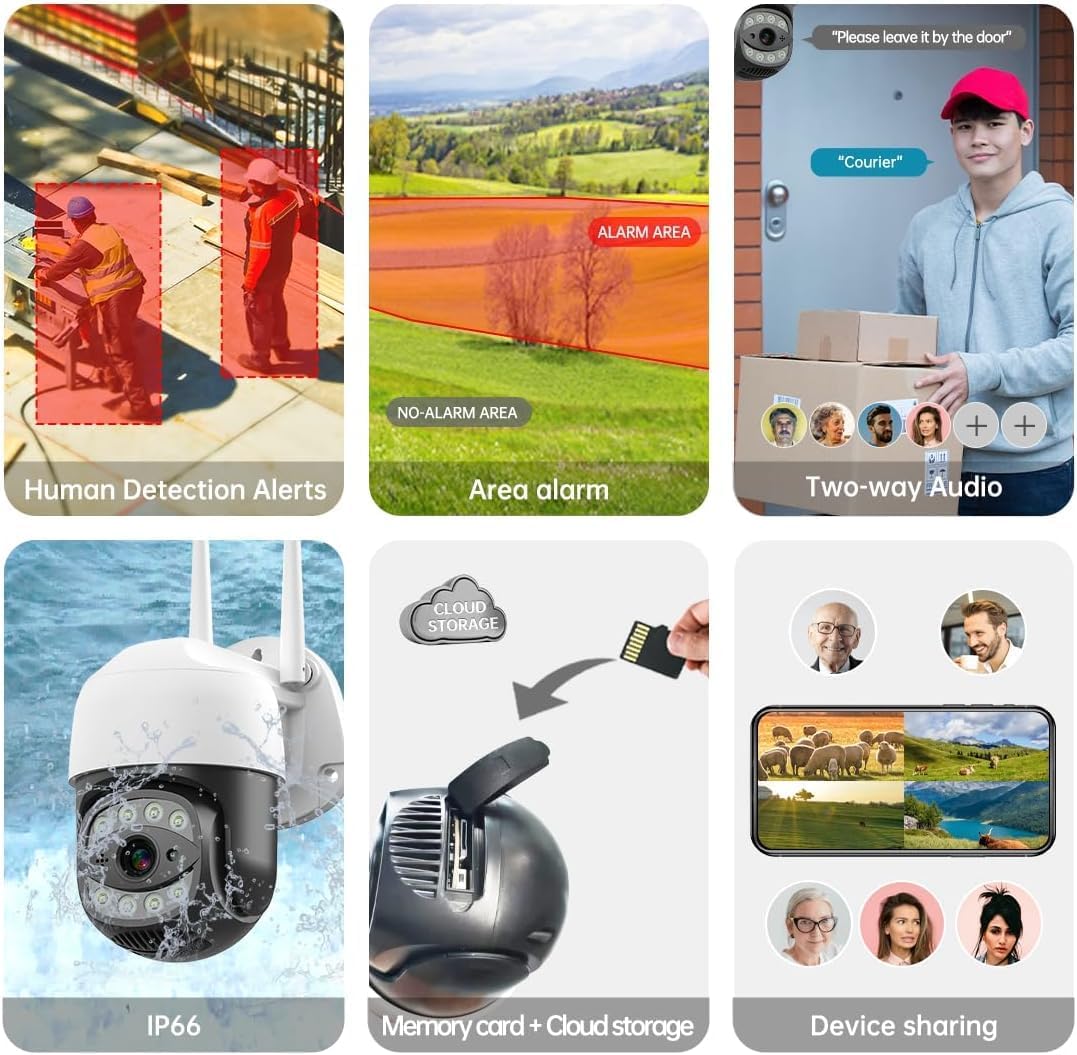
Image 4.1: The SECULINK C17-4MP camera is rated IP66 for dust and water resistance, suitable for various weather conditions.
5. Arahan Operasi
5.1 Langsung View dan Main semula
Access the live video feed and review dirakam footage through the SECUEYE app. The camera provides 4MP (2560x1440p) resolution for clear images.

Image 5.1: Visual comparison demonstrating the enhanced clarity of 5MP resolution over lower resolutions.
5.2 Pan, Tilt, and Digital Zoom (PTZ)
Kawal kamera viewing angle remotely using the SECUEYE app. The camera offers:
- Putaran Mendatar: 335 darjah
- Condong Menegak: 90 darjah
- Zum Digital: pembesaran 10x
Use pinch-to-zoom gestures on your mobile device to digitally zoom in on specific areas of interest.

Image 5.2: Demonstrates controlling the camera's pan and tilt functions via the mobile app.

Image 5.3: Illustration of the 10x digital zoom feature, allowing closer inspection of details.
5.3 Automatic Tracking and Human Motion Detection
The camera features intelligent detection capabilities to enhance security monitoring.
- Penjejakan Automatik: When enabled, the camera will automatically detect and follow moving human figures within its field of view, recording their path.
- Pengesanan Pergerakan Manusia: Advanced algorithms distinguish human activity from other movements (e.g., pets, swaying branches), reducing false alarms.
- Makluman: Upon detection, the camera can send real-time alerts to your mobile phone.
- Floodlight and Sound Alarm: Built-in spotlights activate upon motion detection at night, and a security siren can be triggered as an additional deterrent.

Image 5.4: The camera's AI Humanoid Detection identifies human presence and sends alerts.

Image 5.5: The camera's automatic tracking capability follows detected human movement.

Image 5.6: Illustrates the camera's ability to differentiate human activity from other movements, reducing false alarms.
5.4 Mod Penglihatan Malam
The camera offers multiple night vision options for clear surveillance in low-light conditions:
- Penglihatan Malam Inframerah (IR): Uses IR LEDs to provide black and white video in complete darkness, with a range of up to 100ft (30m).
- Penglihatan Malam Warna: Utilizes white light LEDs (floodlight) to capture full-color video at night when motion is detected or manually activated.
- Sensor Cahaya Bintang: Enhances low-light performance to produce clearer images even without additional illumination.

Image 5.7: Demonstrates the different night vision modes: infrared (black and white), white light (color), and full-color night vision.

Image 5.8: The camera's infrared night vision provides visibility up to 20 meters in darkness.
5.5 Audio Dua Hala
The built-in microphone and speaker allow for real-time two-way communication through the SECUEYE app. You can listen to audio from the camera's location and speak through the camera's speaker.
5.6 Pilihan Storan
The camera supports two primary storage methods for recorded footage:
- Kad SD mikro: Insert a Micro SD card (up to 256GB, sold separately) into the designated slot for local storage. The camera can record 24/7 or motion-triggered videos.
- Storan Awan: Optional cloud storage services are available through the SECUEYE app for secure, remote backup of your recordings.
5.7 Perkongsian Peranti
You can share access to your camera's live feed and recordings with family members or trusted individuals through the SECUEYE app, allowing multiple users to monitor the property simultaneously.
6. Penyelenggaraan
To ensure optimal performance and longevity of your SECULINK C17-4MP camera, consider the following maintenance tips:
- Bersihkan Lensa: Periodically wipe the camera lens with a soft, clean, lint-free cloth to remove dust, dirt, or water spots that may affect image clarity. Avoid abrasive cleaners.
- Semak Sambungan Kuasa: Ensure the power adapter and cable remain securely connected and free from damage, especially in outdoor environments.
- Kemas kini Firmware: Regularly check the SECUEYE app for available firmware updates. Updates often include performance improvements, new features, and security enhancements.
- Periksa Pemasangan: Periodically check the camera's mounting for stability, especially after severe weather conditions.
7. Penyelesaian masalah
If you encounter issues with your SECULINK C17-4MP camera, refer to the following common troubleshooting steps:
7.1 Kamera Tidak Menyambung ke Wi-Fi
- Semak Isyarat Wi-Fi: Ensure the camera is within range of your Wi-Fi router. Weak signals can cause connection issues.
- Verify Network Credentials: Double-check that the Wi-Fi network name (SSID) and password entered in the app are correct.
- Keserasian Penghala: Confirm your router supports 2.4GHz or 5GHz bands, and that the camera is attempting to connect to a compatible band.
- Mulakan semula Peranti: Power cycle both your Wi-Fi router and the camera.
- Tetapkan Semula Kamera: If issues persist, perform a factory reset on the camera (refer to the quick start guide for reset button location and procedure) and attempt the setup process again.
7.2 Kualiti Imej Lemah
- Kanta Bersih: Pastikan kanta kamera bersih dan bebas daripada kesan kotoran atau cela.
- Jalur Lebar Rangkaian: A slow internet connection can affect live stream quality. Check your network speed.
- Keadaan Pencahayaan: Ensure adequate lighting for optimal image quality, especially for color night vision.
7.3 Motion Detection Not Working or Too Sensitive
- Laraskan Kepekaan: In the SECUEYE app settings, adjust the motion detection sensitivity level.
- Zon Pengesanan: Configure specific detection zones to monitor only relevant areas and exclude areas with frequent irrelevant motion (e.g., public roads, swaying trees).
- Check Schedule: Ensure motion detection is enabled for the desired time periods in the app.
7.4 No Recording to SD Card
- Insert SD Card Correctly: Ensure the Micro SD card is inserted properly into the slot.
- Format Kad SD: Format the SD card through the camera settings in the SECUEYE app.
- Card Capacity/Health: Ensure the SD card is not full or corrupted. Try a different, known-good SD card if necessary.
- Tetapan Rakaman: Verify that continuous recording or motion-triggered recording is enabled in the app settings.
8. Spesifikasi
| Ciri | Spesifikasi |
|---|---|
| Model | C17-4MP |
| Resolusi | 4MP (2560x1440p Max) |
| Penderia Imej | CMOS |
| Panjang Fokus | 3.6mm |
| Sudut Putaran Kuali | 335° Mendatar |
| Sudut Putaran Condong | 90 ° menegak |
| Zum Digital | 10x |
| Penglihatan Malam | IR-Cut, Starlight, LED (Color Night Vision) |
| Jarak inframerah | Sehingga 100 kaki (30 meter) |
| Audio | Mikrofon dan Pembesar Suara Terbina Dalam (Audio Dua Hala) |
| Tahan Air | IP65, IP66 (Waterproof) |
| Ketersambungan | Dual-Band Wi-Fi (2.4GHz/5GHz), Wired Ethernet |
| Penyimpanan | Kad Mikro SD (sehingga 256GB), Storan Awan |
| kuasa | DC 12V, 9 Watts |
| Suhu Operasi | -10°C hingga +50°C (14°F hingga 122°F) |
| Keserasian Aplikasi | SECUEYE (iOS, Android) |
| Dimensi | 7 x 7 x 5 inci (Pakej) |
| Berat Barang | 1.2 paun |
9. Waranti dan Sokongan
For warranty information and technical support, please refer to the official SECULINK webtapak atau hubungi perkhidmatan pelanggan mereka secara langsung. Simpan resit pembelian anda sebagai bukti pembelian untuk tuntutan waranti.
Pengeluar: SECULINK


