1. Pengenalan
This manual provides comprehensive instructions for the installation, operation, and maintenance of your GeekTale F02-02 Smart Deadbolt. Please read this manual thoroughly before installation and use to ensure proper function and safety.
The GeekTale F02-02 is a 4-in-1 keyless entry door lock offering multiple access methods: fingerprint, keypad passcode, Bluetooth app control, and traditional physical keys. It is designed for enhanced security and convenience in residential settings.
2. Kandungan Pakej
Sahkan bahawa semua komponen hadir sebelum memulakan pemasangan.
- GeekTale F02-02 Smart Deadbolt (Exterior and Interior Assemblies)
- Perkakasan Pemasangan (Skru, Bolt)
- Plat Hentakan dan Plat Penguatkuasaan
- Kunci Fizikal (2)
- Templat Pemasangan
- Manual Pengguna

3. Spesifikasi
| Ciri | Perincian |
|---|---|
| Nama Model | F02-02 |
| Jenama | GeekTale |
| Jenis Kunci | Deadbolt biometrik |
| bahan | aluminium |
| Jenis Selesai | Polished (Satin Nickel) |
| Kaedah Kawalan | App, Touch (Fingerprint/Keypad) |
| Kapasiti Cap Jari | Sehingga 50 |
| Kapasiti Kod Laluan | Sehingga 20 |
| Sumber Kuasa | 4 Bateri AA (tidak termasuk) |
| Kuasa Kecemasan | Port USB-C |
| Dimensi (L x W x H) | 2.95 x 2.16 x 5.31 inci |
| Berat Barang | 1.94 paun (0.88 kg) |

4. Pemasangan
The GeekTale F02-02 Smart Deadbolt is designed for easy installation and can replace most existing deadbolts. Ensure your door meets the specifications outlined in Section 3 before proceeding.
4.1 Persediaan
- Alat yang Diperlukan: Phillips head screwdriver, measuring tape.
- Keserasian Pintu: Ensure your door thickness is between 1-3/8" (35mm) and 2-1/8" (54mm). The door hole diameter should be 2-1/8" (54mm). The backset (distance from door edge to center of bore hole) should be 2-3/4" (70mm) or 2-3/8" (60mm).
- Tentukan Penyerahan Pintu: The lock is reversible for left-handed and right-handed doors.
4.2 Pemasangan Langkah demi Langkah
- Keluarkan Deadbolt Sedia Ada: Unscrew and remove your current deadbolt from the door.
- Pasang Bolt Selak: Insert the new latch bolt into the door edge. Ensure the "UP" arrow on the latch bolt faces upwards. Secure with screws.
- Pasang Perhimpunan Luaran: Feed the cable from the exterior keypad unit through the door hole. Align the exterior unit with the latch bolt and secure it to the door.
- Pasang Plat Pemasangan Dalaman: Route the cable through the mounting plate. Secure the mounting plate to the exterior assembly using the provided screws.
- Sambungkan Kabel dan Pasang Pemasangan Dalaman: Connect the cable from the exterior unit to the interior unit's port. Ensure the thumb-turn spindle is correctly aligned with the latch bolt mechanism. Secure the interior assembly to the mounting plate with screws.
- Pasang Strike Plate: Install the strike plate and reinforcement plate on the door frame, aligning them with the latch bolt.
- Masukkan Bateri: Open the battery cover on the interior unit and insert 4 AA alkaline batteries (not included). Close the cover.
- Operasi Ujian: Manually test the deadbolt by rotating the thumb-turn. Ensure it extends and retracts smoothly.

5. Arahan Operasi
The GeekTale F02-02 Smart Deadbolt offers multiple ways to lock and unlock your door.
5.1 Persediaan Awal dan Penggandingan Aplikasi
- Muat turun Aplikasi: Cari untuk the "GeekTale" app in your smartphone's app store (iOS/Android).
- Buat Akaun: Ikut arahan dalam aplikasi untuk membuat akaun pengguna.
- Tambah Peranti: In the app, select "Add Device" and follow the prompts to pair your smart deadbolt via Bluetooth. Ensure Bluetooth is enabled on your phone and you are within range of the lock.
- Tetapkan Pentadbir: The first fingerprint or passcode registered through the app will typically be designated as the administrator.

5.2 Kaedah Membuka Kunci
- Buka kunci cap jari: Place your registered finger on the fingerprint sensor on the exterior unit. The lock will unlock if the fingerprint is recognized.

Fingerprint unlocking in progress. - Buka Kunci Kod Laluan: Enter your registered 6-digit passcode on the keypad. The lock will unlock upon correct entry.

Keypad entry with anti-peep function, where random digits can be entered before or after the actual passcode. - App Bluetooth Unlock: Open the GeekTale app on your smartphone, ensure Bluetooth is active, and tap the unlock icon.
- Buka Kunci Fizikal: In case of battery depletion or electronic malfunction, use the provided physical keys to unlock the deadbolt.
5.3 Kaedah Penguncian
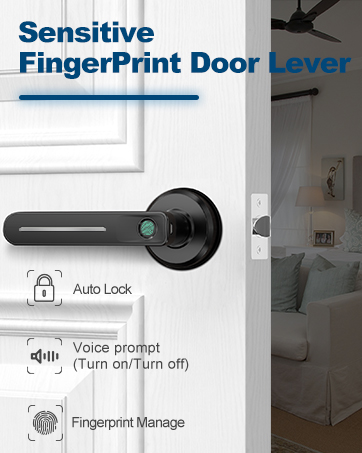
- Kunci Auto: The lock can be configured via the app to automatically lock after a set period (e.g., 5-60 seconds) once unlocked.

The auto-lock feature automatically secures the deadbolt after a preset time. - Kunci Satu Sentuhan: Press the '#' key on the keypad to manually lock the door from the outside.
- App Bluetooth Lock: Open the GeekTale app on your smartphone and tap the lock icon.
- Manual Lock (Interior): Rotate the thumb-turn on the interior unit to lock the door.
5.4 Ciri Apl
- Pengurusan pengguna: Add, modify, or delete fingerprints and passcodes for up to 20 family members.
- Log Akses: View a history of lock and unlock events, including method and user.
- Kod Laluan Sementara: Generate one-time or time-limited passcodes for guests or service providers.
- Mod Bisu: Enable or disable sound feedback from the lock for quiet operation.
- Makluman Bateri Rendah: Receive notifications when battery levels are low.
- Auto-Lock Timer: Adjust the duration for the auto-lock feature.


6. Penyelenggaraan
- Penggantian Bateri: Replace all 4 AA batteries when the low battery alert is triggered. Use only new, high-quality alkaline batteries. Do not mix old and new batteries or different battery types.
- Pembersihan: Clean the lock's exterior surfaces with a soft, dry cloth. Avoid abrasive cleaners or solvents that could damage the finish or electronic components.
- Sensor cap jari: Pastikan sensor cap jari bersih dan kering untuk prestasi optimum.
- Kuasa Kecemasan: If batteries deplete completely, connect a USB-C power bank to the emergency power port on the exterior unit to temporarily power the lock and gain access.
7. Penyelesaian masalah
| Masalah | Kemungkinan Punca | Penyelesaian |
|---|---|---|
| Kunci tidak bertindak balas. | Bateri mati. | Replace batteries. Use emergency USB-C power if needed. |
| Cap jari tidak dikenali. | Finger dirty/wet, sensor dirty, fingerprint not properly registered. | Clean finger and sensor. Re-register fingerprint if issue persists. |
| Kod laluan tidak berfungsi. | Incorrect passcode entered, passcode expired (temporary). | Verify passcode. Check app for temporary passcode status. |
| Apl tidak dapat bersambung ke kunci. | Bluetooth off, phone too far, app issue. | Ensure Bluetooth is on and phone is close. Restart app/phone. |
| Lock grinds or doesn't fully extend/retract. | Misalignment during installation, obstruction. | Check installation alignment. Ensure no obstructions in door frame/latch. |
8. Waranti dan Sokongan
GeekTale provides localized after-sales customer service. For any issues or questions regarding your product, please contact GeekTale customer support through the official channels. Refer to your purchase documentation for specific warranty terms and contact information.
Maklumat Hubungan: Sila layari GeekTale Store on Amazon or refer to the contact details provided with your product packaging.


